|
linux进程间通信——命名管道
fifo(命名管道)不同于匿名管道之处在于它提供⼀个路径名与之关联,以fifo的⽂件形式存储于⽂件系统中。命名管道是⼀个设备⽂件,因此,即使进程与创建fifo的进程不存在亲缘关系,只要可以访问该路径,就能够通过fifo相互通信。值得注意的是,fifo(first input first output)总是按照先进先出的原则⼯作,第⼀个被写⼊的数据将⾸先从管道中读出。
创建命名管道的系统函数有两个:mknod和mkfifo。两个函数均定义在头⽂件sys/stat.h,函数原型如下:
?
|
1
2
3
4
|
#include <sys/types.h>
#include <sys/stat.h>
int mknod(const char *path,mode_t mod,dev_t dev);
int mkfifo(const char *path,mode_t mode);
|
函数mknod参数中path为创建的命名管道的全路径名:mod为创建的命名管道的模式,指明其存取权限;dev为设备值,该值取决于⽂件创建的种类,它只在创建设备⽂件时才会⽤到。这两个函数调⽤成功都返回0,失败都返回-1。下⾯使⽤mknod函数创建了⼀个命名管道:
?
|
1
2
3
4
5
6
7
8
9
10
11
|
umask(0);
if (mknod("/tmp/fifo",s_ififo | 0666) == -1)
{
perror("mkfifo error");
exit(1);
}
|
函数mkfifo前两个参数的含义和mknod相同。下⾯是使⽤mkfifo的⽰例代码:
?
|
1
2
3
4
5
6
7
8
9
10
11
12
|
umask(0);
if (mkfifo("/tmp/fifo",s_ififo|0666) == -1)
{
perror("mkfifo error!");
exit(1);
}
|
下面为一个试例:
read端
?
|
1
2
3
4
5
6
7
8
9
10
11
12
13
14
15
16
17
18
19
20
21
22
23
24
25
26
27
28
29
30
31
32
33
34
35
36
37
38
39
40
41
42
43
44
45
46
|
#include<stdlib.h>
#include<stdio.h>
#include<sys/types.h>
#include<sys/stat.h>
#include<fcntl.h>
#include<errno.h>
#define path "./fifo"
#define size 128
int main()
{
umask(0);
if (mkfifo (path,0666|s_ififo) == -1)
{
perror ("mkefifo error");
exit(0);
}
int fd = open (path,o_rdonly);
if (fd<0)
{
printf("open fd is error\n");
return 0;
}
char buf[size];
while(1){
ssize_t s = read(fd,buf,sizeof(buf));
if (s<0)
{
perror("read error");
exit(1);
}
else if (s == 0)
{
printf("client quit! i shoud quit!\n");
break;
}
else
{
buf = '\0';
printf("client# %s ",buf);
fflush(stdout);
}
}
close (fd);
return 3;
}
|
下面为weite端:
?
|
1
2
3
4
5
6
7
8
9
10
11
12
13
14
15
16
17
18
19
20
21
22
23
24
25
26
27
28
29
30
31
32
33
34
35
36
37
38
39
40
41
42
43
|
#include<stdlib.h>
#include<stdio.h>
#include<unistd.h>
#include<sys/types.h>
#include<sys/stat.h>
#include<string.h>
#include<errno.h>
#include<fcntl.h>
#define path "./fifo"
#define size 128
int main()
{
int fd = open(path,o_wronly);
if (fd < 0)
{
perror("open error");
exit(0);
}
char buf[size];
while(1)
{
printf("please enter#:");
fflush(stdout);
ssize_t s = read(0,buf,sizeof(buf));
if (s<0)
{
perror("read is failed");
exit(1);
}
else if(s==0)
{
printf("read is closed!");
return 1;
}
else{
buf= '\0';
write(fd,buf,strlen(buf));
}
}
return 0;
}
|
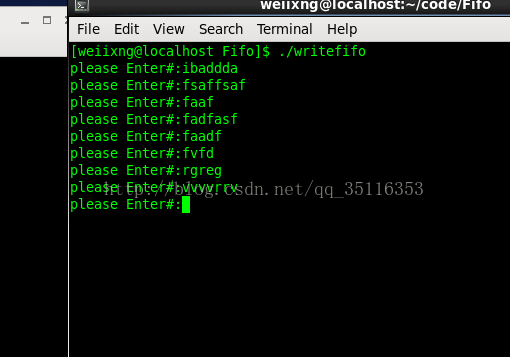
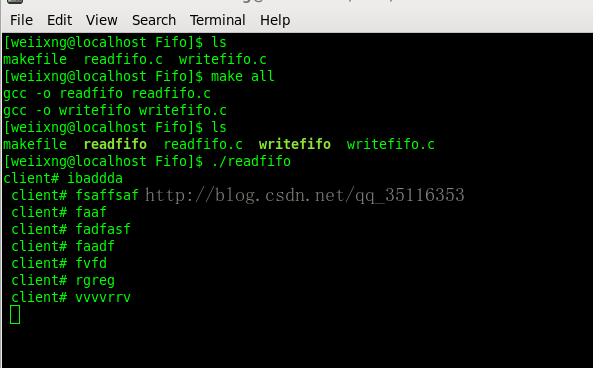
打开两个终端:
感谢阅读,希望能帮助到大家,谢谢大家对本站的支持!
原文链接:http://blog.csdn.net/qq_35116353/article/details/59117339 |



 發表於 2023-9-21 00:00:00