查看: 866|回复: 0

[Win8] Win8取得超级管理员权限为鼠标右键添加取得管理员权限选项

[复制链接]

10

主题

0

回帖

30

积分

技术1级

金币
20
阅读权限
10
精华
0
威望
0
贡献
0
在线时间
0 小时
注册时间
2011-1-5
QQ
发表于 2014-3-7 01:25:15 | 显示全部楼层 |阅读模式
使用Win8在找开系统文件夹是经常提示:无法访问……,拒绝访问。就是没有超级管理员权限所致,取得Win8超级管理员权限很容易,导入一个注册表文件就可以实现,并且操作简单。
不管是使用Win8还是Win7,在打开C盘的一些文件夹时,经常会遇到无法访问的情况,以致于想删除已经确认没有用的文件时删除不了。Win7下很好办,各种工具皆可实现在右键菜单添加取得管理员权限按钮。现在主要介绍Win8下如何为鼠标右键菜单添加取得管理员权限选项。
有些同学会问,我的账户已经是管理员了,为什么还会权限不足呀。简单点说来,在Windows Administrators权限之上还有一项权限,具体叫啥我现在也记不清了,它才是最高管理员。
方法很简单
新建一个记事本将下面的代码Copy进去保存,记事本名字无所谓,记住将扩展名改为.reg就行了。
建好之后,双击这个reg文件(注册表文件)导入注册表,导入前会有提示让你选择,点是就行了。
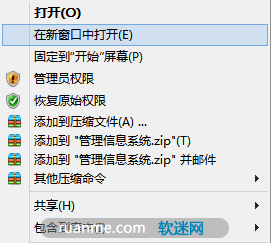
导入进去之后,右击你要取得权限的文件夹,鼠标右键菜单中选择选择管理员权限就行了。
为了安全考虑,对一个文件操作完成之后,应当恢复成默认权限,此时在右键菜单中选择恢复原始权限就行了。

1、取得管理员权限
Windows Registry Editor Version 5.00
;取得文件修改权限  
[HKEY_CLASSES_ROOT\*\shell\runas]  
@="管理员权限"
"Icon"="C:\\Windows\\System32\\imageres.dll,102"
"NoWorkingDirectory"=""
[HKEY_CLASSES_ROOT\*\shell\runas\command]  
@="cmd.exe /c takeown /f \"%1\" && icacls \"%1\" /grant administrators:F"
"IsolatedCommand"="cmd.exe /c takeown /f \"%1\" && icacls \"%1\" /grant administrators:F"
[HKEY_CLASSES_ROOT\exefile\shell\runas2]  
@="管理员权限"
"Icon"="C:\\Windows\\System32\\imageres.dll,102"
"NoWorkingDirectory"=""
[HKEY_CLASSES_ROOT\exefile\shell\runas2\command]  
@="cmd.exe /c takeown /f \"%1\" && icacls \"%1\" /grant administrators:F"
"IsolatedCommand"="cmd.exe /c takeown /f \"%1\" && icacls \"%1\" /grant administrators:F"
[HKEY_CLASSES_ROOT\Directory\shell\runas]  
@="管理员权限"
"Icon"="C:\\Windows\\System32\\imageres.dll,102"
"NoWorkingDirectory"=""
[HKEY_CLASSES_ROOT\Directory\shell\runas\command]  
@="cmd.exe /c takeown /f \"%1\" /r /d y && icacls \"%1\" /grant administrators:F /t"
"IsolatedCommand"="cmd.exe /c takeown /f \"%1\" /r /d y && icacls \"%1\" /grant administrators:F /t"
2、恢复原始权限
Windows Registry Editor Version 5.00
;恢复原始权限  
[HKEY_CLASSES_ROOT\*\shell\runas-]  
@="恢复原始权限"
"Icon"="C:\\Windows\\System32\\imageres.dll,101"
"NoWorkingDirectory"=""
; && takeown /f \"%1\"
[HKEY_CLASSES_ROOT\*\shell\runas-\command]  
@="cmd.exe /c takeown /f \"%1\" && icacls \"%1\" /reset && cacls \"%1\" /e /r \"%%USERNAME%%\""
"IsolatedCommand"="cmd.exe /c takeown /f \"%1\" && icacls \"%1\" /reset && cacls \"%1\" /e /r \"%%USERNAME%%\""
[HKEY_CLASSES_ROOT\exefile\shell\runas2-]  
@="恢复原始权限"
"Icon"="C:\\Windows\\System32\\imageres.dll,101"
"NoWorkingDirectory"=""
[HKEY_CLASSES_ROOT\exefile\shell\runas2-\command]  
@="cmd.exe /c takeown /f \"%1\" && icacls \"%1\" /reset && cacls \"%1\" /e /r \"%%USERNAME%%\""
"IsolatedCommand"="cmd.exe /c takeown /f \"%1\" && icacls \"%1\" /reset && cacls \"%1\" /e /r \"%%USERNAME%%\""
[HKEY_CLASSES_ROOT\Directory\shell\runas-]  
@="恢复原始权限"
"Icon"="C:\\Windows\\System32\\imageres.dll,101"
"NoWorkingDirectory"=""
[HKEY_CLASSES_ROOT\Directory\shell\runas-\command]  
@="cmd.exe /c takeown /f \"%1\" /r /d y && icacls \"%1\" /reset && cacls \"%1\" /e /r \"%%USERNAME%%\""
"IsolatedCommand"="cmd.exe /c takeown /f \"%1\" /r /d y && icacls \"%1\" /reset && cacls \"%1\" /e /r \"%%USERNAME%%\""
回复

使用道具 举报

您需要登录后才可以回帖 登录 | 立即注册

本版积分规则

相关侵权、举报、投诉及建议等,请发 E-mail:qiongdian@foxmail.com

Powered by Discuz! X5.0 © 2001-2026 Discuz! Team.

在本版发帖返回顶部