查看: 311|回复: 0

[教程] 关闭UAC后边栏无法使用问题的解决办法

[复制链接]

10

主题

0

回帖

30

积分

技术1级

金币
20
阅读权限
10
精华
0
威望
0
贡献
0
在线时间
0 小时
注册时间
2011-1-5
QQ
发表于 2013-3-28 01:26:41 | 显示全部楼层 |阅读模式
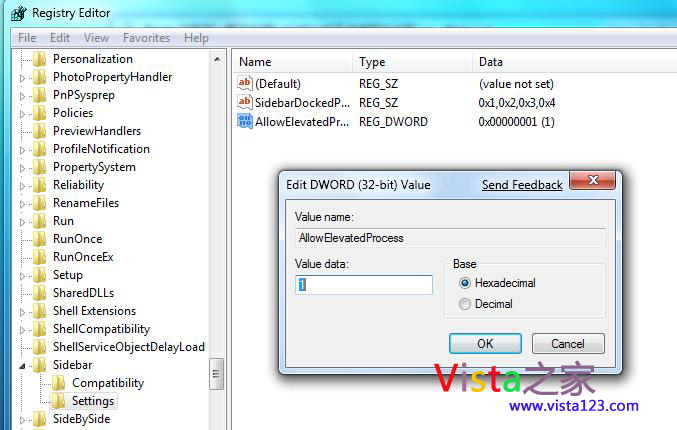
在Vista下,很多人都喜欢关闭UAC,这样一来,除了安全性略微削弱外,其实还有别的问题的。比如,此时,打开侧边栏就会提示“此项目由系统管理员惯例”,从而无法使用,在WIndows 7下我们也有同样的问题,那么,怎么解决呢?

*WIN+R运行regedit打开注册表编辑器
*定位到HKEY_LOCAL_MACHINE\SOFTWARE\Microsoft\Windows\CurrentVersion\Sidebar\Settings
*新建DWORD键值,命名为AllowElevatedProcess
*将键值设置为1
*保存并退出注册表编辑器即可


附部分原文:
If you turn off UAC as described in the previous tip, you can't use gadgets, tiny applets that run on the desktop, because Microsoft deems them a potential security threat. However, if you feel comfortable enough with that potential threat, you can use gadgets even when you've turned off UAC by following these steps.
....

回复

使用道具 举报

您需要登录后才可以回帖 登录 | 立即注册

本版积分规则

相关侵权、举报、投诉及建议等,请发 E-mail:qiongdian@foxmail.com

Powered by Discuz! X5.0 © 2001-2026 Discuz! Team.

在本版发帖返回顶部