查看: 314|回复: 0

[教程] 控制Windows Vista下窗口动画速度的办法

[复制链接]

11

主题

0

回帖

33

积分

技术1级

金币
22
阅读权限
10
精华
0
威望
0
贡献
0
在线时间
0 小时
注册时间
2011-1-4
QQ
发表于 2009-1-31 22:50:09 | 显示全部楼层 |阅读模式
我们都知道,在WIndows Vista中,当最大化/最小化窗口时,会有动画出现,但往往瞬间就没了,那么,有没有办法来控制呢?

其实我们可以用Shift来控制窗口动画的速度,但首先得先修改一下注册表以打开控制功能。

1.WIN+R运行regedit
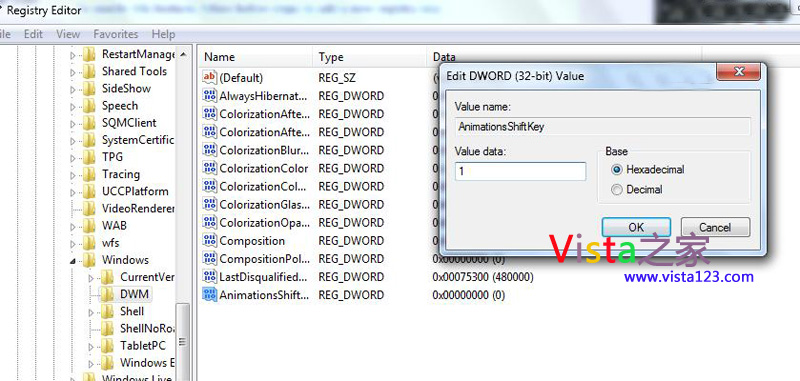
2.定位到:HKEY_CURRENT_USER\Software\Microsoft\Windows\DWM.
3.右键DWM值,新建DWORD值(32位)
4.命名为AnimationsShiftKey.
5.双击AnimationsShiftKey,将其值改为1,确定
6.退出注册表编辑器并注销或重启系统

现在按住Shift键最大化/最小化窗口试试。


附部分原文:
When you minimize, maximize or close any windows/applications, the animation speed to perform these tasks is a default setting and you can’t really control it.
However, you can actually change the window animation speed by just holding down the SHIFT key to make the transition slower after doing some simple registry hack.
...

回复

使用道具 举报

您需要登录后才可以回帖 登录 | 立即注册

本版积分规则

相关侵权、举报、投诉及建议等,请发 E-mail:qiongdian@foxmail.com

Powered by Discuz! X5.0 © 2001-2026 Discuz! Team.

在本版发帖返回顶部