- UID
- 680452
- 積分
- 0
- 金币
- 30
- 精華
- 0
- 威望
- 0
- 贡献
- 0
- 閲讀權限
- 220
- 註冊時間
- 2011-1-17
- 最後登錄
- 2026-5-3
- 在線時間
- 0 小時
热心网友
- 金币
- 30
- 閲讀權限
- 220
- 精華
- 0
- 威望
- 0
- 贡献
- 0
- 在線時間
- 0 小時
- 註冊時間
- 2011-1-17
|
可能很多使用DISCUZ! X3.4平台朋友,发现一个问题就是发帖的标题被限制为80个字符。且也没办法修改长度,今天这里给大家介
绍几个方法,希望对大家有帮助。
字符最大限制为255,不要修改超过255,不然会失败!不管修改什么文件,首先要做的就是备份好要修改的文件,这是一个称职站长必做的一件事情
摘要:现在修改不像以前那样更新就可以直接使用了,更新之后还要等待5-10分钟,这是必须等待的。
心愿:如果此贴对您有用的话麻烦您动一动鼠标给个免费的评分吧!谢谢爸爸们!
第一步:进入后台文件管理。找到文件 static/js/forum_post.js 编辑
找到:
- <div align="left"><font size="3"><span style="white-space:pre"> </span>if(($('postsubmit').name != 'replysubmit' && !($('postsubmit').name == 'editsubmit' && !isfirstpost) && </font></div><div align="left"><font size="3">
- </font></div><div align="left"><font size="3">theform.subject.value == "") || !sortid && !special && trim(message) == "") {</font></div><div align="left"><font size="3"><span style="white-space:pre"> </span>showError('抱歉,您尚未输入标题或内容');</font></div><div align="left"><font size="3"><span style="white-space:pre"> </span>return false;</font></div><div align="left"><font size="3"><span style="white-space:pre"> </span>} else if(mb_strlen(theform.subject.value) > 80) {</font></div><div align="left"><font size="3"><span style="white-space:pre"> </span>showError('您的标题超过 80 个字符的限制');</font></div><div align="left"><font size="3"><span style="white-space:pre"> </span>return false;</font></div><div align="left"><font size="3"><span style="white-space:pre"> </span>}</font></div>
修改为:
- <div align="left"><font size="3"><span style="white-space:pre"> </span>if(($('postsubmit').name != 'replysubmit' && !($('postsubmit').name == 'editsubmit' && !isfirstpost) && </font></div><div align="left"><font size="3">
- </font></div><div align="left"><font size="3">theform.subject.value == "") || !sortid && !special && trim(message) == "") {</font></div><div align="left"><font size="3"><span style="white-space:pre"> </span>showError('抱歉,您尚未输入标题或内容');</font></div><div align="left"><font size="3"><span style="white-space:pre"> </span>return false;</font></div><div align="left"><font size="3"><span style="white-space:pre"> </span>} else if(mb_strlen(theform.subject.value) > 255) {</font></div><div align="left"><font size="3"><span style="white-space:pre"> </span>showError('您的标题超过 255 个字符的限制');</font></div><div align="left"><font size="3"><span style="white-space:pre"> </span>return false;</font></div><div align="left"><font size="3"><span style="white-space:pre"> </span>}</font></div>
然后找到文件 static/js/forum.js 编辑
然后继续找到:
- <div align="left"><font size="3"><span style="white-space:pre"> </span>if(theform.message.value == '' || theform.subject.value == '') {</font></div><div align="left"><font size="3"><span style="white-space:pre"> </span>s = '抱歉,您尚未输入标题或内容';</font></div><div align="left"><font size="3"><span style="white-space:pre"> </span>theform.message.focus();</font></div><div align="left"><font size="3"><span style="white-space:pre"> </span>} else if(mb_strlen(theform.subject.value) > 80) {</font></div><div align="left"><font size="3"><span style="white-space:pre"> </span>s = '您的标题超过 80 个字符的限制';</font></div><div align="left"><font size="3"><span style="white-space:pre"> </span>theform.subject.focus();</font></div><div align="left"><font size="3"><span style="white-space:pre"> </span>}</font></div>
修改为:
- <div align="left"><font size="3"><span style="white-space:pre"> </span>if(theform.message.value == '' || theform.subject.value == '') {</font></div><div align="left"><font size="3"><span style="white-space:pre"> </span>s = '抱歉,您尚未输入标题或内容';</font></div><div align="left"><font size="3"><span style="white-space:pre"> </span>theform.message.focus();</font></div><div align="left"><font size="3"><span style="white-space:pre"> </span>} else if(mb_strlen(theform.subject.value) > 255) {</font></div><div align="left"><font size="3"><span style="white-space:pre"> </span>s = '您的标题超过 255 个字符的限制';</font></div><div align="left"><font size="3"><span style="white-space:pre"> </span>theform.subject.focus();</font></div><div align="left"><font size="3"><span style="white-space:pre"> </span>}</font></div>
第二步:数据库修改
进入discuz的后台->站长->数据库->升级
由于Discuz! 后台默认情况下禁止 SQL 语句直接执行,只能使用常用 SQL 当中的内容。
如果您想自己随意书写 SQL 升级语句,需要将 config/config_global.php 当中的 - $_config['admincp']['runquery'] = '0';
把 0 设置修改为 1
。
(因为我们这里需要执行SQL语句所以需要改,或者直接在PHPmyadmin 里面执行SQL语句即可)
这里我是修改了 config_global.php 文件。
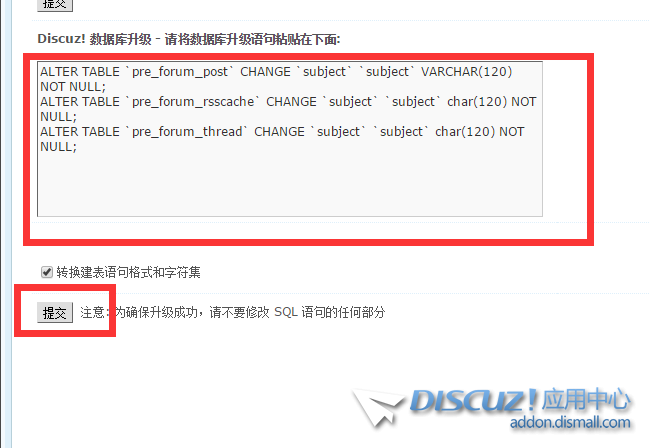
3数据库修改,修改数据库标题字段的长度为255字符:运行下面的sql语句:(注意修改你的表的前缀)
- <div align="left"><font size="3">ALTER TABLE `pre_forum_post` CHANGE `subject` `subject` VARCHAR(255) NOT NULL;</font></div><div align="left"><font size="3">ALTER TABLE `pre_forum_rsscache` CHANGE `subject` `subject` char(255) NOT NULL;</font></div><div align="left"><font size="3">ALTER TABLE `pre_forum_thread` CHANGE `subject` `subject` char(255) NOT NULL;</font></div>
点击:提交 ,成功如图所示
第三步:修改模板中写死的字符限制数
找到文件 \template\default\forum\post_editor_extra.htm 编辑
找到:(把80 改成 255)
- <div align="left"><font size="3">
- </font></div><div align="left"><font size="3"><span style="white-space:pre"> </span><!--{if $_GET[action] != 'reply'}--></font></div><div align="left"><font size="3"><span style="white-space:pre"> </span><span><input type="text" name="subject" id="subject" class="px" value="$postinfo[subject]" onkeyup="strLenCalc(this, 'checklen', 80);" style="width: 25em" tabindex="1" /></span></font></div><div align="left"><font size="3"><span style="white-space:pre"> </span><!--{else}--></font></div><div align="left"><font size="3"><span style="white-space:pre"> </span><span id="subjecthide" class="z">RE: $thread[subject] [<a href="javascript:;" onclick="display('subjecthide');display('subjectbox');return false;">{lang modify}</a>]</span></font></div><div align="left"><font size="3"><span style="white-space:pre"> </span><span id="subjectbox" style="display:none"><input type="text" name="subject" id="subject" class="px" value="" onkeyup="strLenCalc(this, 'checklen', 80);" style="width: 25em" /></span></font></div><div align="left"><font size="3"><span style="white-space:pre"> </span><!--{/if}--><span style="white-space:pre"> </span></font></div><div align="left"><font size="3"><span style="white-space:pre"> </span><span id="subjectchk"{if $_GET[action] == 'reply'} style="display:none"{/if}>{lang comment_message1} <strong id="checklen">80</strong> {lang comment_message2}</span></font></div><div align="left"><font size="3"><span style="white-space:pre"> </span><script type="text/javascript">strLenCalc($('subject'), 'checklen', 80)</script></font></div>
修改为:
- <div align="left"><font size="3"><span style="white-space:pre"> </span><!--{if $_GET[action] != 'reply'}--></font></div><div align="left"><font size="3"><span style="white-space:pre"> </span><span><input type="text" name="subject" id="subject" class="px" value="$postinfo[subject]" onkeyup="strLenCalc(this, 'checklen', 255);" style="width: 25em" tabindex="1" /></span></font></div><div align="left"><font size="3"><span style="white-space:pre"> </span><!--{else}--></font></div><div align="left"><font size="3"><span style="white-space:pre"> </span><span id="subjecthide" class="z">RE: $thread[subject] [<a href="javascript:;" onclick="display('subjecthide');display('subjectbox');return false;">{lang modify}</a>]</span></font></div><div align="left"><font size="3"><span style="white-space:pre"> </span><span id="subjectbox" style="display:none"><input type="text" name="subject" id="subject" class="px" value="" onkeyup="strLenCalc(this, 'checklen', 255);" style="width: 25em" /></span></font></div><div align="left"><font size="3"><span style="white-space:pre"> </span><!--{/if}--><span style="white-space:pre"> </span></font></div><div align="left"><font size="3"><span style="white-space:pre"> </span><span id="subjectchk"{if $_GET[action] == 'reply'} style="display:none"{/if}>{lang comment_message1} <strong id="checklen">255</strong> {lang comment_message2}</span></font></div><div align="left"><font size="3"><span style="white-space:pre"> </span><script type="text/javascript">strLenCalc($('subject'), 'checklen', 255)</script></font></div>
继续找到文件 \template\default\forum\forumdisplay_fastpost.htm 编辑
找到:
- <div align="left"><font size="3"><span style="white-space:pre"> </span><!--{/if}--></font></div><div align="left"><font size="3"><span style="white-space:pre"> </span><input type="text" id="subject" name="subject" class="px" value="" onkeyup="strLenCalc(this, 'checklen', 80);" tabindex="11" style="width: 25em" /></font></div><div align="left"><font size="3"><span style="white-space:pre"> </span><span>{lang comment_message1} <strong id="checklen">80</strong> {lang comment_message2}</span></font></div><div align="left"><font size="3"><span style="white-space:pre"> </span></div></font></div>
修改为:
- <div align="left"><font size="3"><span style="white-space:pre"> </span><!--{/if}--></font></div><div align="left"><font size="3"><span style="white-space:pre"> </span><input type="text" id="subject" name="subject" class="px" value="" onkeyup="strLenCalc(this, 'checklen', 255);" tabindex="11" style="width: 25em" /></font></div><div align="left"><font size="3"><span style="white-space:pre"> </span><span>{lang comment_message1} <strong id="checklen">255</strong> {lang comment_message2}</span></font></div><div align="left"><font size="3"><span style="white-space:pre"> </span></div></font></div>
保存文件上传覆盖原文件
第四步:修改函数验证文件
找到文件 /source/function/function_post.php 编辑
找到:
- <div align="left"><font size="3"><span style="white-space:pre"> </span>if(dstrlen($subject) > 80) {</font></div><div align="left"><font size="3"><span style="white-space:pre"> </span>return 'post_subject_toolong';</font></div><div align="left"><font size="3"><span style="white-space:pre"> </span>}</font></div>
修改为:
- <div align="left"><font size="3"><span style="white-space:pre"> </span>if(dstrlen($subject) > 255) {</font></div><div align="left"><font size="3"><span style="white-space:pre"> </span>return 'post_subject_toolong';</font></div><div align="left"><font size="3"><span style="white-space:pre"> </span>}</font></div>
保存文件上传覆盖原文件
第五步:修改语言包文件
找到: source/language/lang_messege.php 下载编辑
找到:
- 'post_subject_toolong' => '抱歉,您的标题超过 80 个字符修改标题长度',
修改:
- 'post_subject_toolong' => '抱歉,您的标题超过 255 个字符修改标题长度',
最后进入discuz的后台->工具->更新缓存 之后完毕,耐心等待!修改, 文件 |
|



 發表於 2019-7-29 00:11:22