|
一、准备工作
1. 下载并安装centos7.2,配置好网络环境,确保centos能上网,可以获取到yum源。
centos7.2的下载地址:http://pan.baidu.com/s/1ertjats 密码:wnby
centos7.2的网络配置:
?
|
1
|
vim /etc/sysconfig/network-scripts/ifcfg-eno16777736
|
参考以下网络配置:
?
|
1
2
3
4
5
6
7
8
9
10
11
12
13
14
15
16
17
18
19
20
|
type=ethernet
bootproto=static
defroute=yes
peerdns=yes
peerroutes=yes
ipv4_failure_fatal=no
ipv6init=yes
ipv6_autoconf=yes
ipv6_defroute=yes
ipv6_peerdns=yes
ipv6_peerroutes=yes
ipv6_failure_fatal=no
name=eno16777736
uuid=a90b6241-89da-450a-9742-d5b186a17084
device=eno16777736
onboot=yes
ipaddr0=192.168.0.228
prefixo0=24
gateway0=192.168.0.1
dns1=192.168.0.1
|
配置完毕后,使用 systemctl restart network.service 重启网络,然后 ping www.baidu.com 测试是否网络连接通畅。
2. 配置防火墙,开启80、3306端口。centos 7.0默认使用的是firewall作为防火墙,这里改为iptables防火墙。
?
|
1
2
3
4
5
6
7
8
|
systemctl stop firewalld.service
systemctl disable firewalld.service
yum install iptables-services
vi /etc/sysconfig/iptables
|
加入红色的两行代码,请注意位置一定要对应。
?
|
1
2
3
4
5
6
7
8
9
10
11
12
13
14
15
16
17
18
19
20
|
*filter
:input accept [0:0]
:forward accept [0:0]
:output accept [0:0]
-a input -m state --state established,related -j accept
-a input -p icmp -j accept
-a input -i lo -j accept
-a input -m state --state new -m tcp -p tcp --dport 22 -j accept
-a input -m state --state new -m tcp -p tcp --dport 80 -j accept
-a input -m state --state new -m tcp -p tcp --dport 3306 -j accept
-a input -j reject --reject-with icmp-host-prohibited
-a forward -j reject --reject-with icmp-host-prohibited
commit
:wq!
systemctl restart iptables.service
systemctl enable iptables.service
|
3. 关闭seinux
?
|
1
2
3
4
5
6
7
8
|
vi /etc/selinux/config
selinux=disabled
:wq!
setenforce 0
|
二、安装lamp环境。
1. 安装apahce
可能会用到的:
?
|
1
2
3
4
|
systemctl start httpd.service
systemctl stop httpd.service
systemctl restart httpd.service
systemctl enable httpd.service
|
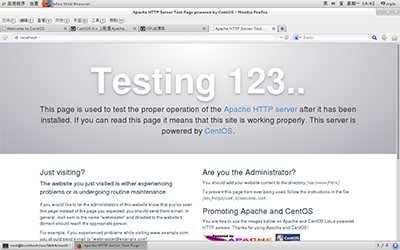
重启服务, systemctl restart httpd.service
输入localhost
出现之后代表已经安装上去了。
2. 安装mysql。
由于yum源上没有mysql-server。所以必须去官网下载,这里 我们用wget命令,直接获取。
安装完成后重启mysql, systemctl restarat mysqld.service
初入安装 root用户没有密码:
?
|
1
2
3
4
5
6
7
|
[root@yl-web yl]
mysql> set password for 'root'@'localhost' =password('123456');
mysql> grant all privileges on *.* to root@'%'identified by '123456';
mysql>flush privileges;
|
3. 安装php
?
|
1
2
3
4
5
6
|
yum install php
yum install php-mysql php-gd libjpeg* php-ldap php-odbc php-pear php-xml php-xmlrpc php-mbstring php-bcmath php-mhash
systemctl restart mysqld.service
systemctl restart httpd.service
|
以上 安装 apahce 、mysql 、php 安装完毕。
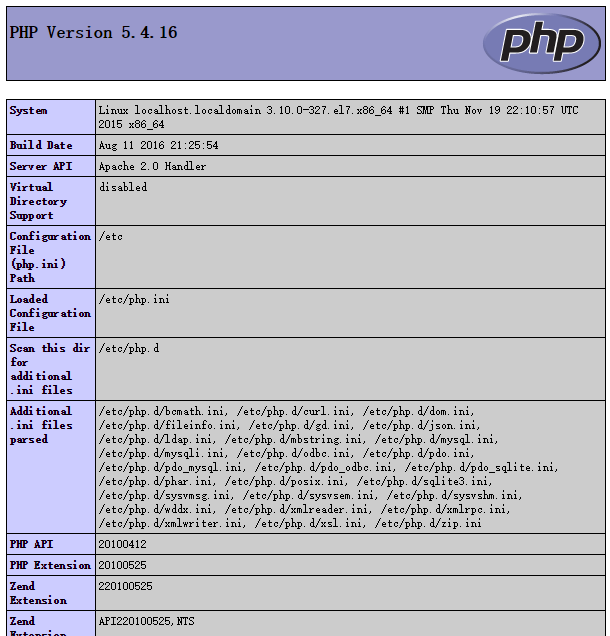
查看安装环境版本:cd /var/www/html ,新建index.php文件,输入:
最终查看为:php版本:
参考链接:http://www.centoscn.com/centosserver/www/2016/0331/6964.html
以上所述是小编给大家介绍的centos7.2 系统上yum安装lamp环境,希望对大家有所帮助,如果大家有任何疑问请给我留言,小编会及时回复大家的。在此也非常感谢大家对服务器之家网站的支持!
原文链接:http://www.cnblogs.com/wgq123/archive/2016/11/04/6028718.html |



 發表於 2023-9-28 00:00:00