|
运维工作中,常常需要下载文件,因为网站下载速度限制或者网络等原因导致下载让人无法忍受,前面有介绍多线程wget工具mwget,提速不少,而且使用很简单。axel使用的人更多,不仅仅安装方法简单,命令更简单。往下看。
1.1 安装Axel
1.1 RPM安装Axel(方法一)
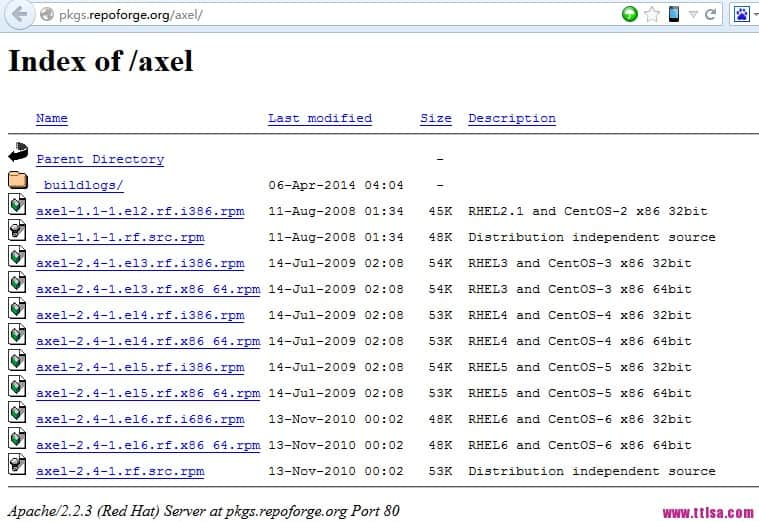
下载地址:http://pkgs.repoforge.org/axel/
如图,选择适合你服务器的RPM
root@ttlsa # wget http://pkgs.repoforge.org/axel/axel-2.4-1.el6.rf.x86_64.rpm
root@ttlsa # rpm -ivh axel-2.4-1.el6.rf.x86_64.rpm
Preparing...                ########################################### [100%]
   1:axel                   ########################################### [100%]
1.2 yum安装Axel(方法二) root@ttlsa # yum install axel 1.3 apt-get安装Axel
如果你是Ubuntu系统 $ sudo apt-get install axel 2. axel使用详解 root@ttlsa # axel -h
Usage: axel [options] url1 [url2] [url...]
--max-speed=x -s x 最大速度 (字节/秒)
--num-connections=x -n x 最大连接数
--output=f -o f 指定文件名
--search[=x] -S [x] Search for mirrors and download from x servers
--header=x -H x 添加header
--user-agent=x -U x 设置用户代理
--no-proxy -N 不使用任何代理
--quiet -q Leave stdout alone
--verbose -v 显示更多状态信息
--alternate -a 显示简单进度条
--help -h 帮助
--version -V 版本信息 3. axel使用实例
3.1 下载centos root@ttlsa # axel http://mirrors.btte.net/centos/6.5/isos/x86_64/CentOS-6.5-x86_64-bin-DVD1.iso
[ 1%] .......... .......... .......... .......... .......... [4654.5KB/s]
[ 1%] .......... .......... .......... .......... .......... [4657.1KB/s]
[ 1%] .......... .......... .......... .......... .......... [4656.5KB/s]
[ 1%] .......... .......... .......... .......... .......... [4659.3KB/s] 3.2 下载运维生存时间某图片 root@ttlsa # axel http://www.ttlsa.com/wp-content/uploads/2014/04/zabbix-adduser-01.jpg
Initializing download: http://www.ttlsa.com/wp-content/uploads/2014/04/zabbix-adduser-01.jpg
File size: 73009 bytes
Opening output file zabbix-adduser-01.jpg
Starting download
[ 0%] .......... .......... .......... .......... .......... [ 598.0KB/s]
[ 70%] .......... .......... .
Connection 0 finished
Downloaded 71.3 kilobytes in 0 seconds. (710.02 KB/s) 3.3 简单进度条
默认情况下,整个屏幕都是进度条,加上-a参数,进度条类似wget。 root@ttlsa # axel -a http://mirrors.btte.net/centos/6.5/isos/x86_64/CentOS-6.5-x86_64-bin-DVD1.iso
Initializing download: http://mirrors.btte.net/centos/6.5/isos/x86_64/CentOS-6.5-x86_64-bin-DVD1.iso
File size: 4467982336 bytes
Opening output file CentOS-6.5-x86_64-bin-DVD1.iso
Starting download
[ 1%] [0 1 2 3 ] [ 3.2MB/s] [21:47] 3.4 下载限速
我们ttlsa的网站带宽有限制,我要保证下载的同时又不影响用户的访问,例如限制为1MB/s的下载速度,如下可以看到速度基本保证在1MB以内。 root@ttlsa # axel -s 1024000 http://mirrors.btte.net/centos/6.5/isos/x86_64/CentOS-6.5-x86_64-bin-DVD1.iso
Initializing download: http://mirrors.btte.net/centos/6.5/isos/x86_64/CentOS-6.5-x86_64-bin-DVD1.iso
File size: 4467982336 bytes
Opening output file CentOS-6.5-x86_64-bin-DVD1.iso
State file found: 30522952 bytes downloaded, 4437459384 to go.
Starting download
,,,,,,,... .......... .......... .......... .......... [ 394.8KB/s]
[ 0%] .......... .......... .......... .......... .......... [ 689.2KB/s]
[ 0%] .......... .......... .......... .......... .......... [ 879.5KB/s]
[ 0%] .......... .......... .......... .......... .......... [ 974.5KB/s]
[ 0%] .......... .......... .......... .......... .......... [1086.4KB/s]
[ 0%] .......... .......... .......... .......... .......... [ 967.5KB/s]
[ 0%] .......... .......... .......... .......... .......... [ 943.8KB/s]
[ 0%] .......... .......... .......... .......... .......... [1021.0KB/s]
[ 0%] .......... .......... .......... .......... .......... [1066.1KB/s] 4. 最后
完成,方法很简单,功能很简单。运维生存时间的服务器以及安装了axel,你的安装了吗? |



 發表於 2023-7-31 00:00:00