:nth-last-child()版本:CSS3 :nth-last-child(),这个CSS 伪类,从兄弟节点中从后往前匹配,处于某些位置的元素。注意:这个伪类和:nth-child()基本一致,但它是从结尾计数,而不是从开始计数。 语法:E:nth-last-child(n){sRules} 匹配父元素的倒数第n个子元素E,假设该子元素不是E,则选择符无效。 - 要使该属性生效,E元素必须是某个元素的子元素,E的父元素最高是
<body>,即E可以是<body>的子元素 - 该选择符允许使用一个乘法因子(n)来作为换算方式,比如我们想选中倒数第一个子元素E,那么选择符可以写成:
E:nth-last-child(1)
:nth-last-child()伪类接受一个参数,用来作为一个模式,从后往前匹配元素。n值如下:
- odd代表奇数,它们在所在的兄弟节点中,从后往前计算的数字位置是奇数,比如: 1, 3, 5等.
- even代表偶数,它们在所在的兄弟节点中,从后往前计算的数字位置是偶数,比如: 2, 4, 6等.
<An+B>代表公式计算,它们在所在兄弟节点中的数字位置满足模式An+B,n是0或者任意的正整数。从结尾开始计算的第一个元素的索引值是1.A和B必须都是整数.
选择器示例tr:nth-last-child(odd)或tr:nth-last-child(2n+1)表示HTML表的倒数的奇数行:1、3、5等。tr:nth-last-child(even)或tr:nth-last-child(2n)表示HTML表的倒数的偶数行:2、4、6等。:nth-last-child(7)表示倒数第7个元素。:nth-last-child(5n)表示倒数的第5、10、15等元素。:nth-last-child(3n+4)表示倒数的第4、7、10、13等元素。:nth-last-child(-n+3)表示一组兄弟节点中的最后三个元素。p:nth-last-child(n)或p:nth-last-child(n+1)表示一组兄弟节点中的每个<p>元素。这与一个简单的p选择器相同。(由于n从0开始,而最后一个元素从1开始,n和n+1都会选择相同的元素。)p:nth-last-child(1)或p:nth-last-child(0n+1)表示所有处于兄弟节点中倒数第一位的元素<p>。这与:last-child选择器相同。
注意<p>第1个p</p>
<p>第2个p</p>
<span>第1个span</span><p>第3个p</p><span>第2个span</span> 如上HTML,假设要命中倒数第一个p(即正数第3个p),那么CSS选择符应该是:p:nth-last-child(2){color:#f00;},而不是:p:nth-last-child(1){color:#f00;}。因为倒数第1个元素是<code<span>< code="" style="margin: 0px; padding: 0px;">,其实是倒数第2个子元素<p>。基于选择符从右到左解析,首先要找到第1个子元素,然后再去检查该子元素是否为<p>,如果不是,则n递增,继续查找。 第1个p 第2个p 第1个span第3个p 第2个span假设不确定倒数第1个子元素是否为E,但是又想命中倒数第1个E,应该这样写:p:last-of-type{color:#f00;}或者这样写:p:nth-last-of-type(1){color:#f00;} 浏览器支持 | | | | | IE9+以及新版浏览器都支持:nth-last-child() |
例子<!DOCTYPE html>
<html>
<head>
<meta charset="utf-8">
<title></title>
<style>
p:nth-last-child(3)
{
background:pink;
}
</style>
</head>
<body>
<h1>元素1</h1>
<p>元素2</p>
<p>元素3</p>
<p>元素4</p>
</body>
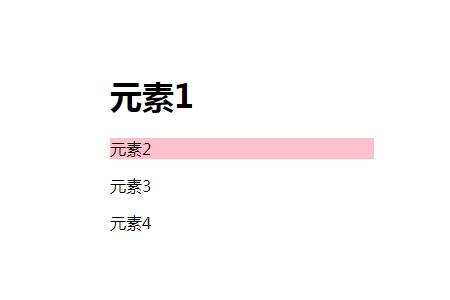
</html>效果图: :nth-last-child()这个CSS伪类从兄弟节点中从后往前匹配处于某些位置的元素
/* 在所有兄弟节点中,从后往前
   选择所有4的倍数的节点 */
:nth-last-child(4n) {
  color: lime;
}注意:这个伪类和:nth-child()基本一致,但它是从结尾计数,而不是从开始计数. //html<table>
<tbody>
<tr>
<td>first line</td>
</tr>
<tr>
<td>second line</td>
</tr>
<tr>
<td>third line</td>
</tr>
<tr>
<td>fourth line</td>
</tr>
<tr>
<td>fifth line</td>
</tr>
</tbody>
</table>//CSStable {
border: 1px solid blue;
}
/* selects the last three elements */
tr:nth-last-child(-n+3) {
background-color: pink;
}
/* selects every element starting from the second to last item */
tr:nth-last-child(n+2) {
color: blue;
}
/* select only the last second element */
tr:nth-last-child(2) {
font-weight: 600;
}| first line | | second line | | third line | | fourth line | | fifth line |
数量查询样式元素取决于它们的数量。在本例中,当给定列表中至少有三个列表项时,列表项变为红色。这是通过组合:nth-last-child()和通用兄弟选择器的功能来实现的 |



 發表於 2025-3-22 00:00:00