1、安装
方法一:yum
#yum install -y dstat
方法二:rpm
官网下载地址:
http://dag.wieers.com/rpm/packages/dstat
#wget http://dag.wieers.com/rpm/packages/dstat/dstat-0.6.7-1.rh7.rf.noarch.rpm
#rpm -ivh dstat-0.6.7-1.rh7.rf.noarch.rpm
2、参数
-c, --cpu 显示CPU情况
-C 0,3,total include cpu0, cpu3 and total
-d, --disk 显示磁盘情况
-D total,hda include hda and total
-g, --page enable page stats
-i, --int enable interrupt stats
-I 5,eth2 include int5 and interrupt used by eth2
-l, --load 显示负载
-m, --mem 显示内存情况
-n, --net 显示网络情况
-N eth1,total 可以指定网络接口
-p, --proc 进程
-s, --swap 显示swap情况
-S swap1,total 可以指定多个swap
-t, --time 当前时间
-y, --sys enable system stats
--ipc 报告IPC消息队列和信号量的使用情况
--lock enable lock stats
--raw enable raw stats
--tcp enable tcp stats
--udp enable udp stats
--unix enable unix stats
-M stat1,stat2 enable external stats
--mods stat1,stat2
-a, --all 使用-cdngy 缺省的就是这样显示
-f, --full 使用 -C, -D, -I, -N and -S 显示
-v, --vmstat 使用-pmgdsc -D 显示
--integer show integer values
--nocolor disable colors (implies --noupdate)
--noheaders 只显示一次表头以后就不显示了,使用重定向写入文件时很有用
--noupdate disable intermediate updates
--output file 写入到CVS文件中
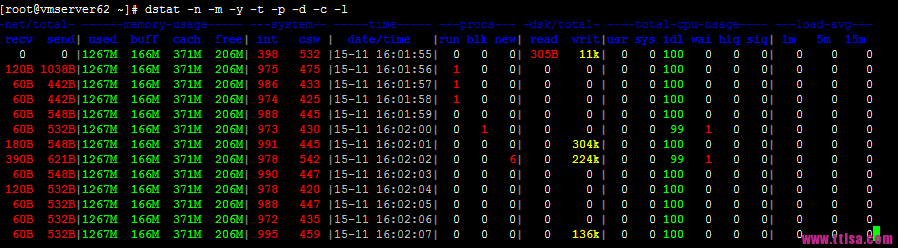
dstat -cdlmnpsy
3、使用
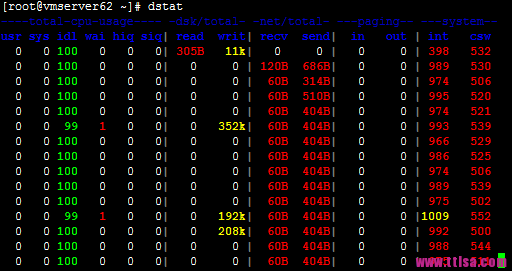
执行 dstat 命令,默认情况它会收集-cpu-、-disk-、-net-、-paging-、-system-的数据,一秒钟收集一次
|



 發表於 2023-8-21 00:00:00