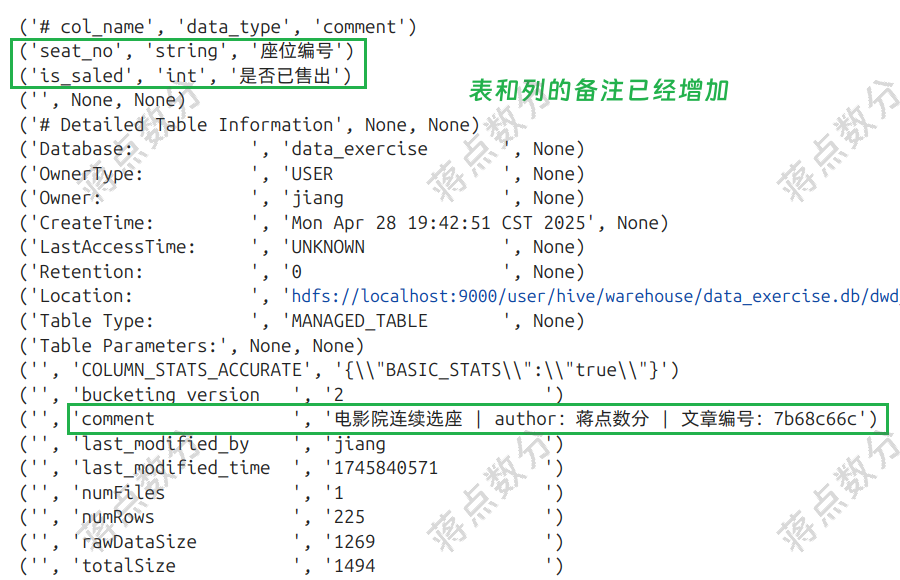
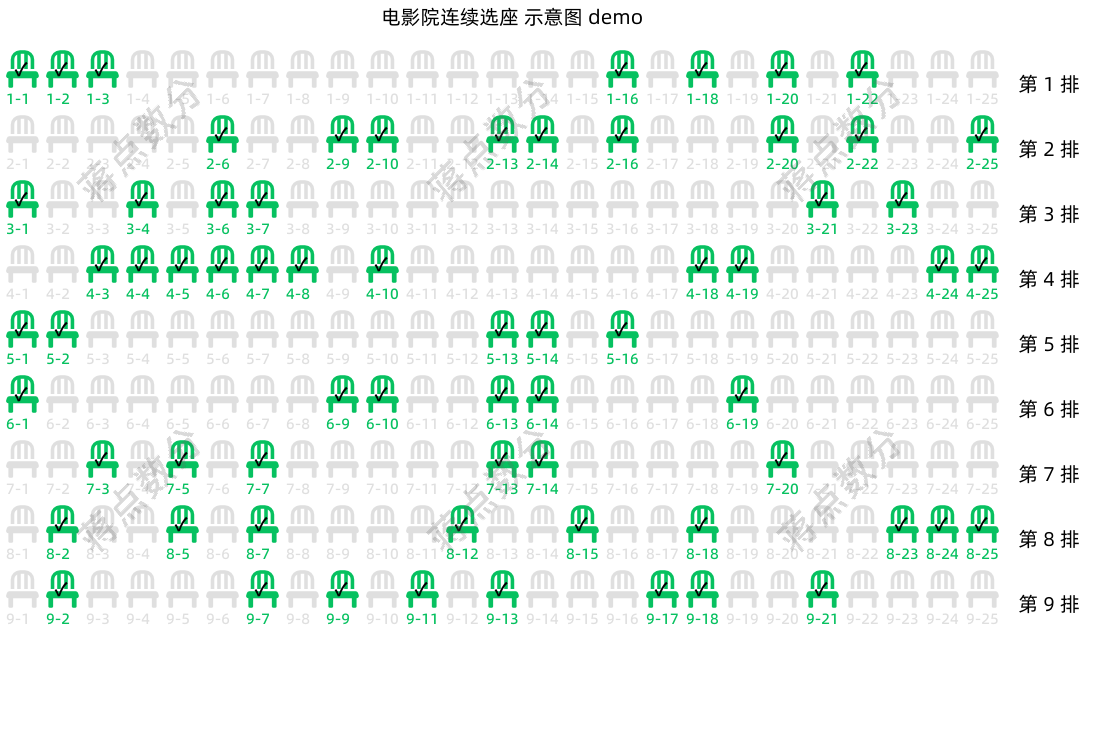
3. 这里创建 Hive表,并将数据写入。与前两期不同,之前我都是将pd.DataFrame采用to_csv转为csv文件;然后用pyHive在Hive中建好表,再使用load data local inpath的方法导入数据。而这一次,我采用CTAS的方式来建表并写入数据,也就是create table ... as select...;但是这种方法有缺点,比如无法在建表时增加表和列的备注。因此我使用alter table 语句来增加备注。
关于 alter table 语句的使用格式和官方文档,我已经在代码注释中说明:
from pyhive import hive

# 配置连接参数
host_ip = "127.0.0.1"
port = 10000
username = "蒋点数分"

hive_table_name = 'data_exercise.dwd_cinema_seat_sales_status'

# '1-1' 必须用引号括起来,否则在 sql 中被当成 1-1 的数学表达式
create_table_and_write_data_sql = f'''
create table {hive_table_name} as
select stack({df.shape[0]},
{','.join([f"'{row[0]}',{row[1]}" for row in df.values])}
) as (seat_no, is_saled)
'''

drop_table_sql = f'''
drop table if exists {hive_table_name}
'''

with hive.Connection(host=host_ip, port=port) as conn:
    cursor = conn.cursor()
    print(f'\n执行删除表语句:\n{drop_table_sql}')
    # 如果该表已存在,则 drop
    cursor.execute(drop_table_sql)

    # 创建表并写入数据
    print(f'\n采用 `CTAS` 建表并写入数据:\n{create_table_and_write_data_sql}')
    cursor.execute(create_table_and_write_data_sql)

    # `CTAS` 不能在创建时添加备注,使用 `alter` 语句增加备注
    # 官方文档
    # https://hive.apache.org/docs/latest/languagemanual-ddl_27362034/#alter-table-comment
    # ALTER TABLE table_name SET TBLPROPERTIES ('comment' = new_comment);
    cursor.execute(f'''
    alter table {hive_table_name} set tblproperties ('comment' =
        '电影院连续选座 | author:蒋点数分 | 文章编号:7b68c66c')
    ''')

    # 增加列备注,根据官方文档
    # https://hive.apache.org/docs/latest/languagemanual-ddl_27362034/#alter-column
    # ALTER TABLE table_name [PARTITION partition_spec] CHANGE [COLUMN] col_old_name col_new_name column_type
      # [COMMENT col_comment] [FIRST|AFTER column_name] [CASCADE|RESTRICT];
    # 没有打方括号的部分是必须写的,也就是哪怕你不更改列名,不更改数据类型,也要写上新旧列名和数据类型
    cursor.execute(f'''
    alter table {hive_table_name} change seat_no seat_no string comment '座位编号'
    ''')

    cursor.execute(f'''
    -- 如果尝试将 `is_saled` 改为 `tinyint` 会报错,只能往更大的整型修改
    alter table {hive_table_name} change is_saled is_saled int comment '是否已售出'
    ''')

    cursor.execute(f'''
    desc formatted {hive_table_name}
    ''')

    records = cursor.fetchall()

    for r in records:
        print(r)

    cursor.close()
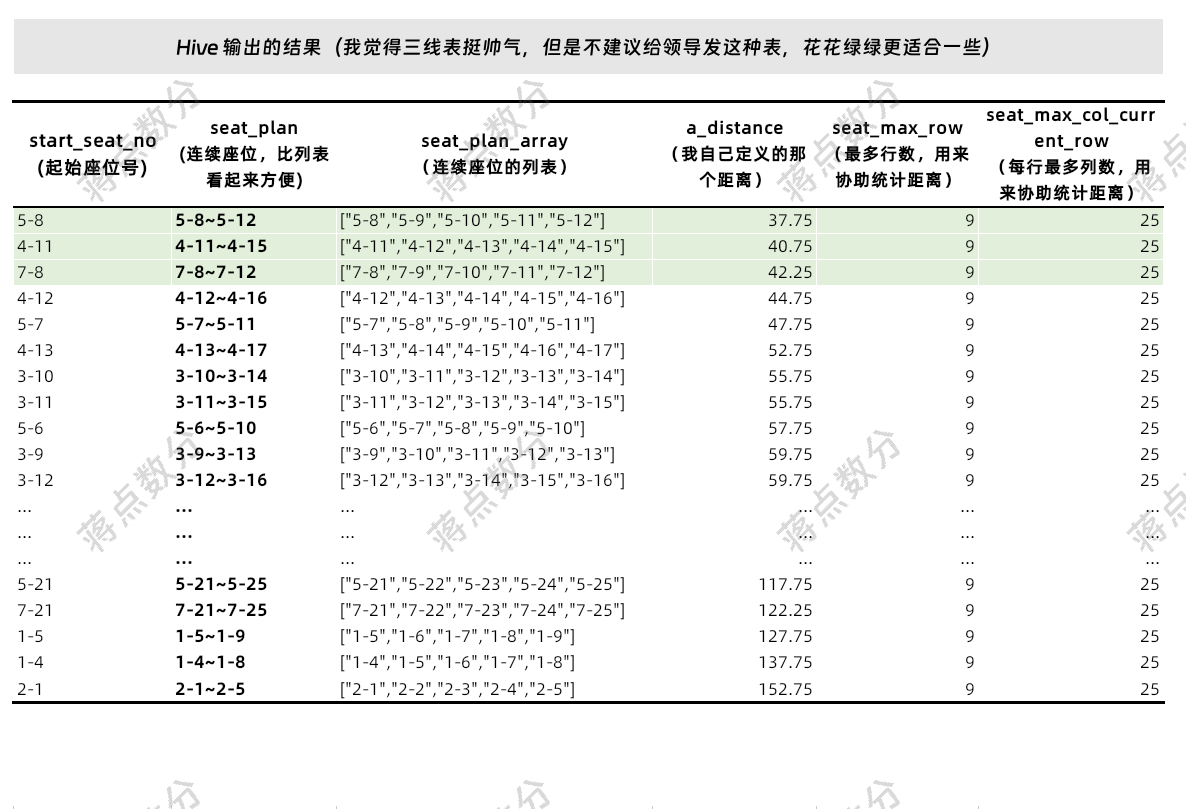
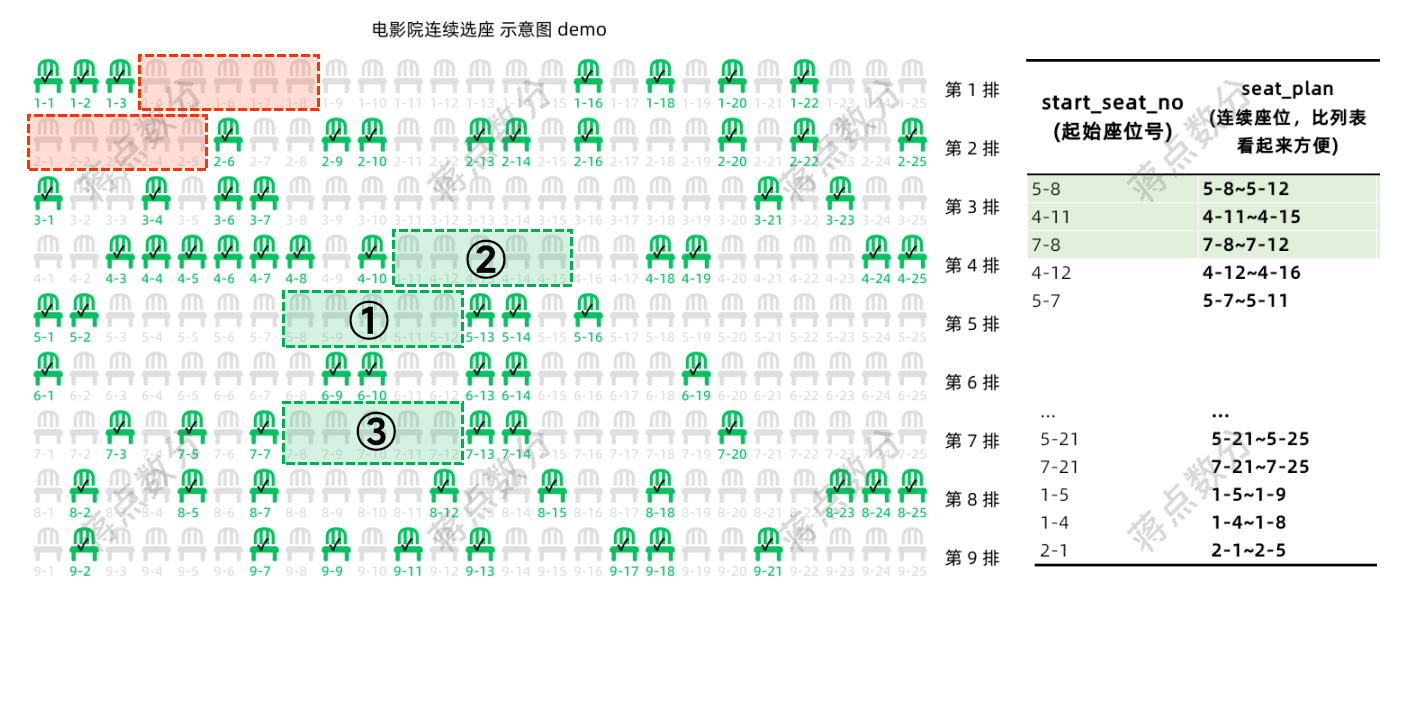
-- 求连续 5 个的空座位

with simple_processing_table as (
    -- 表名根据“有道翻译”取的,就是简单处理一下
    -- 将行号和列号单独拿出来,后面写着方便一点点;不处理也可以
    select
      seat_no
    , int(split(seat_no, '-')[0]) as seat_row
    , int(split(seat_no, '-')[1]) as seat_col
    , is_saled
    from data_exercise.dwd_cinema_seat_sales_status
)

, calc_5_continuous_seats_table as (
   -- 计算连续 5 个空座位,为什么要 sum(if(is_saled=0, 1, 0)) = 5 而不是
   -- sum(is_saled) = 0,因为 rows between ... 4 following,在扫到该分组最后 4 行时
   -- 此时窗口的实际长度已经不是 5 个了,因为后面没有数据了。用 sum(is_saled) = 0
   -- 需要增加额外的逻辑
    select
      seat_no, seat_row, seat_col
    , sum(if(is_saled=0, 1, 0)) over (partition by seat_row order by seat_col asc
        rows between current row and 4 following) as tag
    , collect_set(seat_no) over (partition by seat_row order by seat_col asc
        rows between current row and 4 following) as seat_plan_array
    , max(seat_row) over () as seat_max_row
    -- 这里队列之所以用 partition by seat_row,不像求最多行 over 后面没有内容,
    -- 其实还是兼容了每排座位数不同的情况,只是没有过于细致的处理
    , max(seat_col) over (partition by seat_row) as seat_max_col_current_row
    from simple_processing_table
)

, calc_euclidean_distance_table as (
    -- 计算欧式距离和将座位汇总,依旧是有道翻译,取名太难了
    select
      seat_no as start_seat_no
      -- 注意加 4
    , concat(seat_row, '-', seat_col, '~', seat_row, '-',seat_col+4) as seat_plan
    , seat_max_row
    , seat_max_col_current_row
    , seat_plan_array
      -- 注意到每排最后 4 个的时候,实际可不是 5 个距离之和了;只不过后面会被条件 tag=5 筛掉
    , sum(
        3*abs(seat_row -0.65* seat_max_row) +2*abs(seat_col -0.5* seat_max_col_current_row)
      ) over (partition by seat_row order by seat_col asc
      rows between current row and 4 following) as a_distance
    , tag
    from calc_5_continuous_seats_table
)

select
  start_seat_no
, seat_plan
, seat_plan_array
, a_distance
, seat_max_row
, seat_max_col_current_row
from calc_euclidean_distance_table
where tag =5-- 窗口函数卡了 5 行,不可能超过 5
order by a_distance asc



 發表於 2025-5-4 08:52:00