目录-
前言
-
涉及到的概念介绍
-
1.总线的概念
-
驱动程序
-
2.修改设备树
-
3.应用侧测试程序
-
4.编译
HDF驱动框架探路6:
前言
上一篇文章中最后在操作led灯的硬件时候,我们是直接读的原理图,去操作的寄存器,这种情况是我们绝大多数情况下会这样子进行操作,而本章我们的核心重点是使用总线机制,也就是通过修改设备树的方法来操作硬件。
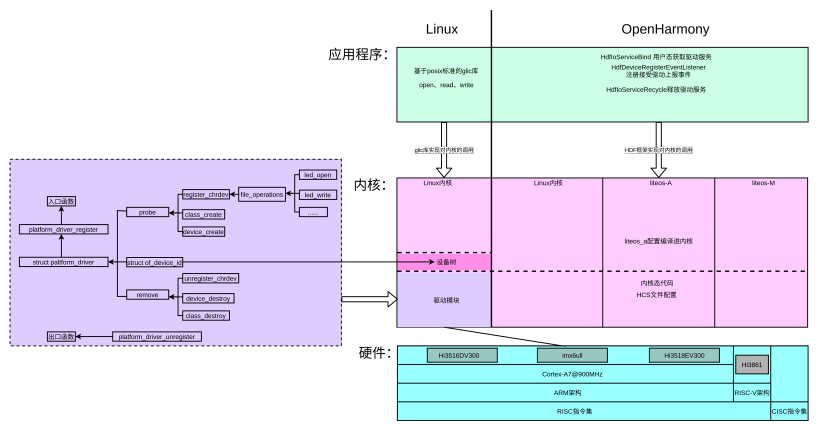
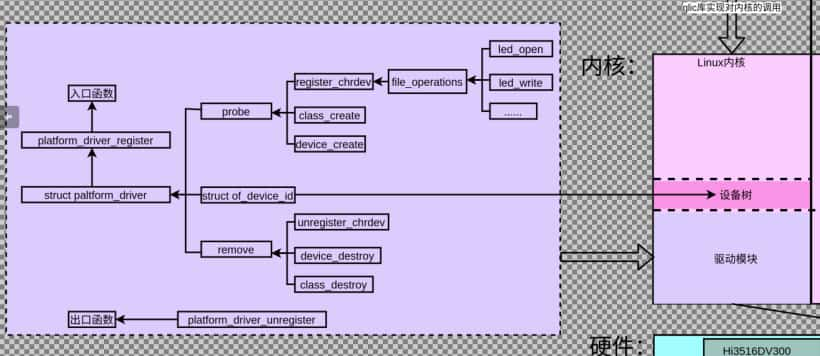
本章框架图
总线框架图
涉及到的概念介绍
1.总线的概念
总线是处理器与一个或者多个设备之间的通道。在设备模型中,所有的设备都通过总线相连。甚至是那些内部的虚拟“平台”总线。总线可以相互插入,比如一个USB控制器通常是一个PCI设备。设备模型展示了总线和它们所控制的设备之间的连接。
驱动程序
1.1 总线的使用逻辑首先调用
为了正确地注册到内核,所有的platform驱动程序都必须创建的主要结构体是struct platform_driver结构体。该结构体由许多回调函数和变量组成,向platform描述了platform驱动程序。所以我们需要写一个struct platform_driver结构体。然后在其中有两个比较重要的回调函数:probe和remove
-
int (*probe)(…)指向platform驱动程序中的探测函数的指针。当platform核心有一个它认为驱动程序需要控制的struct platform_device时,就会调用该函数。所以我们会在这个函数中写驱动程序的逻辑。
-
int (*remove)(…)指向一个移除函数的指针,当struct platform_device被从系统中移除,或者platform驱动程序正在从内核中卸载时,platform核心调用该函数。
为了把struct platform_driver注册到platform核心中,需要调用以struct platform_driver为参数的platform_driver_register函数。通常在platform驱动程序的模块化代码中完成该工程。
当platform驱动程序将要被卸载的时候,需要把struct platform_driver从内核注销。这是通过调用platform_driver_unregister完成的。
1.2 完整实现代码
-
#include
-
#include
-
#include
-
#include
-
#include
-
#include
-
#include
-
#include
-
#include
-
#include
-
#include
-
#include
-
#include
-
#include
-
#include
-
#include
-
#include
-
#include
-
#include
-
#include
-
#include
-
#include
-
#include
-
#include
-
#include
-
#include
-
#include current.h>
-
static int major;
-
static struct class *sr501_class;
-
static struct gpio_desc *sr501_gpio;
-
static int irq;
-
static int sr501_data = 0;
-
static wait_queue_head_t sr501_wq;
-
/* 实现对应的open/read/write等函数,填入file_operations结构体 */
-
static ssize_t sr501_drv_read (struct file *file, char __user *buf, size_t size, loff_t *offset)
-
{
-
#if 0
-
int val;
-
int len = (size < 4)? size : 4;
-
-
val = gpiod_get_value(sr501_gpio);
-
copy_to_user(buf, &val, len);
-
return len;
-
#else
-
int val;
-
int len = (size < 4)? size : 4;
-
/* 1. 有数据就copy_to_uesr */
-
/* 2. 无数据就休眠: 放入某个链表 */
-
wait_event_interruptible(sr501_wq, sr501_data);
-
copy_to_user(buf, &sr501_data, len);
-
sr501_data = 0;
-
return len;
-
#endif
-
}
-
-
static unsigned int sr501_drv_poll(struct file *fp, poll_table * wait)
-
{
-
return 0;
-
}
-
/* 定义自己的file_operations结构体 */
-
static struct file_operations sr501_fops = {
-
.owner = THIS_MODULE,
-
.read = sr501_drv_read,
-
.poll = sr501_drv_poll,
-
};
-
static irqreturn_t sr501_isr(int irq, void *dev_id)
-
{
-
printk("%s %s line %d\n", __FILE__, __FUNCTION__, __LINE__);
-
/* 1. 记录数据 */
-
sr501_data = 1;
-
/* 2. 唤醒APP:去同一个链表把APP唤醒 */
-
wake_up(&sr501_wq);
-
return IRQ_HANDLED;
-
}
-
/* 1. 从platform_device获得GPIO
-
* 2. gpio=>irq
-
* 3. request_irq
-
*/
-
static int sr501_probe(struct platform_device *pdev)
-
{
-
/* 1. 获得硬件信息 */
-
sr501_gpio = gpiod_get(&pdev->dev, NULL, 0);
-
gpiod_direction_input(sr501_gpio);
-
irq = gpiod_to_irq(sr501_gpio);
-
request_irq(irq, sr501_isr, IRQF_TRIGGER_RISING|IRQF_TRIGGER_FALLING, "sr501", NULL);
-
/* 注册file_operations */
-
major = register_chrdev(0, "sr501", &sr501_fops);
-
-
sr501_class = class_create(THIS_MODULE, "sr501_class");
-
if (IS_ERR(sr501_class)) {
-
printk("%s %s line %d\n", __FILE__, __FUNCTION__, __LINE__);
-
unregister_chrdev(major, "sr501");
-
return PTR_ERR(sr501_class);
-
}
-
/* 2. device_create */
-
device_create(sr501_class, NULL, MKDEV(major, 0), NULL, "sr501");
-
-
return 0;
-
}
-
static int sr501_remove(struct platform_device *pdev)
-
{
-
device_destroy(sr501_class, MKDEV(major, 0));
-
class_destroy(sr501_class);
-
unregister_chrdev(major, "sr501");
-
}
-
static const struct of_device_id qzk_sr501[] = {
-
{ .compatible = "qzk,sr501" },
-
{ },
-
};
-
/* 1. 定义platform_driver */
-
static struct platform_driver sr501s_driver = {
-
.probe = sr501_probe,
-
.remove = sr501_remove,
-
.driver = {
-
.name = "qzk_sr501",
-
.of_match_table = qzk_sr501,
-
},
-
};
-
/* 2. 在入口函数注册platform_driver */
-
static int __init sr501_init(void)
-
{
-
int err;
-
printk("%s %s line %d\n", __FILE__, __FUNCTION__, __LINE__);
-
init_waitqueue_head(&sr501_wq);
-
err = platform_driver_register(&sr501s_driver);
-
return err;
-
}
-
/* 3. 有入口函数就应该有出口函数:卸载驱动程序时,就会去调用这个出口函数
-
* 卸载platform_driver
-
*/
-
static void __exit sr501_exit(void)
-
{
-
printk("%s %s line %d\n", __FILE__, __FUNCTION__, __LINE__);
-
-
platform_driver_unregister(&sr501s_driver);
-
}
-
/* 7. 其他完善:提供设备信息,自动创建设备节点 */
-
-
module_init(sr501_init);
-
module_exit(sr501_exit);
-
MODULE_LICENSE("GPL");
2.修改设备树
2.1 修改思路
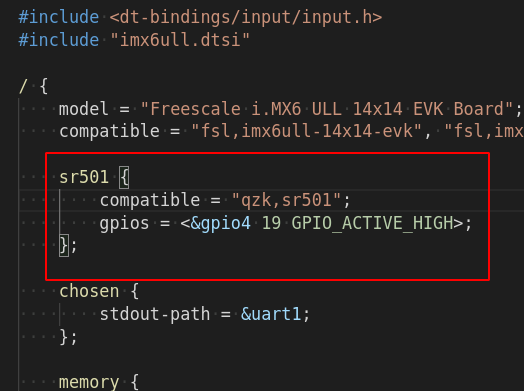
在上述驱动中of_device_id结构体中的.compatible = “qzk,sr501”,所以我们需要将设备树中添加一个这样的设备节点
2.2 修改代码如下:
Linux-4.9.88/arch/arm/boot/dts/100ask_imx6ull-14x14.dts
3.应用侧测试程序
3.1 测试程序逻辑
测试程序只需要不断的去read,等到中断收到返回时,就会获得返回。
3.2 测试程序完成实现代码
-
#include
-
#include
-
#include
-
#include
-
#include
-
#include
-
-
int main(int argc, char **argv)
-
{
-
int fd;
-
int val;
-
fd = open("/dev/sr501", O_RDWR);
-
if (fd == -1)
-
{
-
printf("can not open file %s\n", argv[1]);
-
return -1;
-
}
-
-
while (1)
-
{
-
read(fd, &val, 4);
-
if (val == 0x1) {
-
printf("detect people\n");
-
}
-
}
-
-
close(fd);
-
-
return 0;
-
}
4.编译
4.1 配置交叉编译工具链
回到源码根目录执行source env.sh配置编译工具链
4.2 重新生成内核设备树
进入源码目录下的Linux-4.9.88文件夹后执行make dtbs重新生成设备树
4.3 将重新生成的设备树放入开发板的boot目录
cp 100ask_imx6ull-14x14.dtb /boot
4.4 make编译驱动程序
-
KERN_DIR = ~/imx6ullpro/Linux-4.9.88 # 板子所用内核源码的目录
-
all:
-
make -C $(KERN_DIR) M=`pwd` modules
-
$(CROSS_COMPILE)gcc -o sr501_test sr501_test.c
-
clean:
-
make -C $(KERN_DIR) M=`pwd` modules clean
-
rm -rf modules.order
-
obj-m += sr501_drv.o
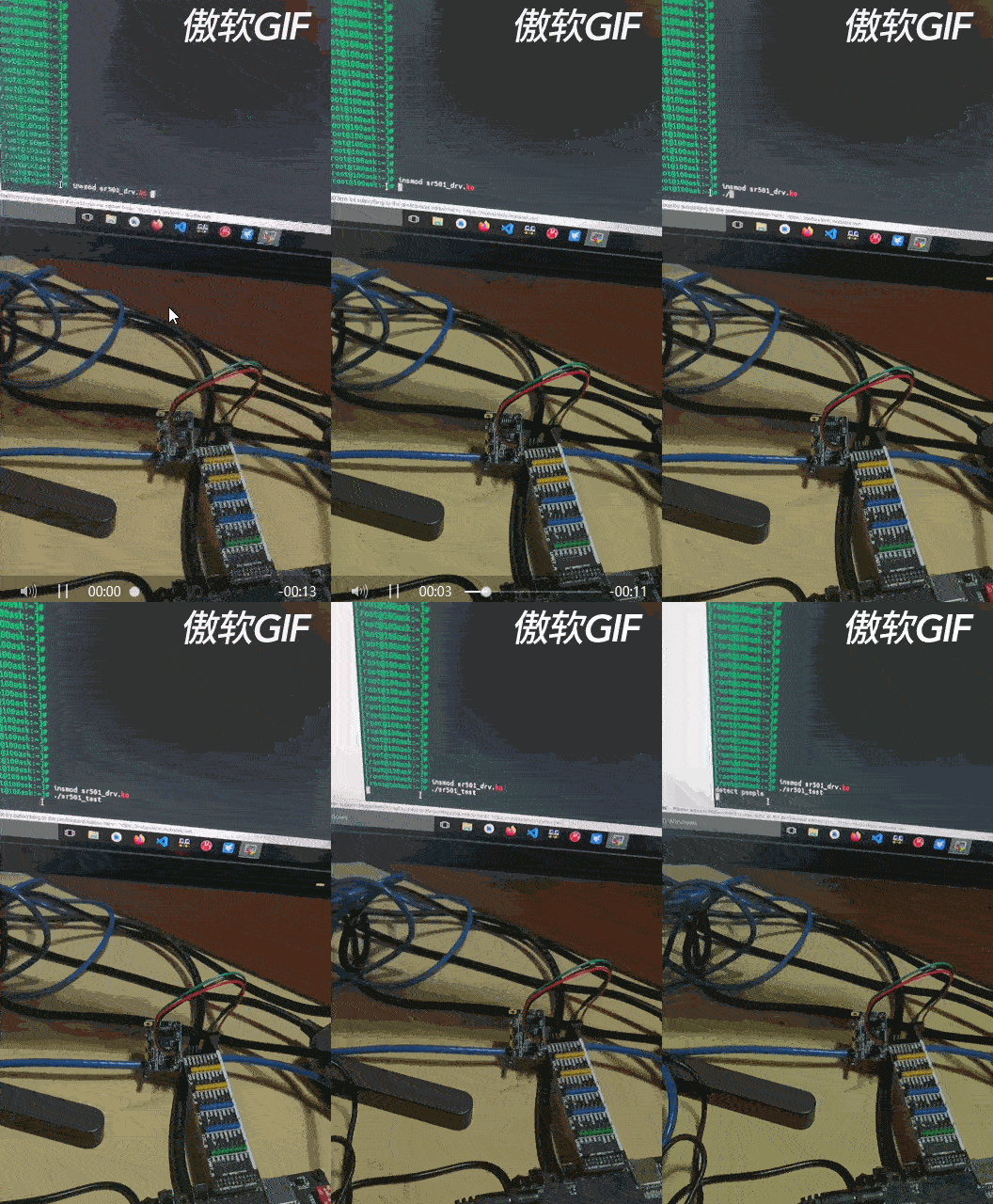
直接执行make脚本执行上述Makefile生成测试程序和驱动ko文件
4.5 加载驱动程序
-
insmod sr501_drv.ko
4.6 执行测试程序
-
./sr501_test
原文链接: https://harmonyos.51cto.com
|



 發表於 2024-1-17 00:00:00