|
前言
lnmp是linux、nginx、mysql和php的缩写,这个组合是最常见的web服务器的运行环境之一。本文将带领大家在centos 6操作系统上搭建一套lnmp环境。
本教程适用于centos 6.5版本。
一、安装php7
1.更新yum源(默认yum源中php版本为5.3.3)
2.安装php7及常用的拓展模块
注:安装其他拓展模块可使用命令 yum -y install php70w-xxx
3.测试是否安装成功
4.配置php.ini文件,在末尾添加cgi.fix_pathinfo = 1
二、安装mysql5.5
1.卸载mysql-libs的5.1版本
2.增加新源
3.安装
4.启动
5.设置开机启动
6.修改默认密码
?
|
1
2
3
4
5
6
|
mysql>select user,host,password from mysql.user;
mysql>drop user ''@localhost;
mysql>update mysql.user set password = password('新的密码') where user='root';
mysql>flush privileges;
mysql>exit
|
三、安装nginx
1.安装
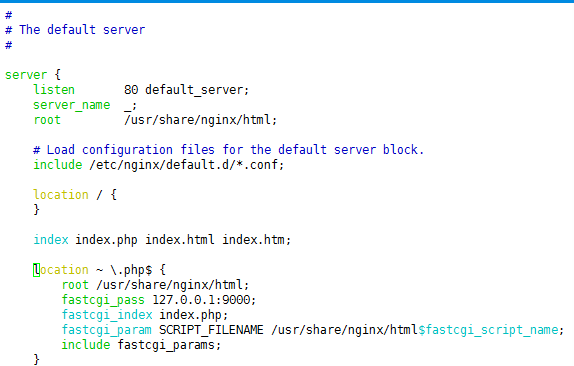
2.配置conf文件
将下面一行干掉
?
|
1
|
listen [::]:80 default_server;
|
并添加fastcgi支持
?
|
1
2
3
4
5
6
7
8
|
index index.php index.html index.htm;
location ~ \.php$ {
root /usr/share/nginx/html;
fastcgi_pass 127.0.0.1:9000;
fastcgi_index index.php;
fastcgi_param script_filename /usr/share/nginx/html$fastcgi_script_name;
include fastcgi_params;
}
|
3.设置开机启动
4.启动nginx和php-fpm
四、测试
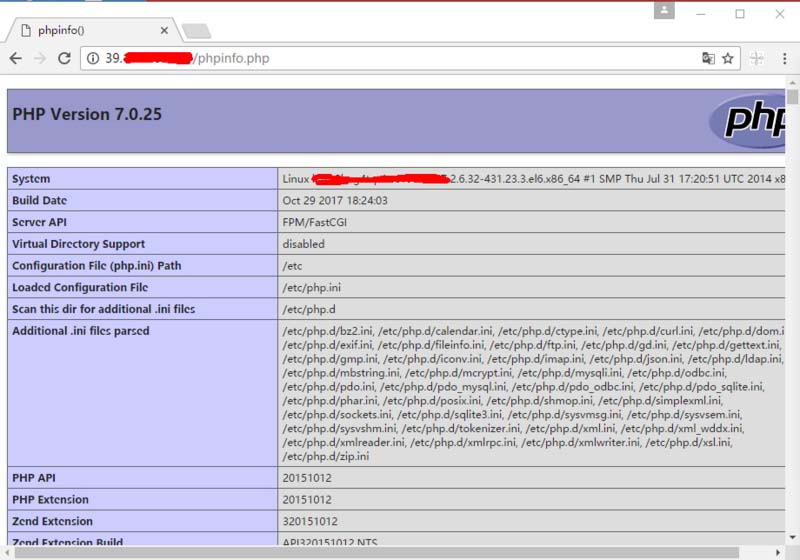
浏览器输入:你的服务器ip/phpinfo.php ,返回php信息页面的话,收工!
总结
以上就是这篇文章的全部内容了,希望本文的内容对大家的学习或者工作具有一定的参考学习价值,如果有疑问大家可以留言交流,谢谢大家对服务器之家的支持。
原文链接:https://segmentfault.com/a/1190000012263131 |



 發表於 2023-6-25 00:00:00