|
一、perl + mod_perl
安装mod_perl使perl脚本速度快
?
|
1
2
3
4
5
6
7
8
9
10
11
12
13
14
15
16
17
18
19
20
21
22
23
24
25
26
27
28
29
30
31
32
33
34
35
36
37
38
39
40
41
42
43
44
45
46
47
48
49
50
51
52
53
54
55
56
57
58
59
60
61
62
63
64
65
66
67
|
[1] 安装mod_perl
[root@linuxprobe ~]
[2] 配置perlrun模式,总是将perl解释器放在ram上。
[root@linuxprobe ~]
perlswitches -w
perlswitches -t
alias /perl /var/www/perl
<directory /var/www/perl>
sethandler perl-script
perlresponsehandler modperl::perlrun
perloptions +parseheaders
options +execcgi
</directory>
<location /perl-status>
sethandler perl-script
perlresponsehandler apache2::status
require ip 127.0.0.1 10.1.1.1/24
</location>
[root@linuxprobe ~]
[3] 创建测试脚本以确保设置不是ploblem。如果显示如下所示的结果,就可以。
[root@linuxprobe ~]
[root@linuxprobe ~]
#!/usr/bin/perl
use strict;
use warnings;
print "content-type: text/html\n\n";
print "<html>\n<body>\n";
print "<div style=\"width:100%; font-size:40px; font-weight:bold; text-align:center;\">";
my $a = 0;
&number();
print "</div>\n</body>\n</html>";
sub number {
$a++;
print "number \$a = $a";
}
[root@linuxprobe ~]
|

[4] 配置在ram上具有代码缓存的注册表模式
?
|
1
2
3
4
5
6
7
8
9
10
11
12
13
|
[root@linuxprobe ~]
alias /perl /var/www/perl
<directory /var/www/perl>
sethandler perl-script
perlresponsehandler modperl::registry
perlresponsehandler modperl::perlrun
perloptions +parseheaders
options +execcgi
</directory>
[root@linuxprobe ~]
|
[5] 访问作为[4]节的示例的测试脚本,然后变量通过重新加载而增加,因为变量被高速缓存在ram上。所以有必要编辑注册表模式的代码,这里浏览器没刷新一次,$a值加一。
?
|
1
2
3
4
5
6
7
8
9
10
11
12
13
14
15
16
17
18
19
20
21
22
23
24
25
|
[root@linuxprobe ~]
use strict;
use warnings;
print "content-type: text/html\n\n";
print "<html>\n<body>\n";
print "<div style=\"width:100%; font-size:40px; font-weight:bold; text-align:center;\">";
my $a = 0;
&number($a
);
print "</div>\n</body>\n</html>";
sub number {
my($a) = @_;
$a++;
print "number \$a = $a";
}
|
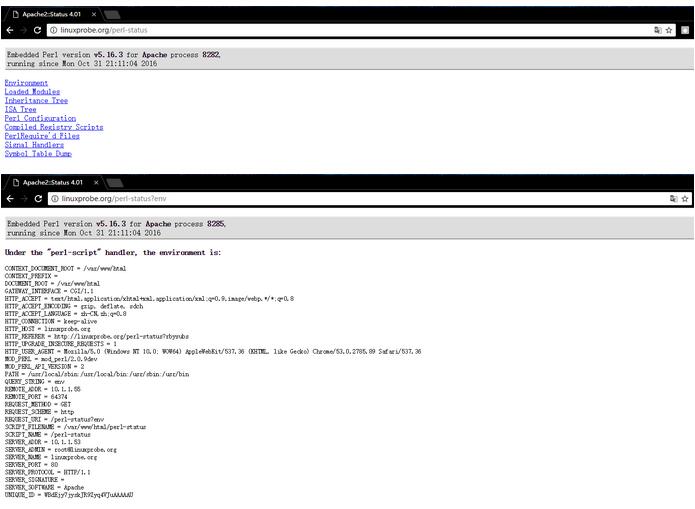
[6]顺便说一下,可以看到mod_perl的状态来访问“http://(主机名或ip地址)/ perl-status”。
二、php + php-fpm
安装php-fpm使php脚本速度快
?
|
1
2
3
4
5
6
7
8
9
10
11
12
13
14
15
16
17
18
|
[1]安装php,请参考这里。
[2]安装php-fpm。
[root@linuxprobe ~]
[3] 配置apache httpd。
[root@linuxprobe ~]
<filesmatch \.php$>
sethandler application/x-httpd-php
sethandler "proxy:fcgi://127.0.0.1:9000"
</filesmatch>
[root@linuxprobe ~]
[root@linuxprobe ~]
[root@linuxprobe ~]
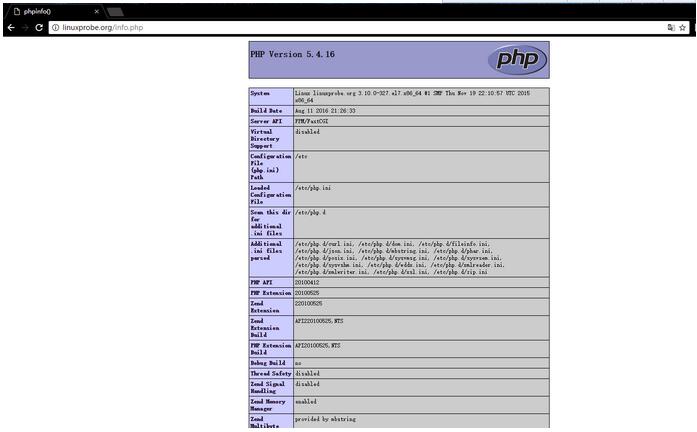
[4]创建phpinfo并访问它,然后如果“fpm / fastcgi”显示,它是确定。
[root@linuxprobe ~]
|
三、python + mod_wsgi
安装mod_wsgi(wsgi:web服务器网关接口),使python脚本更快
?
|
1
2
3
4
5
6
7
8
9
10
11
12
13
14
15
16
17
18
19
20
21
22
23
24
25
|
[1] 安装mod_wsgi .
[root@linuxprobe ~]
[2] 例如,将mod_wsgi配置为可以访问/ test_wsgi,后端是/var/www/html/test_wsgi.py.
[root@linuxprobe ~]
wsgiscriptalias /test_wsgi /var/www/html/test_wsgi.py
[root@linuxprobe ~]
[3] 创建您在上面设置的测试脚本.
[root@linuxprobe ~]
def application(environ,start_response):
status = '200 ok'
html = '<html>\n' \
'<body>\n' \
'<div>\n' \
'mod_wsgi test page\n' \
'</div>\n' \
'</body>\n' \
'</html>\n'
response_header = [('content-type','text/html')]
start_response(status,response_header)
return [html]
|

?
|
1
2
3
4
5
6
7
8
9
10
11
12
13
14
|
[4]配置如果你使用django。 ([参考安装django](http://blog.csdn.net/wh211212/article/details/52992413))例如,在“wang”下拥有的“/home/wang/ venv/testproject”下配置“testapp”
[root@linuxprobe ~]
wsgidaemonprocess testapp python-path=/home/wang/venv/testproject:/home/wang/venv/lib/python2.7/site-packages
wsgiprocessgroup testapp
wsgiscriptalias /django /home/wang/venv/testproject/testproject/wsgi.py
<directory /home/wang/venv/testproject>
require all granted
</directory>
[root@linuxprobe ~]
|
四、访问日志分析器:awstats
安装awstats,它报告http日志以分析对http服务器的访问。
[1] 安装awstats。
?
|
1
2
3
4
5
6
7
8
9
10
11
12
13
14
15
16
17
18
19
20
21
22
23
24
25
26
27
28
29
30
31
32
33
34
35
|
[root@linuxprobe ~]
[root@linuxprobe ~]
logformat=1
sitedomain="linuxprobe.org
hostaliases="localhost 127.0.0.1 regex[server\.world$] regex[^10\.1\.1\.]
"
[root@linuxprobe ~]
require ip 10.1.1.0/24
[root@linuxprobe ~]
[root@linuxprobe ~]
create/update database for config "/etc/awstats/awstats.linuxprobe.org.conf" by awstats version 7.4 (build 20150714)
from data in log file "/var/log/httpd/access_log"...
phase 1 : first bypass old records, searching new record...
searching new records from beginning of log file...
phase 2 : now process new records (flush history on disk after 20000 hosts)...
jumped lines in file: 0
parsed lines in file: 165
found 0 dropped records,
found 0 comments,
found 0 blank records,
found 0 corrupted records,
found 0 old records,
found 165 new qualified records.
|
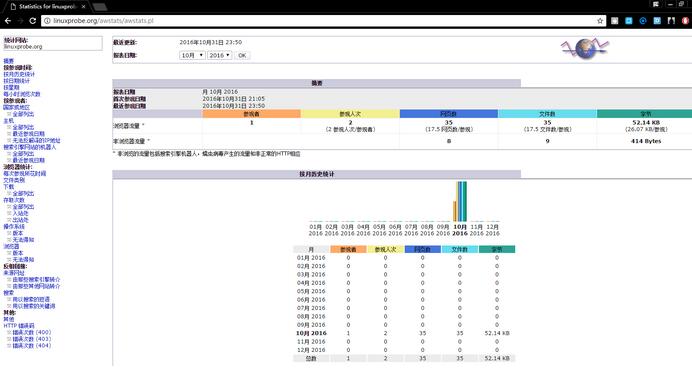
[2]访问“http://(您的服务器的名称或ip地址/)/awstats/awstats.pl”,然后显示以下屏幕,可以看到httpd日志报告。
以上就是本文的全部内容,希望对大家的学习有所帮助,也希望大家多多支持服务器之家。
原文链接:http://blog.csdn.net/wh211212/article/details/52994505 |



 發表於 2023-9-23 00:00:00