python 学习_第五模块 CSS
1 网页引用css样式 3种模式
内联样式
内嵌样式
外部样式(常用)
<!--
    1.内联样式 (行内样式)  少用
    2.内嵌样式
    3.外部样式
-->

<!DOCTYPE html>
<html>
<head>
    <title>3种模式</title>

    <!-- 内嵌样式 -->
    <style type="text/css">
        h3{
            color: green;
        }
    </style>
    <!-- 外部样式-->
    <link rel="stylesheet" type="text/css" href="css/index.css">
</head>
<body>
    <!-- 行内样式 -->
    <p>
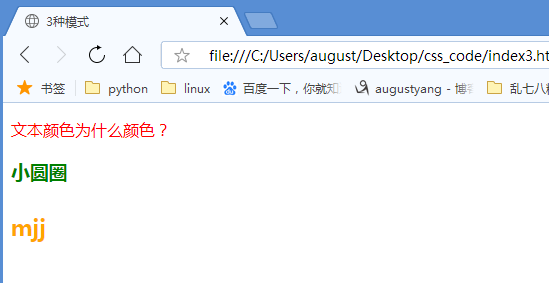
    <p style="color: red;">
        文本颜色为什么颜色?
    </p>

    <h3>
        小圆圈
    </h3>

    <h4>
        mjj
    </h4>

</p>
</body>
</html>
h4{
    color: orange;
    font-size: 22px;
    font-weight: bold;
}
index.css
2 基本选择器
①标签选择器
p{
    color: green;
    font-size: 20px;
}
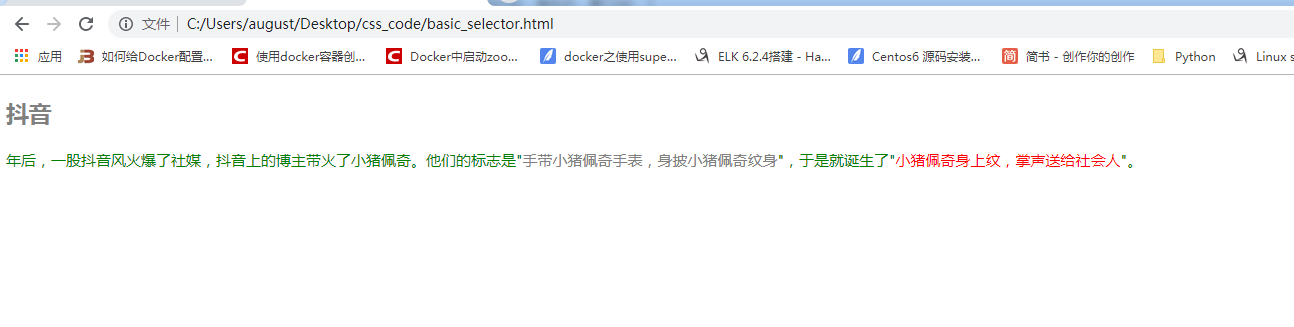
将所有p标签设置字体颜色为绿色 大小为20px
②id选择器
将id为抖音的元素字体颜色设置为红色
③类选择器
将类为 active的颜色设置为灰色
1)基本选择器的使用
<!DOCTYPE html>
<html>
<head>
<title>css基础选择器</title>
<link rel="stylesheet" type="text/css" href="css/index.css">
</head>
<body>
<div id="container">
<h3 class="active title">抖音</h3>
<p>
年后,一股抖音风火爆了社媒,抖音上的博主带火了小猪佩奇。他们的标志是"<span class="active">手带小猪佩奇手表,身披小猪佩奇纹身</span>",于是就诞生了"<span id="peiqi">小猪佩奇身上纹,掌声送给社会人</span>"。
</p>
</div>
</body>
</html>
p{
color: green;
font-size: 20px;
}
.active{
    color: gray;
}
.title{
font-size: 30px;
}
#peiqi{
color: red;
}
index.css
2)类选择器的使用样例
<!DOCTYPE html>
<html>
<head>
    <title>类选择器使用</title>
    <link rel="stylesheet" type="text/css" href="css/common_class.css">
</head>
<body>
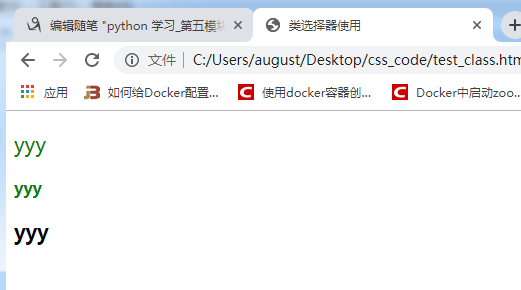
    <!-- 绿色 20px -->
    <p class="lv big">yyy</p>
    <!-- 绿色 粗 -->
    <p class="lv bold">yyy</p>
    <!-- 粗 20px -->
    <p class="bold big">yyy</p>

</body>
</html>
.lv{
    color: green;
}
.big{
    font-size: 20px;
}
.bold{
    font-weight: bold;
}
common_class.css
3 高级选择器
① 后代选择器
/*后代选择器*/
.wrap a {
    color:red;
}
② 子代选择器
/*子代 选择器*/
.wrap >a{
    color: green;
}
③ 组合选择器
/*组合选择器*/

h3,span {
    color: gray;
    font-size: 20px;
}
④ 交集选择器
/*交集选择器*/

h2{
    color: red;
}
.active{
    font-weight: lighter;
}
h2.active{
    font-size: 14px;
}
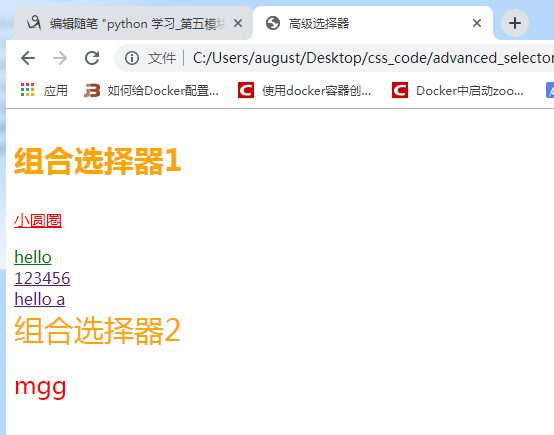
1) 高级选择器使用
<!DOCTYPE html>
<html>
<head>
    <title>高级选择器</title>
    <link rel="stylesheet" type="text/css" href="css/advanced_selector.css">
</head>
<body>
    <h3>组合选择器1</h3>

    <div class='wrap'>
        <p>
            <a href="#">小圆圈</a>
        </p>
        <a href="#">hello</a>
    </div>


    <a href="#">123456</a>


    <div>
        <a href="#"> hello a</a>
    </div>

    <span>组合选择器2</span>


    <h2 class="active">mgg</h2>
</body>
</html>
/*后代选择器*/
.wrap a {
    color:red;
}


/*子代 选择器*/
.wrap >a{

    color: green;
}


/*组合选择器*/

h3,span {
    color: orange;
    font-size: 30px;
}

/*交集选择器*/

h2{
    color: red;
}
.active{
    font-weight: lighter;
}
h2.active{
    font-size: 24px;
}
advanced_selector.css
⑤ 伪类选择器
<!DOCTYPE html>
<html>
<head>
    <title>伪类选择器</title>
    <link rel="stylesheet" type="text/css" href="css/test.css">
</head>
<body>
    <a href="https://www.baidu.com" >baidu</a>

</body>
</html>
      /*让超链接点击之前是红色*/
        a:link{
            color:red;
        }

        /*让超链接点击之后是绿色*/
        a:visited{
            color:green;
        }
        /*鼠标悬停,放到标签上是黄色*/
        a:hover{
            color:orange;
        }
        /*鼠标点击链接,但是不松手是黑色*/
        a:active{
            color:black;
test.css
需要注意的是 :hover 可以应用于任何的元素
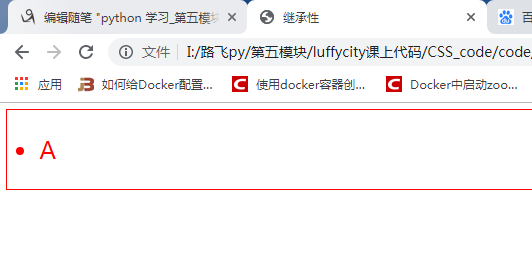
⑥ 继承性
<!DOCTYPE html>
<html>
<head>
    <title>继承性</title>
    <link rel="stylesheet" type="text/css" href="css/special.css">
</head>
<body>
    <div>
        <ul>
            <li>
                <p>
                    A
                </p>
            </li>
        </ul>
    </div>
</body>
</html>
body{
    color: red;
    font-size: 30px;
    border: 1px solid red;
}
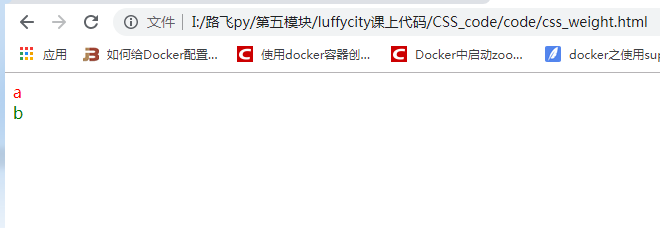
4 选择器权重
<!DOCTYPE html>
<html>
<head>
    <title>选择器权重</title>
    <style type="text/css">
        /*数选择器的数量: id选择器 类选择器 标签选择器*/
        /*0 1 0*/
        .b{
            color: purple;
        }
        /*0 0 3*/
        html body div{
            color: red;
        }
        /*1 0 0*/
        #b{
            color: orange;
        }

    </style>
</head>
<body>
    <div>a</div>
    <div class="b" id="b" style="color: green;">b</div>
</body>
</html>
<!DOCTYPE html>
<html>
<head>
    <title>css选择器权重深入</title>
    <style type="text/css">
        /* 0 0 3*/
        div div p{
            color: yellow;
        }
        /*0 0 1*/
        p{
            color: gray;
        }
        /*0 1 0*/
        .active{
            color: purple;
        }
        /*0 1 1*/
        div .active{
            color: black;
        }
        /*0 1 1*/
        div div .active{
            color: blue;
        }
        /*1 2 0*/
        .wrap1 #box2 .active{
            color: green;
        }
        /*2 0 1*/
        #box1 #box2 p{
            color: red;
        }
        /*继承来的属性 它的权重非常低 0*/
        #box1 #box2 #box3{
            color: orange;
        }

        .container{
            color: orange;
            font-size: 14px;
        }
        .container ul li {
            color: #000;
            font-size: 16px;

        }

    </style>
</head>
<body>
    <div class="wrap1" id="box1">
        <div class="wrap2" id="box2">
            <div class="wrap3" id="box3">
                <p class="active">MJJ是什么颜色</p>
            </div>
        </div>

    </div>


    <div class="container">
        <ul>
            <li>小米手机</li>
        </ul>
    </div>
</body>
</html>
5 字体相关属性
① font-family 字体系列
body {
  font-family: "Microsoft Yahei", "微软雅黑", "Arial", sans-serif
}
如果设置成inherit,则表示继承父元素的字体。
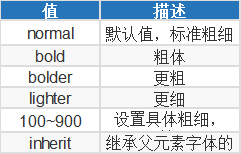
② font-weight 字重(字体粗细)
取值范围:
③ font-size 字体大小
如果设置成inherit表示继承父元素的字体大小值。
④ color 设置内容的字体颜色
支持三种颜色值:
十六进制值 如: #FF0000
一个RGB值 如: RGB(255,0,0)
颜色的名称 如: red
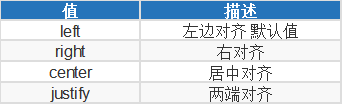
⑤ text-align 文本对齐
取值范围:
⑥ line-height 行高
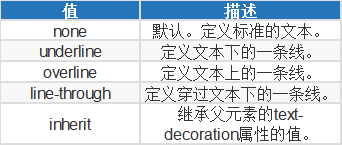
⑦ text-decoration 文字装饰
取值范围:
字体属性和文本属性总结:
字体属性
    1.字体
        font-family: "微软雅黑","宋体",...;
    2.字体大小
        font-size: 20px;
        像素单位: px,em,rem
        px: 绝对单位。 一旦设置了值,不管网页如何变化始终如一
        em:相对单位。当前某块区域的字体大小,比如给p标签设置了字体大小20px,那么1em= 20px;
        rem:相对单位 主要应用于移动端
    3.字体颜色
        color: red
        颜色表示法:
            - 单词表示法  red green yellow purple.
            - rgb()表示法
                + rgba()  a:alpha 表示透明度
            - 十六进制表示法
                + #ff6700
    4.字体样式
            font-style
                normal : 默认的字体
                italic:斜体
    5.字体粗细
            font-weight:
                bold:粗的字体
                100~900
                400表示默认
文本属性:
    1.文本修饰
            text-decoration
                underline 下划线
                none 无线
                overline 上划线
                line-through 删除线
    2.文本缩进
            text-indent
                单位建议使用em
    3.行高
            行与行之间的距离
                line-height
                    px,em,rem
    4.中文字间距/单词间距
            letter-spacing
            word-spacing
    5.文本对齐方式
            text-align
                left
                right
                center  使用最多
⑧ 字体属性示例
<!DOCTYPE html>
<html>
<head>
    <title>字体属性</title>
    <style type="text/css">
        body{
            font-family: "Hoefler Text","Arial";
            font-size: 30px;
            color: rgb(255,103,0);
            font-style: italic;
            font-weight: 900;
            text-decoration: line-through;
        }

    </style>
</head>
<body>
    <!-- 像素单位: px  em rem  -->
    MJJ 小猿圈

</body>
</html>
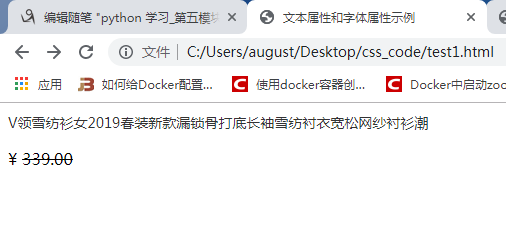
⑨ 文本属性和字体属性示例
<!DOCTYPE html>
<html>
<head>
    <title>文本属性和字体属性示例</title>
    <style type="text/css">
         a{
            text-decoration: none;
            color: #333;
            font-size: 14px;
        }
        a:hover{
            color: #FD8308;
            text-decoration: underline;
        }
        .box p span{
            text-decoration: line-through;
        }
    </style>
</head>
<body>
    <div class="box">
        <a href="https://detail.tmall.com/item.htm?spm=a230r.1.14.10.3e58105cVQmmSc&id=576523555964&cm_id=140105335569ed55e27b&abbucket=9">
            V领雪纺衫女2019春装新款漏锁骨打底长袖雪纺衬衣宽松网纱衬衫潮</a>
        <p>¥ <span>339.00</span></p>
    </div>
</body>
</html>
<!DOCTYPE html>
<html>
<head>
    <title>文本属性</title>
    <style type="text/css">
        p{
            /*font-family: */
            text-indent: 2em;
            /*font-size: 20px;*/
            /*行高: 行与行之间的距离*/
            /*line-height: 60px;*/
            /*文字和文字之间的距离*/
            letter-spacing: 5px;
            /*英文单词之间的距离*/
            word-spacing: 10px;
            /*综合属性*/
            font: 20px / 3 "Helvetica Neue",Helvetica,Arial,"Microsoft Yahei","Hiragino Sans GB","Heiti SC","WenQuanYi Micro Hei",sans-serif;
        }
        div{
            line-height: 60px;
            font-size: 20px;
            background-color: red;
            /*设置文本水平居中显示*/
            text-align: center;
        /*    text-align: left; 默认
            text-align: right;*/
        }
    </style>
</head>
<body>
      <p>
           hello  world在人类漫长的历史长河中,推动社会向前的从不会是那些甘于平凡的多数人,相反,他们往往都是一群特立独行桀骜不驯的疯子!这一群疯子中有位传奇的人物,他颠覆性地将人文与科技完美融合,极大地改变了人类计算机领域,改变了人们的生活方式,其一手创建的计算机公司到如今仍是手机行业的传奇,没错!他就是乔布斯!
      </p>
      <div>
          在人类漫长的历史长河
      </div>

</body>
</html>
来源:https://www.cnblogs.com/augustyang/p/11120359.html |



 發表於 2019-7-2 14:16:00