1.微信公众平台测试帐号
1.1 申请测试账号
微信公众平台接口测试帐号:https://mp.weixin.qq.com/debug/cgi-bin/sandbox?t=sandbox/login&token=399029368&lang=zh_CN
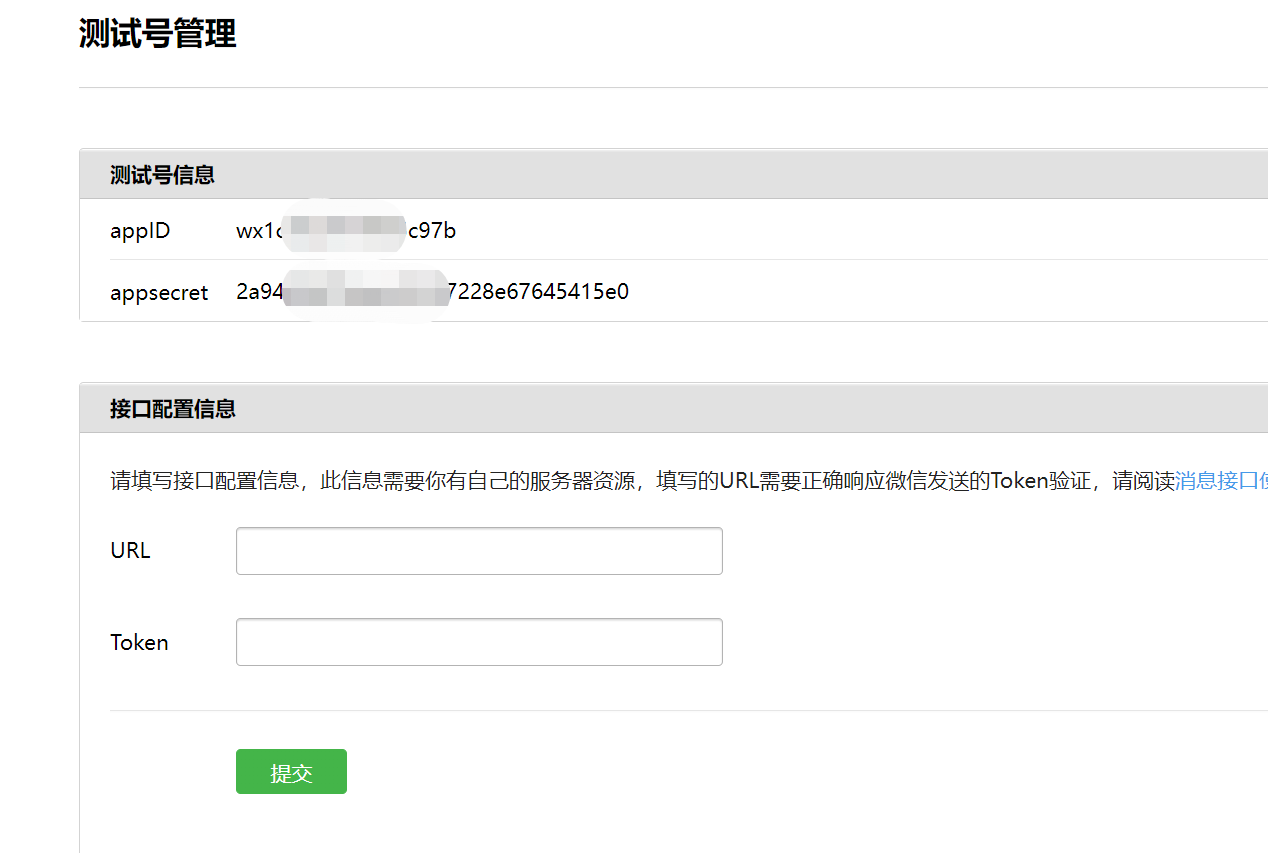
1.2 查看测试号管理
(1)其中appID和appsecret用于后面菜单开发使用
(2)其中URL是开发者用来接收微信消息和事件的接口URL。Token可由开发者可以任意填写,用作生成签名(该Token会和接口URL中包含的Token进行比对,从而验证安全性)。本地测试,url改为内网穿透地址。
2.微信公众号菜单开发
2.1 公众号自定义菜单说明
微信自定义菜单文档地址:https://developers.weixin.qq.com/doc/offiaccount/Custom_Menus/Creating_Custom-Defined_Menu.html
微信自定义菜单注意事项:
-
自定义菜单最多包括3个一级菜单,每个一级菜单最多包含5个二级菜单。
-
一级菜单最多4个汉字,二级菜单最多8个汉字,多出来的部分将会以“...”代替。
-
创建自定义菜单后,菜单的刷新策略是,在用户进入公众号会话页或公众号profile页时,如果发现上一次拉取菜单的请求在5分钟以前,就会拉取一下菜单,如果菜单有更新,就会刷新客户端的菜单。测试时可以尝试取消关注公众账号后再次关注,则可以看到创建后的效果。
2.2 数据格式
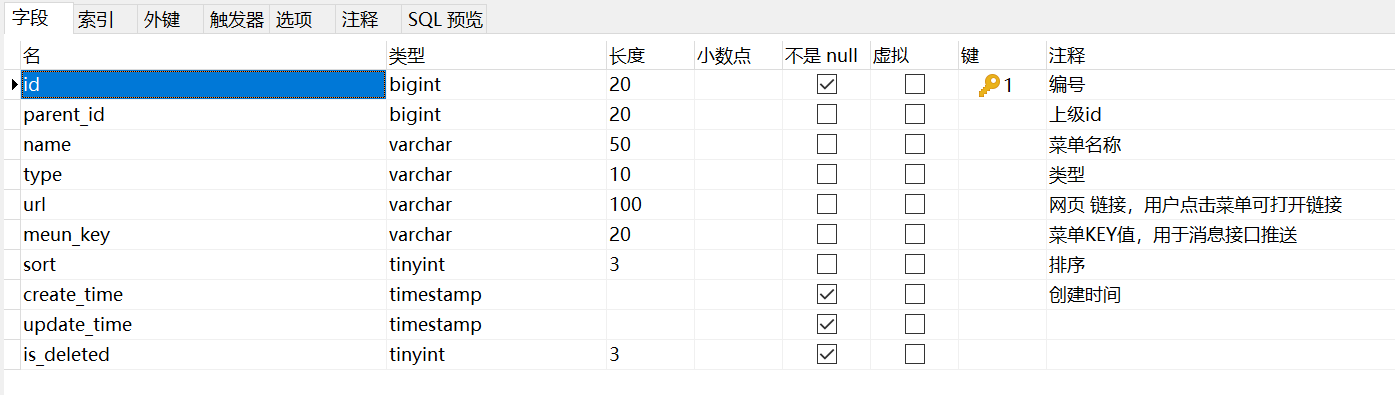
在数据库新建一张menu表,用来存放菜单信息
具体数据格式如下:
2.3 导入依赖
导入微信公众号开发相关依赖
    <dependencies>
        <dependency>
            <groupId>com.github.binarywang</groupId>
            <artifactId>weixin-java-mp</artifactId>
            <version>4.1.0</version>
        </dependency>
    </dependencies>
在yml中定义公众号id和密钥
wechat.mpAppId: wx09f201e9013e81d8

wechat.mpAppSecret: 6c999765c12c51850d28055e8b6e2eda
2.4 添加工具类
该工具类提供从yml中解析出id和密钥的功能
package com.gh.ggkt.wechat.utils;

import org.springframework.beans.factory.InitializingBean;
import org.springframework.beans.factory.annotation.Value;
import org.springframework.stereotype.Component;

/**
 * 常量类,读取配置文件application.properties中的配置
 */
@Component
public class ConstantPropertiesUtil implements InitializingBean {

    @Value("${wechat.mpAppId}")
    private String appid;

    @Value("${wechat.mpAppSecret}")
    private String appsecret;

    public static String ACCESS_KEY_ID;
    public static String ACCESS_KEY_SECRET;

    @Override
    public void afterPropertiesSet() throws Exception {
        ACCESS_KEY_ID = appid;
        ACCESS_KEY_SECRET = appsecret;
    }
}
View Code
HttpClientUtils用于微信公众号发送请求
 
package com.gh.ggkt.wechat.utils;

import org.apache.commons.io.IOUtils;
import org.apache.commons.lang.StringUtils;
import org.apache.http.Consts;
import org.apache.http.HttpEntity;
import org.apache.http.HttpResponse;
import org.apache.http.NameValuePair;
import org.apache.http.client.HttpClient;
import org.apache.http.client.config.RequestConfig;
import org.apache.http.client.config.RequestConfig.Builder;
import org.apache.http.client.entity.UrlEncodedFormEntity;
import org.apache.http.client.methods.HttpGet;
import org.apache.http.client.methods.HttpPost;
import org.apache.http.conn.ConnectTimeoutException;
import org.apache.http.conn.ssl.SSLConnectionSocketFactory;
import org.apache.http.conn.ssl.SSLContextBuilder;
import org.apache.http.conn.ssl.TrustStrategy;
import org.apache.http.conn.ssl.X509HostnameVerifier;
import org.apache.http.entity.ContentType;
import org.apache.http.entity.StringEntity;
import org.apache.http.impl.client.CloseableHttpClient;
import org.apache.http.impl.client.HttpClients;
import org.apache.http.impl.conn.PoolingHttpClientConnectionManager;
import org.apache.http.message.BasicNameValuePair;

import javax.net.ssl.SSLContext;
import javax.net.ssl.SSLException;
import javax.net.ssl.SSLSession;
import javax.net.ssl.SSLSocket;
import java.io.IOException;
import java.net.SocketTimeoutException;
import java.security.GeneralSecurityException;
import java.security.cert.CertificateException;
import java.security.cert.X509Certificate;
import java.util.ArrayList;
import java.util.List;
import java.util.Map;
import java.util.Map.Entry;
import java.util.Set;

/**
 *  依赖的jar包有:commons-lang-2.6.jar、httpclient-4.3.2.jar、httpcore-4.3.1.jar、commons-io-2.4.jar
 * @author zhaoyb
 *
 */
public class HttpClientUtils {

    public static final int connTimeout=10000;
    public static final int readTimeout=10000;
    public static final String charset="UTF-8";
    private static HttpClient client = null;

    static {
        PoolingHttpClientConnectionManager cm = new PoolingHttpClientConnectionManager();
        cm.setMaxTotal(128);
        cm.setDefaultMaxPerRoute(128);
        client = HttpClients.custom().setConnectionManager(cm).build();
    }

    public static String postParameters(String url, String parameterStr) throws ConnectTimeoutException, SocketTimeoutException, Exception{
        return post(url,parameterStr,"application/x-www-form-urlencoded",charset,connTimeout,readTimeout);
    }

    public static String postParameters(String url, String parameterStr,String charset, Integer connTimeout, Integer readTimeout) throws ConnectTimeoutException, SocketTimeoutException, Exception{
        return post(url,parameterStr,"application/x-www-form-urlencoded",charset,connTimeout,readTimeout);
    }

    public static String postParameters(String url, Map<String, String> params) throws ConnectTimeoutException,
            SocketTimeoutException, Exception {
        return postForm(url, params, null, connTimeout, readTimeout);
    }

    public static String postParameters(String url, Map<String, String> params, Integer connTimeout,Integer readTimeout) throws ConnectTimeoutException,
            SocketTimeoutException, Exception {
        return postForm(url, params, null, connTimeout, readTimeout);
    }

    public static String get(String url) throws Exception {
        return get(url, charset, null, null);
    }

    public static String get(String url, String charset) throws Exception {
        return get(url, charset, connTimeout, readTimeout);
    }

    /**
     * 发送一个 Post 请求, 使用指定的字符集编码.
     *
     * @param url
     * @param body RequestBody
     * @param mimeType 例如 application/xml "application/x-www-form-urlencoded" a=1&b=2&c=3
     * @param charset 编码
     * @param connTimeout 建立链接超时时间,毫秒.
     * @param readTimeout 响应超时时间,毫秒.
     * @return ResponseBody, 使用指定的字符集编码.
     * @throws ConnectTimeoutException 建立链接超时异常
     * @throws SocketTimeoutException  响应超时
     * @throws Exception
     */
    public static String post(String url, String body, String mimeType,String charset, Integer connTimeout, Integer readTimeout)
            throws ConnectTimeoutException, SocketTimeoutException, Exception {
        HttpClient client = null;
        HttpPost post = new HttpPost(url);
        String result = "";
        try {
            if (StringUtils.isNotBlank(body)) {
                HttpEntity entity = new StringEntity(body, ContentType.create(mimeType, charset));
                post.setEntity(entity);
            }
            // 设置参数
            Builder customReqConf = RequestConfig.custom();
            if (connTimeout != null) {
                customReqConf.setConnectTimeout(connTimeout);
            }
            if (readTimeout != null) {
                customReqConf.setSocketTimeout(readTimeout);
            }
            post.setConfig(customReqConf.build());

            HttpResponse res;
            if (url.startsWith("https")) {
                // 执行 Https 请求.
                client = createSSLInsecureClient();
                res = client.execute(post);
            } else {
                // 执行 Http 请求.
                client = HttpClientUtils.client;
                res = client.execute(post);
            }
            result = IOUtils.toString(res.getEntity().getContent(), charset);
        } finally {
            post.releaseConnection();
            if (url.startsWith("https") && client != null&& client instanceof CloseableHttpClient) {
                ((CloseableHttpClient) client).close();
            }
        }
        return result;
    }


    /**
     * 提交form表单
     *
     * @param url
     * @param params
     * @param connTimeout
     * @param readTimeout
     * @return
     * @throws ConnectTimeoutException
     * @throws SocketTimeoutException
     * @throws Exception
     */
    public static String postForm(String url, Map<String, String> params, Map<String, String> headers, Integer connTimeout,Integer readTimeout) throws ConnectTimeoutException,
            SocketTimeoutException, Exception {

        HttpClient client = null;
        HttpPost post = new HttpPost(url);
        try {
            if (params != null && !params.isEmpty()) {
                List<NameValuePair> formParams = new ArrayList<NameValuePair>();
                Set<Entry<String, String>> entrySet = params.entrySet();
                for (Entry<String, String> entry : entrySet) {
                    formParams.add(new BasicNameValuePair(entry.getKey(), entry.getValue()));
                }
                UrlEncodedFormEntity entity = new UrlEncodedFormEntity(formParams, Consts.UTF_8);
                post.setEntity(entity);
            }

            if (headers != null && !headers.isEmpty()) {
                for (Entry<String, String> entry : headers.entrySet()) {
                    post.addHeader(entry.getKey(), entry.getValue());
                }
            }
            // 设置参数
            Builder customReqConf = RequestConfig.custom();
            if (connTimeout != null) {
                customReqConf.setConnectTimeout(connTimeout);
            }
            if (readTimeout != null) {
                customReqConf.setSocketTimeout(readTimeout);
            }
            post.setConfig(customReqConf.build());
            HttpResponse res = null;
            if (url.startsWith("https")) {
                // 执行 Https 请求.
                client = createSSLInsecureClient();
                res = client.execute(post);
            } else {
                // 执行 Http 请求.
                client = HttpClientUtils.client;
                res = client.execute(post);
            }
            return IOUtils.toString(res.getEntity().getContent(), "UTF-8");
        } finally {
            post.releaseConnection();
            if (url.startsWith("https") && client != null
                    && client instanceof CloseableHttpClient) {
                ((CloseableHttpClient) client).close();
            }
        }
    }


    /**
     * 发送一个 GET 请求
     *
     * @param url
     * @param charset
     * @param connTimeout  建立链接超时时间,毫秒.
     * @param readTimeout  响应超时时间,毫秒.
     * @return
     * @throws ConnectTimeoutException   建立链接超时
     * @throws SocketTimeoutException   响应超时
     * @throws Exception
     */
    public static String get(String url, String charset, Integer connTimeout,Integer readTimeout)
            throws ConnectTimeoutException,SocketTimeoutException, Exception {

        HttpClient client = null;
        HttpGet get = new HttpGet(url);
        String result = "";
        try {
            // 设置参数
            Builder customReqConf = RequestConfig.custom();
            if (connTimeout != null) {
                customReqConf.setConnectTimeout(connTimeout);
            }
            if (readTimeout != null) {
                customReqConf.setSocketTimeout(readTimeout);
            }
            get.setConfig(customReqConf.build());

            HttpResponse res = null;

            if (url.startsWith("https")) {
                // 执行 Https 请求.
                client = createSSLInsecureClient();
                res = client.execute(get);
            } else {
                // 执行 Http 请求.
                client = HttpClientUtils.client;
                res = client.execute(get);
            }

            result = IOUtils.toString(res.getEntity().getContent(), charset);
        } finally {
            get.releaseConnection();
            if (url.startsWith("https") && client != null && client instanceof CloseableHttpClient) {
                ((CloseableHttpClient) client).close();
            }
        }
        return result;
    }


    /**
     * 从 response 里获取 charset
     *
     * @param ressponse
     * @return
     */
    @SuppressWarnings("unused")
    private static String getCharsetFromResponse(HttpResponse ressponse) {
        // Content-Type:text/html; charset=GBK
        if (ressponse.getEntity() != null  && ressponse.getEntity().getContentType() != null && ressponse.getEntity().getContentType().getValue() != null) {
            String contentType = ressponse.getEntity().getContentType().getValue();
            if (contentType.contains("charset=")) {
                return contentType.substring(contentType.indexOf("charset=") + 8);
            }
        }
        return null;
    }


    /**
     * 创建 SSL连接
     * @return
     * @throws GeneralSecurityException
     */
    private static CloseableHttpClient createSSLInsecureClient() throws GeneralSecurityException {
        try {
            SSLContext sslContext = new SSLContextBuilder().loadTrustMaterial(null, new TrustStrategy() {
                public boolean isTrusted(X509Certificate[] chain,String authType) throws CertificateException {
                    return true;
                }
            }).build();

            SSLConnectionSocketFactory sslsf = new SSLConnectionSocketFactory(sslContext, new X509HostnameVerifier() {

                @Override
                public boolean verify(String arg0, SSLSession arg1) {
                    return true;
                }

                @Override
                public void verify(String host, SSLSocket ssl)
                        throws IOException {
                }

                @Override
                public void verify(String host, X509Certificate cert)
                        throws SSLException {
                }

                @Override
                public void verify(String host, String[] cns,
                                   String[] subjectAlts) throws SSLException {
                }

            });

            return HttpClients.custom().setSSLSocketFactory(sslsf).build();

        } catch (GeneralSecurityException e) {
            throw e;
        }
    }

    public static void main(String[] args) {
        try {
            String str= post("https://localhost:443/ssl/test.shtml","name=12&page=34","application/x-www-form-urlencoded", "UTF-8", 10000, 10000);
            //String str= get("https://localhost:443/ssl/test.shtml?name=12&page=34","GBK");
            /*Map<String,String> map = new HashMap<String,String>();
            map.put("name", "111");
            map.put("page", "222");
            String str= postForm("https://localhost:443/ssl/test.shtml",map,null, 10000, 10000);*/
            System.out.println(str);
        } catch (ConnectTimeoutException e) {
            // TODO Auto-generated catch block
            e.printStackTrace();
        } catch (SocketTimeoutException e) {
            // TODO Auto-generated catch block
            e.printStackTrace();
        } catch (Exception e) {
            // TODO Auto-generated catch block
            e.printStackTrace();
        }
    }

}
View Code2.5 添加配置类
package com.gh.ggkt.wechat.config;

import com.gh.ggkt.wechat.utils.ConstantPropertiesUtil;
import me.chanjar.weixin.mp.api.WxMpService;
import me.chanjar.weixin.mp.api.impl.WxMpServiceImpl;
import me.chanjar.weixin.mp.config.WxMpConfigStorage;
import me.chanjar.weixin.mp.config.impl.WxMpDefaultConfigImpl;
import org.springframework.beans.factory.annotation.Autowired;
import org.springframework.context.annotation.Bean;
import org.springframework.context.annotation.Configuration;
import org.springframework.stereotype.Component;

/**
 * @author Eric Fang
 * @date 2022/10/6 14:05
 */
@Component
public class WechatMpConfig {


    @Autowired
    private ConstantPropertiesUtil constantPropertiesUtil;

    @Bean
    public WxMpService wxMpService(){
        WxMpService wxMpService = new WxMpServiceImpl();
        wxMpService.setWxMpConfigStorage(wxMpConfigStorage());
        return wxMpService;
    }
    @Bean
    public WxMpConfigStorage wxMpConfigStorage(){
        WxMpDefaultConfigImpl wxMpConfigStorage = new WxMpDefaultConfigImpl();
        wxMpConfigStorage.setAppId(ConstantPropertiesUtil.ACCESS_KEY_ID);
        wxMpConfigStorage.setSecret(ConstantPropertiesUtil.ACCESS_KEY_SECRET);
        return wxMpConfigStorage;
    }
}
View Code2.6 代码实现
public List<Menu> findOneMenuInfo() {
        //查询parent_id为0的
        LambdaQueryWrapper<Menu> queryWrapper = new LambdaQueryWrapper<>();
        queryWrapper.eq(Menu::getParentId, 0);
        List<Menu> menuList = baseMapper.selectList(queryWrapper);
        return menuList;
    }

    @Override
    public void syncMenu() {
        //获取所有的菜单列表
        List<MenuVo> menuInfoList = this.findMenuInfo();
        //菜单
        JSONArray buttonList = new JSONArray();
        for (MenuVo oneMenuVo : menuInfoList) {
            JSONObject one = new JSONObject();
            one.put("name", oneMenuVo.getName());
            JSONArray subButton = new JSONArray();
            for (MenuVo twoMenuVo : oneMenuVo.getChildren()) {
                JSONObject two = new JSONObject();
                two.put("type", twoMenuVo.getType());
                //菜单的响应动作类型,view表示网页类型,click表示点击类型,miniprogram表示小程序类型
                if (twoMenuVo.getType().equals("view")) {
                    two.put("name", twoMenuVo.getName());
                    two.put("url", "http://ggkt2.vipgz1.91tunnel.com/#"
                            + twoMenuVo.getUrl());
                } else {
                    two.put("name", twoMenuVo.getName());
                    two.put("key", twoMenuVo.getMeunKey());
                }
                subButton.add(two);
            }
            one.put("sub_button", subButton);
            buttonList.add(one);
        }
        JSONObject button = new JSONObject();
        button.put("button", buttonList);
        try {
            wxMpService.getMenuService().menuCreate(button.toJSONString());
        } catch (WxErrorException e) {
            e.printStackTrace();
        }
    }
2.7 删除菜单
@SneakyThrows
@Override
public void removeMenu() {
    wxMpService.getMenuService().menuDelete();
}
3.内网穿透工具
发送微信公众号消息需要使用到内网穿透服务器,这里使用的是ngrok,注册网址:https://ngrok.cc/login/register
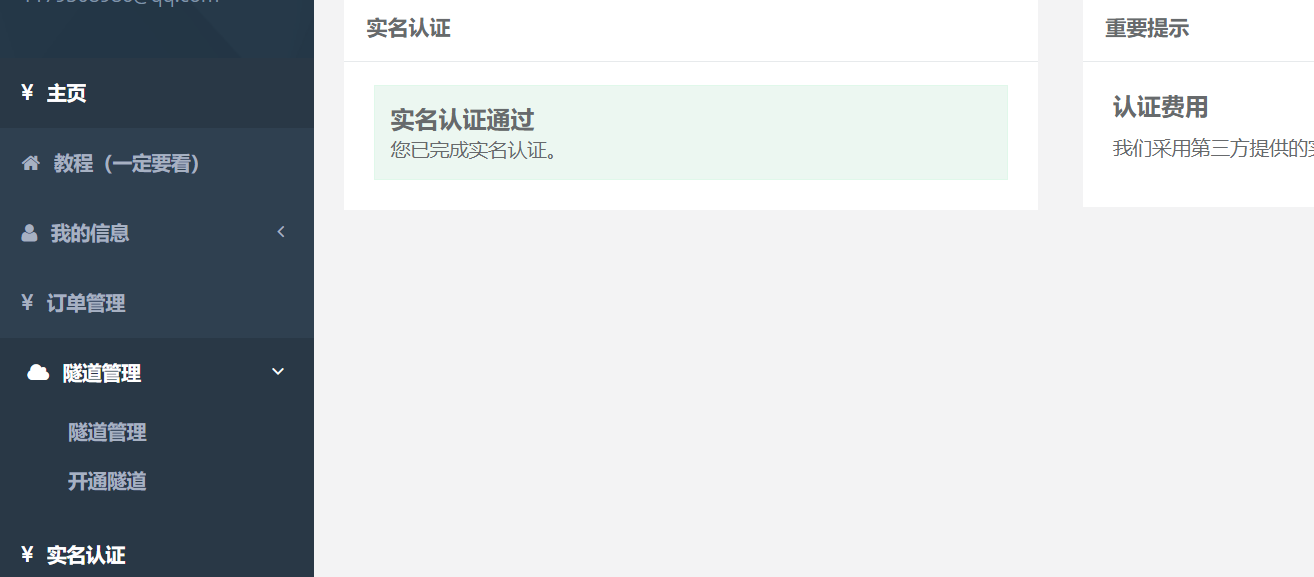
3.1 实名认证
登录进去后,首先需要进行实名认证,认证费2元
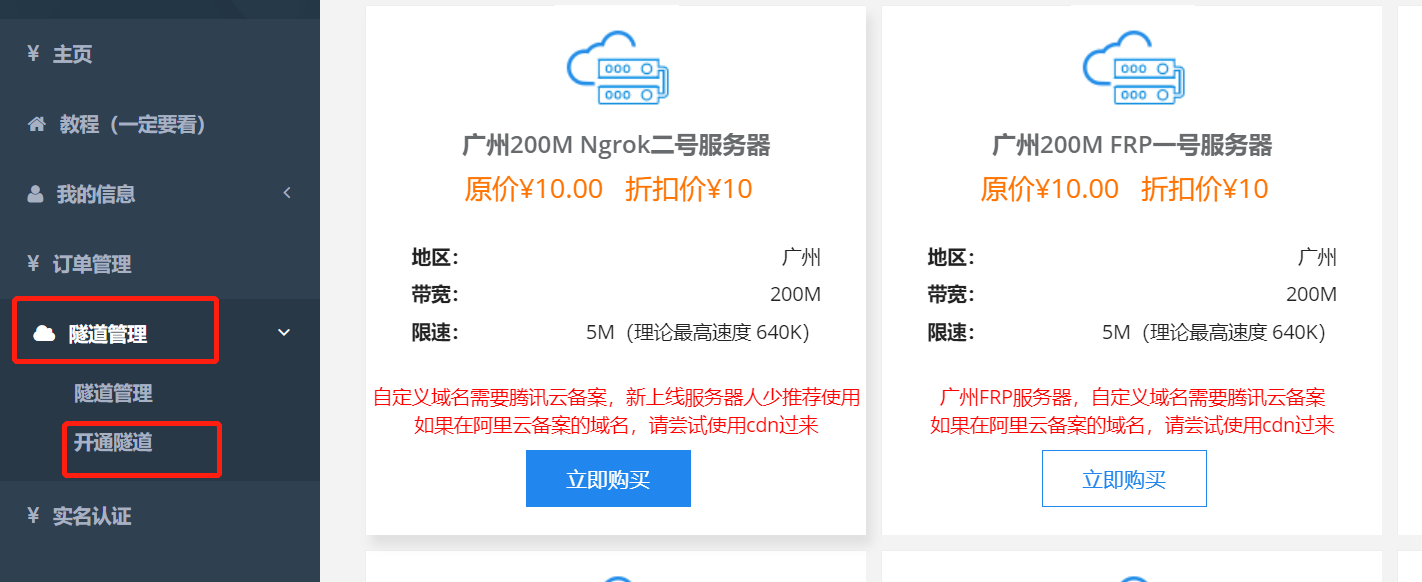
3.2 开通隧道
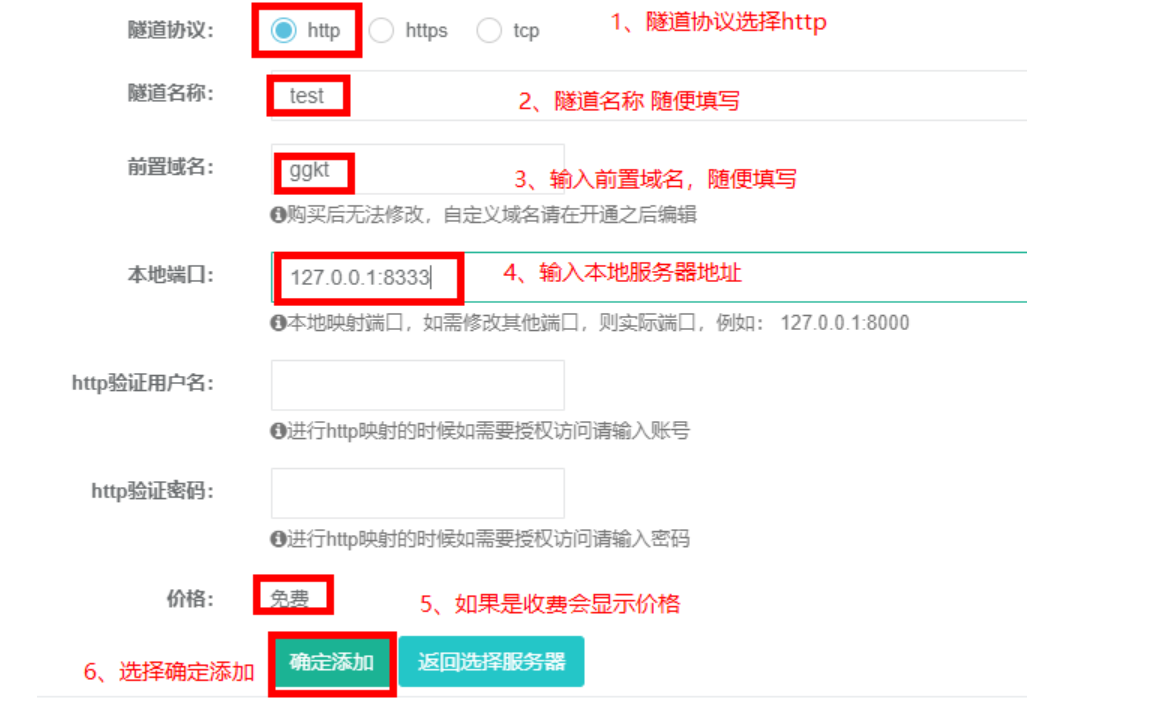
选择 隧道管理-->开通隧道,最后一个是免费服务器,建议选择付费服务器,10元/月,因为免费服务器使用人数很多,经常掉线
点击立即购买,输入相关信息
开通成功后,查看开通的隧道
3.3 隧道启动
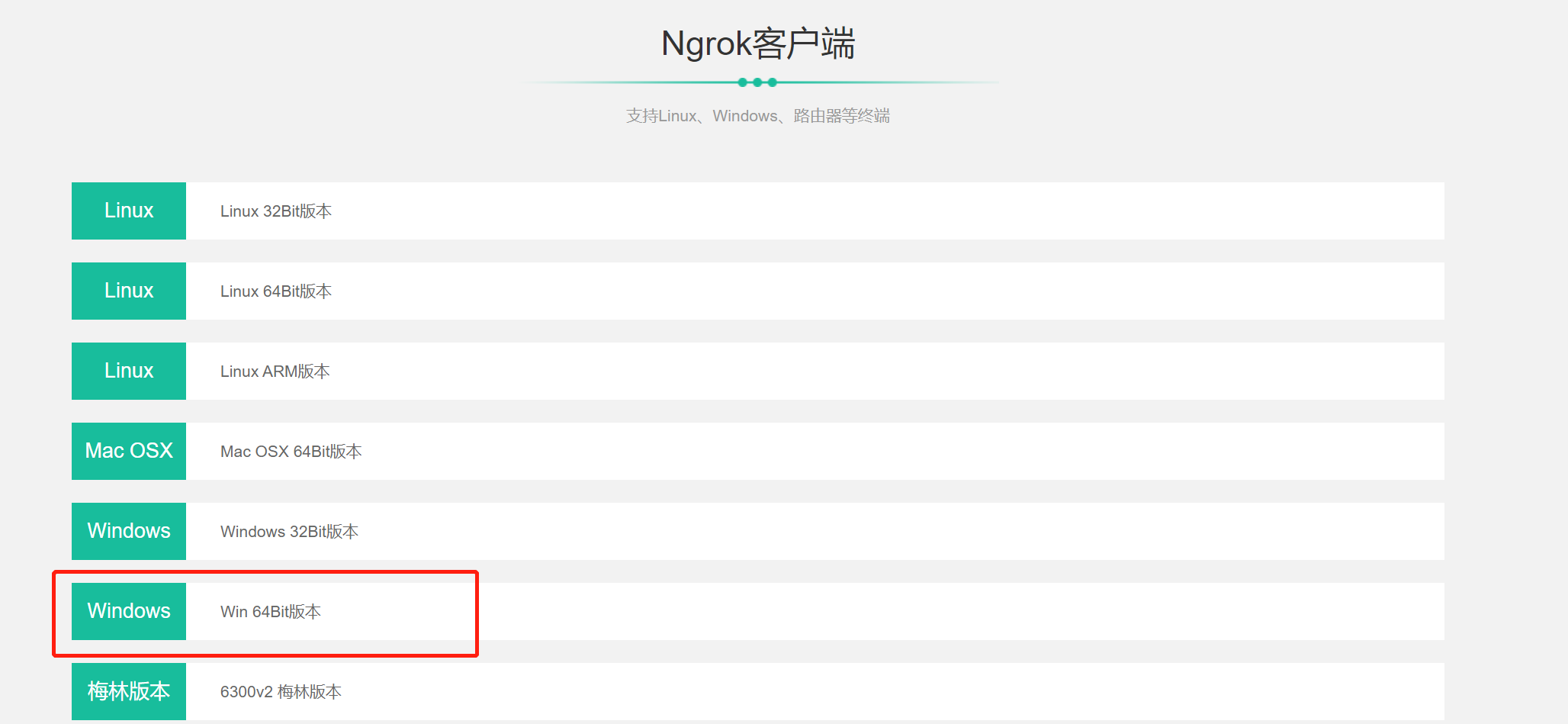
下载客户端工具,选择windows版进行下载
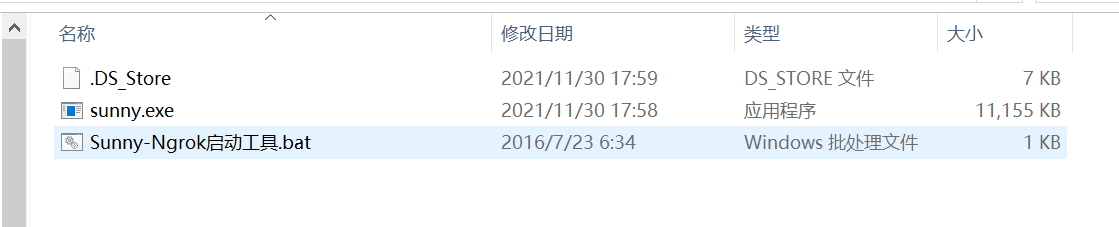
下载完成之后进行解压
下载之后得到两个文件,可以通过cmd命令行进到sunny.exe所在的目录执行
看到如图所示界面代表启动成功
4.公众号普通消息
4.1 消息接入
参考文档:https://developers.weixin.qq.com/doc/offiaccount/Basic_Information/Access_Overview.html
接入微信公众平台开发,开发者需要按照如下步骤完成:
1、填写服务器配置
2、验证服务器地址的有效性
3、依据接口文档实现业务逻辑
4.2 公众号服务器配置
需要填写url和token,url为内网穿透地址,token自己随意定
4.3 代码实现
创建MessageController
@RestController
@RequestMapping("/api/wechat/message")
public class MessageController {

    private static final String token = "ggkt";

    /**
     * 服务器有效性验证
     * @param request
     * @return
     */
    @GetMapping
    public String verifyToken(HttpServletRequest request) {
        String signature = request.getParameter("signature");
        String timestamp = request.getParameter("timestamp");
        String nonce = request.getParameter("nonce");
        String echostr = request.getParameter("echostr");
        log.info("signature: {} nonce: {} echostr: {} timestamp: {}", signature, nonce, echostr, timestamp);
        if (this.checkSignature(signature, timestamp, nonce)) {
            log.info("token ok");
            return echostr;
        }
        return echostr;
    }

    private boolean checkSignature(String signature, String timestamp, String nonce) {
        String[] str = new String[]{token, timestamp, nonce};
        //排序
        Arrays.sort(str);
        //拼接字符串
        StringBuffer buffer = new StringBuffer();
        for (int i = 0; i < str.length; i++) {
            buffer.append(str);
        }
        //进行sha1加密
        String temp = SHA1.encode(buffer.toString());
        //与微信提供的signature进行匹对
        return signature.equals(temp);
    }
}
完成之后,我们的校验接口就算是开发完成了。接下来就可以开发消息接收接口了。
接收消息
接下来我们来开发消息接收接口,消息接收接口和上面的服务器校验接口地址是一样的,都是我们一开始在公众号后台配置的地址。只不过消息接收接口是一个 POST 请求。
   /**
     * 接收微信服务器发送来的消息
     * @param request
     * @return
     * @throws Exception
     */
    @PostMapping
    public String receiveMessage(HttpServletRequest request) throws Exception {

        WxMpXmlMessage wxMpXmlMessage = WxMpXmlMessage.fromXml(request.getInputStream());
        System.out.println(JSONObject.toJSONString(wxMpXmlMessage));
        return "success";
    }

    private Map<String, String> parseXml(HttpServletRequest request) throws Exception {
        Map<String, String> map = new HashMap<String, String>();
        InputStream inputStream = request.getInputStream();
        SAXReader reader = new SAXReader();
        Document document = reader.read(inputStream);
        Element root = document.getRootElement();
        List<Element> elementList = root.elements();
        for (Element e : elementList) {
            map.put(e.getName(), e.getText());
        }
        inputStream.close();
        inputStream = null;
        return map;
    }
这样我们就完成了接收消息的代码开发,于是就可以测试了,在微信公众号进行发消息,就可以看到后台消息接收了
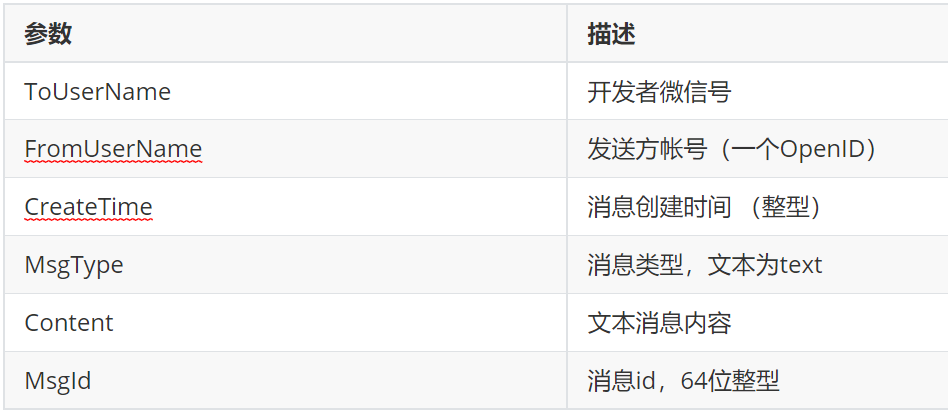
{"content":"哈哈哈哈","createTime":1666851473,"fromUser":"o5Gkj5wvS1C9FIbTflNPryZTX5lQ","hardWare":{},"msgId":23863574950788803,"msgType":"text","scanCodeInfo":{},"sendLocationInfo":{},"sendPicsInfo":{"picList":[]},"toUser":"gh_53dbd8c5c889"}
4.4 模板消息
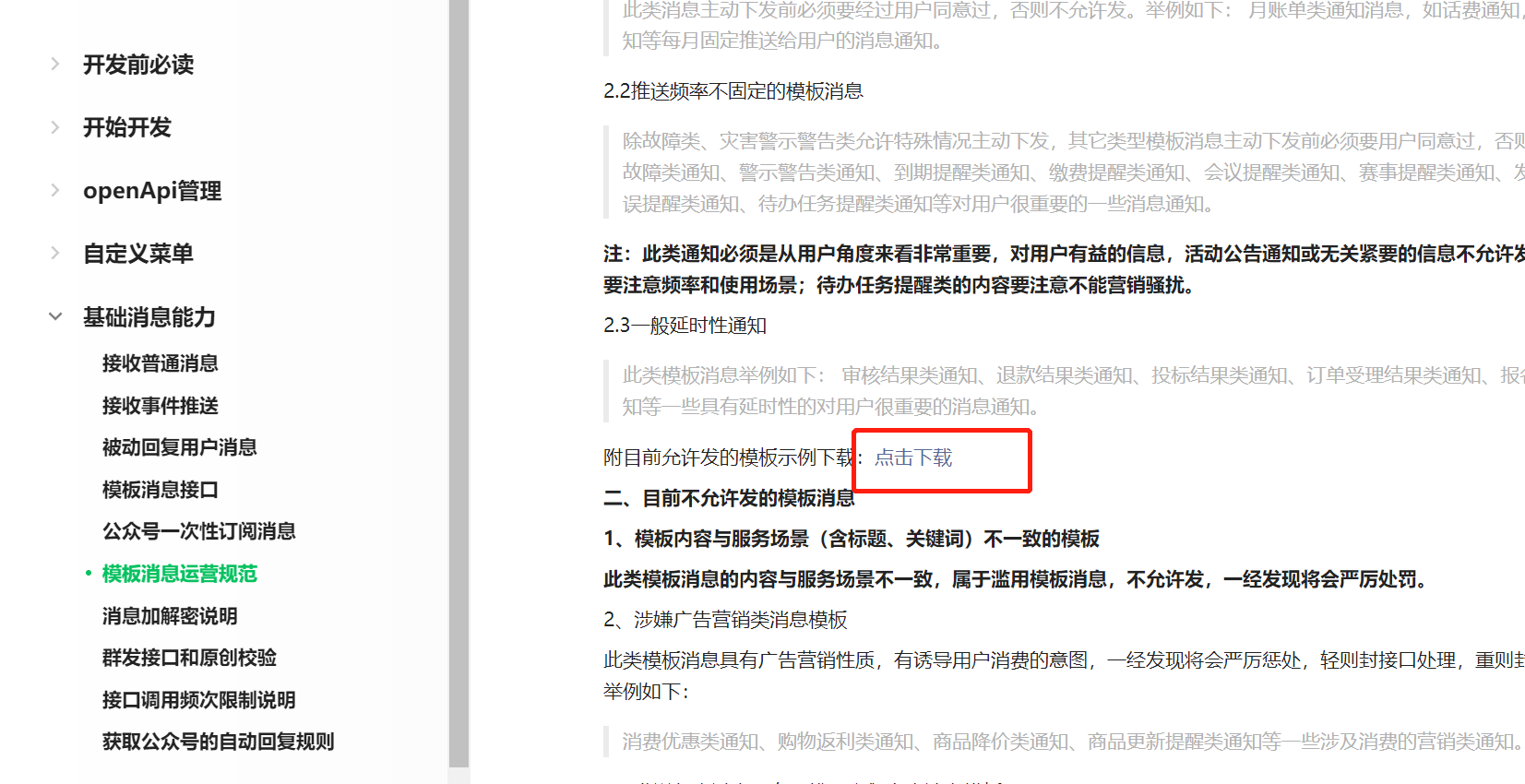
打开文档可以下载一个模板
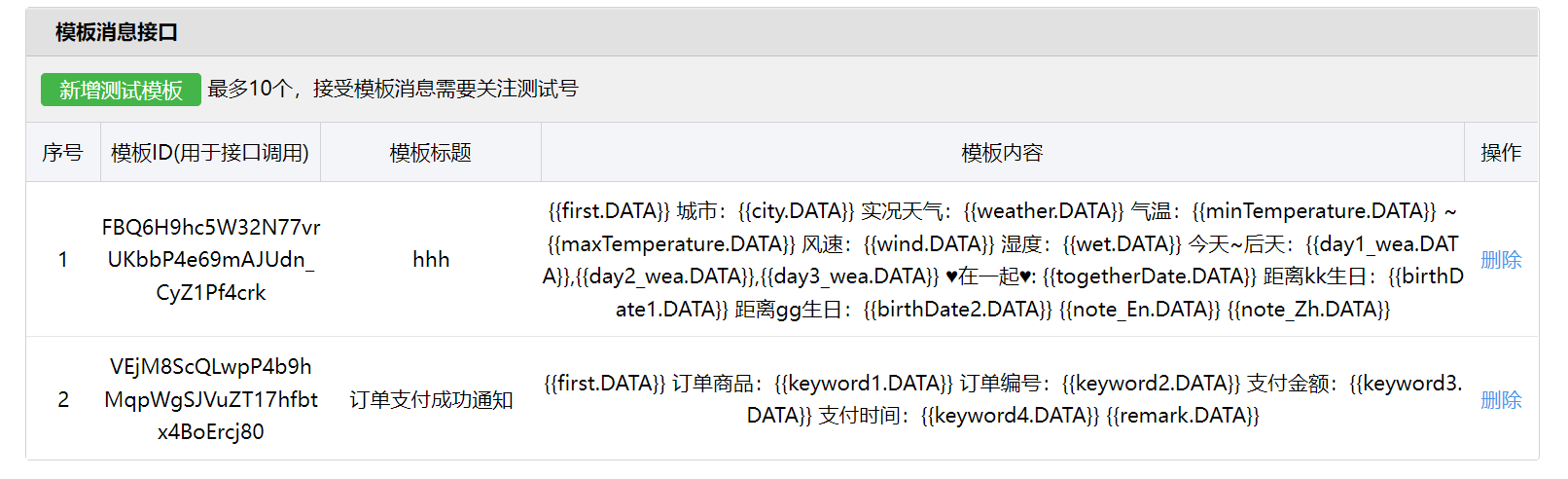
首先进入微信公众平台新增一个模板
编写代码进行
    @SneakyThrows
    @Override
    public void pushPayMessage(long orderId) {
        String openid = "o5Gkj5wvS1C9FIbTflNPryZTX5lQ";
        WxMpTemplateMessage templateMessage = WxMpTemplateMessage.builder()
                .toUser(openid)//要推送的用户openid
                .templateId("VEjM8ScQLwpP4b9hMqpWgSJVuZT17hfbtx4BoErcj80")//模板id
                .url("https://www.baidu.com")//点击模板消息要访问的网址
                .build();
        //3,如果是正式版发送消息,,这里需要配置你的信息
        templateMessage.addData(new WxMpTemplateData("first", "亲爱的用户:您有一笔订单支付成功", "#272727"));
        templateMessage.addData(new WxMpTemplateData("keyword1", "java基础课程", "#272727"));
        templateMessage.addData(new WxMpTemplateData("keyword2", "1314520", "#272727"));
        templateMessage.addData(new WxMpTemplateData("keyword3", "100", "#272727"));
        templateMessage.addData(new WxMpTemplateData("keyword4", new SimpleDateFormat("yyyy-MM-dd HH:mm:ss").format(new Date()), "#272727"));
        templateMessage.addData(new WxMpTemplateData("remark", "感谢你购买课程,如有疑问,随时咨询!", "#272727"));
        String msg = wxMpService.getTemplateMsgService().sendTemplateMsg(templateMessage);
        System.out.println(msg);
    }
5.微信公众号授权登录
接口文档:https://developers.weixin.qq.com/doc/offiaccount/OA_Web_Apps/Wechat_webpage_authorization.html
5.1 配置域名
打开公众平台的接口测试,找到最下面的网页授权,点击修改,将内网穿透域名配置进去。
5.2 代码实现
在pom.xm里面引入相关依赖
        <dependency>
            <groupId>com.github.binarywang</groupId>
            <artifactId>weixin-java-mp</artifactId>
            <version>2.7.0</version>
        </dependency>

        <dependency>
            <groupId>dom4j</groupId>
            <artifactId>dom4j</artifactId>
            <version>1.1</version>
        </dependency>
添加配置
# 微信公众平台appId
wechat.mpAppId: wx1c7aa7341465c97b
##微信公众平台api秘钥
wechat.mpAppSecret: 2a94606076dcd32587228e67645415e0
# 授权回调获取用户信息接口地址
wechat.userInfoUrl: http://savage.free.idcfengye.com/api/user/wechat/userInfo
添加工具类
@Component
public class ConstantPropertiesUtil implements InitializingBean {

    @Value("${wechat.mpAppId}")
    private String appid;

    @Value("${wechat.mpAppSecret}")
    private String appsecret;

    public static String ACCESS_KEY_ID;
    public static String ACCESS_KEY_SECRET;

    @Override
    public void afterPropertiesSet() throws Exception {
        ACCESS_KEY_ID = appid;
        ACCESS_KEY_SECRET = appsecret;
    }
}
微信配置类
@Component
public class WeChatMpConfig {

    @Autowired
    private ConstantPropertiesUtil constantPropertiesUtil;

    @Bean
    public WxMpService wxMpService(){
        WxMpService wxMpService = new WxMpServiceImpl();
        wxMpService.setWxMpConfigStorage(wxMpConfigStorage());
        return wxMpService;
    }

    @Bean
    public WxMpConfigStorage wxMpConfigStorage(){
        WxMpInMemoryConfigStorage wxMpConfigStorage = new WxMpInMemoryConfigStorage();
        wxMpConfigStorage.setAppId(ConstantPropertiesUtil.ACCESS_KEY_ID);
        wxMpConfigStorage.setSecret(ConstantPropertiesUtil.ACCESS_KEY_SECRET);
        return wxMpConfigStorage;
    }
}
View Code
编写controller进行实现
@Slf4j
@Controller
@RequestMapping("/api/user/wechat")
public class WechatController {

    @Autowired
    private UserInfoService userInfoService;

    @Autowired
    private WxMpService wxMpService;

    @Value("${wechat.userInfoUrl}")
    private String userInfoUrl;

    @GetMapping("/authorize")
    public String authorize(@RequestParam("returnUrl") String returnUrl,
                            HttpServletRequest request) {
        String url = wxMpService.oauth2buildAuthorizationUrl(userInfoUrl,
                WxConsts.OAUTH2_SCOPE_USER_INFO,
                URLEncoder.encode(returnUrl.replace("guiguketan", "#")));

        return "redirect:" + url;
    }

    @GetMapping("/userInfo")
    public String userInfo(@RequestParam("code") String code,
                           @RequestParam("state") String returnUrl) {
        try {
            //拿着code进行请求
            WxMpOAuth2AccessToken wxMpOAuth2AccessToken = wxMpService.oauth2getAccessToken(code);
            //获取openId
            String openId = wxMpOAuth2AccessToken.getOpenId();
            log.info("获取openId,{}", openId);
            //获取微信信息
            WxMpUser wxMpUser = wxMpService.oauth2getUserInfo(wxMpOAuth2AccessToken, null);
            log.info("wxMpUser:{}", wxMpUser);
            //获取微信信息添加数据库
            UserInfo userInfo = userInfoService.getUserInfoOpenId(openId);
            if (userInfo == null) {
                userInfo = new UserInfo();
                userInfo.setOpenId(openId);
                userInfo.setNickName(wxMpUser.getNickname());
                userInfo.setProvince(wxMpUser.getProvince());
                userInfo.setSex(wxMpUser.getSexId());
                userInfo.setUnionId(wxMpUser.getUnionId());
                userInfo.setAvatar(wxMpUser.getHeadImgUrl());
                userInfoService.save(userInfo);
            }
            //授权完成之后,跳转到具体功能页面
            //生成token 按照一定规则生产字符串,可以包含用户信息
            String token = JwtHelper.createToken(userInfo.getId(), userInfo.getNickName());
            if(returnUrl.indexOf("?")==-1){
                return "redirect:" + returnUrl + "?token=" + token;
            }
            return "redirect:" + returnUrl + "&token=" + token;
        } catch (WxErrorException e) {
            e.printStackTrace();
        }
        return null;
    }
}
View Code
一点点学习,一丝丝进步。不懈怠,才不会被时代所淘汰!
来源:https://www.cnblogs.com/fqh2020/p/16760539.html |



 發表於 2022-10-29 14:45:00