|
FTP,即:文件传输协议(File Transfer Protocol),基于客户端/服务器模式,默认使用20、21端口号,其
中端口20(数据端口)用于进行数据传输,端口21(命令端口)用于接受客户端发出的相关FTP命令与参
数。FTP服务器普遍部署于局域网中,具有容易搭建、方便管理的特点。而且有些FTP客户端工具还可以支
持文件的多点下载以及断点续传技术,因此FTP服务得到了广大用户的青睐。
FTP协议有以下两种工作模式:
主动模式(PORT):FTP服务器主动向客户端发起连接请求。
被动模式(PASV):FTP服务器等待客户端发起连接请求(FTP的默认工作模式)。
vsftpd是一款运行在Linux操作系统上的FTP服务程序,具有很高的安全性和传输速度。
vsftpd有以下三种认证模式:
匿名开放模式:是一种最不安全的认证模式,任何人都可以无需密码验证而直接登陆。
本地用户模式:是通过Linux系统本地的账户密码信息进行认证的模式,相较于匿名开放模式更安全,而且
配置起来简单。
虚拟用户模式:是这三种模式中最安全的一种认证模式,它需要为FTP服务单独建立用户数据库文件,虚
拟出用来进行口令验证的账户信息,而这些账户信息在服务器系统中实际上是不存在的,仅供FTP服务程
序进行认证使用。
下面以虚拟用户模式配置讲解
1.输入图中命令,若输出图中信息表示已安装vsftpd,否则输入命令:yum install -y vsftpd 进行安装
2.安装完成后
vsftpd缺省安装在/etc/vsftpd/目录中,进入该目录后如下所示
1.vsftpd.conf:为核心配置文件
2.user_list:指定允许使用vsftpd 的用户列表文件,即白名单
3.ftpusers:指定哪些用户不能访问FTP服务器,即黑名单
4.如需去掉配置文件里的注释行输入以下命令即可
mv /etc/vsftpd/vsftpd.conf /etc/vsftpd/vsftpd.conf.bak
grep -v "#" /etc/vsftpd/vsftpd.conf.bak > /etc/vsftpd/vsftpd.conf
5.vsftpd.conf常用配置参数讲解
listen=<YES/NO> # YES: 服务以独立运行方式运行; NO: 运行在 xinetd 内。 默认为 YES
listen_address=<ip address> # 服务监听地址, 如果有多个网卡, 需要将服务绑定到指定 IP 地址
listen_port=<port> # 服务监听端口, 默认为 21
anonymous_enable=<YES/NO> # 是否允许匿名用户访问, 默认 NO
anon_mkdir_write_enable=<YES/NO> # 是否允许匿名用户创建文件夹, 默认 NO
anon_other_write_enable=<YES/NO> # 是否允许匿名用户其他的写权限, 创建文件、重命名、删除文件等权限 默认为 NO
anon_upload_enable=<YES/NO> # 是否允许匿名用户上传, 默认 NO
anon_umask=<nnn> # 匿名用户上传的文件的生成掩码, 默认为077
anon_max_rate=<n> # 匿名用户的最大传输速率, 单位为 Byte/s, 值为 0 表示不限制
anon_world_readable_only=<YES/NO> # 是否允许匿名用户只读浏览
local_enable=<YES/NO> # 是否支持本地用户帐号访问
write_enable=<YES/NO> # 是否开放本地用户的写权限
local_umask=<nnn> # 本地用户上传的文件的生成掩码, 默认为077
local_max_rate=<n> # 本地用户最大的传输速率, 单位为 Byte/s,值为0表示不限制
local_root=<file> # 本地用户登陆后的目录,默认为本地用户的主目录
chroot_local_user=<YES/NO> # 本地用户是否可以执行 chroot, 默认为 NO
chroot_list_enable=<YES/NO> # 是否只有指定的用户才能执行 chroot, 默认为 NO
chroot_list_file=<filename> # 当 chroot_local_user=NO 且 chroot_list_enable=YES 时,
# 只有 filename 文件内指定的用户(每行一个用户名)可以执行 chroot,
# 默认值为 /etc/vsftpd.chroot_list
userlist_enable=<YES/NO> # 是否启用 userlist_file 白/黑名单用户列表, 默认为 NO
userlist_deny=<YES/NO> # 当 userlist_enable=YES(即启用 userlist_file )时, 则该字段才有效。
userlist_deny=YES: userlist_file 为 黑名单, 即在该文件内的用户均不可登录, 其他用户可以登录
userlist_deny=NO: userlist_file 为 白名单, 即在该文件内的用户才可以登录, 其他用户均不可登录
userlist_file=<filename> # 黑/白名单用户列表文件(每行一个用户名)
# 是黑名单还是白名单, 根据 userlist_deny 的值决定
# 默认值为 /etc/vsftpd.user_list
ftpd_banner=<message> # 客户端连接服务器后显示的欢迎信息
connect_timeout=<n> # 远程客户端响应端口数据连接超时时间, 单位为秒, 默认 60
accept_connection_timeout=<n> # 空闲的数据连接超时时间, 单位为秒, 默认 120
data_connection_timeout=<n> # 空闲的用户会话超时时间, 单位为秒, 默认 300
max_clients=<n> # 在独立模式运行时, 最大连接数, 0 表示无限制
max_per_ip=<n> # 在独立模式运行时, 每 IP 的最大连接数, 0表示无限制
pasv_min_port=45000 # PASV模式最小端口
pasv_max_port=49999 # PASV模式最大端口
3.配置防火墙开放vsftpd命令端口与PASV模式下的端口
firewall-cmd --zone=public --add-port=21/tcp --permanent
firewall-cmd --zone=public --add-port=45000-49000/tcp --permanent
firewall-cmd --reload
4.创建用于FTP认证的用户数据库文件
vim /etc/vsftpd/vuser.txt
其中奇数行为用户名,偶数行为密码
如:
xuyuanyuan
123456
chendanting
123456
明文信息不安全,需要使用db_load命令用哈希(hash)算法将明文信息转换成数据文件,然后将明文信息文件删除
db_load -T -t hash -f /etc/vsftpd/vuser.txt /etc/vsftpd/vuser.db
chmod 600 /etc/vsftpd/vuser.db
rm -f /etc/vsftpd/vuser.txt
5.创建虚拟用户映射的系统本地用户和FTP根目录
输入命令:
useradd -d /ftp_data -s /sbin/nologin virtual
chmod -Rf 755 /ftp_data
6.建立用于支持虚拟用户的PAM文件
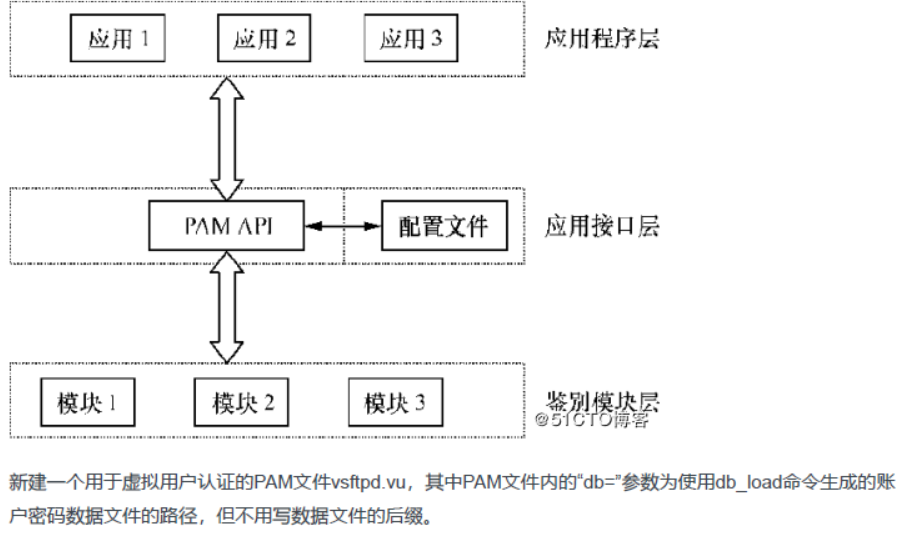
PAM(可插拔认证模块)是一种认证机制,通过一些动态链接库和统一的API把系统提供的服务与认证方式分
开,使得系统管理员可以根据需求灵活调整服务程序的不同认证方式。PAM采用了分层设计(应用程序层、
应用接口层、鉴别模块层)的思想,其结构如下图所示。
vim /etc/pam.d/vsftpd.vu
添加以下信息
auth required pam_userdb.so db=/etc/vsftpd/vuser
account required pam_userdb.so db=/etc/vsftpd/vuser
6.为vuser.txt里的用户配置相关参数
(1) 创建存放用户的目录
mkdir /etc/vsftpd/vusers_dir
(2) 为各用户创建文件,文件名即为用户名
vim /etc/vsftpd/vusers_dir/xuyuanyuan
vim /etc/vsftpd/vusers_dir/chendanting
(3) 按各用户需要加入参数配置
local_root=/ftp_data/xuyuanyuan
anon_upload_enable=YES
anon_mkdir_write_enable=YES
anon_other_write_enable=YES
anon_world_readable_only=YES
6.修改核心配置文件vsftpd.conf为以下内容
anonymous_enable=NO
local_enable=YES
# 开启虚拟用户模式
guest_enable=YES
# 指定虚拟用户对应的系统用户
guest_username=virtual
# 允许对ftp根目录执行写入操作
allow_writeable_chroot=YES
write_enable=YES
local_umask=022
dirmessage_enable=YES
xferlog_enable=YES
connect_from_port_20=YES
xferlog_std_format=YES
listen_port=21
listen=NO
listen_ipv6=YES
#PAM文件
pam_service_name=vsftpd.vu
userlist_enable=YES
tcp_wrappers=YES
# 虚拟用户配置文件目录
user_config_dir=/etc/vsftpd/vuser_dir
# 被动模式端口范围
pasv_min_port=45000
pasv_max_port=49000
chroot_local_user=YES
7.最后启动服务即可访问
systemctl start vsftpd.serivce 启动服务
systemctl stop vsftpd.serivce 停止服务
systemctl status vsftpd.serivce 查看服务状态
systemctl restart vsftpd.serivce 查看服务状态
在浏览器输入 ftp://ip:21 就可访问了
最后配上操作ftp的工具类
maven依赖
<dependency>
<groupId>commons-net</groupId>
<artifactId>commons-net</artifactId>
<version>3.6</version>
</dependency>
![]() ![]()
1 /**
2 * @author Medusa
3 * @Date 12-14-19
4 * @Description ftp工具类
5 */
6 public class FtpUtil {
7
8 /**
9 * ftp服务器的ip
10 */
11 private String ip;
12
13 /**
14 * ftp服务器的端口,缺省为21
15 */
16 private int port;
17
18 /**
19 * 连接ftp服务器的用户名
20 */
21 private String userName;
22
23 /**
24 * 用户名对应通行证
25 */
26 private String password;
27
28 /**
29 * 客户端编码
30 */
31 private String clientCharset = "GBK";
32
33 /**
34 * 服务端编码,缺省为ISO8859-1
35 */
36 private String serverCharset = "ISO8859-1";
37
38 private FTPClient ftpClient;
39
40 public FtpUtil(String ip, int port, String userName, String password) {
41 this.ip = ip;
42 this.port = port;
43 this.userName = userName;
44 this.password = password;
45 }
46
47 /**
48 * 建立连接并登陆服务器
49 */
50 public boolean connectFtp() {
51 ftpClient = new FTPClient();
52
53 try {
54 ftpClient.connect(ip, port);
55
56 // 是否连接成功
57 if (!FTPReply.isPositiveCompletion(ftpClient.getReplyCode())) {
58 System.out.println("create connect fail");
59 ftpClient.disconnect();
60 return false;
61 }
62
63 if (!ftpClient.login(userName, password)) {
64 System.out.println("login server fail");
65 ftpClient.disconnect();
66 return false;
67 }
68
69 // 开启服务器对UTF-8的支持,如果服务器支持就用UTF-8编码,否则使用本地编码
70 if (FTPReply.isPositiveCompletion(ftpClient.sendCommand("OPTS UTF8", "ON"))) {
71 clientCharset = "UTF-8";
72 }
73 ftpClient.setControlEncoding(clientCharset);
74 ftpClient.enterLocalPassiveMode(); // 设置被动模式
75 ftpClient.setFileType(FTPClient.BINARY_FILE_TYPE); // 设置文件传输类型
76 } catch (IOException e) {
77 System.out.println("create connect or close connect error");
78 return false;
79 }
80 return true;
81 }
82
83 /**
84 * 退出登陆并关闭连接
85 */
86 public boolean closeFtp() {
87 if (ftpClient != null && ftpClient.isConnected()) {
88 try {
89 ftpClient.logout();
90 ftpClient.disconnect();
91 return true;
92 } catch (IOException e) {
93 System.out.println("logout or close connect error");
94 return false;
95 }
96 }
97 return false;
98 }
99
100 /**
101 * 客户端转服务端编码
102 */
103 private String clientCharsetToServer(String path) {
104 try {
105 return new String(path.getBytes(clientCharset), serverCharset);
106 } catch (UnsupportedEncodingException e) {
107 System.out.println("client to server encode error");
108 return null;
109 }
110 }
111
112 /**
113 * 服务端转客户端编码
114 */
115 private String serverCharsetToClient(String path) {
116 try {
117 return new String(path.getBytes(serverCharset), clientCharset);
118 } catch (UnsupportedEncodingException e) {
119 System.out.println("server to client encode error");
120 return null;
121 }
122 }
123
124 /**
125 * 获取当前工作目录
126 */
127 private String getWorkDirectory() {
128 try {
129 return serverCharsetToClient(ftpClient.printWorkingDirectory());
130 } catch (IOException e) {
131 System.out.println("get work directory error");
132 return null;
133 }
134 }
135
136 /**
137 * 获取当前工作目录下的所有文件名
138 */
139 private String[] getWorkDirectoryFileNames() {
140 try {
141 FTPFile[] ftpFiles = ftpClient.listFiles();
142 if (ftpFiles.length > 0) {
143 String[] fileNames = new String[ftpFiles.length];
144 int i = 0;
145
146 for (FTPFile ftpFile: ftpFiles) fileNames[i++] = ftpFile.getName();
147
148 return fileNames;
149 }
150 return null;
151 } catch (IOException e) {
152 System.out.println("get work directory files error");
153 return null;
154 }
155 }
156
157 /**
158 * 根据从根目录开始的完整文件路径,切换工作目录
159 */
160 private boolean changeWorkDirectory(String path) {
161 try {
162 return ftpClient.changeWorkingDirectory(clientCharsetToServer(path));
163 } catch (IOException e) {
164 System.out.println("change directory error");
165 return false;
166 }
167 }
168
169 /**
170 * 当前工作目录下是否有查询的文件
171 */
172 private boolean isWorkDirectoryHasFile(String fileName) {
173 try {
174 FTPFile[] ftpFiles = ftpClient.listFiles();
175
176 for (FTPFile ftpFile : ftpFiles) {
177 if (ftpFile.getName().equals(fileName)) return true;
178 }
179
180 return false;
181 } catch (IOException e) {
182 System.out.println("get work directory files error");
183 return false;
184 }
185 }
186
187 /**
188 *获取对应路径下的文件(根目录除外),并切换工作目录至此文件的父目录
189 */
190 private FTPFile getFTPFile(String path) {
191 if (path.equals("/")) {
192 System.out.println("invalid root directory");
193 return null;
194 }
195
196 String fileName = path;
197 if (!path.equals("/") && path.indexOf("/") != -1) {
198 String[] split = path.split("/");
199 fileName = split[split.length - 1];
200 }
201 if (changeWorkDirectory(path.substring(0, path.length() - fileName.length()))) {
202 try {
203 for (FTPFile ftpFile : ftpClient.listFiles()) {
204 if (ftpFile.getName().equals(fileName)) return ftpFile;
205 }
206 } catch (IOException e) {
207 System.out.println("get work directory files error");
208 return null;
209 }
210 }
211 return null;
212 }
213
214 /**
215 * 获取服务端文件夹下所有文件路径
216 */
217 public List<List<String>> getDirectoryUnderAllFile(String path) throws IOException {
218 // 存放目录和文件的路径
219 List<List<String>> directoryAndFilePaths = new ArrayList<>();
220 // 存放目录的路径
221 List<String> directoryPaths = new ArrayList<>();
222 // 存放文件的路径
223 List<String> filePaths = new ArrayList<>();
224 // 待遍历处理的文件夹路径
225 Queue<String> ergodicDirPaths = new LinkedList<>();
226 ergodicDirPaths.offer(path);
227 directoryPaths.add(path);
228
229 while (ergodicDirPaths.size() > 0) {
230 String entry = ergodicDirPaths.poll();
231 if (changeWorkDirectory(entry)) {
232 entry = "/".endsWith(entry) ? "" : entry;
233 FTPFile[] ftpFiles = ftpClient.listFiles();
234 for (FTPFile ftpFile : ftpFiles) {
235 if (ftpFile.isFile()) {
236 filePaths.add(entry + "/" + ftpFile.getName());
237 } else {
238 directoryPaths.add(entry + "/" + ftpFile.getName());
239 ergodicDirPaths.offer(entry + "/" + ftpFile.getName());
240 }
241 }
242 } else {
243 System.out.println("切换目录失败");
244 return null;
245 }
246 }
247
248 directoryAndFilePaths.add(directoryPaths);
249 directoryAndFilePaths.add(filePaths);
250 return directoryAndFilePaths;
251 }
252
253 /**
254 * 获取客户端文件夹下所有文件路径
255 */
256 public List<List<String>> getDirectoryUnderAllFile1(String path) {
257 // 存放目录和文件的路径
258 List<List<String>> directoryAndFilePaths = new ArrayList<>();
259 // 存放目录的路径
260 List<String> directoryPaths = new ArrayList<>();
261 // 存放文件的路径
262 List<String> filePaths = new ArrayList<>();
263 // 待遍历处理的文件夹路径
264 Queue<String> ergodicDirPaths = new LinkedList<>();
265 ergodicDirPaths.offer(path);
266 directoryPaths.add(path);
267
268 while (ergodicDirPaths.size() > 0) {
269 String entry = ergodicDirPaths.poll();
270
271 File dir = new File(entry);
272 for (File file : dir.listFiles()) {
273 if (file.isFile()) {
274 filePaths.add(entry + "/" + file.getName());
275 } else {
276 directoryPaths.add(entry + "/" + file.getName());
277 ergodicDirPaths.offer(entry + "/" + file.getName());
278 }
279 }
280 }
281
282 directoryAndFilePaths.add(directoryPaths);
283 directoryAndFilePaths.add(filePaths);
284 return directoryAndFilePaths;
285 }
286
287 /**
288 * 下载文件,若客户端已存在则覆盖它
289 */
290 public boolean download(String serverPath, String clientPath) {
291 // 判断服务端文件是否存在
292 FTPFile ftpFile = getFTPFile(serverPath);
293 if (ftpFile == null) {
294 System.out.println("server file not exist");
295 return false;
296 }
297
298 // 若客户端目录不存在,就创建它,否则清空目录
299 File clientDirectory = new File(clientPath);
300 if (!clientDirectory.exists()) {
301 if (!clientDirectory.mkdirs()) {
302 System.out.println("client create directory fail");
303 return false;
304 }
305 } else {
306 if (!clientDirectory.isDirectory()) {
307 System.out.println("clientPath is not directory");
308 return false;
309 } else {
310 if (!emptyDirectory(clientDirectory)) {
311 System.out.println("empty client directory fail");
312 return false;
313 }
314 }
315 }
316
317 if (ftpFile.isFile()) {
318 executeDownload(serverPath, clientPath + serverPath.substring(serverPath.lastIndexOf("/")));
319 } else {
320 try {
321 List<List<String>> allFile = getDirectoryUnderAllFile(serverPath);
322 // 获取所有目录路径
323 List<String> directoryPaths = allFile.get(0);
324 if (directoryPaths.size() > 0) {
325 directoryPaths.forEach(path -> new File(clientPath + path).mkdir());
326 } else {
327 System.out.println("get all directory fail");
328 return false;
329 }
330
331 // 获取所有文件路径
332 List<String> filePaths = allFile.get(1);
333 for (String path : filePaths) {
334 executeDownload(path, clientPath + path);
335 }
336 } catch (IOException e) {
337 System.out.println("error getting all files under this path");
338 return false;
339 }
340 }
341 return true;
342 }
343
344 /**
345 * 执行下载文件
346 */
347 private void executeDownload(String serverPath, String clientPath) {
348 InputStream is = null;
349 OutputStream os = null;
350 try {
351 is = ftpClient.retrieveFileStream(clientCharsetToServer(serverPath));
352 File file = new File(clientPath);
353 if (!file.createNewFile()) {
354 System.out.println("client create file fail");
355 return;
356 }
357 os = new FileOutputStream(file);
358 byte[] by = new byte[1024];
359 int len = 0;
360 while ((len = is.read(by)) != -1) os.write(by, 0, len);
361 } catch (IOException e) {
362 System.out.println("stream handle file fail");
363 return;
364 } finally {
365 try {
366 if (is != null) {
367 is.close();
368 // 必须调用此方法,否则第二次调用retrieveFileStream()方法时,返回null
369 ftpClient.completePendingCommand();
370 }
371 if (os != null) os.close();
372 } catch (IOException e) {
373 e.printStackTrace();
374 }
375 }
376 }
377
378 /**
379 * 执行上传文件
380 */
381 private void executeUpload(String serverPath, String clientPath) {
382 InputStream is = null;
383 OutputStream os = null;
384 try {
385 is = new FileInputStream(clientPath);
386 os = ftpClient.storeFileStream(clientCharsetToServer(serverPath));
387
388 byte[] by = new byte[1024];
389 int len = 0;
390 while ((len = is.read(by)) != -1) os.write(by, 0, len);
391 } catch (FileNotFoundException e) {
392 System.out.println("client file not found");
393 return;
394 } catch (IOException e) {
395 System.out.println("stream handle file fail");
396 return;
397 } finally {
398 try {
399 if (is != null) is.close();
400 if (os != null) {
401 os.close();
402 ftpClient.completePendingCommand();
403 }
404 } catch (IOException e) {
405 e.printStackTrace();
406 }
407 }
408 }
409
410 /**
411 * 上传文件,若服务端已存在则覆盖它
412 */
413 public boolean upload(String serverPath, String clientPath) {
414 File clientFile = new File(clientPath);
415 if (!clientFile.exists()) {
416 System.out.println("client file not exist");
417 return false;
418 }
419
420 if (!"/".equals(serverPath)) {
421 FTPFile ftpFile = getFTPFile(serverPath);
422 if (ftpFile == null) {
423 String[] split = serverPath.split("/");
424 changeWorkDirectory("/");
425 try {
426 for (int i = 1; i < split.length; i++) {
427 ftpClient.makeDirectory(clientCharsetToServer(split));
428 changeWorkDirectory(getWorkDirectory() + "/" + split);
429 }
430 } catch (IOException e) {
431 System.out.println("create server directory error");
432 return false;
433 }
434 }
435 }
436
437 serverPath = "/".endsWith(serverPath) ? "" : serverPath;
438 if (clientFile.isFile()) {
439 try {
440 String filePath = serverPath + clientPath.substring(clientPath.lastIndexOf("/"));
441 ftpClient.deleteFile(filePath);
442 executeUpload(filePath, clientPath);
443 } catch (IOException e) {
444 System.out.println("delete server file error");
445 return false;
446 }
447 } else {
448 List<List<String>> allFile = getDirectoryUnderAllFile1(clientPath);
449 List<String> directoryPaths = allFile.get(0);
450 String path2;
451 if (directoryPaths.size() > 0) {
452 try {
453 String firstDir = directoryPaths.get(0);
454 String path1 = firstDir.substring(firstDir.lastIndexOf("/"));
455 path2 = firstDir.substring(0, firstDir.lastIndexOf("/"));
456 ftpClient.makeDirectory(clientCharsetToServer(serverPath + path1));
457 for (int i = 1; i < directoryPaths.size(); i++) {
458 String tempPath = directoryPaths.get(i).substring(path2.length());
459 ftpClient.makeDirectory(clientCharsetToServer(serverPath + tempPath));
460 }
461 } catch (IOException e) {
462 System.out.println("create server directory error");
463 return false;
464 }
465 } else {
466 System.out.println("get all directory fail");
467 return false;
468 }
469 List<String> filePaths = allFile.get(1);
470 for (String path : filePaths) {
471 String tempPath = path.substring(path2.length());
472 executeUpload(serverPath + tempPath, path);
473 }
474 }
475 return true;
476 }
477
478 /**
479 * 清空目录
480 */
481 private boolean emptyDirectory(File dir) {
482 File[] oneLevelFile = dir.listFiles();
483 if (oneLevelFile.length > 0) {
484 Stack<File> willDeleteFile = new Stack<>();
485 for (int i = 0; i < oneLevelFile.length; i++) {
486 willDeleteFile.push(oneLevelFile);
487 }
488
489 while (willDeleteFile.size() > 0) {
490 File entry = willDeleteFile.pop();
491 if (entry.isFile()) {
492 if (!entry.delete()) return false;
493 } else {
494 File[] lowerLevelFile = entry.listFiles();
495 if (lowerLevelFile.length > 0) {
496 willDeleteFile.push(entry);
497 for (int i = 0; i < lowerLevelFile.length; i++) {
498 willDeleteFile.push(lowerLevelFile);
499 }
500 } else {
501 if (!entry.delete()) return false;
502 }
503 }
504 }
505 }
506 return true;
507 }
508
509 /**
510 * web端上传
511 */
512 public boolean webUpload(MultipartFile file, String serverPath) {
513 if (!"/".equals(serverPath)) {
514 FTPFile ftpFile = getFTPFile(serverPath);
515 if (ftpFile == null) {
516 String[] split = serverPath.split("/");
517 changeWorkDirectory("/");
518 try {
519 for (int i = 1; i < split.length; i++) {
520 ftpClient.makeDirectory(clientCharsetToServer(split));
521 changeWorkDirectory(getWorkDirectory() + "/" + split);
522 }
523 } catch (IOException e) {
524 System.out.println("create server directory error");
525 return false;
526 }
527 }
528 }
529 String filePath;
530 try {
531 serverPath = "/".endsWith(serverPath) ? "" : serverPath;
532 filePath = serverPath + "/" + file.getOriginalFilename();
533 ftpClient.deleteFile(filePath);
534 } catch (IOException e) {
535 System.out.println("delete server file error");
536 return false;
537 }
538
539 InputStream is = null;
540 OutputStream os = null;
541 try {
542 is = file.getInputStream();
543 os = ftpClient.storeFileStream(clientCharsetToServer(filePath));
544
545 byte[] by = new byte[1024];
546 int len = 0;
547 while ((len = is.read(by)) != -1) os.write(by, 0, len);
548 } catch (FileNotFoundException e) {
549 System.out.println("client file not found");
550 return false;
551 } catch (IOException e) {
552 System.out.println("stream handle file fail");
553 return false;
554 } finally {
555 try {
556 if (is != null) is.close();
557 if (os != null) {
558 os.close();
559 ftpClient.completePendingCommand();
560 }
561 } catch (IOException e) {
562 e.printStackTrace();
563 }
564 }
565 return true;
566 }
567
568 /**
569 * web端下载
570 */
571 public boolean webDownload(HttpServletResponse response, String serverPath) {
572 FTPFile ftpFile = getFTPFile(serverPath);
573 if (ftpFile == null) {
574 System.out.println("server file not exist");
575 return false;
576 }
577
578 InputStream is = null;
579 try {
580 is = ftpClient.retrieveFileStream(clientCharsetToServer(serverPath));
581 ServletOutputStream sos = response.getOutputStream();
582 byte[] by = new byte[1024];
583 int len = 0;
584 while ((len = is.read(by)) != -1) sos.write(by, 0, len);
585 } catch (IOException e) {
586 System.out.println("stream handle file fail");
587 return false;
588 } finally {
589 try {
590 if (is != null) {
591 is.close();
592 ftpClient.completePendingCommand();
593 }
594 } catch (IOException e) {
595 e.printStackTrace();
596 }
597 }
598
599 return true;
600 }
601
602 }
View Code
来源:https://www.cnblogs.com/nearWind/p/12081260.html |



 發表於 2019-12-22 21:52:00