/**
 * 初始化数据库
 * 用evn属性可以切换属性
 * database({evn:test})
 */
const db = wx.cloud.database();
const user = db.collection("user");
const cloudImage = db.collection("image");
// pages/personal/personal.js
Page({
  /**
   * 页面的初始数据
   */
  data: {
    images: []
  },
  /**
   * 插入数据
   */
  insert: function () {
    user.add({
      data: {
        name: 'hh',
        age: 20
      }
    }).then(res => {
      // 回调函数
      console.log(res)
      wx.showToast({
        title: 'success',
      })
    }).catch(err => {
      //抓取错误
      console.log(err)
    })
  },
  update: function () {
    user.doc('74b140b45e4513af0f0aab605928da00').update({
      data: {
        age: 19,
        name: 'mm'
      }
    }).then(res => {
      console.log(res)
      console.log('success')
    }).catch(err => {
      console.log(err)
    })
  },
  del: function () {
    user.doc('0ec685215e45122d0f0ad2e55bb2ee69').remove()
      .then(res => {
        console.log(res)
        console.log('success')
      }).catch(err => {
        console.log(err)
      })
  },
  select: function () {
    user.where({
      name: 'hh'
    }).get().then(res => {
      console.log(res)
      console.log('success')
    }).catch(err => {
      console.log(err)
    })
  },
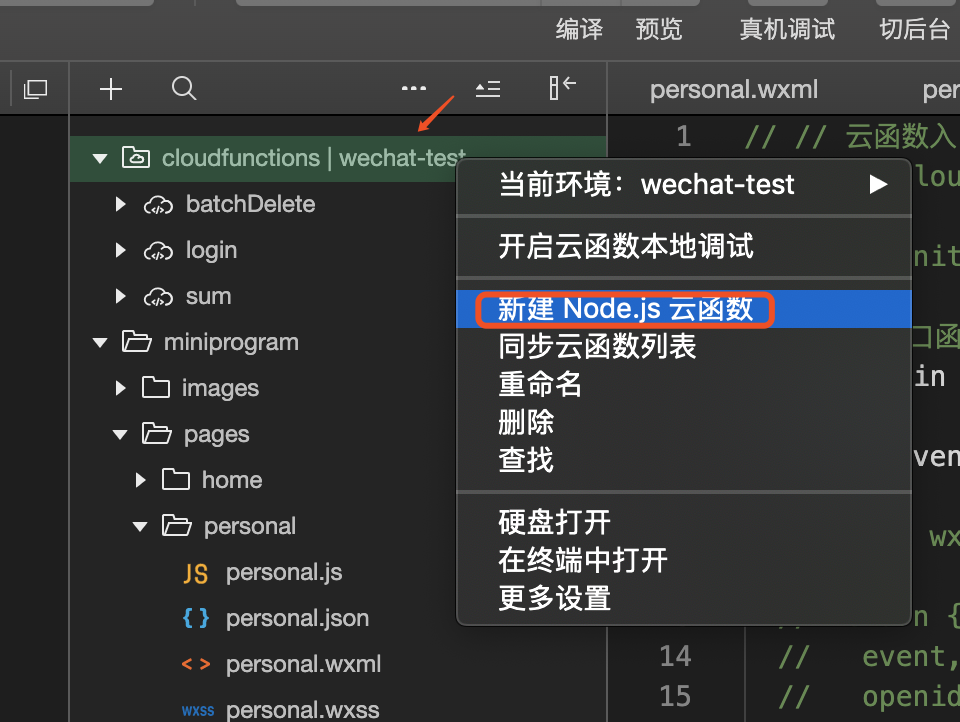
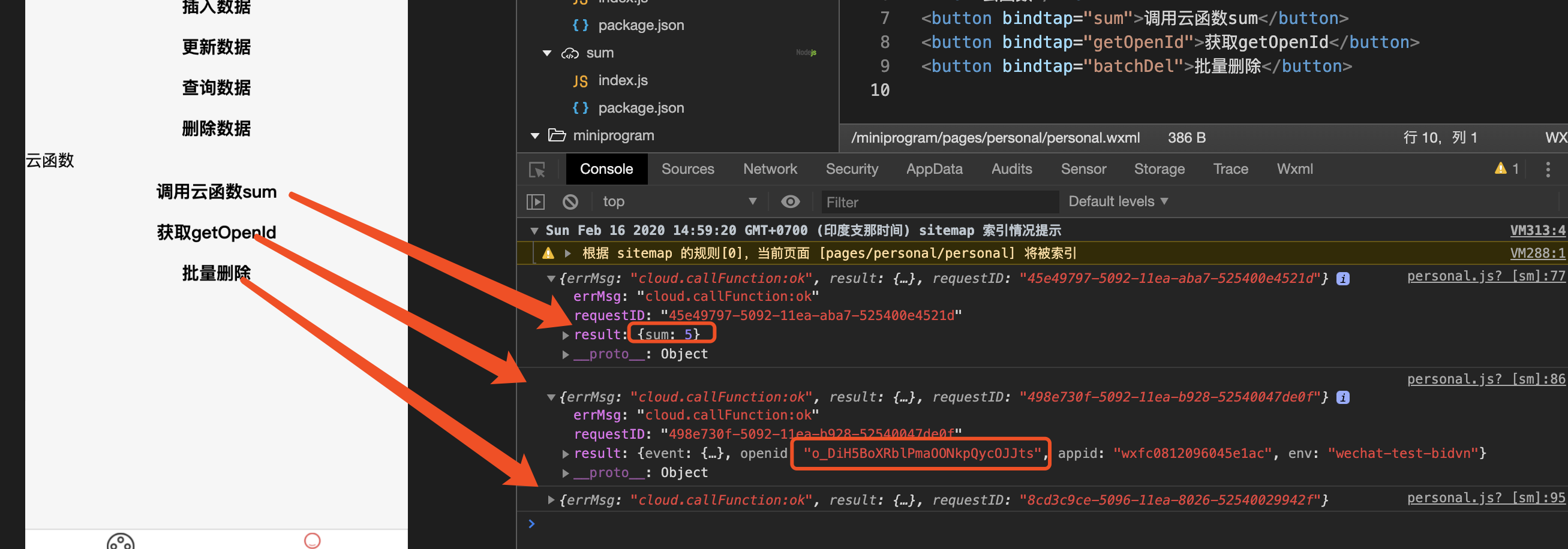
  sum: function () {
    wx.cloud.callFunction({
      name: 'sum',//云函数名
      data: {
        a: 2,
        b: 3
      }
    }).then(res => {
      console.log(res)
    }).catch(err => {
      console.log(err)
    });
  },
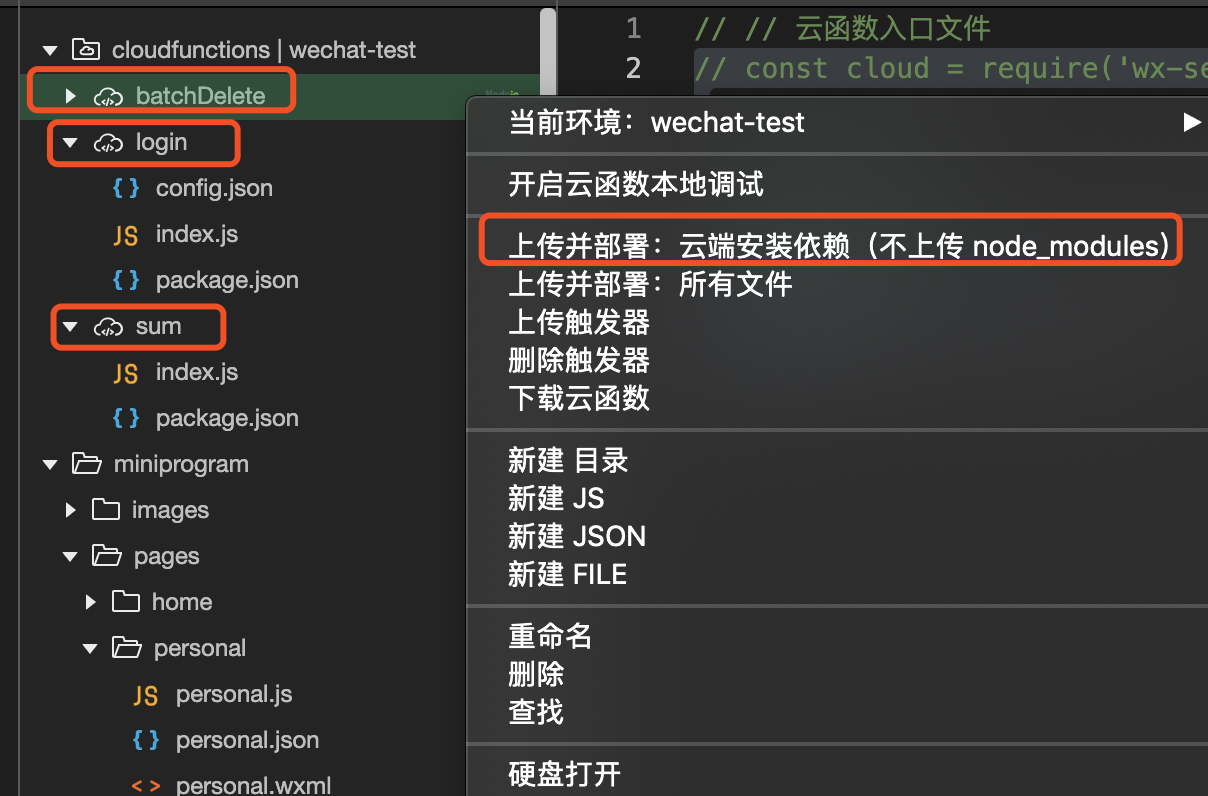
  getOpenId: function () {
    wx.cloud.callFunction({
      name: 'login'
    }).then(res => {
      console.log(res)
    }).catch(err => {
      console.log(err)
    });
  },
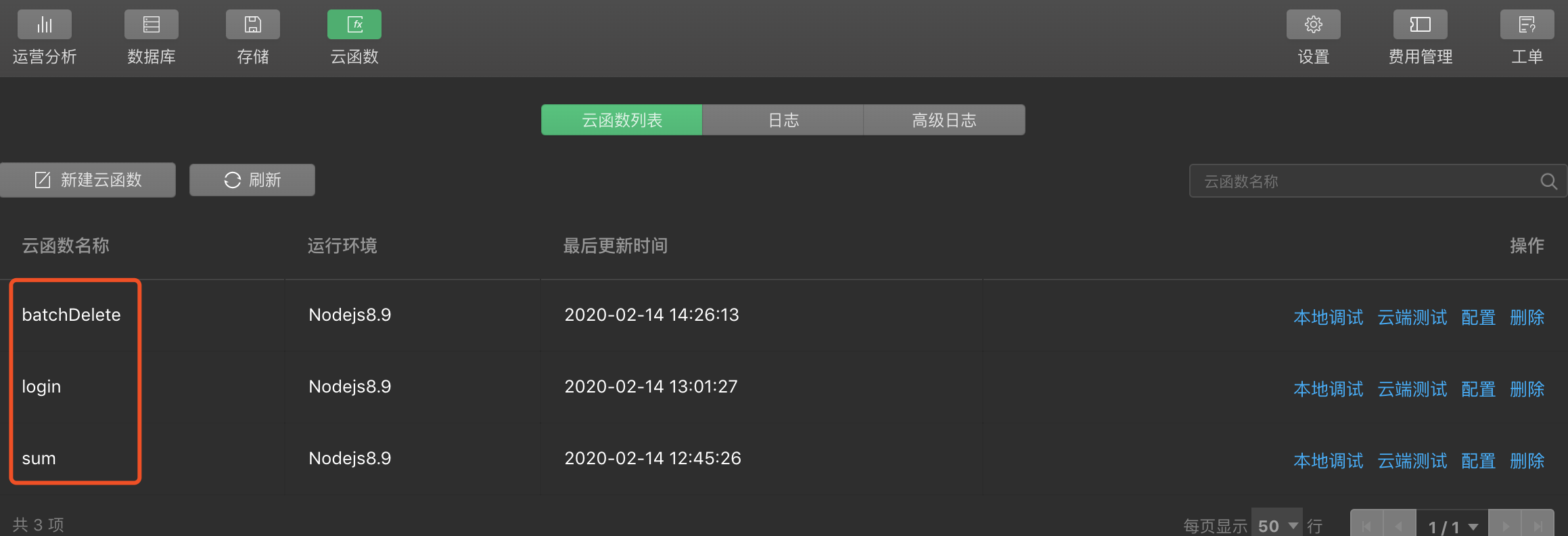
  batchDel: function () {
    wx.cloud.callFunction({
      name: 'batchDelete'
    }).then(res => {
      console.log(res)
    }).catch(err => {
      console.error(err)
    });
  },
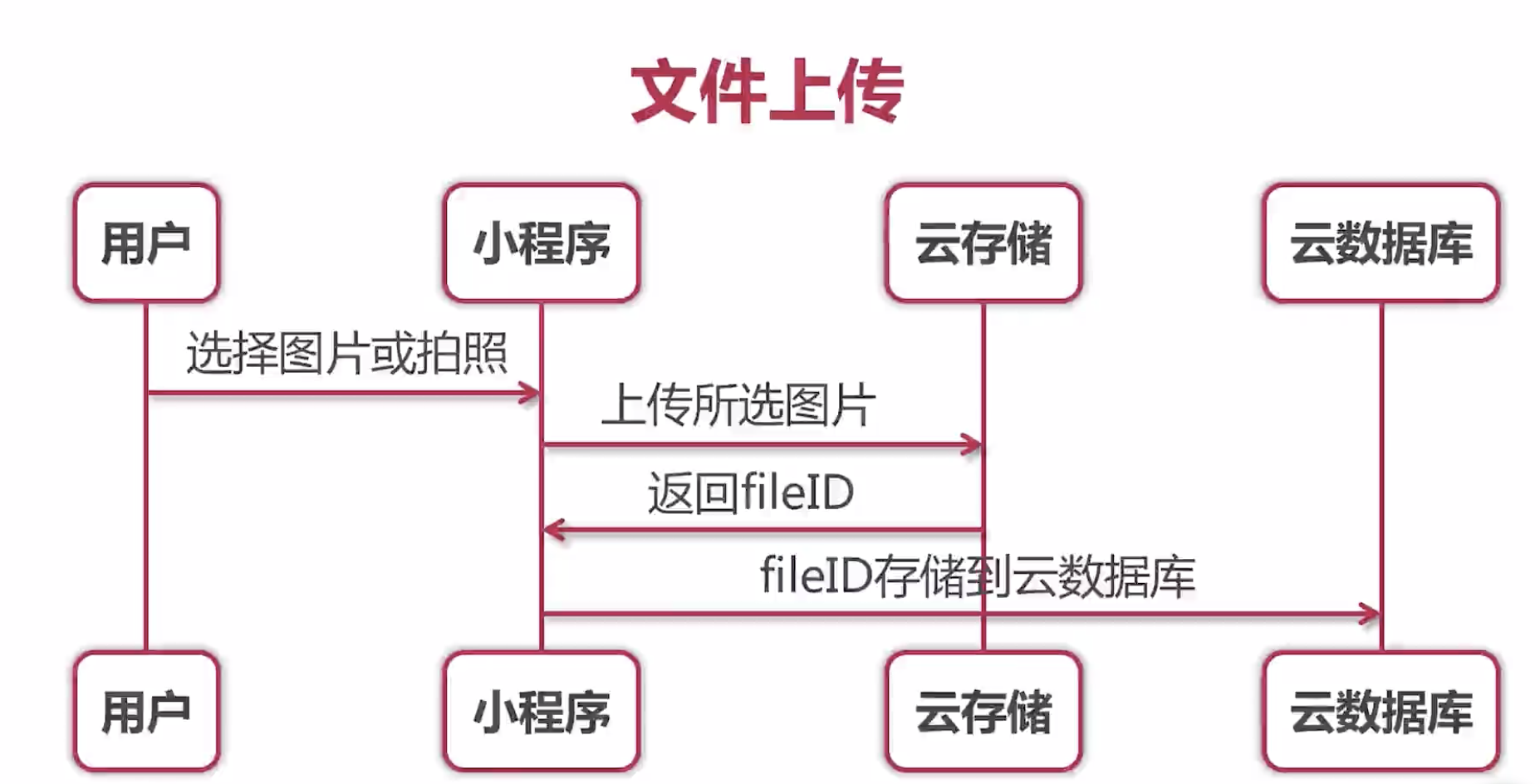
  //上传图片
  uploadImg: function () {
    wx.chooseImage({
      count: 1,
      sizeType: ['original', 'compressed'],
      sourceType: ['album', 'camera'],
      success(res) {
        // tempFilePath可以作为img标签的src属性显示图片
        const tempFilePaths = res.tempFilePaths;
        wx.cloud.uploadFile({
          cloudPath: new Date().getTime() + '.png', // 为了确保不重名
          filePath: tempFilePaths[0], // 文件路径,因为tempFilePaths是一个数组
          success: res => {
            // get resource ID
            console.log(res.fileID)
            //存储数据到云数据库
            cloudImage.add({
              data: {
                fileId: res.fileID
              }
            }).then(res => {
              console.log(res)
            }).catch(err => {
              console.error(err)
            })
          },
          fail: err => {
            // handle error
          }
        })
      }
    })
  },
  // 获取图片
  getImg: function () {
    wx.cloud.callFunction({
      name: 'login'
    }).then(res => {
      // 查询
      cloudImage.where({ _openid: res.result.openid })
        .get().then(res => {
          this.setData({
            images: res.data
          })
        })
    }).catch(err => {
      console.log(err)
    });
  },
  // 文件下载
  downloadFile: function (event) {
    /** event.target.dataset.fileid在wxml遍历数据时候设置的
     * data-fileId="{{item.fileId}}"
    */
    console.log(event.target.dataset.fileid)
    wx.cloud.downloadFile({
      fileID: event.target.dataset.fileid,
      success: res => {
        // get temp file path
        console.log(res.tempFilePath)
        //res.tempFilePath是响应回来的零食路径
        wx.saveImageToPhotosAlbum({
          filePath: res.tempFilePath,
          success(res) {
            console.log(res)
            wx.showToast({
              title: '保存成功!',
            })
          },
          fail(err) {
            // 保存未授权
            console.error(err)
            if (err.errMsg === "saveImageToPhotosAlbum:fail:auth denied" || err.errMsg === "saveImageToPhotosAlbum:fail auth deny") {
              // 这边微信做过调整,必须要在按钮中触发,因此需要在弹框回调中进行调用
              wx.showModal({
                title: '提示',
                content: '需要您授权保存相册',
                showCancel: false,
                success: modalSuccess => {
                  wx.openSetting({
                    success(settingdata) {
                      console.log("settingdata", settingdata)
                      if (settingdata.authSetting['scope.writePhotosAlbum']) {
                        wx.showModal({
                          title: '提示',
                          content: '获取权限成功,再次点击图片即可保存',
                          showCancel: false,
                        })
                      } else {
                        wx.showModal({
                          title: '提示',
                          content: '获取权限失败,将无法保存到相册哦~',
                          showCancel: false,
                        })
                      }
                    },
                    fail(failData) {
                      console.log("failData", failData)
                    },
                    complete(finishData) {
                      console.log("finishData", finishData)
                    }
                  })
                }
              })
            }
          }
        })
      },
      fail: err => {
        // handle error
      }
    })
  },
  /**
   * 生命周期函数--监听页面加载
   */
  onLoad: function (options) {

  },

  /**
   * 生命周期函数--监听页面初次渲染完成
   */
  onReady: function () {

  },

  /**
   * 生命周期函数--监听页面显示
   */
  onShow: function () {

  },

  /**
   * 生命周期函数--监听页面隐藏
   */
  onHide: function () {

  },

  /**
   * 生命周期函数--监听页面卸载
   */
  onUnload: function () {

  },

  /**
   * 页面相关事件处理函数--监听用户下拉动作
   */
  onPullDownRefresh: function () {

  },

  /**
   * 页面上拉触底事件的处理函数
   */
  onReachBottom: function () {

  },

  /**
   * 用户点击右上角分享
   */
  onShareAppMessage: function () {

  }
})



 發表於 2020-2-16 16:58:00