|
来源:https://blog.csdn.net/chou342175867/article/details/62429354
利用H5开发微信公众号
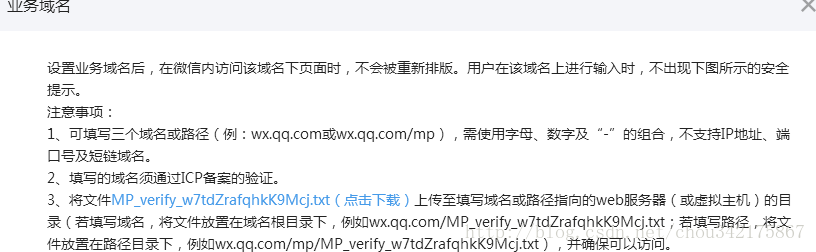
一、 首先授权配置
-
-
这里的MP_verify_w7tdZrafqhkK9Mcj.txt文件,需要放到你项目的根目录下,例子:你的项目war包叫 test.war ,里面包含了src,WEB-INFO两个文件夹,则把MP_verify_w7tdZrafqhkK9Mcj.txt放到这两个文件夹的同级目录下;即现在test.war下有两个文件夹一个txt文件:src,WEB-INFO,MP_verify_w7tdZrafqhkK9Mcj.txt.
后面就需要配置JS接口安全域名和网页授权域名了,最好和业务域名配置为一样就好了。
二、开发中的配置
在开发目录下的基本配置中进行配置。
基本配置–》开发者ID–》AppID(应用ID),AppSecret(应用密钥);
基本配置–》微信开放平台账号绑定
这里需要绑定微信开放平台,若不绑定,在获取用户信息的时候就只能获取到用户的openId,不能获取到unionId.
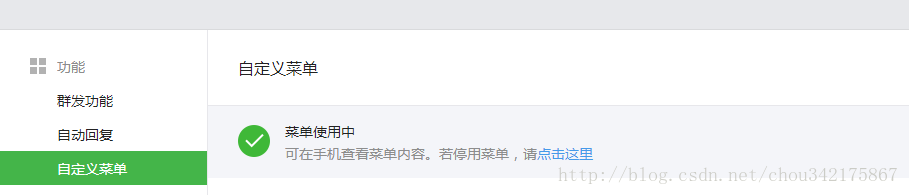
注意:定义菜单的时候有讲究了,
如果你想在用户点这个菜单的时候就拿到用户的微信基本信息(性别,昵称,openId,unionId),这里直接可以配置成为授权链接,授权链接回调url直接写成你后台的一个接口地址,然后由这个接口来跳转到其它页面.
例子:H5授权的链接:
http://open.weixin.qq.com/connect/oauth2/authorize?appid=xxxxxxxxx&redirect_uri=http://xxxx.com/test/login&response_type=code&scope=snsapi_userinfo&state=xxx&connect_redirect=1#wechat_redirect
微信回调的url是一个接口地址:http://xxxx.com/test/login,不能回调网页,因为存在跨域错误。
state的值是可以自定义的。
这里的scope是用的snsapi_userinfo,这样可以直接在后台拿到用户信息。
微信回调这个接口的时候会把code和state的值返回,接口就可以通过code去拿用户的信息了。
若要用code去拿用户的信息,又会去做一堆事情,这些事情确实麻烦;推荐直接使用第三方的jar包,一步就拿到了。
推荐的jar包:weixin-java-mp-2.5.0.jar,weixin-java-common-2.5.0.jar;
maven地址
-
-
<groupId>com.github.binarywang</groupId>
-
<artifactId>weixin-java-mp</artifactId>
-
-
-
在做微信支付的时候有可能会用到xstream的包,有需要也拿去
-
xstream-1.4.7.jar,xxp3_min-1.1.4.jar,xmlpull-1.1.3.1.jar
-
-
-
<groupId>com.thoughtworks.xstream</groupId>
-
<artifactId>xstream</artifactId>
-
-
-
-
-
<artifactId>xpp3</artifactId>
-
<version>1.1.4c</version>
-
-
-
<groupId>xmlpull</groupId>
-
<artifactId>xmlpull</artifactId>
-
<version>1.1.3.1</version>
-
- 1
- 2
- 3
- 4
- 5
- 6
- 7
- 8
- 9
- 10
- 11
- 12
- 13
- 14
- 15
这里说下weixin-java-mp-2.5.0.jar的使用方法,
1.weixin-java-mp-2.5.0.jar里面最重要的类是
WxMpInMemoryConfigStorage和WxMpService;
WxMpInMemoryConfigStorage是用来存微信公众号的基本信息的,
在Spring+SpringMvc中的使用方法例子:
-
-
-
value={"classpath:wxProperties.properties"},
-
ignoreResourceNotFound = true)
-
-
public class WeixinConfig {
-
-
@Value("${wxProperties.appid}")
-
-
-
@Value("${wxProperties.appsecret}")
-
private String appsecret;
-
-
@Value("${wxProperties.token}")
-
-
-
@Value("${wxProperties.aeskey}")
-
-
-
@Value("${wxProperties.partener_id}")
-
private String partenerId;
-
-
@Value("${wxProperties.partener_key}")
-
private String partenerKey;
-
-
@Value("${wxProperties.notify_url}")
-
private String notifyUrl;
-
-
-
public static PropertySourcesPlaceholderConfigurer propertySourcesPlaceholderConfigurer() {
-
PropertySourcesPlaceholderConfigurer ppc = new PropertySourcesPlaceholderConfigurer();
-
ppc.setIgnoreUnresolvablePlaceholders(true);
-
-
-
-
-
public WxMpConfigStorage wxMpConfigStorage() {
-
WxMpInMemoryConfigStorage configStorage = new WxMpInMemoryConfigStorage();
-
configStorage.setAppId(this.appid);
-
configStorage.setSecret(this.appsecret);
-
configStorage.setToken(this.token);
-
configStorage.setAesKey(this.aesKey);
-
configStorage.setPartnerId(this.partenerId);
-
configStorage.setPartnerKey(this.partenerKey);
-
configStorage.setNotifyURL(this.notifyUrl);
-
-
-
-
-
public WxMpService wxMpService() {
-
WxMpService wxMpService = new WxMpServiceImpl();
-
wxMpService.setWxMpConfigStorage(wxMpConfigStorage());
-
-
-
-
- 1
- 2
- 3
- 4
- 5
- 6
- 7
- 8
- 9
- 10
- 11
- 12
- 13
- 14
- 15
- 16
- 17
- 18
- 19
- 20
- 21
- 22
- 23
- 24
- 25
- 26
- 27
- 28
- 29
- 30
- 31
- 32
- 33
- 34
- 35
- 36
- 37
- 38
- 39
- 40
- 41
- 42
- 43
- 44
- 45
- 46
- 47
- 48
- 49
- 50
- 51
- 52
- 53
- 54
- 55
- 56
这里是配置微信公众号的基本信息,其它地方要使用就直接使用:
-
-
protected WxMpService wxMpService;
2.获取微信用户基本信息示例代码:
-
WxMpOAuth2AccessToken accessToken;
-
WxMpUser wxMpUser = null;
-
accessToken = this.wxMpService.oauth2getAccessToken(code);
-
wxMpUser = this.wxMpService.getUserService().userInfo(accessToken.getOpenId(), null);
-
3.H5若要使用微信封装好的js,则需要一些基本的配置信息,完全可以从后天台获取然后返回,示例代码:
-
public StatusResult<Map<String, Object>> createJsapiSignature(String url) {
-
Map<String, Object> result = new HashMap<String, Object>();
-
-
WxJsapiSignature wxJsapiSignature = wxMpService.createJsapiSignature(url);
-
String getJsapiTicket = wxMpService.getJsapiTicket();
-
result.put("wxJsapiSignature", wxJsapiSignature);
-
return StatusResult.success(result, "");
-
} catch (WxErrorException e) {
-
return StatusResult.failed("未知错误出现", result);
-
-
这里的url是H5用js代码获取的:
var url = location.href.split('#')[0];
4.公众号支付
流程:
页面发起–>后台下单后返回前端所需要的参数–>页面发起支付–>用户输入密码付款成功–>微信回调后台通知接口–>业务处理完成
H5页面发起支付:
微信公众号的页面支付首先要配置微信公众号:
微信支付–>开发配置–>支付授权目录(正式、测试的目录必须要不一样,否则有你好看的,)
注意:设置授权目录的时候必须要精确到需要支付页面的目录文件夹;
例子:需要支付的H5页面 http://xxxxx.com/test/html/pay/pay.html
则授权目录配置为 http://xxxxx.com/test/html/pay/
配置完成后就可以发起下单了,
后台下单代码示例:
-
public StatusResult<Map<String, String>> getJSSDKPayInfo(HttpServletResponse response,
-
HttpServletRequest request) {
-
StatusResult<Map<String, String>> result = null;
-
String spbill_create_ip = request.getRemoteAddr();
-
Map<String, String> map = new HashMap<String, String>();
-
WxMpConfigStorage wx= wxMpService.getWxMpConfigStorage();
-
WxPayUnifiedOrderRequest prepayInfo = new WxPayUnifiedOrderRequest();
-
-
prepayInfo.setOpenid("openId");
-
prepayInfo.setOutTradeNo("out_trade_no");
-
int total_fee = 0.01 * 100;
-
-
prepayInfo.setTotalFee(Integer.valueOf(total_fee));
-
prepayInfo.setBody("xxxxx");
-
prepayInfo.setTradeType("JSAPI");
-
prepayInfo.setSpbillCreateIp(spbill_create_ip);
-
-
prepayInfo.setNotifyURL(wx.getNotifyURL());
-
-
两种下单方式,如果报错请先仔细检查微信配置的各种参数
-
-
Map<String, String> payInfo = this.wxMpService.getPayService().getPayInfo(prepayInfo);
-
-
-
-
result = StatusResult.success(payInfo);
-
-
} catch (WxErrorException e) {
-
log.error(e.getError().toString());
-
map.put("error", e.getError().toString());
-
return StatusResult.failed("微信下单失败",map);
-
-
- 1
- 2
- 3
- 4
- 5
- 6
- 7
- 8
- 9
- 10
- 11
- 12
- 13
- 14
- 15
- 16
- 17
- 18
- 19
- 20
- 21
- 22
- 23
- 24
- 25
- 26
- 27
- 28
- 29
- 30
- 31
- 32
- 33
H5页面支付js代码(需要引入微信js哈):
-
-
if (typeof WeixinJSBridge == "undefined"){
-
if( document.addEventListener ){
-
document.addEventListener('WeixinJSBridgeReady', onBridgeReady, false);
-
}else if (document.attachEvent){
-
document.attachEvent('WeixinJSBridgeReady', onBridgeReady);
-
document.attachEvent('onWeixinJSBridgeReady', onBridgeReady);
-
-
-
-
-
-
function onBridgeReady(){
-
-
'getBrandWCPayRequest', {
-
-
-
-
-
-
-
-
-
if (res.err_msg == "get_brand_wcpay_request:ok") {
-
-
} else if (res.err_msg == "get_brand_wcpay_request:cancel") {
-
-
-
-
-
-
-
- 1
- 2
- 3
- 4
- 5
- 6
- 7
- 8
- 9
- 10
- 11
- 12
- 13
- 14
- 15
- 16
- 17
- 18
- 19
- 20
- 21
- 22
- 23
- 24
- 25
- 26
- 27
- 28
- 29
- 30
- 31
- 32
- 33
微信回调后台通知接口代码示例:
-
public void getJSSDKCallbackData(HttpServletRequest request,
-
HttpServletResponse response) {
-
-
-
Map<String, String> kvm = XMLUtil.parseRequestXmlToMap(request);
-
System.out.println("微信通知返回结果:\t"+kvm.toString());
-
WxPayOrderQueryResult wxPayOrderQueryResult = wxMpService.getPayService().queryOrder("", kvm.get("out_trade_no"));//用订单号去查询订单状态,冗余代码可看可删
-
// if (this.wxMpService.getPayService().checkSign(kvm, kvm.get("sign"))) {
-
System.out.println("查询订单返回结果:\t"+wxPayOrderQueryResult.getTradeState());
-
if ("SUCCESS".equals(wxPayOrderQueryResult.getTradeState())) {
-
if (kvm.get("result_code").equals("SUCCESS")) {
-
//TODO(user) 微信服务器通知此回调接口支付成功后,通知给业务系统做处理
-
log.info("out_trade_no: " + kvm.get("out_trade_no") + " pay SUCCESS!");
-
String out_trade_no = kvm.get("out_trade_no"); //支付订单号,接下来写业务代码
-
-
-
-
log.info("已经支付的订单详情\t"+aleadyPayOrder);
-
response.getWriter().write("<xml><return_code><![CDATA[SUCCESS]]></return_code><return_msg><![CDATA[ok]]></return_msg></xml>");
-
-
log.error("out_trade_no: "
-
+ kvm.get("out_trade_no") + " result_code is FAIL");
-
response.getWriter().write(
-
"<xml><return_code><![CDATA[FAIL]]></return_code><return_msg><![CDATA[result_code is FAIL]]></return_msg></xml>");
-
-
-
response.getWriter().write(
-
"<xml><return_code><![CDATA[FAIL]]></return_code><return_msg><![CDATA[check signature FAIL]]></return_msg></xml>");
-
log.error("out_trade_no: " + kvm.get("out_trade_no")
-
+ " check signature FAIL");
-
-
-
-
-
-
- 1
- 2
- 3
- 4
- 5
- 6
- 7
- 8
- 9
- 10
- 11
- 12
- 13
- 14
- 15
- 16
- 17
- 18
- 19
- 20
- 21
- 22
- 23
- 24
- 25
- 26
- 27
- 28
- 29
- 30
- 31
- 32
- 33
- 34
- 35
- 36
到此为止公众号支付完成。
三、微信js中接口使用
分享等很常见的,需要初始化微信的js,需要利用到上面写的createJsapiSignature后台接口。
公众号的分享给朋友、朋友圈、QQ空间等方法在微信js中是可以直接调用的,分享的内容可以自己改变的,但是分享出去的按钮只能是微信右上角的分享,开发者不能自定义分享按钮。。。这一点让人非常不爽。
H5页面js的代码示例:
引入微信的js,然后初始化,然后微信会自动执行wx.ready中的方法
-
-
-
-
-
-
-
-
-
-
-
-
-
-
-
var imgUrl = "http://xxx.com/test/picture/xxxxx.png";
-
wx.onMenuShareAppMessage({
-
-
-
-
-
-
-
-
-
-
-
-
-
-
-
alert(JSON.stringify(res));
-
-
-
- 1
- 2
- 3
- 4
- 5
- 6
- 7
- 8
- 9
- 10
- 11
- 12
- 13
- 14
- 15
- 16
- 17
- 18
- 19
- 20
- 21
- 22
- 23
- 24
- 25
- 26
- 27
- 28
- 29
- 30
- 31
- 32
- 33
- 34
调用微信js中的方法流程:
初始化config–>执行wx.ready
开发者需要更多的功能就依照葫芦画瓢了,或者去微信js sdk文档去copy方法了。
让人不愉快的事情又发生了,微信在4月29日开始限制自定义分享的链接啦,必须要是安全域名下的链接才可以分享。
详情请看:
JSSDK自定义分享接口的策略调整
这样导致不能直接分享自己想要的链接了,但是解决方法还是有的:
在你的域名下新建一个H5页面,在这个H5页面的js代码中做一个跳转就好啦(但是如果你分享出去的是支付页面,那多半是支付不了地)!
四、处理微信直接可以分享页面问题
有时候业务需要不能把当前的页面分享出去,但是微信自带的分享、复制链接按钮是可以在任何页面拿到当前页面的地址,如果别人点击就会进入。为了避免这个情况发生,有几种处理方法:
1.后端足够强大,页面跳转完全由后端完成,在加入了权限验证的情况下就不怕这个的,后端会拦截请求验证,验证不过就跳指定的error页面就好。
2.前端做验证
jsp可以用session,判断session中的一个全局参数即可。
H5可以使用cookie,在项目的开始页写入cookie,在js中写一个验证方法,每个页面都调用这个验证方法进行验证,虽然有冗余代码,但是这个是可以实现地,简单粗暴,速度快。
设置cookie的方法:
-
-
var expiresDate= new Date();
-
expiresDate.setTime(expiresDate.getTime() + (30 * 60 * 1000));
-
jquery.cookie("openId",'${openId}', {
-
-
-
-
然后在js中写一个方法每个页面都调用判断。
来源:https://www.cnblogs.com/wangsongbai/p/13444699.html |



 發表於 2020-8-6 10:32:00