CSS3学习
##学习自狂神##
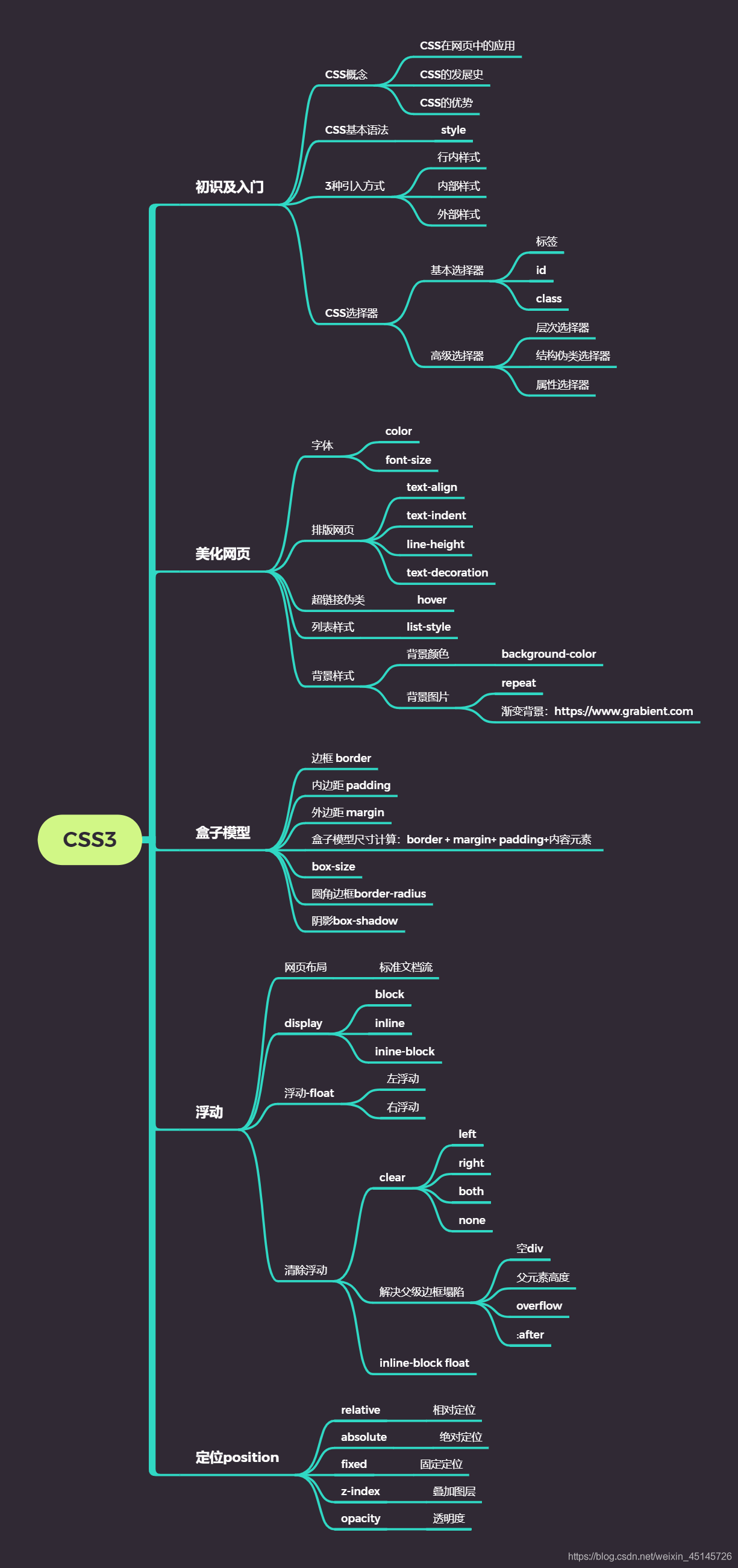
1.css是什么
2.CSS怎么用(快速入门)
3.CSS选择器(重点 + 难点)
4.美化页面(文字、阴影、超链接、列表、渐变…)
5.盒子模型
6.浮动
7.定位
8.网页动画(特效)
1.什么是CSS
1、什么是CSS
Cascading Style Sheet 层叠样式表 CSS:表现(美化网页) 字体,颜色,边距,高度,宽度,背景图片,网页定位,网页浮动
1.2、发展史
CSS1.0 CSS2.0:DIV(块)+CSS,HTML与CSS结构分离的思想,网页变得简单,SEO CSS2.1:浮动,定位 CSS3.0:圆角、阴影、动画…浏览器兼容性~
2、快速入门
<!DOCTYPE html>
<html lang="en">
<head>
<meta charset="UTF-8">
<title>Title</title>
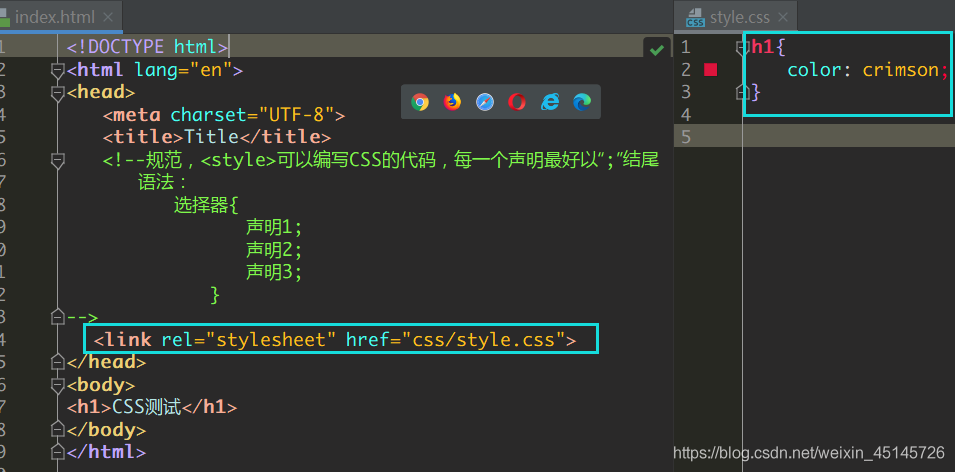
<!--规范,<style>可以编写CSS的代码,每一个声明最好以“;”结尾
语法:
选择器{
声明1;
声明2;
声明3;
} -->
<style>
h1{
color: crimson;
}
</style>
</head>
<body>
<h1>CSS测试</h1>
</body>
</html>
3、CSS的优势:
1、内容和表现分离;
2、网页结构表现统一,可以实现复用
3、样式十分的丰富
4、建议使用独立于html的css文件
5、利用SEO,容易被搜索引擎收录!
4、CSS的3种常用导入方式
<style><!--内部样式-->
h1{
color: green;
}
</style>
<!--外部样式-->
<link rel="stylesheet" href="css/style.css" />
</head>
<body>
</body>
</html>
拓展:外部样式两种方法
链接式 html
导入式 @import
是CSS2.1特有的!
<style>
@import url("css/style.css");
</style>
4
2选择器
作用:选择页面上的某一个后者某一类元素
2.1、基本选择器
1、标签选择器
选择一类标签
格式: 标签 { }
<head>
<meta charset="UTF-8">
<title>Title</title>
<style>
h1{
color: orange;
background: blue;
border-radius: 10px;
}
h3{
color: orange;
background: blue;
border-radius: 10px;
}
p{
font-size: 80px;
}
</style>
</head>
<body>
<h1>标签选择器</h1>
<p>我爱学习</p>
<h3>学习JAVA</h3>
</body>
2、类选择器class
选择所有class一致的标签,跨标签
格式: .类名{}
<head>
<meta charset="UTF-8">
<title>Title</title>
<style>
/*类选择器的格式 .class的名称{}
好处:可以多个标签归类,是同一个class,可以复用*/
.demo1{
color: blue;
}
.demo2{
color: red;
}
.demo3{
color: aqua;
}
</style>
</head>
<body>
<h1 class = "demo1">类选择器:demo1</h1>
<h1 class="demo2">类选择器:demo2</h1>
<h1 class="demo3">类选择器:demo3</h1>
<p class="demo3">p标签</p>
</body>
3、id 选择器
全局唯一
格式: #id名{}
<head>
<meta charset="UTF-8">
<title>Title</title>
<style>
/*id选择器:id必须保证全局唯一
#id名称{}
不遵循就近原则,优先级是固定的
id选择器 > class类选择器 > 标签选择器
*/
#demo1{
color: red;
}
.demo2{
color: green;
}
#demo2{
color: orange;
}
h1{
color: blue;
}
</style>
</head>
<body>
<h1 id="demo1" class="demo2">id选择器:demo1</h1>
<h1 class="demo2" id = "demo2">id选择器:demo2</h1>
<h1 class="demo2">id选择器:demo3</h1>
<h1 >id选择器:demo4</h1>
<h1>id选择器:demo5</h1>
</body>
4.优先级:id > class > 标签
2.2、高级选择器
1.层次选择器
后代选择器:在某个元素的后面
后代选择器
/*后代选择器*/
<style>
body p{
background:red;
}
</style>
子选择器,一代
/子选择器/
/*子选择器*/
<style>
body>p{
background:orange;
}
</style>
相邻的兄弟选择器 同辈
/相邻兄弟选择器:只选择一个,相邻(向下)/
/*相邻兄弟选择器:只选择一个,相邻(向下)*/
<style>
.active+p{
background: red
}
</style>
<body>
<p class="active">p1<p>
<p>p2</p>
</body>
通用选择器
<style>
/*通用兄弟选择器,当前选中元素的向下的所有兄弟元素*/
.active~p{
background:red;
}
</style>
<body>
<p class="active">p1<p>
<p>p2</p>
</body>
2.3结构伪类选择器
伪类
    <style>
        ul li:first-child{/*ul的第一个子元素*/
            background: aqua;
        }
        ul li:last-child{/*ul的最后一个子元素*/
            background: blue;
        }
        /*选中p1:定位到父元素,选择当前的第一个元素
            选择当前p元素 的父级元素,选中父级元素的第一个,并且是当前元素才生效!*/
        p:nth-child(1){
            background: orange;
        }
        p:nth-of-type(2){/*选中父元素下的,第2个p元素*/
            background: red;
        }
        a:hover{
            color: green;
        }
    </style>
</head>
<body>
    <a href="">123</a>
    <p>p1</p>
    <p>p2</p>
    <p>p3</p>
    <h3>h3</h3>
    <ul>
        <li>1li1</li>
        <li>1li2</li>
        <li>1li3</li>
    </ul>
    <ul>
        <li>2li1</li>
        <li>2li2</li>
        <li>2li3</li>
    </ul>
    <a href="www.baidu.com">百度</a>
</body>
2.4属性选择器(常用)
id + class结合
<head>
<meta charset="UTF-8">
<title>Title</title>
<style>
.demo a{
float: left;
display: block;
height: 50px;
width: 50px;
border-radius: 10px;
background: aquamarine;
text-align: center;
color: gray;
text-decoration: none;
margin-right: 5px;
/*line-height:50px;*/
font: bold 20px/50px Arial;
}
/*属性名,属性名=属性值(正则)
= 表示绝对等于
*= 表示包含
^= 表示以...开头
$= 表示以...结尾
存在id属性的元素
a[]{}
*/
a[id]{
background: yellow;
}
a[id=first]{/*id=first的元素*/
background: green;
}
a[class*="links"]{/*class 中有links的元素*/
background: bisque;
}
a[href^=http]{/*选中href中以http开头的元素*/
background: aquamarine;
}
a[href$=pdf]{/*选中href中以http开头的元素*/
background: aquamarine;
}
</style>
</head>
<body>
<p class="demo">
<a href="http:www.baidu.com" class="links item first" id="first">1</a>
<a href="" class="links item active" target="_blank " title="test">2</a>
<a href="images/123.html" class="links item">3</a>
<a href="images/1.png" class="links item">4</a>
<a href="images/1.jpg" class="links item">5</a>
<a href="abc" class="links item">6</a>
<a href="/a.pdf" class="links item">7</a>
<a href="/abc.pdf" class="links item">8</a>
<a href="abc.doc" class="links item">9</a>
<a href="abcd.doc" class="links item last">10</a>
</p>
</body>
3、美化网页元素
3.1、为什么要美化网页
-
有效的传递页面信息
-
美化网页,页面漂亮才能吸引客户
-
凸显页面的主题
-
提高用户的体验
span标签:重点要突出的字,使用span标签套起来
<head>
    <meta charset="UTF-8">
    <title>Title</title>
    <style>
        #title1{
            font-size: 50px;
        }
    </style>
</head>
<body>
学习语言<span id="title1">JAVA</span>
</body>
3.2、字体样式
font-weight:bolder;/*也可以填px,但不能超过900,相当于bloder*/
/*常用写法:*/
font:oblique bloder 12px "楷体"
3.3、文本样式
-
颜色–>color rgb rgba
-
文本对齐方式–>text-align:center
-
首行缩进–>text-indent:2em
-
行高–>line-height:300px;
-
下划线–>text-decoration
text-decoration:underline/*下划线*/
text-decoration:line-through/*中划线*/
text-decoration:overline/*上划线*/
text-decoration:none/*超链接去下划线*/
-
图片、文字水平对齐
img,span{vetical-align:middle}
3.4、文本,阴影和超链接伪类
a:hover用的多
<style>
	a{/*超链接有默认的颜色*/
		text-decoration:none;
		color:#000000;
	}
	a:hover{/*鼠标悬浮的状态*/
		color:orange;
	}
	a:active{/*鼠标按住未释放的状态*/
		color:green
	}
	a:visited{/*点击之后的状态*/
		color:red
	}
	a:link{
            background: bisque;
        }
</style>
阴影:
/* 第一个参数:表示水平偏移
	第二个参数:表示垂直偏移
	第三个参数:表示模糊半径
	第四个参数:表示颜色
*/
text-shadow:5px 5px 5px 颜色
3.5、列表ul li
主页index.html代码:
<!DOCTYPE html>
<html lang="en">
<head>
<meta charset="UTF-8">
<title>Title</title>
<link href="css/style.css" rel="stylesheet" type="text/css">
</head>
<body>
<div id="nav">
<h2 class="title">全部商品分类</h2>
<ul>
<li>
<a href="#">图书</a>
<a href="#">音像</a>
<a href="#">数字商品</a>
</li>
<li>
<a href="#">家用电器</a>
<a href="#">手机</a>
<a href="#">数码</a>
</li>
<li>
<a href="#">电脑</a>
<a href="#">办公</a>
</li>
<li>
<a href="#">家居</a>
<a href="#">家装</a>
<a href="#">厨具</a>
</li>
<li>
<a href="#">服饰鞋帽</a>
<a href="#">个性化妆</a>
</li>
<li>
<a href="#">礼品箱包</a>
<a href="#">钟表</a>
<a href="#">珠宝</a>
</li>
<li>
<a href="#">食品饮料</a>
<a href="#">保健食品</a>
</li>
<li>
<a href="#">彩票</a>
<a href="#">旅行</a>
<a href="#">充值</a>
<a href="#">票务</a>
</li>
</ul>
</div>
</body>
</html>
css代码:
#nav{
    width: 300px;
    background: antiquewhite;
}
.title{
    font-size: 18px;
    font-weight: bold;
    text-indent: 1em;/*缩进*/
    line-height: 35px;
    background: red;
}
/*ul li*/
/*
list-style:
    non 去掉实心圆
    circle 空心圆
    square 正方形
*/
/*ul{!*nav替换效果*!
    background: antiquewhite;
}*/
ul li{
    height: 30px;
    list-style: none;
    text-indent: 1em;
}
a{
    text-decoration: none;
    font-size: 14px;
    color: black;
 }
a:hover{
    color: burlywood;
    text-decoration: underline;
}
3.6、背景
-
背景颜色:background
-
背景图片
background-image:url("");/*默认是全部平铺的*/
background-repeat:repeat-x/*水平平铺*/
background-repeat:repeat-y/*垂直平铺*/
background-repeat:no-repeat/*不平铺*/
3.7、渐变
渐变背景网址:https://www.grabient.com
径向渐变、圆形渐变
body{
            background-color: #4158D0;
            background-image: linear-gradient(43deg, #4158D0 0%, #C850C0 46%, #FFCC70 100%);
        }
4、盒子模型
4.1什么是盒子模型
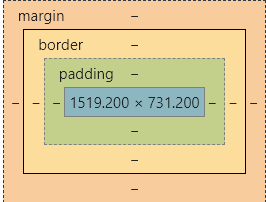
margin:外边距padding:内边距border:边框
4.2、边框
border:粗细 样式 颜色
1.边框的粗细
2.边框的样式
3.边框的颜色
代码练习
 <!DOCTYPE html>
 <html lang="en">
 <head>
     <meta charset="UTF-8">
     <title>Title</title>
     <style>
         #nav{
             text-align: center;
             width: 300px;
             height: 200px;
             border:1px solid red;
         }
         #user input{
             border: 2px solid green;
         }
     </style>
 </head>
 <body>
 <div id="nav">
     <h1>会员登录</h1>
     <form action="#">
         <div id="user">
             <span>用户名:</span>
             <input type="text">
         </div>
         <div>
             <span>密码:</span>
             <input type="text">
         </div>
         <div>
             <span>邮箱:</span>
             <input type="text">
         </div>
     </form>
 </div>
 </body>
 </html>
 4.3外边距----妙用:居
4.3、外边距----妙用:居中
margin-left/right/top/bottom–>表示四边,可分别设置,也可以同时设置如下
margin:0 0 0 0/*分别表示上、右、下、左;从上开始顺时针*/
/*例1:居中*/
margin:0 auto /*auto表示左右自动*/
/*例2:*/
margin:4px/*表示上、右、下、左都为4px*/
/*例3*/
margin:10px 20px 30px/*表示上为10px,左右为20px,下为30px*/
盒子的计算方式:
margin+border+padding+内容的大小
总结:
body总有一个默认的外边距 margin:0
常见操作:初始化
margin:0;
padding:0;
text-decoration:none;
4.4、圆角边框----border-radius
border-radius有四个参数(顺时针),左上->右上->右下->左下
圆圈:圆角=半径
<style>
        div{
            width: 100px;
            height: 100px;
            border: 10px solid red;
            /*一个border-radius只管一个圆的1/4*/
            border-radius: 50px 20px 20px 30px;/*左上 右上 右下 左下 ,顺时针方向*/
        }
</style>
box-shadow: 10px 10px 1px black;
5、浮动
块级元素:独占一行 h1~h6 、p、div、 列表…
行内元素:不独占一行 span、a、img、strong
注: 行内元素可以包含在块级元素中,反之则不可以。
5.1标准文档流
5.2、display(重要)
-
block:块元素
-
inline:行内元素
-
inline-block:是块元素,但是可以内联,在一行
这也是一种实现行内元素排列的方式,但是我们很多情况用float
none:消失
 <!DOCTYPE html>
 <html lang="en">
 <head>
     <meta charset="UTF-8">
     <title>Title</title>
     <!--block 块元素
         inline 行内元素
         inline-block 是块元素,但是可以内联 ,在一行
     -->
     <style>
         div{
             width: 100px;
             height: 100px;
             border: 1px solid red;
             display: inline-block;
         }
         span{
             width: 100px;
             height: 100px;
             border: 1px solid red;
             display: inline-block;
         }
     </style>
 </head>
 <body>
 <div>div块元素</div>
 <span>span行内元素</span>
 </body>
 </html>
5.3、float:left/right左右浮动
clear:both
5.4、overflow及父级边框塌陷问题
clear:
right:右侧不允许有浮动元素
left:左侧不允许有浮动元素
both:两侧不允许有浮动元素
none:
解决塌陷问题方案:
方案一:增加父级元素的高度;
方案二:增加一个空的div标签,清除浮动
<div class = "clear"></div>
<style>
.clear{
clear:both;
margin:0;
padding:0;
}
</style>
方案三:在父级元素中增加一个overflow属性
overflow:hidden/*隐藏超出部分*/
overflow:scoll/*滚动*/
方案四:父类添加一个伪类:after
#father:after{
	content:'';
	display:block;
	clear:both;
}
小结:
-
浮动元素增加空div----> 简单、代码尽量避免空div
-
设置父元素的高度-----> 简单,但是元素假设有了固定的高度,可能就会超出范围
-
overflow----> 简单,下拉的一些场景避免使用
-
父类添加一个伪类:after(推荐)----> 写法稍微复杂,但是没有副作用,推荐使用
5.5display与float对比
-
display:方向不可以控制
-
float:浮动起来的话会脱离标准文档流,所以要解决父级边框塌陷的问题。
6、定位
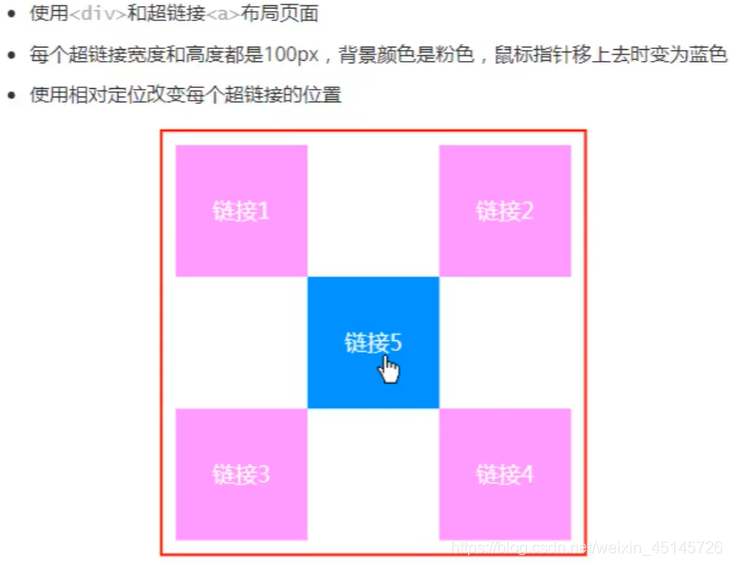
6.1、相对定位
相对定位:positon:relstive;
相对于原来的位置,进行指定的偏移,相对定位的话,它仍然在标准文档流中!原来的位置会被保留
top:-20px;/*向上偏移20px*/
left:20px;/*向右偏移20px*/
bottom:10px;/*向上偏移10px*/
right:20px;/*向左偏移20px*/
<!DOCTYPE html>
<html lang="en">
<head>
<meta charset="UTF-8">
<title>相对定位</title>
<!--相对定位
相对于自己原来的位置进行偏移
-->
<style>
body{
padding: 20px;
}
div{
margin: 10px;
padding: 5px;
font-size: 12px;
line-height: 25px;
}
#father{
border: #ffa538 1px solid;
padding: 0;
}
#first{
border: #b3ff38 1px solid;
background-color: #ffa538;
position: relative;/*相对定位:上下左右*/
top: -20px;/*向上偏移20px*/
left: 20px;/*向右偏移20px*/
}
#second{
border: #427b11 1px solid;
background-color: #66c77f;
}
#third{
background-color: #b3ff38;
border: #38d7ff 1px solid;
position: relative;
bottom: 10px;/*向上偏移10px*/
}
</style>
</head>
<body>
<div id="father">
<div id="first">第一个盒子</div>
<div id="second">第二个盒子</div>
<div id="third">第三个盒子</div>
</div>
</body>
</html>
<style>
#box{
height: 300px;
width: 300px;
border: 2px red solid;
padding: 10px;
}
a{
height: 100px;
width: 100px;
background-color: #ee73b7;
color: white;
text-align: center;
text-decoration: none;
line-height: 100px;/*设置行距100px*/
display: block;/*设置方块*/
}
a:hover{
background: #4158D0;
}
.a2{
position: relative;
left: 200px;
top: -100px;
}
.a4{
position: relative;
left: 200px;
top: -100px;
}
.a5{
position: relative;
left: 100px;
top: -300px;
}
</style>
</head>
<body>
<div id="box">
<div class="a1"><a href="" >连接1</a></div>
<div class="a2"><a href="" >连接2</a></div>
<div class="a3"><a href="" >连接3</a></div>
<div class="a4"><a href="" >连接4</a></div>
<div class="a5"><a href="" >连接5</a></div>
</div>
</body>
6.2、绝对定位-absolute和固定定位-fixed
定位:基于xxx定位,上下左右~
1、没有父级元素定位的前提下,相对于浏览器定位
2、假设父级元素存在定位,我们通常会相对于父级元素进行偏移
3、在父级元素范围内移动 总结:相对一父级或浏览器的位置,进行指定的偏移,绝对定位的话,它不在标准文档流中,原来的位置不会被保留
<head>
<meta charset="UTF-8">
<title>Title</title>
<style>
body{
height: 1000px;
}
div:nth-of-type(1){
width: 100px;
height: 100px;
background-color: red;
position: absolute;/*absolute 绝对定位*/
right: 0;
bottom: 0;
}
div:nth-of-type(2){
width: 50px;
height: 50px;
background-color: #b3ff38;
position: fixed;/*fixed 固定定位*/
right: 0;
bottom: 0;
}
</style>
</head>
<body>
<div>div1</div>
<div>div2</div>
</body>
6.3、z-index
图层-z-index:默认是0,最高无限~999
index.html代码:
<!DOCTYPE html>
<html lang="en">
<head>
<meta charset="UTF-8">
<title>Title</title>
<link rel="stylesheet" href="css/style.css" type="text/css">
<style></style>
</head>
<body>
<div id="content">
<ul>
<li><img src="images/2020.jpg" alt=""/></li>
<li class="tipText">学习微服务,找狂神</li>
<li class="tipBg"></li>
<li>时间:2099-01-01</li>
<li>地点:月球一号基地</li>
</ul>
</div>
</body>
</html>
css代码:
#content{
width: 380px;
padding: 0px;
margin: 0px;
overflow: hidden;
font-size: 12px;
line-height: 25px;
border: 1px solid yellow;
}
ul,li{
padding: 0px;
margin: 0px;
list-style: none;
}
/*父级元素相对定位*/
#content ul{
position: relative;
}
.tipText,.tipBg{
position: absolute;
width: 380px;
height: 25px;
top:216px
}
.tipText{
color: white;
z-index: 999;
}
.tipBg{
background: orange;
opacity: 0.5;/*背景透明度*/
filter: alpha(opacity=50);
}
7、动画及视野拓展
css做动画过于繁琐,已有很多工具间接性做出
百度搜索canvas动画、卡巴斯基监控站(仅作了解)
8、总结
来源:https://www.cnblogs.com/th11/p/14975892.html |



 發表於 2021-7-6 10:53:00