|
在HTML5的服务器发送事件中,使用EventSource对象可以接收服务器发送事件的通知。
示例:
es.html
 1 <!DOCTYPE html>
 2 <html>
 3 <head>
 4 <meta charset="UTF-8">
 5 <title>Insert title here</title>
 6 <script src="https://cdn.bootcss.com/jquery/1.12.4/jquery.min.js"></script>
 7 <script src="https://cdn.bootcss.com/event-source-polyfill/0.0.9/eventsource.min.js"></script>
 8 </head>
 9 <body>
10 <ul id="list">
11 </ul>
12 <script>
13 var source = new EventSource("test1");
14 source.onmessage = function(event) {
15     var item = $("<li></li>").html(event.data);
16     $("#list").append(item);
17 }
18 </script>
19 </body>
20 </html>
服务端接收我用的是Spring MVC实现的:
Demo1Controller.java
 1 package com.test.controller;
 2
 3 import java.util.Date;
 4
 5 import org.springframework.stereotype.Controller;
 6 import org.springframework.web.bind.annotation.RequestMapping;
 7 import org.springframework.web.bind.annotation.ResponseBody;
 8
 9 @Controller
10 public class Demo1Controller {
11
12     @ResponseBody
13     @RequestMapping(value="/test1",produces="text/event-stream;charset=UTF-8")
14     public String test6() {
15         return "retry:5000\ndata:" + new Date().toLocaleString() + "\n\n";
16     }
17
18 }
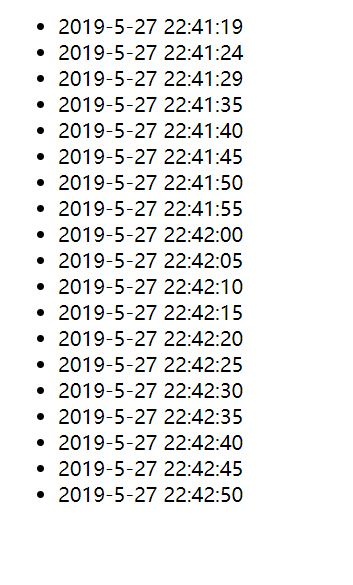
页面效果:
这个示例实现了每隔5秒钟从服务器获取当前服务器时间,并输出到页面上。
下面我解释一下关键代码:
es.html网页第7行,是引入了eventsource.min.js脚本,加入这个脚本是为了让IE8及以上版本的IE可以支持EventSource,EventSource在目前所有版本都不支持。在其他主流浏览器如谷歌,火狐等都是支持的
es.html网页第13行,是创建EventSource对象,并建立和服务端请求test1的连接
es.html网页第14行,是用来接收服务端发来的数据,并进行后续操作
java类第13行,需要在注解添加属性produces="text/event-stream;charset=UTF-8",不然会报错:EventSource's response has a charset ("iso-8859-1") that is not UTF-8. Aborting the connection.
java类第15行,是EventSource接收数据的固定格式:retry:${毫秒数}\ndata:${返回数据}\n\n,retry是指每隔多久请求一次服务器,data是指要接收的数据。注意这个retry参数不是必须的,如果不填写,对应的浏览器会有一个默认间隔时间,谷歌默认是3000毫秒,也就是3秒钟。
来源:https://www.cnblogs.com/modou/p/10933968.html |



 發表於 2019-5-27 22:39:00