|
Angular 12 视乎比以往更稳定了.
这里记入一般的 get started 结构和做法.
第 1 步, 创建项目.
ng new project --create-application=false
默认会自动创建 app, 先关掉它.
第 2 步, 装 eslint 和 prettier
早期 ng 是用 tslint 的, 后来废弃了, 现在改用 eslint
https://github.com/angular-eslint/angular-eslint 这个是第三方的,但是做的很好一下.
ng add @angular-eslint/schematics
ng config cli.defaultCollection @angular-eslint/schematics
然后就安装 Prettier - Code formatter vscode 插件
https://marketplace.visualstudio.com/items?itemName=esbenp.prettier-vscode
setup vs code setting
"editor.defaultFormatter": "esbenp.prettier-vscode",
"prettier.singleQuote": true,
"editor.formatOnSave": true,
"eslint.options": {
  "extensions": [".ts", ".html"]
},
"eslint.validate": [
  "javascript",
  "typescript",
  "html"
],
"editor.codeActionsOnSave": {
    "source.fixAll.tslint": true,
    "source.fixAll.eslint": true
},
"editor.detectIndentation": false,
然后安装 prettier
要让 prettier 和 eslint 一起工作. 我们需要安装一些 prettier 的 plugin
yarn add eslint-plugin-prettier eslint-config-prettier --dev
然后就创建 app
ng g app control-panel --routing --style=scss --prefix=cp
每一个 app 或 lib 都会自带 .eslintrc.json, 尽量不要使用全局的, best practice 是每一个 app 或 lib 独立管理 (虽然会有重复的设置啦, 但是不多啦)
由于我使用 eslint standard config 所以我要装
yarn add eslint-config-standard eslint-plugin-import eslint-plugin-node eslint-plugin-promise --dev
这个是最终版本的 eslintrc.json, 所以我没有使用 root eslintrc.json 然后我使用了 eslint standard config, 然后我没有 e2e, 其它的都是安装官网配置的了.
{
  "root": true,
  // "extends": "../../.eslintrc.json", // we don't have root file, so use root: true instead
  "ignorePatterns": [
    "!**/*"
  ],
  "overrides": [{
      "files": [
        "*.ts"
      ],
      "extends": [
        "standard",
        "plugin:@angular-eslint/recommended",
        "plugin:@angular-eslint/template/process-inline-templates",
        "plugin:prettier/recommended"
      ],
      "plugins": [
        "@typescript-eslint"
      ],
      "parserOptions": {
        "project": [
          "projects/control-panel/tsconfig.app.json",
          "projects/control-panel/tsconfig.spec.json"
          // "projects/control-panel/e2e/tsconfig.json" // we don't have e2e now
        ],
        "createDefaultProgram": true
      },
      "rules": {
        "space-before-function-paren": "off",
        "no-multiple-empty-lines": "off",
        "no-new": "off",
        "no-extend-native": "off",
        "prettier/prettier": ["error", {
          "singleQuote": true,
          "endOfLine": "auto" // refer: https://stackoverflow.com/questions/53516594/why-do-i-keep-getting-delete-cr-prettier-prettier
        }],
        "@angular-eslint/directive-selector": [
          "error",
          {
            "type": "attribute",
            "prefix": "cp",
            "style": "camelCase"
          }
        ],
        "@angular-eslint/component-selector": [
          "error",
          {
            "type": "element",
            "prefix": "cp",
            "style": "kebab-case"
          }
        ]
      }
    },
    {
      "files": [
        "*.html"
      ],
      "extends": ["plugin:@angular-eslint/template/recommended"],
      "rules": {}
    },
    {
      "files": ["*.html"],
      "excludedFiles": ["*inline-template-*.component.html"],
      "extends": ["plugin:prettier/recommended"],
      "rules": {
        "prettier/prettier": ["error", {
          "parser": "angular"
        }]
      }
    }
  ]
}
第 3 步 安装 library
ng g lib stooges --prefix=s
通常一个 project 里面会有好几个 app, shared code 就可以做一个 library 来管理, 以后要发布也比较容易.
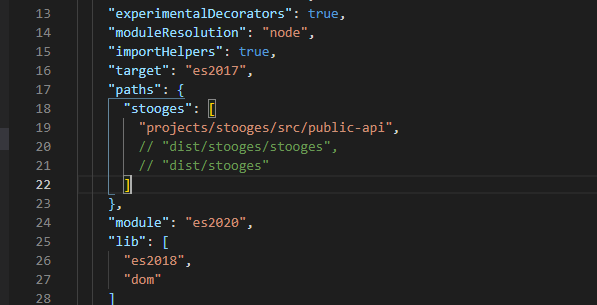
由于我没有要做成发布的版本,所以我需要修改一下 ts config
第 4 步 安装 tailwind css 和 stylelint
tailwind 火, 无论如何都是要跟风一下的啦.
yarn add tailwindcss postcss autoprefixer stylelint stylelint-scss stylelint-config-recommended stylelint-prettier stylelint-config-prettier --dev
tailwind.config.js
module.exports = {
  purge: {
    enabled: true,
    content: ['./projects/*/src/**/*.html'],
  },
  darkMode: false, // or 'media' or 'class'
  theme: {
    extend: {},
  },
  variants: {
    extend: {},
  },
  plugins: [],
};
stylelint.config.js
module.exports = {
  extends: ['stylelint-config-recommended', 'stylelint-prettier/recommended'],
  plugins: ['stylelint-scss'],
  rules: {
    'at-rule-no-unknown': null,
    'scss/at-rule-no-unknown': [
      true,
      {
        ignoreAtRules: [
          'tailwind',
          'apply',
          'variants',
          'responsive',
          'screen',
        ],
      },
    ],
    'declaration-block-trailing-semicolon': null,
    'no-descending-specificity': null,
    'prettier/prettier': [
      true,
      {
        endOfLine: 'auto', // refer: https://stackoverflow.com/questions/53516594/why-do-i-keep-getting-delete-cr-prettier-prettier
      },
    ],
  },
};
vs code setting
"css.validate": false,
"scss.validate": false,
"stylelint.enable": true,
到这里我们就有了一个 project 通常会用到的结构了.
来源:https://www.cnblogs.com/keatkeat/p/14821676.html |



 發表於 2021-5-28 12:06:00