|
H5之template元素
模版元素是 Web Components 技术中的一种。
里面的元素在页面加载时不会呈现,在随后的JS实例化时可以呈现。
<template id="tpl">
     <span>so good </span>
</template>

<div id="container">
</div>

<script type="text/javascript">
    const container = document.getElementById('container');
    const tpl = document.getElementById('tpl');
    let tplNode = document.importNode(tpl.content,true);
    container.appendChild(tplNode);
</script>
template 的类型是 HTMLTemplateElement.
模版元素 在 HTMLTemplateElement.content 中, 类型是 DocumentFragment,在浏览器渲染出来的结果如下:
<template id="tpl">
    #document-fragment
    <span>so good </span>
</template>
DocumentFragment 表示一个没有父级文件的最小文档对象,常常被作为一个轻量版的Document使用。
是DOM节点, 不是真实DOM树的一部分。 在DOM树中,文档片段被其所有子元素代替。
因为文档片段存在内存中,不存在DOM树中,将元素插入文档片段时,不会引起回流。
Angular 之 视图类型
Angular 支持的 View 视图 类型:
1、Embeded Views - Template 模版元素
2、Host View是 --Componet 组件
Angular 之 TemplateRef
内嵌template模板元素,通过TemplateRef实例,可以通过ElementRef 封装后的nativeElement。
<ng-template #tpl>
  <span>I am span in template {{title}}</span>
</ng-template>

@ViewChild('tpl')
tpl: TemplateRef<any>;

title:string = 'jack';

ngAfterViewInit() {
    const embeddedView = this.tpl.createEmbeddedView(null); // 创建内嵌视图

    const commentElement = this.tpl.elementRef.nativeElement; // 模版DOM元素,此时被渲染成了 comment元素

  // 遍历内嵌视图中的rootNodes, 动态插入 node
    embeddedView.rootNodes.forEach( (node) => {
      commentElement.parentNode.insertBefore(node, commentElement.nextSibling);
    });
}
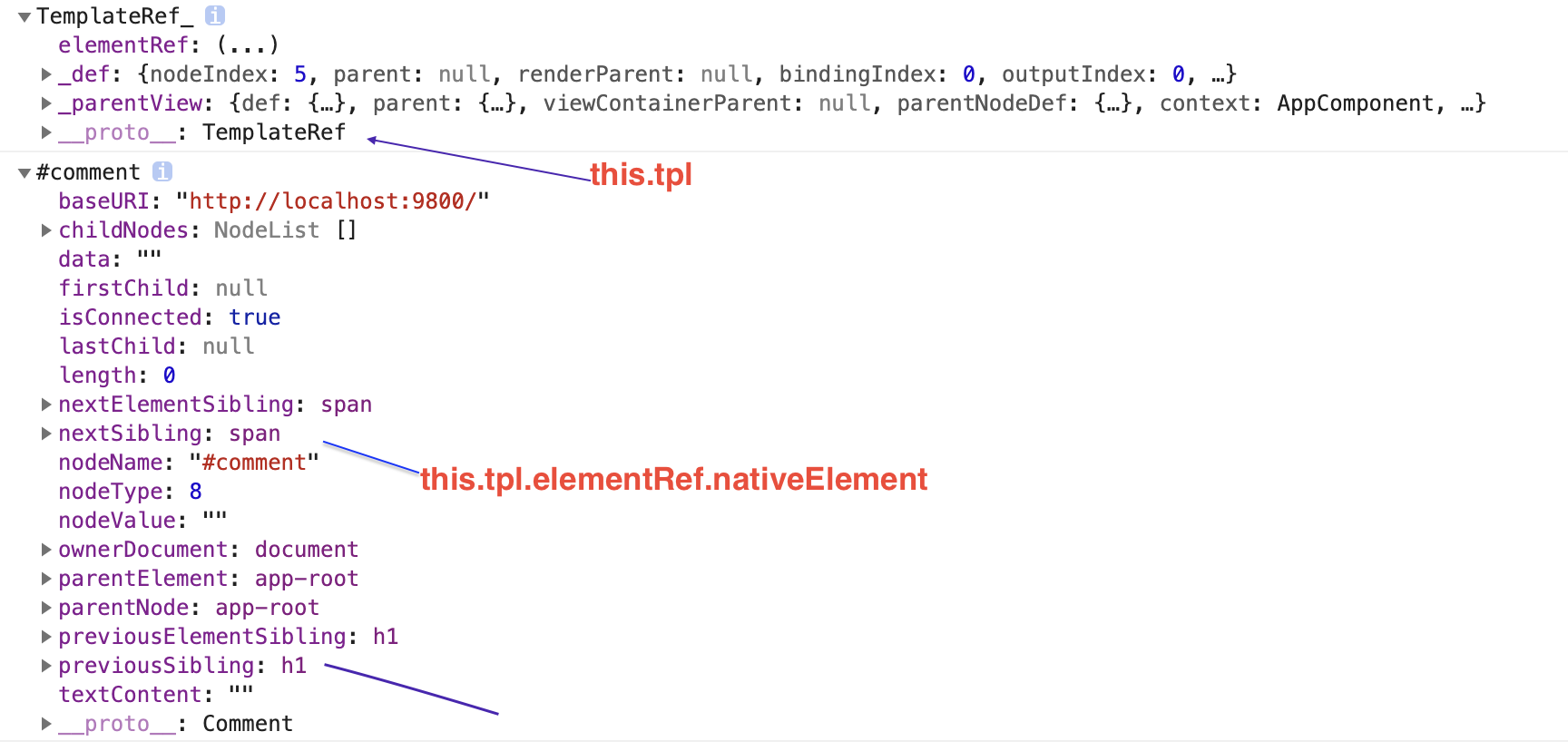
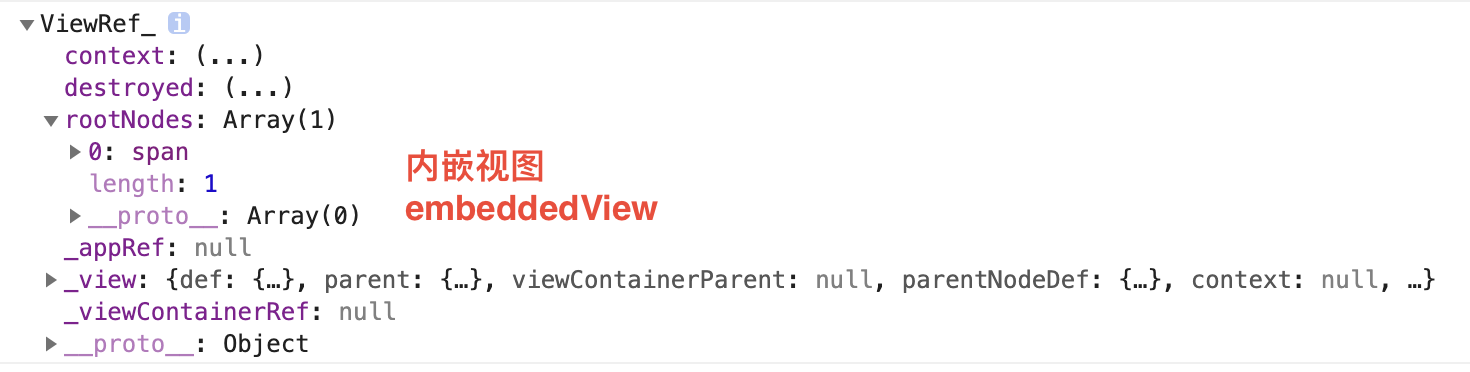
由上图可得知如下结论:
1、<ng-template>元素渲染后被替换成 comment元素。
2、通过@ViewChild获取的模版元素 this.tpl,是 TemplateRef_ 类的实例。
其中 TemplateRef_<C> extends TemplateRef<C> 。
3、内嵌视图 是 ViewRef_ 对象,其rootNodes属性包含了<template>模版中的内容。
4、EmbeddedViewRef<C> extends ViewRef 。
Angular 之 ViewContainerRef
上述方法渲染数据,似乎只能渲染静态文本,而 {{title}} 值却没有渲染出来。
这时候就需要 ViewContainerRef。
ViewContainerRef: 视图容器,用于创建和管理内嵌视图或组件视图。
可添加一个或多个基于TemplateRef实例创建内嵌视图,指定内嵌视图的插入位置。
<ng-template #tpl1>
  <span>我是第一个模版</span>
</ng-template>

<ng-template #tpl2>
  <span>我是第二个模版</span>
</ng-template>

@ViewChild('tpl1')
tpl1: ElementRef<any>;

@ViewChild('tpl2')
tpl2: ElementRef<any>;

@ViewChild('tpl1', { read: ViewContainerRef } )
tplContainer: ViewContainerRef;

ngAfterViewInit() {
   const view1 = this.tpl1.createEmbeddedView(null);
   const view2 = this.tpl2.createEmbeddedView(null);
   this.tplContainer.insert(view1);
   this.tplContainer.insert(view2);
}
来源:https://www.cnblogs.com/xianrongbin/p/9686389.html |



 發表於 2019-6-11 14:45:00