How to fix Tailwind CSS colors not work in Next.js All In One
Tailwind CSS & Next.js 13
error
import type { Config } from 'tailwindcss'

const config: Config = {
  content: [
    './src/pages/**/*.{js,ts,jsx,tsx,mdx}',
    './src/components/**/*.{js,ts,jsx,tsx,mdx}',
    './src/app/**/*.{js,ts,jsx,tsx,mdx}',
  ],
  theme: {
    colors: {
      transparent: 'transparent',
      current: 'currentColor',
      'white': '#ffffff',
      'custom-green': '#7e22ce',
      'custom-color': {
        100: '#cffafe',
        200: '#a5f3fc',
        300: '#67e8f9',
        400: '#22d3ee',
        500: '#06b6d4',
        600: '#0891b2',
        700: '#00ff00',// #7e22ce
        800: '#155e75',
        900: '#164e63',
      },
      // ...
    },
  },
  plugins: [],
}
export default config
async function Page() {
  const data = await getData({ id: 1});
  const {
    id,
    article,
  } = data.props;
  return (
    <div className="flex-column items-center justify-center p-6">
      <div className="m-6">Page article id = {id}</div>
      <div className="m-6 custom-green">custom-green ❌</div>
      <div className="m-6 border-red-500 custom-color-700">{JSON.stringify(article)}❌</div>
    </div>
  );
}

export default Page;
solution
// tailwind.config.js
module.exports = {
  theme: {
    colors: {
      indigo: '#5c6ac4',
      blue: '#007ace',
      red: '#de3618',
    }
  }
}
By default these colors are automatically shared by the textColor, borderColor, and backgroundColor utilities, so the above configuration would generate classes like .text-indigo, .border-blue, and .bg-red.
https://v1.tailwindcss.com/docs/customizing-colors
demos
http://localhost:3000/article
import type { Config } from 'tailwindcss'

const config: Config = {
  content: [
    './src/pages/**/*.{js,ts,jsx,tsx,mdx}',
    './src/components/**/*.{js,ts,jsx,tsx,mdx}',
    './src/app/**/*.{js,ts,jsx,tsx,mdx}',
  ],
  theme: {
    extend: {
      backgroundImage: {
        'gradient-radial': 'radial-gradient(var(--tw-gradient-stops))',
        'gradient-conic':
          'conic-gradient(from 180deg at 50% 50%, var(--tw-gradient-stops))',
      },
    },
    colors: {
      transparent: 'transparent',
      current: 'currentColor',
      'white': '#ffffff',
      'custom-green': '#7e22ce',
      'custom-color': {
        100: '#cffafe',
        200: '#a5f3fc',
        300: '#67e8f9',
        400: '#22d3ee',
        500: '#06b6d4',
        600: '#0891b2',
        700: '#00ff00',// #7e22ce
        800: '#155e75',
        900: '#164e63',
      },
      // ...
    },
  },
  plugins: [],
}
export default config
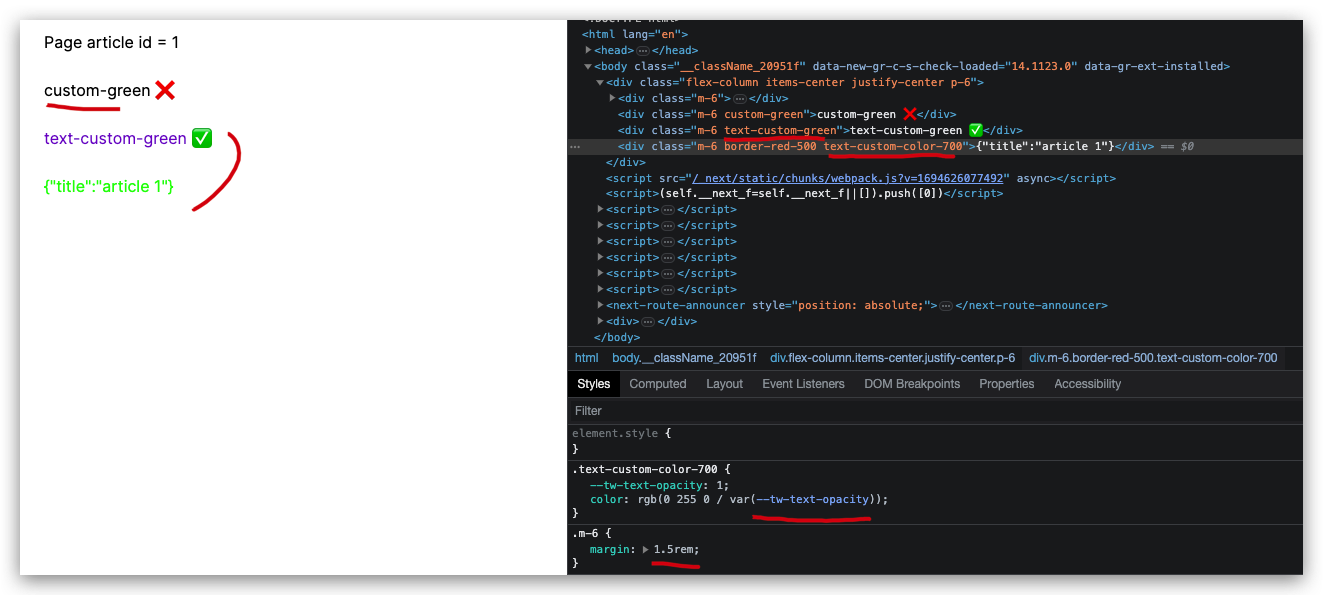
async function Page() {
  const data = await getData({ id: 1});
  const {
    id,
    article,
  } = data.props;
  return (
    <div className="flex-column items-center justify-center p-6">
      <div className="m-6">Page article id = {id}</div>
      <div className="m-6 custom-green">custom-green ❌</div>
      <div className="m-6 text-custom-green">text-custom-green ✅</div>
      <div className="m-6 border-red-500 text-custom-color-700">{JSON.stringify(article)}</div>
    </div>
  );
}

export default Page;
(🐞 反爬虫测试!打击盗版⚠️)如果你看到这个信息, 说明这是一篇剽窃的文章,请访问 https://www.cnblogs.com/xgqfrms/ 查看原创文章!
refs
©xgqfrms 2012-2021
www.cnblogs.com/xgqfrms 发布文章使用:只允许注册用户才可以访问!
原创文章,版权所有©️xgqfrms, 禁止转载 🈲️,侵权必究⚠️!
本文首发于博客园,作者:xgqfrms,原文链接:https://www.cnblogs.com/xgqfrms/p/17701255.html
未经授权禁止转载,违者必究!
来源:https://www.cnblogs.com/xgqfrms/p/17701255.html |



 發表於 2023-9-14 11:49:00