目录- 正文
- 工程配置(一)
- 工程配置(二)集成JPushExtension
- 处理推送显示的内容
- 注意事项
正文
本Demo推送使用的是极光推送(换成其他推送改动也不大)极光文档 极光Demo
先看下效果图,在系统的推送弹窗右侧增加了一个图片
工程配置(一)
- 首先需要一个已经集成了极光推送,并且可以正常接收推送的工程(参考极光文档again);
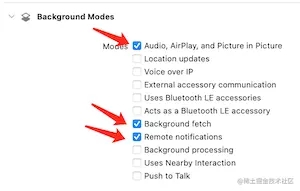
- 配置主Target,如下截图所示,勾选主Target的Background Modes;
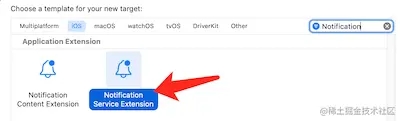
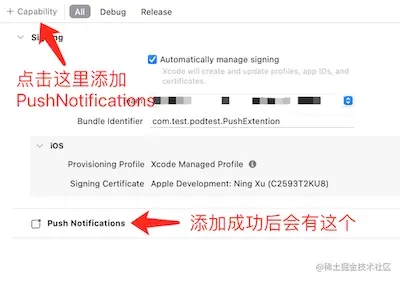
- 创建Service Extension,看下面的三图;
- 给创建好的PushExtension(子Target)配置Push Notifications,这一步操作就和主Target的配置推送一样;
工程配置(二)集成JPushExtension
这一步是按照需求可选的,引入JPushExtension的目的是为了极光推送做统计
处理推送显示的内容
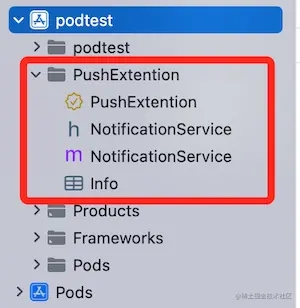
这是配置好的工程目录,多了一个PushExtention文件夹
NotificationService.m文件的内容改为如下
#import "NotificationService.h"
#import "JPushNotificationExtensionService.h"
@interface NotificationService ()
@property (nonatomic, strong) void (^contentHandler)(UNNotificationContent *contentToDeliver);
@property (nonatomic, strong) UNMutableNotificationContent *bestAttemptContent;
@end
@implementation NotificationService
- (void)didReceiveNotificationRequest:(UNNotificationRequest *)request withContentHandler:(void (^)(UNNotificationContent * _Nonnull))contentHandler {
    self.contentHandler = contentHandler;
    self.bestAttemptContent = [request.content mutableCopy];
    // 读取图片地址,并加载
    NSString *imgUrl = [NSString stringWithFormat:@"%@", self.bestAttemptContent.userInfo[@"imageUrl"]]; // ⚠️图片字段的key值需要跟后台开发统一
    if (imgUrl) {
        NSURL *fileURL = [NSURL URLWithString:imgUrl];
        [self downloadAndSave:fileURL handler:^(NSString *localPath) {
            if (localPath) {
                UNNotificationAttachment * attachment = [UNNotificationAttachment attachmentWithIdentifier:@"myAttachment" URL:[NSURL fileURLWithPath:localPath] options:nil error:nil];
                self.bestAttemptContent.attachments = @[attachment];
            }
            [self apnsDeliverWith:request];
        }];
    } else {
        [self apnsDeliverWith:request];
    }
}
- (void)serviceExtensionTimeWillExpire {
    self.contentHandler(self.bestAttemptContent);
}
#pragma mark - 私有方法
- (void)downloadAndSave:(NSURL *)fileURL handler:(void (^)(NSString *))handler {
    // 这里需要用系统网络请求来下载图片
    NSURLSession *session = [NSURLSession sharedSession];
    NSURLSessionDownloadTask *task = [session downloadTaskWithURL:fileURL completionHandler:^(NSURL * _Nullable location, NSURLResponse * _Nullable response, NSError * _Nullable error) {
        NSString *localPath = nil;
        if (!error) {
            // 临时文件夹路径,APP没有运行时会自动清除图片,不会占用内存
            NSString *localURL = [NSString stringWithFormat:@"%@/%@", NSTemporaryDirectory(), fileURL.lastPathComponent];
            if ([[NSFileManager defaultManager] moveItemAtPath:location.path toPath:localURL error:nil]) {
                localPath = localURL;
            }
        }
        handler(localPath);
    }];
    [task resume];
}
- (void)apnsDeliverWith:(UNNotificationRequest *)request {
    [JPushNotificationExtensionService jpushSetAppkey:@"本应用在极光平台的AppKey"];
    [JPushNotificationExtensionService jpushReceiveNotificationRequest:request with:^ {
        NSLog(@"apns upload success");
        self.contentHandler(self.bestAttemptContent);
    }];
}
@end
注意事项
如果传了图片地址却还不显示,不要惊慌,先请确保图片别太大,而且可以使用NSURLSession下载,否则就会出现图片不显示的问题。
以上就是iOS推送增加右侧显示图Service Extension的详细内容,更多关于iOS 推送增加右侧显示图的资料请关注琼殿技术社区其它相关文章!
您可能感兴趣的文章:- iOS13即将到来,iOS推送DeviceToken适配方案详解
- 浅谈iOS推送证书生成pem文件(详细生成过程)
- ios 服务器端推送证书生成的方法
- 如何用IOS调用WebService(SOAP接口)
- IOS如何在Host App 与 App Extension 之间发送通知
|



 發表於 2022-10-11 16:48:46