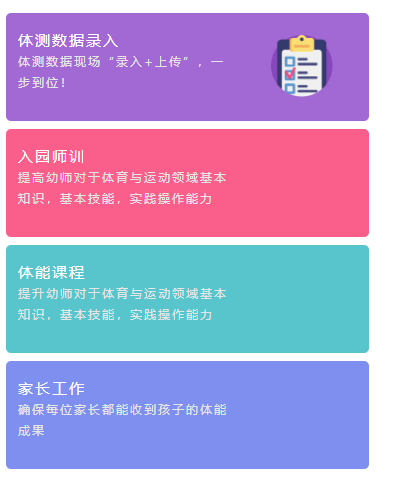
|
动态切换class,主要代码::class="i.themColor"
<view  v-for="i in htmlJSON" class="column" :class="i.themColor"  >
    <view class="uni-flex uni-column line">
        <view class="flex-item flex-item-V uni-bg-red">
            <view class="flex-item left">
                <view class="title">{{i.title}}</view>
                <view class="txt">{{i.txt}}</view>
            </view>
        </view>
    </view>
</view>


<script>
    import common from '../../common/common.js';
    export default {
        data() {
            return {
                htmlJSON:common.kdtHomeHtmlJSON
            }
        },
        methods: {
        },
        mounted() {
        }
    }
</script>

<style lang="scss">
    // body
    .content{
        width: 750upx;
        height: 634upx;
    }

    // 内容:
    .colorA268D4{
        background:#A268D4 url(../../static/images/kdt/icon-test.png) no-repeat  530upx 45upx;
        background-size: 125upx;
    }
    .colorFA5E8A{
        background:#FA5E8A url(../../static/images/kdt/icon-.png) no-repeat  530upx 45upx;
        background-size: 125upx;
    }
    .color58C4CC{
        background:#58C4CC url(../../static/images/kdt/icon-curriculum.png) no-repeat  530upx 45upx;
        background-size: 125upx;
    }
    .color7E8FEF{
        background:#7E8FEF url(../../static/images/kdt/icon-family.png) no-repeat  530upx 45upx;
        background-size: 125upx;
    }
    .column {
        width: 702upx;
        height: 182upx;
        margin:17upx  auto;
        padding-left: 25upx;
        padding-top: 35upx;
        line-height: 42upx;
        letter-spacing: 4upx;
        border-radius: 10upx;
        .title{
            color: #ffffff;
            font-size: 31upx;
        }
        .txt{
            width: 426upx;
            font-size: 25upx;
            color: #E6E6E6
        }
    }

</style>

//commom.js
export default {
    kdtHomeHtmlJSON:[{
        title:'体测数据录入',
        txt:'体测数据现场“录入+上传”,一步到位!',
        themColor:'colorA268D4'
    },
    {
        title:'入园师训',
        txt:'提高幼师对于体育与运动领域基本知识,基本技能,实践操作能力',
        themColor:'colorFA5E8A'
    },
    {
        title:'体能课程',
        txt:'提升幼师对于体育与运动领域基本知识,基本技能,实践操作能力',
        themColor:'color58C4CC'
    },
    {
        title:'家长工作',
        txt:'确保每位家长都能收到孩子的体能成果',
        themColor:'color7E8FEF'
    }]
}
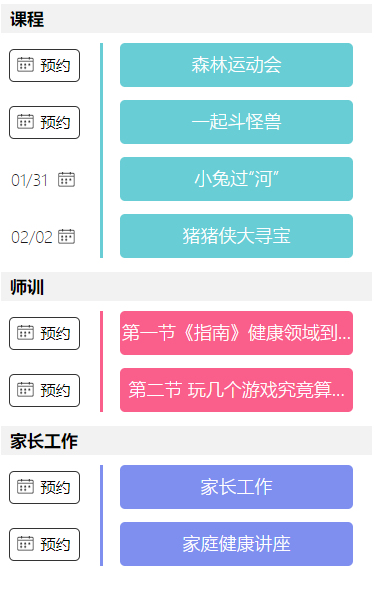 动态切换style,主要代码: :style="{'background':item.TypeColor}"
<!-- 体测 -->
        <view class="block"  v-for="itemList in list">
            <view class="title">
                <view class="title-word">
                    {{itemList[0].TypeName}}
                </view>
            </view>
            <view class="content" v-for="(item,index) in itemList" :key="index">
                <!-- 日历选择器 -->
                <picker mode="date" :value="item.BookTime"  @change="bindDateChange($event,item)">
                    <view class="book left" v-if="!item.BookTime">
                        <image src="../../static/images/icon-calendar.png" mode=""></image>
                        <view class="text">
                            预约
                        </view>
                    </view>
                    <view class="booked left" v-else  >
                        <text>{{item.BookTimeTxt}}</text>
                        <image src="../../static/images/icon-calendar.png" mode=""></image>
                    </view>
                </picker>
                <!-- 分割西线 -->
                <view class="break left" >
                    <view class="break-line-pe left" :style="{'background': item.TypeColor}"></view>
                </view>
                <!-- 题目 -->
                <view class="message-pe left" :style="{'background': item.TypeColor}">
                    <view class="message-info nowrap">
                        {{item.Name}}
                    </view>
                </view>
            </view>
            <view class="box"></view>
        </view>

<script>
 this.list={
    "2":[
        {
            "Id":1657,
            "CreateTime":"2019-01-26T15:05:40.5970000",
            "ServiceUnitId":2004,
            "ServiceMetadataId":5,
            "LikedCount":0,
            "Type":2,
            "Status":false,
            "ContentId":81,
            "Name":"森林运动会",
            "TypeName":"课程",
            "TypeColor":"#68CDD4"
        },
        Object{...},
        Object{...},
        Object{...}
    ],
    "3":[
        Object{...},
        Object{...}
    ],
    "4":[
        Object{...},
        Object{...}
    ]
}
<script>
说明:为节约性能,将 Class 与 Style 的表达式通过 compiler 硬编码到 uni-app 中,支持语法和转换效果如下:
class 支持的语法:
<view :class="{ active: isActive }">111</view>
<view class="static" v-bind:class="{ active: isActive, 'text-danger': hasError }">222</view
<view class="static" :class="[activeClass, errorClass]">333</view>
<view class="static" v-bind:class="[isActive ? activeClass : '', errorClass]">444</view>
<view class="static" v-bind:class="[{ active: isActive }, errorClass]">555</view>
style 支持的语法:
<view v-bind:style="{ color: activeColor, fontSize: fontSize + 'px' }">666</view>
<view v-bind:style="[{ color: activeColor, fontSize: fontSize + 'px' }]">777</view>
不支持 Vue官方文档:Class 与 Style 绑定 中的 classObject 和 styleObject 语法。
此外还可以用 computed 方法生成 class 或者 style 字符串,插入到页面中,举例说明:
<template>
    <!-- 支持 -->
    <view class="container" :class="computedClassStr"></view>
    <view class="container" :class="{active: isActive}"></view>
    <!-- 不支持 -->
    <view class="container" :class="computedClassObject"></view>
</template>
动态菜单切换示例
<template>
 <scroll-view class="menus">
  <view v-for="(menu, index) in menus" :class="[index == currentIndex ? 'menuActive' : '']">{{menu}}</view>
 </scroll-view>
</template>

<script>
export default {
 data: {
  currentIndex : 0,
  menus : [
   '新闻', '汽车', '读书'
  ]
 },
 onLoad:function(options){
  console.log("onLoad");
 },
 onHide:function(){
  console.log("onHide");
 },
 onShow:function(){
  console.log("onShow");
 }
}
</script>

<style>
.menus{width:700px; margin:0 auto; padding:20px 0px;}
.menus view{padding:8px; line-height:20px; font:38px; float:left;}
.menuActive{color:#900;}
</style>
来源:https://www.cnblogs.com/-mrl/p/11207694.html |



 發表於 2019-7-18 15:34:00