概述
在实际工作中,App既需要支持Android手机,又要支持IOS手机,还要支持微信小程序,公众号等,面对这样的需求,是否劳心费力,苦不堪言,还要考虑各平台的兼容性。现在uni-app以“开发一次,多端覆盖”的理念,海纳百川,求同存异,受到大多数开发者的青睐。uni-app是采用vue.js作为开发前端应用的框架,开发者编写一套代码,可发布到iOS、Android、Web(响应式)、以及各种小程序(微信/支付宝/百度/头条/QQ/钉钉/淘宝)、快应用等多个平台。本文以一个天气预报的小例子,简述uni-app的开发步骤。
为什么选择uni-app ?
- uni-app实现了一套代码,同时运行到多个平台。
- uni-app在开发者数量、案例、跨端抹平度、扩展灵活性、性能体验、周边生态、学习成本、开发成本等8大关键指标上拥有更强的优势。
- DCloud为uni-app开发提供了开发利器HBuilderX,以其轻巧极速,强大的语法提示,清爽护眼,和专为vue量身打造的优势,吸引了大多数的开发者。
uni-app目录结构
一个uni-app工程,默认包含如下目录及文件,如下图所示:
uni-app应用生命周期
uni-app 支持如下应用生命周期函数:
注意:应用生命周期仅可在App.vue中监听,在其它页面监听无效。
uni-app页面生命周期
uni-app 支持如下页面生命周期函数:
关于其他uni-app介绍,可以参考uni-app官网
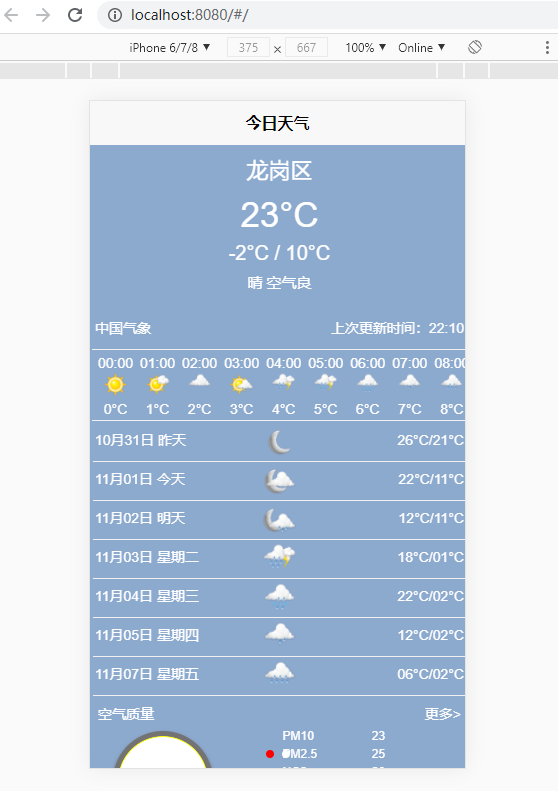
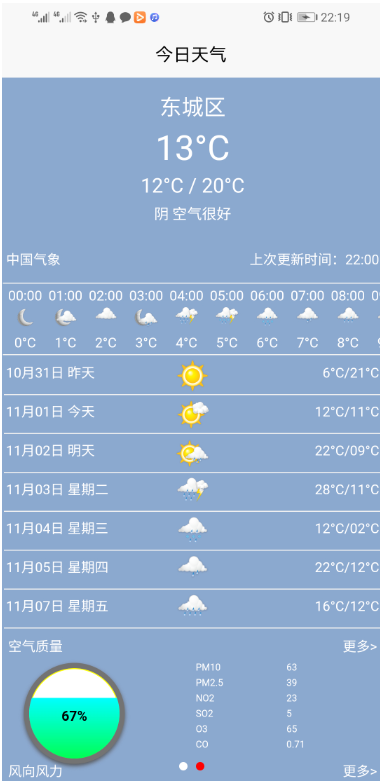
示例效果图
本次开发是一个天气预报的小例子,在Chrome浏览器里面如下图所示:
在Android手机上如下所示:
源码分析
在uni-app开发小例子时,为了代码的复用,自定义三个组件,包括,风车组件,圆形进度球组件,天气组件。源码分别如下:
(一)圆形进度球组件
组件包含三部分,分别是页面(template),脚本(JavaScript),样式(CSS),源码如下:
页面(template)代码如下:
 1 <template>
 2     <view class="content">
 3         <view class="progress">
 4             <view class="progress_outer">
 5                 <view class="progress_inner"></view>
 6                 <view class="progress_masker" :style="maskStyle"></view>
 7             </view>
 8             <view class="progress_value">{{cvalue}}%</view>
 9         </view>
10     </view>
11 </template>
View Code
脚本(JavaScript)代码如下:
 1 <script>
 2     export default {
 3         props: {
 4             cvalue: {
 5                 // 进度条百分比
 6                 type: Number,
 7                 default: 10,
 8             },
 9         },
10
11         data() {
12             return {
13
14             };
15         },
16         computed: {
17             maskStyle(){
18                 var top=100-this.cvalue;
19                 return {marginTop :  top + '%'};
20             },
21
22         }
23
24     }
25 </script>
View Code
样式(CSS)代码如下:
![]() ![]()
 1 <style>
 2     .content{
 3         width: 200rpx;
 4         height: 200rpx;
 5         display: block;
 6         box-sizing: border-box;
 7     }
 8     .progress {
 9         position: relative;
10         width: 200rpx;
11         height: 200rpx;
12         padding: 0;
13         box-sizing: border-box;
14     }
15     .progress_outer
16     {
17          height:100%;
18          width:100%;
19          background-color:gray;
20          border-radius:calc(100%/2);
21          border:5px solid rgba(0,0,0, 0.1);
22          padding:0;
23          box-shadow: 0px 2px 4px #555555;
24          -webkit-box-shadow: 0px 2px 4px #555555;
25          -moz-box-shadow: 0px 2px 4px #555555;
26          position: absolute;
27          box-sizing: border-box;
28          overflow: hidden;
29
30      }
31       .progress_inner
32       {
33           height:100%;
34           width:100%;
35           border:1px solid yellow;
36           border-radius:calc(100%/2);
37           position:absolute;
38           background-color:white;
39           text-align:center;
40           box-sizing: border-box;
41
42       }
43      .progress_masker
44      {
45          height:100%;
46          width:100%;
47          background: -webkit-gradient(linear,center top,center bottom,from(#0ff), to(#0f0));
48          background: -moz-linear-gradient( top,#fff,#0f0);
49          background: -o-linear-gradient( top,#fff,#0f0);
50          position: absolute;
51          box-sizing: border-box;
52      }
53      .progress_value
54      {
55          width:100%;
56          color:black;
57          font-weight:bolder;
58          background-color:transparent;
59          text-align:center;
60          position: absolute;
61          margin-top: 90rpx;
62      }
63 </style>
View Code(二)风车组件
风车组件包含两部分,分别是页面(template),样式(CSS),源码如下:
页面(template)代码如下:
 1 <template>
 2     <view>
 3         <view class="wind_mill">
 4             <view class="cicle"></view>
 5             <view class="vane">
 6                 <view class="vane1"></view>
 7                 <view class="vane2"></view>
 8                 <view class="vane3"></view>
 9             </view>
10             <view class="blade">
11
12             </view>
13         </view>
14     </view>
15 </template>
View Code
样式(CSS)代码如下:
![]() ![]()
 1 <style>
 2     .wind_mill{
 3         width: 200rpx;
 4         height: 220rpx;
 5         /* background-color:  rgba(25, 83, 157, 0.5); */
 6         position: relative;
 7     }
 8     @keyframes vanflash{
 9         from{transform: rotate(0deg); transform-origin: center;}
10         to{transform: rotate(360deg);transform-origin: center;}
11     }
12     .vane{
13         width: 200rpx;
14         height: 200rpx;
15         position: relative;
16         animation-name: vanflash;
17         animation-duration: 5s;
18         animation-iteration-count: infinite;
19         -webkit-animation-name: vanflash;
20         -webkit-animation-duration: 5s;
21         -webkit-animation-iteration-count: infinite;
22     }
23     .vane1{
24         display: block;
25         width: 80rpx;
26         height: 4rpx;
27         background-color: #FFFFFF;
28         border-radius: 5rpx;
29         position: absolute;
30         left: 100rpx;
31         top:100rpx;
32         transform: rotate(0deg);
33         transform-origin:left;
34         -webkit-transform:rotate(0deg);
35
36     }
37     .vane2{
38         width: 80rpx;
39         height: 4rpx;
40         background-color: #FFFFFF;
41         position: absolute;
42         left: 100rpx;
43         top:100rpx;
44         border-radius: 5rpx;
45         transform: rotate(120deg);
46         transform-origin:left;
47         -webkit-transform:rotate(120deg);
48     }
49     .vane3{
50         width: 80rpx;
51         height: 4rpx;
52         background-color: #FFFFFF;
53         position: absolute;
54         left: 100rpx;
55         top:100rpx;
56         border-radius: 5rpx;
57         transform: rotate(240deg);
58         transform-origin:left;
59         -webkit-transform:rotate(240deg);
60     }
61     .cicle{
62         position: absolute;
63         left: 90rpx;
64         top:90rpx;
65         background-color: #FFFFFF;
66         width: 20rpx;
67         height: 20rpx;
68         border-radius: 16rpx;
69     }
70     .blade{
71         width: 120rpx;
72         height: 10rpx;
73         background-color: #FFFFFF;
74         position: absolute;
75         left: 100rpx;
76         top:100rpx;
77         border-radius: 5rpx;
78         transform: rotate(90deg);
79         transform-origin:left;
80         -webkit-transform:rotate(90deg);
81     }
82 </style>
View Code(三)天气组件
天气组件,引用了前面两个组件,并有自定义数据内容,如下所示:
页面(template)代码如下:
![]() ![]()
 1 <template>
 2     <scroll-view scroll-y="true" class="main">
 3         <view class="current">
 4             <view class="district">{{district}}</view>
 5             <view class="temp">{{temp}}°C</view>
 6             <view class="temp_range">{{temprange}}</view>
 7             <view class="temp_desc">{{tempdesc}}</view>
 8             <br>
 9             <view class="temp_src">
10                 <view class="temp_src_left">中国气象</view>
11                 <view class="temp_src_right">上次更新时间:{{updatetime}}</view>
12             </view>
13         </view>
14         <scroll-view scroll-x="true">
15             <view class="hour" enable-flex="true">
16                 <view class="each_hour" v-for="item in timelist">
17                     <view class="each_hour_time">{{item.time}}</view>
18                     <image :src="item.img" mode="scaleToFill" class="each_hour_img" ></image>
19                     <view class="each_hour_temp">{{item.temp}}</view>
20                 </view>
21             </view>
22         </scroll-view>
23
24         <view class="sevenday">
25             <view class="each_day" v-for="item in daylist">
26                 <view class="each_day_text">
27                     {{item.day}} {{item.week}}
28                 </view>
29                 <image class="each_day_img" :src="item.img" mode=""></image>
30                 <view class="each_day_temp">{{item.temp}}</view>
31             </view>
32
33         </view>
34         <view class="air">
35             <view class="air_title">
36                 <view class="" style="flex: 1;">空气质量</view>
37                 <view class="" style="text-align: right;flex: 1;">更多></view>
38             </view>
39             <view class="air_body">
40                 <view class="air_left">
41                     <airprogress class="airprogress" :cvalue="airvalue"></airprogress>
42                 </view>
43                 <view class="air_right">
44                     <view class="air_content" v-for="item in airlist">
45                         <view class="air_content_name">{{item.name}}</view>
46                         <view class="air_content_value">{{item.value}}</view>
47                     </view>
48                 </view>
49             </view>
50         </view>
51         <view class="wind">
52             <view class="wind_title">
53                 <view class="" style="flex: 1;">风向风力</view>
54                 <view class="" style="text-align: right;flex: 1;">更多></view>
55             </view>
56             <view class="wind_body">
57                 <view class="wind_left">
58                     <windmill class="wind01"></windmill>
59                     <windmill class="wind02"></windmill>
60                 </view>
61                 <view class="wind_right">
62                     <view class="wind_right_direction">
63                         <view style="flex: 1;text-align: left;">风向</view>
64                         <view style="flex: 1;text-align: left;">{{winddirection}}</view>
65                     </view>
66                     <view class="wind_right_power">
67                         <view style="flex: 1;text-align: left;">风力</view>
68                         <view style="flex: 1;text-align: left;">{{windpower}}</view>
69                     </view>
70                 </view>
71             </view>
72         </view>
73         <view class="provider">provide by Alan.hsiang</view>
74     </scroll-view>
75 </template>
View Code脚本(JavaScript)代码如下:
 1 <script>
 2     import windmill from "../windmill/windmill.vue"
 3     import airprogress from "../airprogress/airprogress.vue"
 4     export default {
 5         components: {
 6             windmill,
 7             airprogress
 8         },
 9         props:{
10             district:{
11                 type:String,
12                 required:true,
13             },
14             temp:{
15                 type:Number,
16                 default:0
17             },
18             temprange:{
19                 type:String,
20
21             },
22             tempdesc:{
23                 type:String,
24
25             },
26             updatetime:{
27                 type:String,
28
29             },
30             timelist:{
31                 type:Array,
32
33             },
34             daylist:{
35                 type:Array,
36
37             },
38             airvalue:{
39                 type:Number,
40                 default:10,
41
42             },
43             airlist:{
44                 type:Array,
45
46             },
47             winddirection:{
48                 type:String,
49
50             },
51             windpower:{
52                 type:String,
53
54             }
55         },
56         data() {
57             return {
58
59
60             };
61         },
62         }
63 </script>
View Code
样式(CSS)代码如下:
![]() ![]()
  1 <style>
  2     view {
  3         /* border: #007AFF 1rpx solid; */
  4         font-family: Arial, Helvetica, sans-serif;
  5         font-size: 28rpx;
  6         padding: 2rpx;
  7     }
  8
  9     .main {
 10         width: 100%;
 11         height: 100%;
 12         padding: 4rpx;
 13         background-color: rgba(25, 83, 157, 0.5);
 14         color: #FFFFFF;
 15     }
 16
 17     .current {
 18         display: flex;
 19         flex-direction: column;
 20         vertical-align: middle;
 21         justify-content: center;
 22         height: 400rpx;
 23         border-bottom: #F1F1F1 2rpx solid;
 24     }
 25
 26     .current view {
 27         margin-bottom: 4rpx;
 28     }
 29
 30     .district {
 31         height: 60rpx;
 32         font-size: 45rpx;
 33         text-align: center;
 34
 35     }
 36
 37     .temp {
 38         height: 90rpx;
 39         font-size: 70rpx;
 40         text-align: center;
 41         line-height: 1.5;
 42     }
 43
 44     .temp_range {
 45         height: 60rpx;
 46         font-size: 40rpx;
 47         text-align: center;
 48         line-height: 1.5;
 49     }
 50
 51     .temp_desc {
 52         height: 50rpx;
 53         font-size: 30rpx;
 54         text-align: center;
 55         line-height: 1.5;
 56     }
 57
 58     .temp_src {
 59         display: flex;
 60         flex-direction: row;
 61         text-align: justify;
 62         vertical-align: bottom;
 63     }
 64
 65     .temp_src_left {}
 66
 67     .temp_src_right {
 68         flex: 1;
 69         text-align: right;
 70     }
 71
 72     .top {
 73         display: flex;
 74         flex-direction: column;
 75     }
 76
 77     .hour {
 78         display: flex;
 79         flex-direction: row;
 80         text-align: center;
 81         font-size: small;
 82         margin-top: 4rpx;
 83         margin-bottom: 4rpx;
 84         border-bottom: #F1F1F1 2rpx solid;
 85     }
 86     .each_hour{
 87         margin-left: 6rpx;
 88     }
 89     .each_hour_img{
 90         width: 50rpx;
 91         height: 50rpx;
 92     }
 93     .sevenday {
 94         display: flex;
 95         flex-direction: column;
 96     }
 97
 98     .each_day {
 99         display: flex;
100         flex-direction: row;
101         text-align: center;
102         margin-bottom: 2rpx;
103         border-bottom: #F1F1F1 2rpx solid;
104
105     }
106
107
108     .each_day_text {
109         flex: 1;
110         text-align: left;
111         line-height: 2;
112     }
113
114
115     .each_day_img {
116         width: 70rpx;
117         height: 70rpx;
118     }
119
120     .each_day_temp {
121         flex: 1;
122         text-align: right;
123         line-height: 2;
124     }
125
126     .air {
127         display: flex;
128         flex-direction: column;
129         margin: 6rpx;
130     }
131
132     .air_title {
133         display: flex;
134         flex-direction: row;
135         font-size: small;
136     }
137
138     .air_body {
139         display: flex;
140         flex-direction: row;
141     }
142
143     .air_left {
144         flex: 1;
145         display: inline-block;
146         text-align: center;
147         margin-top: 6rpx;
148     }
149     .airprogress{
150         position: absolute;
151         left: 40rpx;
152     }
153     .air_right {
154         flex: 1;
155         display: flex;
156         flex-direction: column;
157     }
158
159     .air_content {
160         display: flex;
161         flex-direction: row;
162     }
163
164     .air_content_name {
165         flex: 1;
166         font-size: 20rpx;
167     }
168
169     .air_content_value {
170         flex: 1;
171         font-size: 20rpx;
172     }
173
174
175     .wind{
176         display: flex;
177         flex-direction: column;
178         height: 260rpx;
179         margin: 6rpx;
180     }
181     .wind_title{
182         display: flex;
183         flex-direction: row;
184     }
185     .wind_body{
186         display: flex;
187         flex-direction: row;
188     }
189     .wind_left{
190         flex: 1;
191         position: relative;
192         height: 150rpx;
193     }
194     .wind_right{
195         flex: 1;
196         display: flex;
197         flex-direction: column;
198     }
199     .wind_right_direction{
200         flex: 0.5;
201         display: flex;
202         flex-direction: row;
203     }
204     .wind_right_power{
205         flex: 1;
206         display: flex;
207         flex-direction: row;
208     }
209     .wind_left_img{
210         width: 140rpx;
211         height: 140rpx;
212     }
213     .wind01{
214         position: absolute;
215         top: 10rpx;
216         left: 0rpx;
217     }
218     .wind02{
219         position: absolute;
220         top: -20rpx;
221         left: 90rpx;
222     }
223     .provider{
224         text-align: center;
225     }
226 </style>
View Code
(四)页面调用组件
当组件定义完成,就可以在页面引用组件,如下所示:
本例采用swiper来实现左右滑动功能,页面(template)源码如下:
 1 <template>
 2     <view class="content">
 3         <swiper :indicator-dots="showIndicatorDots" indicator-color="#FFFFFF" indicator-active-color="#FF0000" :autoplay="isAutoPlay">
 4             <swiper-item v-for="(item,index) in weather_content">
 5                 <weather :id="index"
 6                 :district="item.district"
 7                 :temp="item.temp"
 8                 :tempdesc="item.tempdesc"
 9                 :temprange="item.temprange"
10                 :updatetime="item.updatetime"
11                 :timelist="item.time_list"
12                 :daylist="item.day_list"
13                 :airvalue="item.air_value"
14                 :airlist="item.air_list"
15                 :winddirection="item.winddirection"
16                 :windpower="item.windpower"
17                 class="weather">
18
19                 </weather>
20             </swiper-item>
21         </swiper>
22     </view>
23 </template>
View Code
本例通过脚本造了一些数据,没有进行接口调用,脚本(JavaScript)代码如下:
![]() ![]()
1 <script>
2 import weather from "@/components/weather/weather.vue"
3 export default {
4 components: {
5 weather
6 },
7 data() {
8 return {
9 title: 'Hello',
10 showIndicatorDots:true,
11 isAutoPlay:false,
12 weather_content:[{
13 district:"龙岗区",
14 temp:23,
15 temprange:"-2°C / 10°C",
16 tempdesc:"晴 空气良",
17 updatetime:"22:10",
18 time_list: [{
19 time: "00:00",
20 img: "../../static/day/00.png",
21 temp: "0°C"
22 },
23 {
24 time: "01:00",
25 img: "../../static/day/01.png",
26 temp: "1°C"
27 }, {
28 time: "02:00",
29 img: "../../static/day/02.png",
30 temp: "2°C"
31 },
32 {
33 time: "03:00",
34 img: "../../static/day/03.png",
35 temp: "3°C"
36 }, {
37 time: "04:00",
38 img: "../../static/day/04.png",
39 temp: "4°C"
40 },
41 {
42 time: "05:00",
43 img: "../../static/day/05.png",
44 temp: "5°C"
45 }, {
46 time: "06:00",
47 img: "../../static/day/06.png",
48 temp: "6°C"
49 },
50 {
51 time: "07:00",
52 img: "../../static/day/07.png",
53 temp: "7°C"
54 }, {
55 time: "08:00",
56 img: "../../static/day/08.png",
57 temp: "8°C"
58 },
59 {
60 time: "09:00",
61 img: "../../static/day/09.png",
62 temp: "9°C"
63 }, {
64 time: "10:00",
65 img: "../../static/day/10.png",
66 temp: "10°C"
67 },
68 {
69 time: "11:00",
70 img: "../../static/day/11.png",
71 temp: "11°C"
72 }, {
73 time: "12:00",
74 img: "../../static/day/12.png",
75 temp: "12°C"
76 },
77 {
78 time: "13:00",
79 img: "../../static/day/13.png",
80 temp: "13°C"
81 }, {
82 time: "14:00",
83 img: "../../static/day/14.png",
84 temp: "14°C"
85 },
86 {
87 time: "15:00",
88 img: "../../static/day/15.png",
89 temp: "15°C"
90 }, {
91 time: "16:00",
92 img: "../../static/day/16.png",
93 temp: "16°C"
94 },
95 {
96 time: "17:00",
97 img: "../../static/day/17.png",
98 temp: "17°C"
99 }, {
100 time: "18:00",
101 img: "../../static/day/18.png",
102 temp: "18°C"
103 },
104 {
105 time: "19:00",
106 img: "../../static/day/19.png",
107 temp: "19°C"
108 }, {
109 time: "20:00",
110 img: "../../static/day/20.png",
111 temp: "20°C"
112 },
113 {
114 time: "21:00",
115 img: "../../static/day/21.png",
116 temp: "21°C"
117 }, {
118 time: "22:00",
119 img: "../../static/day/22.png",
120 temp: "22°C"
121 },
122 {
123 time: "23:00",
124 img: "../../static/day/23.png",
125 temp: "23°C"
126 }
127 ],
128 day_list: [{
129 day: "10月31日",
130 week: "昨天",
131 img: "../../static/night/00.png",
132 temp: "26°C/21°C"
133 },
134 {
135 day: "11月01日",
136 week: "今天",
137 img: "../../static/night/01.png",
138 temp: "22°C/11°C"
139 },
140 {
141 day: "11月02日",
142 week: "明天",
143 img: "../../static/night/03.png",
144 temp: "12°C/11°C"
145 },
146 {
147 day: "11月03日",
148 week: "星期二",
149 img: "../../static/night/04.png",
150 temp: "18°C/01°C"
151 },
152 {
153 day: "11月04日",
154 week: "星期三",
155 img: "../../static/night/06.png",
156 temp: "22°C/02°C"
157 },
158 {
159 day: "11月05日",
160 week: "星期四",
161 img: "../../static/night/07.png",
162 temp: "12°C/02°C"
163 },
164 {
165 day: "11月07日",
166 week: "星期五",
167 img: "../../static/night/09.png",
168 temp: "06°C/02°C"
169 }
170 ],
171 air_value:30,
172 air_list: [{
173 name: "PM10",
174 value: 23
175 },
176 {
177 name: "PM2.5",
178 value: 25
179 },
180 {
181 name: "NO2",
182 value: 28
183 },
184 {
185 name: "SO2",
186 value: 5
187 },
188 {
189 name: "O3",
190 value: 35
191 },
192 {
193 name: "CO",
194 value: 0.91
195 }
196 ],
197 winddirection:"北风",
198 windpower:"3~4级"
199 },{
200 district:"东城区",
201 temp:13,
202 temprange:"12°C / 20°C",
203 tempdesc:"阴 空气很好",
204 updatetime:"22:00",
205 time_list: [{
206 time: "00:00",
207 img: "../../static/night/00.png",
208 temp: "0°C"
209 },
210 {
211 time: "01:00",
212 img: "../../static/night/01.png",
213 temp: "1°C"
214 }, {
215 time: "02:00",
216 img: "../../static/night/02.png",
217 temp: "2°C"
218 },
219 {
220 time: "03:00",
221 img: "../../static/night/03.png",
222 temp: "3°C"
223 }, {
224 time: "04:00",
225 img: "../../static/night/04.png",
226 temp: "4°C"
227 },
228 {
229 time: "05:00",
230 img: "../../static/night/05.png",
231 temp: "5°C"
232 }, {
233 time: "06:00",
234 img: "../../static/night/06.png",
235 temp: "6°C"
236 },
237 {
238 time: "07:00",
239 img: "../../static/night/07.png",
240 temp: "7°C"
241 }, {
242 time: "08:00",
243 img: "../../static/night/08.png",
244 temp: "8°C"
245 },
246 {
247 time: "09:00",
248 img: "../../static/night/09.png",
249 temp: "9°C"
250 }, {
251 time: "10:00",
252 img: "../../static/night/10.png",
253 temp: "10°C"
254 },
255 {
256 time: "11:00",
257 img: "../../static/night/11.png",
258 temp: "11°C"
259 }, {
260 time: "12:00",
261 img: "../../static/night/12.png",
262 temp: "12°C"
263 },
264 {
265 time: "13:00",
266 img: "../../static/night/13.png",
267 temp: "13°C"
268 }, {
269 time: "14:00",
270 img: "../../static/night/14.png",
271 temp: "14°C"
272 },
273 {
274 time: "15:00",
275 img: "../../static/night/15.png",
276 temp: "15°C"
277 }, {
278 time: "16:00",
279 img: "../../static/night/16.png",
280 temp: "16°C"
281 },
282 {
283 time: "17:00",
284 img: "../../static/night/17.png",
285 temp: "17°C"
286 }, {
287 time: "18:00",
288 img: "../../static/night/18.png",
289 temp: "18°C"
290 },
291 {
292 time: "19:00",
293 img: "../../static/night/19.png",
294 temp: "19°C"
295 }, {
296 time: "20:00",
297 img: "../../static/night/20.png",
298 temp: "20°C"
299 },
300 {
301 time: "21:00",
302 img: "../../static/night/21.png",
303 temp: "21°C"
304 }, {
305 time: "22:00",
306 img: "../../static/night/22.png",
307 temp: "22°C"
308 },
309 {
310 time: "23:00",
311 img: "../../static/night/23.png",
312 temp: "23°C"
313 }
314 ],
315 day_list: [{
316 day: "10月31日",
317 week: "昨天",
318 img: "../../static/day/00.png",
319 temp: "6°C/21°C"
320 },
321 {
322 day: "11月01日",
323 week: "今天",
324 img: "../../static/day/01.png",
325 temp: "12°C/11°C"
326 },
327 {
328 day: "11月02日",
329 week: "明天",
330 img: "../../static/day/03.png",
331 temp: "22°C/09°C"
332 },
333 {
334 day: "11月03日",
335 week: "星期二",
336 img: "../../static/day/04.png",
337 temp: "28°C/11°C"
338 },
339 {
340 day: "11月04日",
341 week: "星期三",
342 img: "../../static/day/06.png",
343 temp: "12°C/02°C"
344 },
345 {
346 day: "11月05日",
347 week: "星期四",
348 img: "../../static/day/07.png",
349 temp: "22°C/12°C"
350 },
351 {
352 day: "11月07日",
353 week: "星期五",
354 img: "../../static/night/09.png",
355 temp: "16°C/12°C"
356 }
357 ],
358 air_value:67,
359 air_list: [{
360 name: "PM10",
361 value: 63
362 },
363 {
364 name: "PM2.5",
365 value: 39
366 },
367 {
368 name: "NO2",
369 value: 23
370 },
371 {
372 name: "SO2",
373 value: 5
374 },
375 {
376 name: "O3",
377 value: 65
378 },
379 {
380 name: "CO",
381 value: 0.71
382 }
383 ],
384 winddirection:"东南风",
385 windpower:"1~4级"
386 }]
387 }
388 },
389 onLoad() {
390 console.log("测试加载页面")
391 },
392 onShow(){
393 console.log("页面onshow....")
394 },
395 methods: {
396
397 }
398 }
399 </script>
View Code样式(CSS)代码如下:
 1 <style>
 2     .content {
 3         width: 100%;
 4         height: 100%;
 5         color: #007AFF;
 6     }
 7     swiper{
 8         width: 100%;
 9         height: 100%;
10     }
11     .swiper-item{
12         border: #007AFF 1rpx solid;
13     }
14     .weather{
15         height: 100%;
16     }
17 </style>
View Code
(五)注意事项
例子虽小,开发时也会踩坑,具体事项如下:
1. 开发过程中,在运行到Chrome浏览器,一切正常,但是当运行到Android真机时,页面除了导航条显示,其他一片空白,后来发现,需要在App.vue中定义页面的高度,才可以正常显示。App.vue源码如下所示:
 1 <script>
 2     export default {
 3         onLaunch: function() {
 4             console.log('App Launch')
 5         },
 6         onShow: function() {
 7             console.log('App Show')
 8         },
 9         onHide: function() {
10             console.log('App Hide')
11         }
12     }
13 </script>
14
15 <style>
16     /*每个页面公共css */
17     uni-page-body,#app {width:100%;height: 100%;}
18     /* #ifdef APP-PLUS */
19
20     /* 以下样式用于 hello uni-app 演示所需 */
21     page {
22         /* background-color: #F4F5F6; */
23         height: 100%;
24         /* font-size: 28rpx; */
25         /* line-height: 1.8; */
26     }
27     /* #endif*/
28 </style>
View Code
2. 在开发过程中,最初圆形进度条是采用svg进行开发,在Chrome浏览器显示正常,但是在手机App上显示不出来,并造成页面显示一大片空白,后来不得已采用css实现。
备注
次北固山下
【作者】王湾 【朝代】唐
客路青山外,行舟绿水前。
潮平两岸阔,风正一帆悬。
海日生残夜,江春入旧年。
乡书何处达?归雁洛阳边。
作者:老码识途
出处:http://www.cnblogs.com/hsiang/
本文版权归作者和博客园共有,写文不易,支持原创,欢迎转载【点赞】,转载请保留此段声明,且在文章页面明显位置给出原文连接,谢谢。
关注个人公众号,定时同步更新技术及职场文章
来源:https://www.cnblogs.com/hsiang/p/13967038.html |



 發表於 2020-11-13 23:33:00