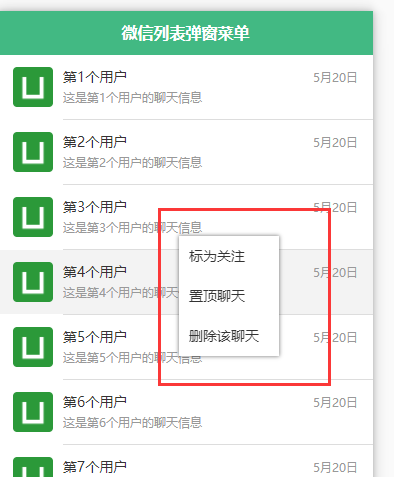
<template>
    <view>
        <view class="list">
            <view class="flex_col" @longpress="onLongPress" :class="{'active':pickerUserIndex==index}" @tap="listTap" v-for="(item,index) in userList"
             :key="index" :data-index="index">
                <image src="../../static/logo.png" mode="aspectFill"></image>
                <view class="flex_grow">
                    <view class="flex_col">
                        <view class="flex_grow">{{item.name}}</view>
                        <view class="time">{{item.time}}</view>
                    </view>
                    <view class="info">{{item.info}}</view>
                </view>
            </view>
        </view>
        <view class="shade" v-show="showShade" @tap="hidePop">
            <view class="pop" :style="popStyle" :class="{'show':showPop}">
                <view v-for="(item,index) in popButton" :key="index" @tap="pickerMenu" :data-index="index">{{item}}</view>
            </view>
        </view>
    </view>
</template>
<script>
    export default {
        data() {
            return {
                userList: [],
                /* 窗口尺寸 */
                winSize: {},
                /* 显示遮罩 */
                showShade: false,
                /* 显示操作弹窗 */
                showPop: false,
                /* 弹窗按钮列表 */
                popButton: ["标为关注", "置顶聊天", "删除该聊天"],
                /* 弹窗定位样式 */
                popStyle: "",
                /* 选择的用户下标 */
                pickerUserIndex: -1
            }
        },
        onLoad() {
            this.getListData();
            this.getWindowSize();

            // #ifdef H5
            document.onLong = function(e) {
                var e = e || window.event;
                e.preventDefault();
            };
            // #endif
        },
        methods: {
            /* 列表触摸事件 */
            listTap() {
                /* 因弹出遮罩问题,所以需要在遮罩弹出的情况下阻止列表事件的触发 */
                if (this.showShade) {
                    return;
                }

                console.log("列表触摸事件触发")
            },
            /* 获取列表数据 */
            getListData() {
                let list = [];
                for (let i = 0; i < 20; i++) {
                    list.push({
                        "name": `第${i+1}个用户`,
                        "time": '5月20日',
                        "info": `这是第${i+1}个用户的聊天信息`
                    })
                }
                this.userList = list;
            },
            /* 获取窗口尺寸 */
            getWindowSize() {
                uni.getSystemInfo({
                    success: (res) => {
                        this.winSize = {
                            "witdh": res.windowWidth,
                            "height": res.windowHeight
                        }
                    }
                })
            },
            /* 长按监听 */
            onLongPress(e) {
                let [touches, style, index] = [e.touches[0], "", e.currentTarget.dataset.index];

                /* 因 非H5端不兼容 style 属性绑定 Object ,所以拼接字符 */
                if (touches.clientY > (this.winSize.height / 2)) {
                    style = `bottom:${this.winSize.height-touches.clientY}px;`;
                } else {
                    style = `top:${touches.clientY}px;`;
                }
                if (touches.clientX > (this.winSize.witdh / 2)) {
                    style += `right:${this.winSize.witdh-touches.clientX}px`;
                } else {
                    style += `left:${touches.clientX}px`;
                }

                this.popStyle = style;
                this.pickerUserIndex = Number(index);
                this.showShade = true;
                this.$nextTick(() => {
                    setTimeout(() => {
                        this.showPop = true;
                    }, 10);
                });
            },
            /* 隐藏弹窗 */
            hidePop() {
                this.showPop = false;
                this.pickerUserIndex = -1;
                setTimeout(() => {
                    this.showShade = false;
                }, 250);
            },
            /* 选择菜单 */
            pickerMenu(e) {
                let index = Number(e.currentTarget.dataset.index);
                console.log(`第${this.pickerUserIndex+1}个用户,第${index+1}个按钮`);
                // 在这里开启你的代码秀

                uni.showToast({
                    title: `第${this.pickerUserIndex+1}个用户,第${index+1}个按钮`,
                    icon: "none",
                    mask: true,
                    duration: 600
                });

                /*
                 因为隐藏弹窗方法中会将当前选择的用户下标还原为-1,
                 如果行的菜单方法存在异步情况,请在隐藏之前将该值保存,或通过参数传入异步函数中
                 */
                this.hidePop();
            }
        }
    }
</script>
<style scoped lang="scss">
    /* 列式弹性盒子 */
    .flex_col {
        display: flex;
        flex-direction: row;
        flex-wrap: nowrap;
        justify-content: flex-start;
        align-items: center;
        align-content: center;
    }

    /* 弹性盒子弹性容器 */
    .flex_col .flex_grow {
        width: 0;
        -webkit-box-flex: 1;
        -ms-flex-positive: 1;
        flex-grow: 1;
    }

    .flex_row .flex_grow {
        -webkit-box-flex: 1;
        -ms-flex-positive: 1;
        flex-grow: 1;
    }

    /* 弹性盒子允许换行 */
    .flex_col.flex_wrap {
        -ms-flex-wrap: wrap;
        flex-wrap: wrap;
    }

    /* 列表 */
    .list {
        background-color: #fff;
        font-size: 28upx;
        color: #333;
        user-select: none;
        touch-callout: none;

        &>view {
            padding: 24upx 30upx;
            position: relative;

            &:active,
            &.active {
                background-color: #f3f3f3;
            }

            image {
                height: 80upx;
                width: 80upx;
                border-radius: 4px;
                margin-right: 20upx;
            }

            &>view {
                line-height: 40upx;

                .time,
                .info {
                    color: #999;
                    font-size: 24upx;
                }

                .time {
                    width: 150upx;
                    text-align: right;
                }

                .info {
                    overflow: hidden;
                    text-overflow: ellipsis;
                    white-space: nowrap;
                }
            }
        }

        &>view:not(:first-child) {
            margin-top: 1px;

            &::after {
                content: '';
                display: block;
                height: 0;
                border-top: #CCC solid 1px;
                width: 620upx;
                position: absolute;
                top: -1px;
                right: 0;
                transform:scaleY(0.5);    /* 1px像素 */
            }
        }
    }

    /* 遮罩 */
    .shade {
        position: fixed;
        z-index: 100;
        top: 0;
        right: 0;
        bottom: 0;
        left: 0;
        -webkit-touch-callout: none;

        .pop {
            position: fixed;
            z-index: 101;
            width: 200upx;
            box-sizing: border-box;
            font-size: 28upx;
            text-align: left;
            color: #333;
            background-color: #fff;
            box-shadow: 0 0 5px rgba(0, 0, 0, 0.5);
            line-height: 80upx;
            transition: transform 0.15s ease-in-out 0s;
            user-select: none;
            -webkit-touch-callout: none;
            transform: scale(0, 0);

            &.show {
                transform: scale(1, 1);
            }

            &>view {
                padding: 0 20upx;
                overflow: hidden;
                text-overflow: ellipsis;
                white-space: nowrap;
                user-select: none;
                -webkit-touch-callout: none;

                &:active {
                    background-color: #f3f3f3;
                }
            }
        }
    }
</style>



 發表於 2020-6-30 08:44:00