1. 安装CertBot
$ sudo yum install certbot python2-certbot-nginx
参考官方网址:https://certbot.eff.org/lets-encrypt/centosrhel7-nginx
2. 手动模式
2.1 输入命令:
$ certbot certonly --preferred-challenges dns --manual -d *.cncaq.com --server https://acme-v02.api.letsencrypt.org/directory
参数说明:
- --preferred-challenges dns: 认证方式选择DNS, 泛域名支持DNS
- --manual: 手动模式, 这里为了简单就使用手动认证了, 下面会说自动模式的使用.
- -d *.cncaq.com: 就是要申请的泛域名了
- --server https://acme-v02.api.letsencrypt.org/directory: 泛域名证书是新功能, 如果要使用就得加上这个参数
如果出现下列错误:
ImportError: cannot import name UnrewindableBodyError
pkg_resources.DistributionNotFound: The 'urllib3<1.23,>=1.21.1' distribution was not found and is required by requests
ImportError: 'pyOpenSSL' module missing required functionality. Try upgrading to v0.14 or newer.
则需要执行下列命令(参考https://github.com/certbot/certbot/issues/5534):
pip install --upgrade --force-reinstall 'requests==2.6.0'
2.2 敲下回车:
-------------------------------------------------------------------------------
NOTE: The IP of this machine will be publicly logged as having requested this
certificate. If you're running certbot in manual mode on a machine that is not
your server, please ensure you're okay with that.

Are you OK with your IP being logged?
-------------------------------------------------------------------------------
(Y)es/(N)o: y
2.3 再敲下y:
-------------------------------------------------------------------------------
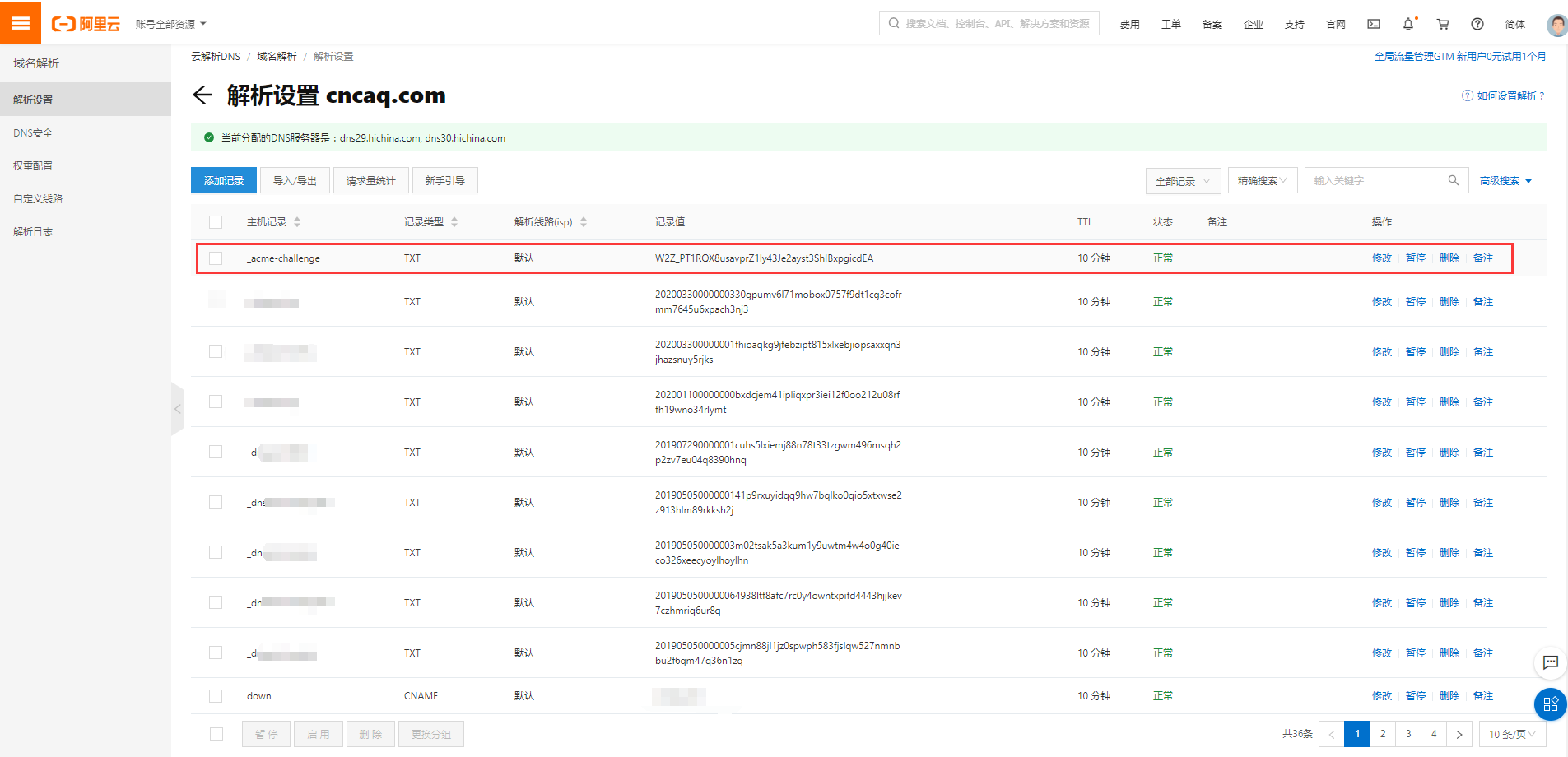
Please deploy a DNS TXT record under the name
_acme-challenge.cncaq.com with the following value:

W2Z_PT1RQX8usavprZ1ly43Je2ayst3ShIBxpgicdEA

Before continuing, verify the record is deployed.
-------------------------------------------------------------------------------
2.4 在阿里云控制台的域名解析服务中添加一个泛解析:
2.5 按下回车
Waiting for verification...
Cleaning up challenges

IMPORTANT NOTES:
 - Congratulations! Your certificate and chain have been saved at:
   /etc/letsencrypt/live/cncaq.com/fullchain.pem
   Your key file has been saved at:
   /etc/letsencrypt/live/cncaq.com/privkey.pem
   Your cert will expire on 2020-07-16. To obtain a new or tweaked
   version of this certificate in the future, simply run certbot
   again. To non-interactively renew *all* of your certificates, run
   "certbot renew"
 - If you like Certbot, please consider supporting our work by:

   Donating to ISRG / Let's Encrypt:   https://letsencrypt.org/donate
   Donating to EFF:                    https://eff.org/donate-le
https://www.jianshu.com/p/1eb7060c5ede
https://blog.csdn.net/wc810267705/article/details/79917688
https://www.jianshu.com/p/43e74cddba45
https://www.jianshu.com/p/2c1de124d994
作者:lee2guang
出处:https://www.cnblogs.com/lee2guang/
本文版权归作者和博客园共有,欢迎转载,但未经作者同意必须保留此段声明,且在文章页面明显位置给出原文连接,否则保留追究法律责任的权利.
来源:https://www.cnblogs.com/lee2guang/p/12736355.html |



 發表於 2020-4-20 10:39:00