宝塔配置域名反向代理到ip+端口的接口地址
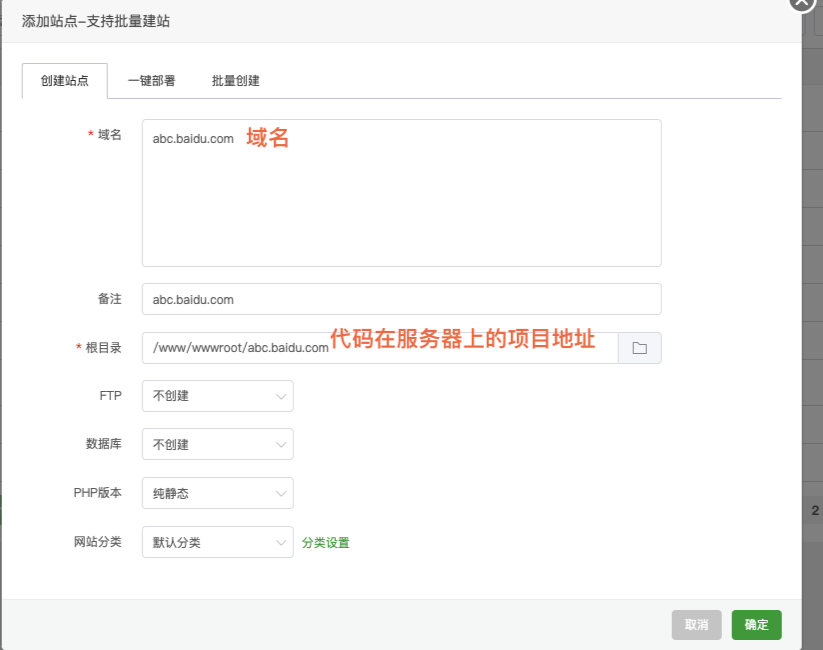
添加站点
配置域名
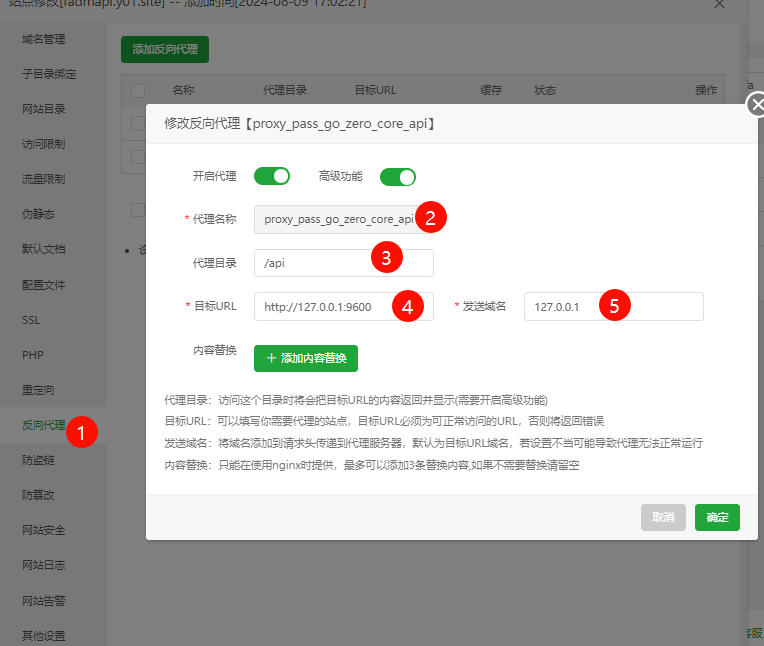
配置反向代理
- 方法一:
1.1 添加返回代理
1.2 添加 目标URL 和 发送域名
#PROXY-START/api

location ^~ /api/
{
    proxy_pass http://127.0.0.1:8888/;
    proxy_set_header Host 127.0.0.1;
    proxy_set_header X-Real-IP $remote_addr;
    proxy_set_header X-Forwarded-For $proxy_add_x_forwarded_for;
    proxy_set_header REMOTE-HOST $remote_addr;
    proxy_set_header Upgrade $http_upgrade;
    proxy_set_header Connection $connection_upgrade;
    proxy_http_version 1.1;
    # proxy_hide_header Upgrade;

    add_header X-Cache $upstream_cache_status;
    #Set Nginx Cache

    set $static_filejElzhH2c 0;
    if ( $uri ~* "\.(gif|png|jpg|css|js|woff|woff2)$" )
    {
        set $static_filejElzhH2c 1;
        expires 1m;
    }
    if ( $static_filejElzhH2c = 0 )
    {
        add_header Cache-Control no-cache;
    }
}
#PROXY-END/
- 方法二:
目标URL写服务器的本地ip地址127.0.0.1 代理到9600端口上 发关域名也写 127.0.0.1 或者$host
确定后,配置文件会保存到下面目录中
/www/server/panel/vhost/nginx/proxy/fadmapi.y01.site/
进入目录查看配置文件
[root@test-server fadmapi.y01.site]# cd /www/server/panel/vhost/nginx/proxy/fadmapi.y01.site/

[root@test-server fadmapi.y01.site]# ls
0971eda6fecccac13f490505407b6d3b_fadmapi.y01.site.conf

[root@test-server fadmapi.y01.site]# cat 0971eda6fecccac13f490505407b6d3b_fadmapi.y01.site.conf

#PROXY-START/

location ^~ /api
{
    proxy_pass http://127.0.0.1:9600;
    proxy_set_header Host 127.0.0.1;
    proxy_set_header X-Real-IP $remote_addr;
    proxy_set_header X-Forwarded-For $proxy_add_x_forwarded_for;
    proxy_set_header REMOTE-HOST $remote_addr;
    proxy_set_header Upgrade $http_upgrade;
    proxy_set_header Connection $connection_upgrade;
    proxy_http_version 1.1;
    # proxy_hide_header Upgrade;

    add_header X-Cache $upstream_cache_status;
    #Set Nginx Cache

    set $static_filewj56IvHT 0;
    if ( $uri ~* "\.(gif|png|jpg|css|js|woff|woff2)$" )
    {
        set $static_filewj56IvHT 1;
        expires 1m;
    }
    if ( $static_filewj56IvHT = 0 )
    {
        add_header Cache-Control no-cache;
    }
}
注意 : proxy_pass http://127.0.0.1:9600; 后台别加/号
此时访问/api开头的接口就会代理到 http://127.0.0.1:9600端口上
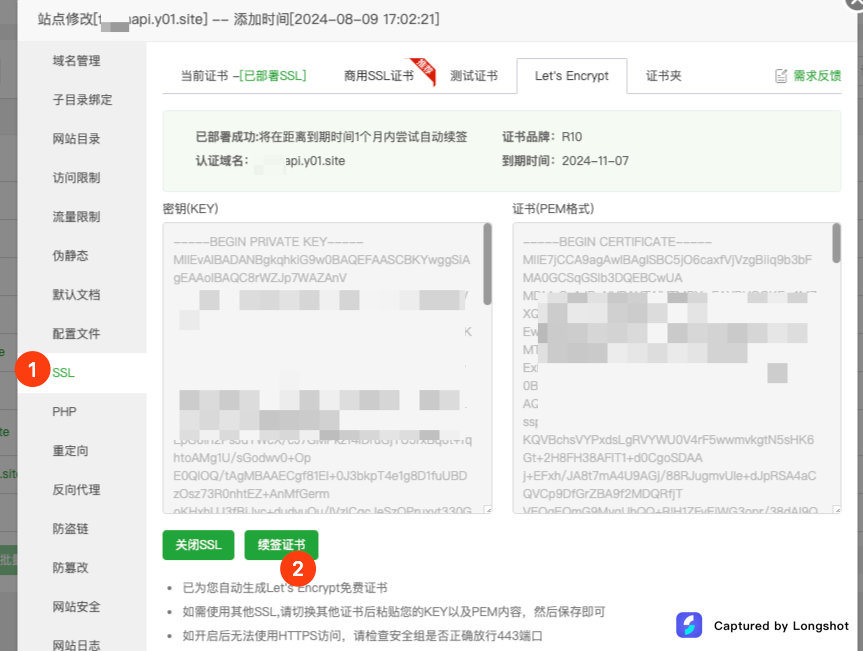
申请https证书
访问接口
https://abc.baidu.com/erpapi3/xxx
当访问接口是 /erpapi3 开的就会转发到 http://127.0.0.1:8889 端口上
https://abc.baidu.com/api/xxx
当访问接口是 /api 开的就会转发到 http://127.0.0.1:9600 端口上
[Haima的博客]
http://www.cnblogs.com/haima/
来源:https://www.cnblogs.com/haima/p/18351100 |



 發表於 2024-8-9 17:20:00