|
uni-app在本地访问接口跨域,可进行如下配置:
需要在manifest.json的源码中找到h5,添加以下代码:
"devServer" : {
            "proxy" : {
                "/dpc" : {
                    "target" : "****", //域名
                    "changeOrigin" : true,
                    "secure" : false,
                    "pathRewrite" : {
                        "^/dpc" : ""
                    }
                }
            },
            "https" : true
        },
其中
target接口访问的域名
pathRewrite为接口重定向
https  是否是https的

然后在请求接口的时候需要将/dcp/,重定向的路径加到访问接口的域名中;

如下https.js:
const baseUrl = 'https://***';  //接口请求域名
const httpRequest = (opts, data) => {
    var httpDefaultOpts = {
        url: "/dpc/"+opts.url, //本地访问时开启
        // url: baseUrl+opts.url, //线上环境中开启
        data: data,
        beforeSend :function(xmlHttp){
            xmlHttp.setRequestHeader("If-Modified-Since","0");
            xmlHttp.setRequestHeader("Cache-Control","no-cache");
        },
        method: opts.method,
        header: opts.method == 'GET' ? {
        'X-Requested-With': 'XMLHttpRequest',
        "Accept": "application/json",
        "Content-Type": "application/json; charset=UTF-8"
    } : {
       'content-type': 'application/x-www-form-urlencoded'
    },
        dataType: 'json',
    }
    var promise = new Promise(function(resolve, reject) {
        uni.request(httpDefaultOpts).then(
            (res) => {
                resolve(res[1])
            }
        ).catch(
            (response) => {
                reject(response)
            }
        )
    })
    return promise
};
export default {
    baseUrl,
    httpRequest,
}
在本地浏览器中,接口地址为 url: "/dpc/"+opts.url,
在线上访问时,需要将接口地址切换回来 url: baseUrl+opts.url,
https.js在main.js中全局配置后就可以在整个项目中使用;

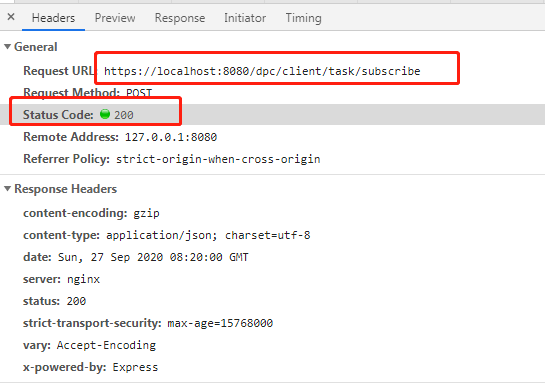
如下图,访问出的接口地址是
请求地址会变成 https://localhost:8080/dpc/*****
而请求的状态是成功;
至此成功解决uni-app本地接口访问跨域的问题;
啦
啦啦
啦啦啦
啦啦啦啦啦
有问题可以留言
来源:https://www.cnblogs.com/yeziyou/p/13740269.html |



 發表於 2020-9-27 16:23:00