|
目前2023/3/16日测试, 可以正常使用
环境:
uni-app中Vue版本是3.0
Towxml版本:3.0
Towxml 是一个让小程序(微信/QQ)可以解析Markdown、HTML的解析库。能够使小程序完美解析Markdown内容。
github地址:https://github.com/sbfkcel/towxml
下面介绍如何使用Towxml:
第一步:首先,需要构建Towxml(常规步骤,按照操作步骤执行就是了)
- 克隆项目到本地
- git clone https://github.com/sbfkcel/towxml.git
- 安装构建依赖
- npm install 或 yarn
- 编辑配置文件towxml/config.js
- 根据自行需要,仅保留你需要的功能即可(配置中有详细注释)
- 运行 npm run build 或 yarn run build即可
- (重要)修改 towxml/decode.json 里所有/towxml开头的绝对路径为相对路径。例如 “decode”: “/towxml/decode”, 改成 “decode”: “./decode”,
第二步:将构建好的towxml复制到项目中
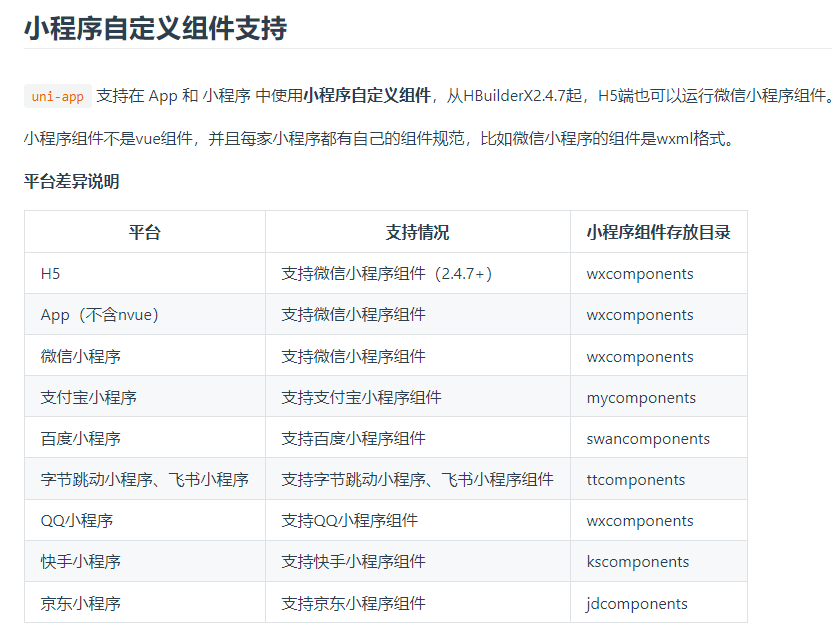
首先在项目下新建wxcomponents目录,名字不能错,这个是“乌龟的屁股”。
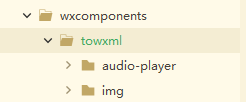
将第一步构建的Towxml目录复制到wxcomponents中,目录结构如下
.
第三步:开始使用
1、在main.js中进入Towxml
1 //新增一
2 const towxml = require("./wxcomponents/towxml/index")  //这里最后一定是index,不要写成了towxml
3 //新增二
4 app.config.globalProperties.$towxml = towxml
完整代码如下:
 1 app.$mount()
 2 // #endif
 3 // #ifdef VUE3
 4 import { createSSRApp } from 'vue'
 5 import App from './App.vue'
 6 //新增一
 7 const towxml = require("./wxcomponents/towxml/index")
 8 export function createApp() {
 9   const app = createSSRApp(App)
10   //新增二
11   app.config.globalProperties.$towxml = towxml
12   return {
13     app
14   }
15 }
16 // #endif
2、在页面中引入组件
在pages.json中,在指定页面新增组件:
1 "usingComponents": {
2   "towxml": "/wxcomponents/towxml/towxml"
3 }
完整使用如下:
 1 {
 2         "path": "pages/home/home",
 3         "style": {
 4             "navigationBarTitleText": "首页",
 5             "enablePullDownRefresh": false,
 6             "usingComponents": {
 7                 "towxml": "/wxcomponents/towxml/towxml"
 8             }
 9         }
10     },
3、在页面插入组件
1 <template>
2     <view>
3         <towxml :nodes="article"></towxml>
4     </view>
5 </template>
4、解析内容
 1 <script>
 2     export default {
 3         data() {
 4             return {
 5                 article: {}
 6             };
 7         },
 8         onLoad() {
 9             uni.showLoading({
10                 title:"加载数据中...."
11             })
12             uni.request({
13                 url: 'https://www.vvadd.com/wxml_demo/demo.txt?v=2', //仅为示例,并非真实接口地址。
14                 data: {},
15                 header: {},
16                 success: (res) => {
17                     uni.showToast({
18                         title:"获取数据完成"
19                     })
20                     this.parseMarkdown(res.data.data);
21                 },
22                 complete() {
23                     uni.hideLoading()
24                 }
25             });
26         },
27         methods: {
28             parseMarkdown(content) {
29                 let result = this.$towxml(content,
30                     'markdown', {
31                         // base: 'https://xxx.com', // 相对资源的base路径
32                         theme: 'dark', // 主题,默认`light`
33                         events: { // 为元素绑定的事件方法
34                             tap: (e) => {
35                                 console.log('tap', e);
36                             }
37                         }
38                     });
39                 // 更新解析数据
40                 this.article = result
41             }
42         }
43     }
44 </script>
以上就是towxml的使用方法
注意:如果上面的步骤都没有问题,但是解析出来没有样式,只需要将项目重新运行下即可.
转自:
https://blog.hi917.com/detail/559.html
来源:https://www.cnblogs.com/chuan2021/p/17223663.html |



 發表於 2023-3-16 17:51:00