globalStyle全局配置
pages.json是项目的配置,而这个配置文件里的globalStyle选项是项目的全局样式配置
用于设置应用的状态栏、导航条、标题、窗口背景色等。详细文档
| 属性 |
类型 |
默认值 |
描述 |
| navigationBarBackgroundColor |
HexColor |
#F7F7F7 |
导航栏背景颜色(同状态栏背景色) |
| navigationBarTextStyle |
String |
white |
导航栏标题颜色及状态栏前景颜色,仅支持 black/white |
| navigationBarTitleText |
String |
|
导航栏标题文字内容,注意页面级配置会覆盖全局配置 |
| backgroundColor |
HexColor |
#ffffff |
窗口的背景色 |
| backgroundTextStyle |
String |
dark |
下拉 loading 的样式,仅支持 dark / light |
| enablePullDownRefresh |
Boolean |
false |
是否开启下拉刷新,详见页面生命周期。 |
| onReachBottomDistance |
Number |
50 |
页面上拉触底事件触发时距页面底部距离,单位只支持px,详见页面生命周期 |
pages页面配置
pages.json是项目的配置,而这个配置文件里的pages选项是项目的全局样式配置
创建新的message页面
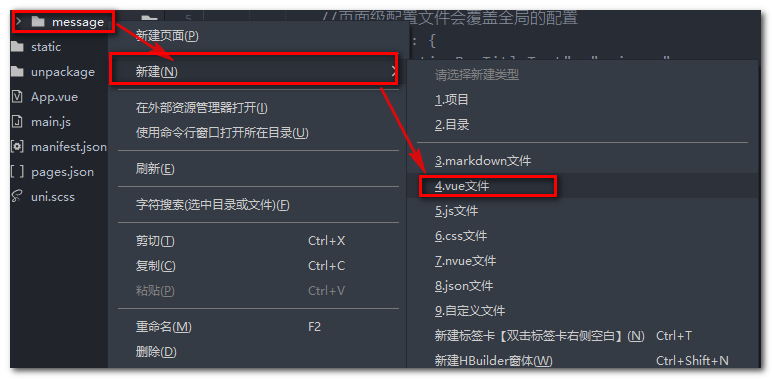
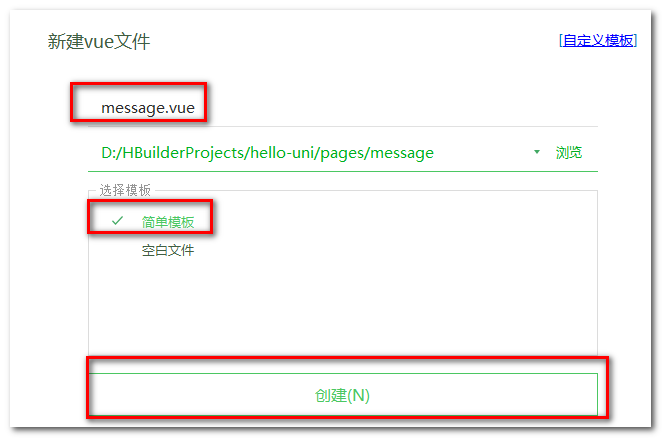
右键pages新建message目录,在message目录下右键新建.vue文件,并选择基本模板
创建完之后内容如下
<template>
</template>

<script>
</script>

<style>
</style>
随便写点儿东西
<template>
	<view>
		hello-uni
	</view>
</template>

<script>
</script>

<style>
</style>
通过pages来配置页面
| 属性 |
类型 |
默认值 |
描述 |
| path |
String |
|
配置页面路径 |
| style |
Object |
|
配置页面窗口表现,配置项参考 pageStyle |
pages数组数组中第一项表示应用启动页
"pages": [
		{
			"path":"pages/message/message"
		},
		{
			"path": "pages/index/index",
			"style": {
				"navigationBarTitleText": "uni-app"
			}
		}
	]
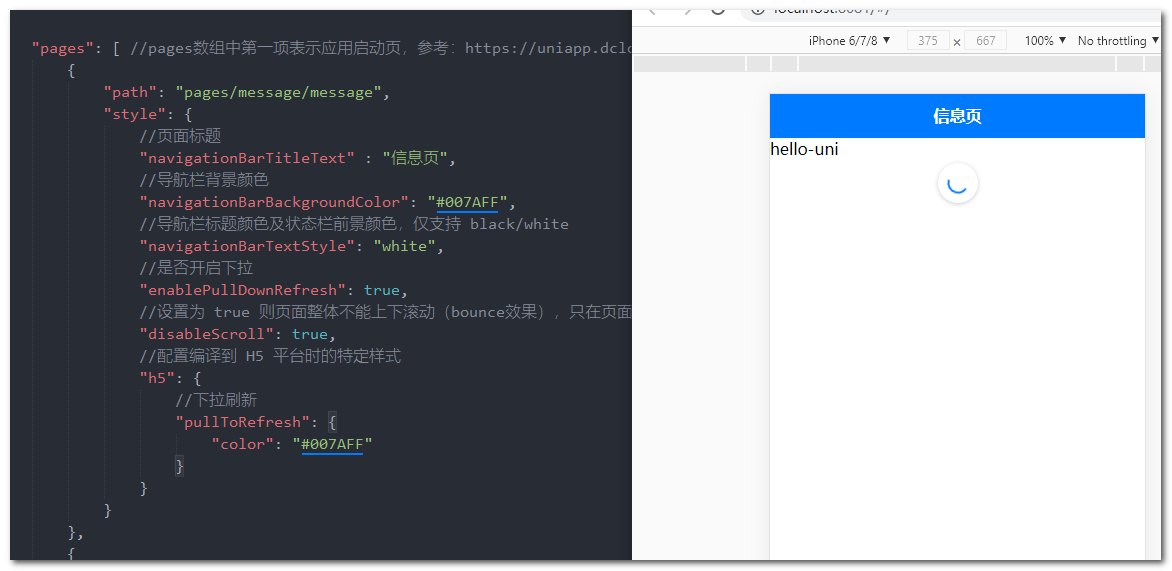
例:通过style修改页面的标题和导航栏背景色,并且设置h5下拉刷新的特有样式
"pages": [ //pages数组中第一项表示应用启动页,参考:https://uniapp.dcloud.io/collocation/pages
		{
			"path": "pages/message/message",
			"style": {
				//页面标题
				"navigationBarTitleText" : "信息页",
				//导航栏背景颜色
				"navigationBarBackgroundColor": "#007AFF",
				//导航栏标题颜色及状态栏前景颜色,仅支持 black/white
				"navigationBarTextStyle": "white",
				//是否开启下拉
				"enablePullDownRefresh": true,
				//设置为 true 则页面整体不能上下滚动(bounce效果),只在页面配置中有效,在globalStyle中设置无效
				"disableScroll": true,
				//配置编译到 H5 平台时的特定样式
				"h5": {
					//下拉刷新
					"pullToRefresh": {
						"color": "#007AFF"
					}
				}
			}
		},
		{
			"path": "pages/index/index",
			//页面级配置文件会覆盖全局的配置
			"style": {
				"navigationBarTitleText": "uni-app"
			}
		}
	],
配置tabbar
https://uniapp.dcloud.io/collocation/pages?id=tabbar
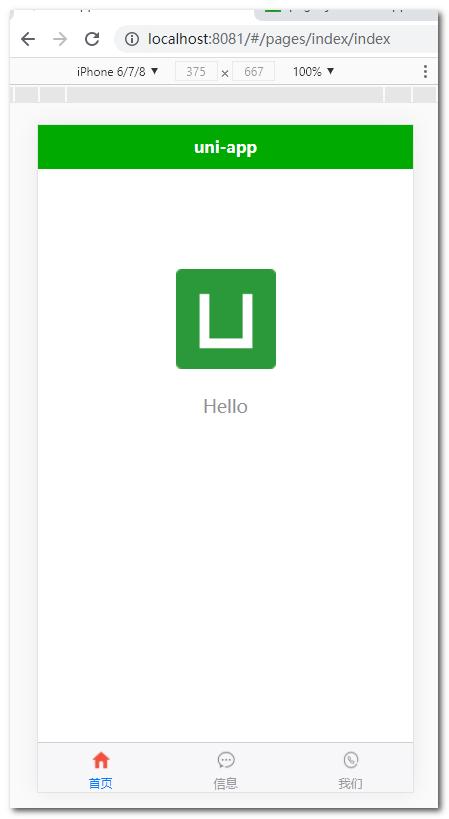
如果应用是一个多 tab 应用,可以通过 tabBar 配置项指定一级导航栏,以及 tab 切换时显示的对应页。
在 pages.json 中提供 tabBar 配置,不仅仅是为了方便快速开发导航,更重要的是在App和小程序端提升性能。在这两个平台,底层原生引擎在启动时无需等待js引擎初始化,即可直接读取 pages.json 中配置的 tabBar 信息,渲染原生tab。
Tips
- 当设置 position 为 top 时,将不会显示 icon
- tabBar 中的 list 是一个数组,只能配置最少2个、最多5个 tab,tab 按数组的顺序排序。
- tabbar 切换第一次加载时可能渲染不及时,可以在每个tabbar页面的onLoad生命周期里先弹出一个等待雪花(hello uni-app使用了此方式)
- tabbar 的页面展现过一次后就保留在内存中,再次切换 tabbar 页面,只会触发每个页面的onShow,不会再触发onLoad。
- 顶部的 tabbar 目前仅微信小程序上支持。需要用到顶部选项卡的话,建议不使用 tabbar 的顶部设置,而是自己做顶部选项卡,可参考 hello uni-app->模板->顶部选项卡。
属性说明:
| 属性 |
类型 |
必填 |
默认值 |
描述 |
平台差异说明 |
| color |
HexColor |
是 |
|
tab 上的文字默认颜色 |
|
| selectedColor |
HexColor |
是 |
|
tab 上的文字选中时的颜色 |
|
| backgroundColor |
HexColor |
是 |
|
tab 的背景色 |
|
| borderStyle |
String |
否 |
black |
tabbar 上边框的颜色,可选值 black/white |
App 2.3.4+ 支持其他颜色值、H5 3.0.0+ |
| blurEffect |
String |
否 |
none |
iOS 高斯模糊效果,可选值 dark/extralight/light/none(参考:使用说明) |
App 2.4.0+ 支持、H5 3.0.0+(只有最新版浏览器才支持) |
| list |
Array |
是 |
|
tab 的列表,详见 list 属性说明,最少2个、最多5个 tab |
|
| position |
String |
否 |
bottom |
可选值 bottom、top |
top 值仅微信小程序支持 |
| fontSize |
String |
否 |
10px |
文字默认大小 |
App 2.3.4+、H5 3.0.0+ |
| iconWidth |
String |
否 |
24px |
图标默认宽度(高度等比例缩放) |
App 2.3.4+、H5 3.0.0+ |
| spacing |
String |
否 |
3px |
图标和文字的间距 |
App 2.3.4+、H5 3.0.0+ |
| height |
String |
否 |
50px |
tabBar 默认高度 |
App 2.3.4+、H5 3.0.0+ |
| midButton |
Object |
否 |
|
中间按钮 仅在 list 项为偶数时有效 |
App 2.3.4+、H5 3.0.0+ |
其中 list 接收一个数组,数组中的每个项都是一个对象,其属性值如下:
| 属性 |
类型 |
必填 |
说明 |
| pagePath |
String |
是 |
页面路径,必须在 pages 中先定义 |
| text |
String |
是 |
tab 上按钮文字,在 App 和 H5 平台为非必填。例如中间可放一个没有文字的+号图标 |
| iconPath |
String |
否 |
图片路径,icon 大小限制为40kb,建议尺寸为 81px * 81px,当 postion 为 top 时,此参数无效,不支持网络图片,不支持字体图标 |
| selectedIconPath |
String |
否 |
选中时的图片路径,icon 大小限制为40kb,建议尺寸为 81px * 81px ,当 postion 为 top 时,此参数无效 |
示例:基本使用
pagePath页面路径,必须在 pages 选项中先定义path
pages
"pages": [ //pages数组中第一项表示应用启动页,参考:https://uniapp.dcloud.io/collocation/pages
		{
			"path": "pages/message/message",
		},
		{
			"path": "pages/index/index",
			//页面级配置文件会覆盖全局的配置
			"style": {
				"navigationBarTitleText": "uni-app"
			}
		},
		{
			"path": "pages/contact/contact"
		}
	],
tabBar
"tabBar": {
		"list": [{
				"text": "首页",
				"pagePath": "pages/index/index",
				"iconPath": "static/tabs/home.png",
				"selectedIconPath": "static/tabs/home-active.png"
			},
			{
				"text": "信息",
				"pagePath": "pages/message/message",
				"iconPath": "static/tabs/message.png",
				"selectedIconPath": "static/tabs/message-active.png"
			},
			{
				"text": "我们",
				"pagePath": "pages/contact/contact",
				"iconPath": "static/tabs/contact.png",
				"selectedIconPath": "static/tabs/contact-active.png"
			}
		]
	},
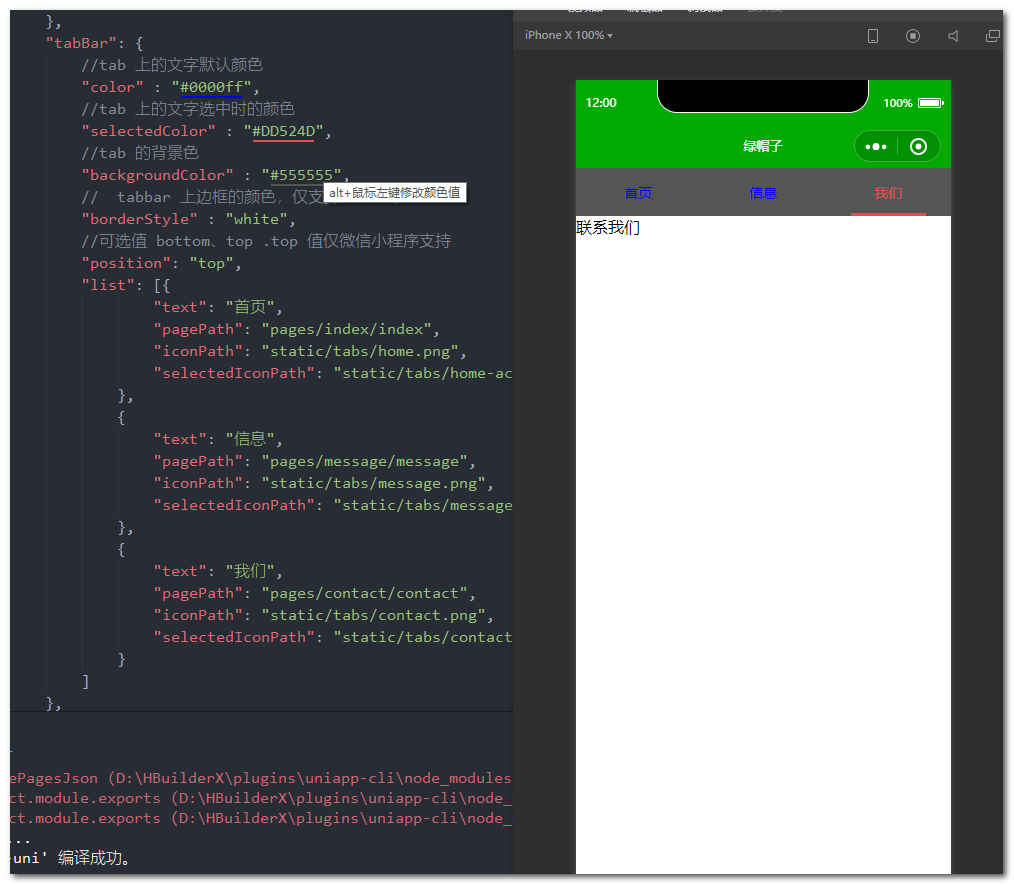
示例:tabbar其他属性的使用
"tabBar": {
		//tab 上的文字默认颜色
		"color" : "#0000ff",
		//tab 上的文字选中时的颜色
		"selectedColor" : "#DD524D",
		//tab 的背景色
		"backgroundColor" : "#555555",
		//	tabbar 上边框的颜色,仅支持 black/white
		"borderStyle" : "white",
		//可选值 bottom、top .top 值仅微信小程序支持
		"position": "top",
		"list": [{
				"text": "首页",
				"pagePath": "pages/index/index",
				"iconPath": "static/tabs/home.png",
				"selectedIconPath": "static/tabs/home-active.png"
			},
			{
				"text": "信息",
				"pagePath": "pages/message/message",
				"iconPath": "static/tabs/message.png",
				"selectedIconPath": "static/tabs/message-active.png"
			},
			{
				"text": "我们",
				"pagePath": "pages/contact/contact",
				"iconPath": "static/tabs/contact.png",
				"selectedIconPath": "static/tabs/contact-active.png"
			}
		]
	},
condition启动模式配置
https://uniapp.dcloud.io/collocation/pages?id=condition
启动模式配置,仅开发期间生效,用于模拟直达页面的场景,如:小程序转发后,用户点击所打开的页面。
属性说明:
| 属性 |
类型 |
是否必填 |
描述 |
| current |
Number |
是 |
当前激活的模式,list节点的索引值 |
| list |
Array |
是 |
启动模式列表 |
list说明:
| 属性 |
类型 |
是否必填 |
描述 |
| name |
String |
是 |
启动模式名称 |
| path |
String |
是 |
启动页面路径 |
| query |
String |
否 |
启动参数,可在页面的 onLoad 函数里获得 |
例:微信小程序模拟用户点击进入详情页
创建详情页
<template>
	<view>这是详情页</view>
</template>

<script>
</script>

<style>
</style>
配置
加入到pages里,配置页面路径
{
	"path": "pages/detail/detail"
}
condition配置
"condition": { //模式配置,仅开发期间生效
		"current": 0, //当前激活的模式(list 的索引项)
		"list": [{
			"name": "详情页", //模式名称
			"path": "pages/detail/detail", //启动页面,必选
			"query": "id=50" //启动参数,在页面的onLoad函数里面得到
		}]
	}
访问
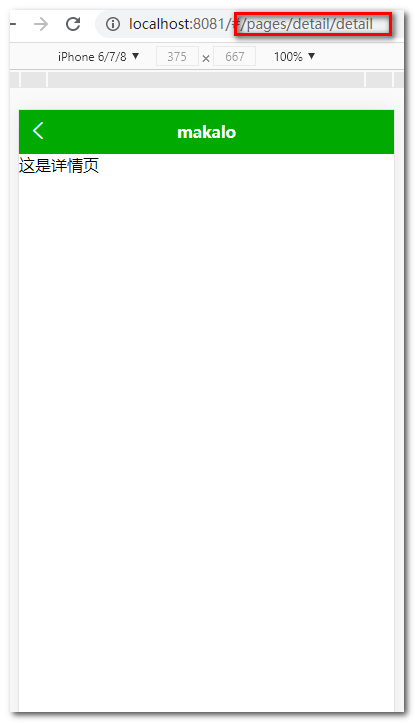
对于h5页面来说,只需要访问pages里面配置的path路径即可
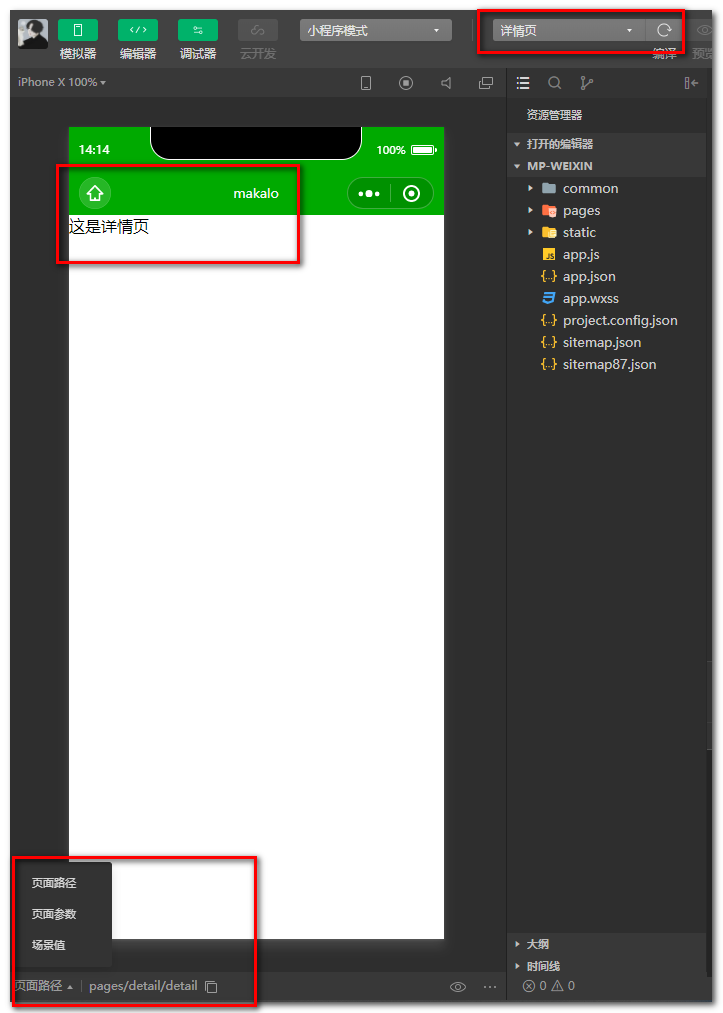
但是微信小程序不能输路径吧,这时候condition的作用就出来了,你打开调试的项目,如果你配置了condition你会发现,多了个你配置的页面
点击进入
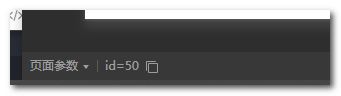
点击页面参数
这样我们就可以方便的进行调式了
来源:https://www.cnblogs.com/makalochen/p/14537337.html |



 發表於 2021-3-15 14:18:00