|
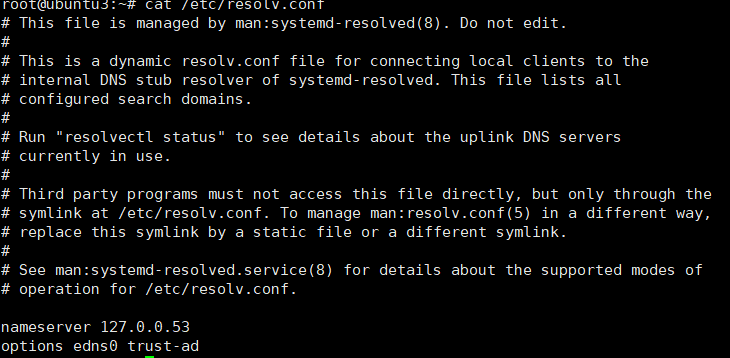
ubuntu在域名解析时,最直接使用的是/etc/resolve.conf文件,它是/run/systemd/resolve/
resolve.conf的软链接,而对于刚装完的ubuntu系统,该文件的内容如下:
This file is managed by man:systemd-resolved(8). Do not edit.
This is a dynamic resolv.conf file for connecting local clients to the
internal DNS stub resolver of systemd-resolved. This file lists all
configured search domains.
Run "resolvectl status" to see details about the uplink DNS servers
currently in use.
Third party programs must not access this file directly, but only through the
symlink at /etc/resolv.conf. To manage man:resolv.conf(5) in a different way,
replace this symlink by a static file or a different symlink.
See man:systemd-resolved.service(8) for details about the supported modes of
operation for /etc/resolv.conf.
nameserver 127.0.0.53
options edns0 trust-ad
直接修改/etc/resolv.conf中的nameserver 配置,例如nameserver 192.168.4.2,修改完成后,重启服务会重新还原文件。
解决:
- 修改/etc/systemd/resolved.conf,例如:
[Resolve]
DNS=8.8.8.8 114.114.114.114 192.168.4.2
2.重启域名解析服务
systemctl restart systemd-resolved
systemctl enable systemd-resolved
3.备份当前的/etc/resolve.conf,并重新设置/run/systemd/resolve/resolv.conf 到/etc/resolve.conf的软链接
mv /etc/resolv.conf /etc/resolv.conf.bak
ln -s /run/systemd/resolve/resolv.conf /etc/resolv.conf
4.查看验证,
cat /etc/resolv.conf
重启服务再查看。ping www.baidu.com可以ping通。
来源:https://www.cnblogs.com/zhaichao93/p/16224163.html |



 發表於 2022-5-5 11:39:00