|
安装mysql5.6
在ubuntu上安装mysql5.6的版本
1.添加mysql5.6的源
sudo apt-get install software-properties-common
sudo add-apt-repository 'deb http://archive.ubuntu.com/ubuntu trusty universe'
2.安装mysql5.6
sudo apt-get update
sudo apt install mysql-server-5.6
sudo apt install mysql-client-5.6
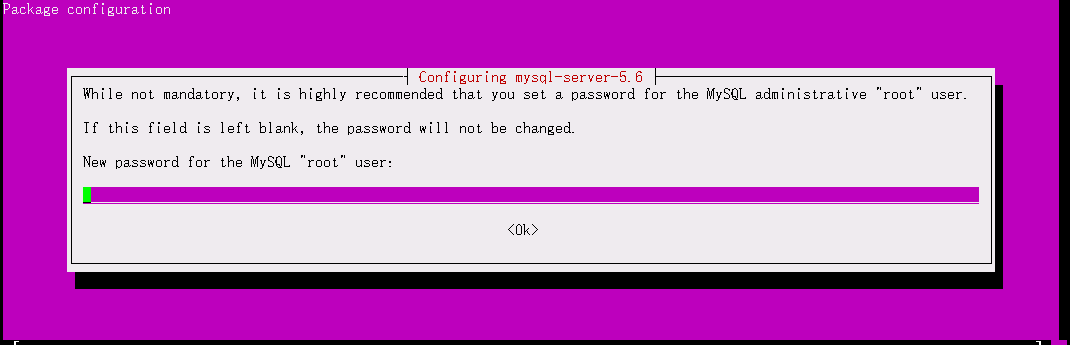
安装mysql server的时候需要手动配置root密码:
3.设置开机自启
update-rc.d mysql defaults
4.创建或修改 my.cnf 文件
在/etc/mysql/目录下添加 my.cnf文件
sudo vim /etc/mysql/my.cnf
复制下面的内容,并保存文件
# The MySQL database server configuration file.
#
# You can copy this to one of:
# - "/etc/mysql/my.cnf" to set global options,
# - "~/.my.cnf" to set user-specific options.
#
# One can use all long options that the program supports.
# Run program with --help to get a list of available options and with
# --print-defaults to see which it would actually understand and use.
#
# For explanations see
# http://dev.mysql.com/doc/mysql/en/server-system-variables.html

# This will be passed to all mysql clients
# It has been reported that passwords should be enclosed with ticks/quotes
# escpecially if they contain "#" chars...
# Remember to edit /etc/mysql/debian.cnf when changing the socket location.

# Here is entries for some specific programs
# The following values assume you have at least 32M ram

!includedir /etc/mysql/conf.d/
# add here
[mysqld]
default-time_zone = '+8:00'
lower_case_table_names=1
5.重启Mysql服务
sudo service mysql restart
启动/停止 Mysql
> sudo /etc/init.d/mysql start

> sudo /etc/init.d/mysql stop
修改root密码
sudo /usr/local/mysql/bin/mysqladmin -u root password abc
原文链接:https://blog.csdn.net/qq_36641556/article/details/80921737
专业从事搬砖多年,还是在继续搬砖中,厚积薄发~
来源:https://www.cnblogs.com/Crazy-Liu/p/12510551.html |



 發表於 2020-3-17 14:33:00