1. 基础操作与系统基本配置
|
操作与指令
|
CentOS
|
麒麟
|
Ubuntu
|
|
版本与内核
|
CentOS 7.9 内核:3.10.0
|
Kylin v10 sp3 内核:4.19.90
|
Ubuntu 20.04 lts 内核:5.4.0(20.04 ) 5.15(22.04 )
|
|
密码要求
|
随意
|
8位并且大写,小写,数字,特殊符号 4种中3种
|
随意
|
|
登录用户
|
root
|
root
|
普通用户,通过sudo su -切换为root.
|
|
有区别的命令
|
vi/vim 2个命令在/bin/
|
vi/vim 2个命令在/bin/
|
vi/vim是一个命令vim.basic
|
|
修改查看主机名
|
hostnamectl/hostname
|
hostnamectl/hostname
|
hostnamectl/hostname
|
|
登录后欢迎信息
|
/etc/motd
|
/etc/motd
|
/etc/motd
|
|
开机自启动文件
|
软连接:/etc/rc.local
原始:/etc/rc.d/rc.local
|
软连接:/etc/rc.local
原始:/etc/rc.d/rc.local
|
/etc/rc.local 原始文件,使用前记得检查权限
|
|
用户登录信息日志
|
/var/log/secure
|
/var/log/secure
|
/var/log/auth.log
|
|
系统默认日志/服务日志
|
/var/log/messages
|
/var/log/messages
|
/var/log/syslog
|
|
添加用户
|
useradd/adduser是1个人命令,软连接关系
|
useradd/adduser是1个人命令,软连接关系
|
2个命令
useradd需要指定命令解释器为
-s /bin/bash
adduser 交互式
|
|
设置密码(非交互)
|
passwd 有--stdin选项
|
passwd 有--stdin选项
|
passwd 没有 chpasswd命令修改
|
|
sudo
|
visudo
/etc/sudoers
|
visudo
/etc/sudoers
|
visudo 默认是nano编辑器
修改/etc/sudoers,在Defaults后面添加
Defaults editor=/usr/bin/vim, env_editor
|
|
/tmp/目录
|
默认属于根分区
|
独立分区,tmpfs类型,断电后内容丢失,大小较小,一般是内存的一半
|
默认属于根分区
|
|
救援模式
|
正常进入即可
|
grub菜单密码root Kylin123123
|
直接使用
|
|
selinux
|
开启
|
关闭
|
无
|
|
防火墙
|
firewalld
|
firewalld
|
ufw
|
|
时间修改
|
随意修改
|
随意修改
|
修改后自动修改时间
|
|
zlib
|
|
1.2.11
|
|
|
openssl
|
|
1.1.1f
|
|
|
openssh
|
|
8.2p1
|
|
|
glibc
|
2.28
|
|
|
2. 用户管理
2.1. 麒麟添加用户删除后无法重新创建相同uid的用户
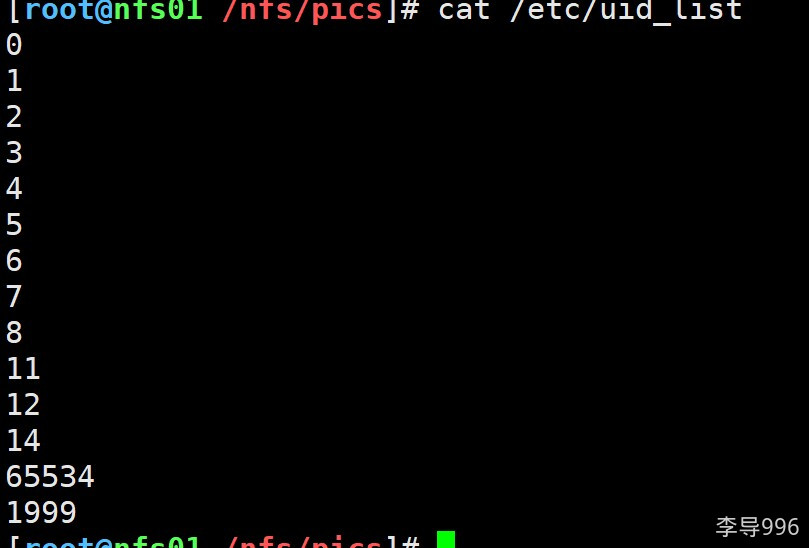
sp2故障,sp3目前OK.麒麟把用户的uid记录在/etc/uid_list中.如果里面有用过的uid,则需要删除后才能继续使用
3. 软件包管理
3.1. 操作指令
|
操作与指令
|
CentOS
|
麒麟
|
Ubuntu
|
|
安装软件
|
yum install -y
|
yum install -y
|
apt update (配置或修改apt源)
apt install -y
|
|
查看软件
|
rpm -qa
|
rpm -qa
|
dpkg -l
|
|
查看软件包内容
|
rpm -ql
|
rpm -ql
|
dpkg -L
|
|
删除软件
|
rpm -e
|
rpm -e
|
dpkg -r(remove)
dpkg -P(--purge)
|
|
软件校验
|
rpm -aV
|
rpm -aV
|
dpkg -V
|
|
是否要修改软件源
|
要修改修改默认的base,增加epel源
|
不用修改
|
一般配置
|
|
系统时间必须同步
|
不影响
|
无法安装软件
|
没啥影响
|
3.2. apt/yum源
3.2.1. yum源(c7)
#修改系统默认的源 base
curl -o /etc/yum.repos.d/CentOS-Base.repo https://mirrors.aliyun.com/repo/Centos-7.repo

#增加epel源
curl -o /etc/yum.repos.d/epel.repo https://mirrors.aliyun.com/repo/epel-7.repo

#php webtatic源 或remi源
xxx
3.2.2. 麒麟sp3
不要修改默认的源, kylin_x86_64.repo 保留相当于是base源,update源...
可以增加1个epel源(centos 7就行)
坑: 麒麟系统中 yum源中
$releasever 正常是系统版本 比如centos 7 就是7 麒麟中这个变量是10
$basearch/ x86_64/aarch64 这个没有坑
nginx源
[root@web01 ~]# cat /etc/yum.repos.d/ngx.repo
[nginx-stable]
name=nginx stable repo
#baseurl=http://nginx.org/packages/centos/$releasever/$basearch/
baseurl=http://nginx.org/packages/centos/7/$basearch/    #这里直接写为7即可.
gpgcheck=1
enabled=1
gpgkey=https://nginx.org/keys/nginx_signing.key
module_hotfixes=true
3.2.3. Ubuntu xxx.xxx
cp /etc/apt/sources.list /tmp/sources.list
修改文件即可
备份ubt源不要放在/etc/apt/目录,只要放了就会被读取.
apt源内容 ubt20.04 lts
deb https://mirrors.aliyun.com/ubuntu/ focal main restricted universe multiverse
deb-src https://mirrors.aliyun.com/ubuntu/ focal main restricted universe multiverse

deb https://mirrors.aliyun.com/ubuntu/ focal-security main restricted universe multiverse
deb-src https://mirrors.aliyun.com/ubuntu/ focal-security main restricted universe multiverse

deb https://mirrors.aliyun.com/ubuntu/ focal-updates main restricted universe multiverse
deb-src https://mirrors.aliyun.com/ubuntu/ focal-updates main restricted universe multiverse

# deb https://mirrors.aliyun.com/ubuntu/ focal-proposed main restricted universe multiverse
# deb-src https://mirrors.aliyun.com/ubuntu/ focal-proposed main restricted universe multiverse

deb https://mirrors.aliyun.com/ubuntu/ focal-backports main restricted universe multiverse
deb-src https://mirrors.aliyun.com/ubuntu/ focal-backports main restricted universe multiverse
4. 定时任务使用与管理
|
操作与指令
|
CentOS
|
麒麟
|
Ubuntu
|
|
定时任务管理
|
crontab -e /-l
|
crontab -e /-l
|
crontab -e / -l ,需要使用select-editor选择编辑器
|
|
定时任务日志
|
/var/log/cron
|
/var/log/cron
|
/var/log/syslog
|
|
定时任务注意事项
|
定向空,PATH变量问题
|
定向空,PATH变量问题
|
&>/dev/null 形式无法使用
>/dev/null 2>&1
|
麒麟系统中不定向到空不会有邮件或临时文件了.
但是还是要配置定向到空.
5. 网络相关指令和文件
|
操作与指令
|
CentOS
|
麒麟
|
Ubuntu
|
|
网卡配置文件
|
/etc/sysconfig/network-scripts/ifcfg-ens33 或eth0
|
/etc/sysconfig/network-scripts/ifcfg-ens33 或eth0
|
/etc/netplan/00-installer-config.yaml
|
|
管理网络指令
|
nmtui
|
nmtui
|
默认没有nmtui需要安装network-manager
|
|
重启网卡指令/网络配置生效指令
|
systemctl restart network
|
无法使用systemctl 重启
使用Ifdown ens33或ifup ens33
|
netplan apply
|
6. 发送邮件
|
操作与指令
|
CentOS
|
麒麟
|
Ubuntu
|
|
发送邮件配置文件
|
/etc/mail.rc
|
/etc/mail.rc
|
/etc/s-nail.rc
|
|
发送邮件的命令
|
mail/mailx
|
mail/mailx
|
s-nail
|
|
安装
|
yum install -y mailx
|
yum install -y mailx
|
apt install -y s-nail
|
7. 服务软件
7.1. 备份服务rsync
|
操作与指令
|
CentOS
|
麒麟
|
Ubuntu
|
|
rsync服务配置文件
|
/etc/rsyncd.conf
|
/etc/rsyncd.conf
|
/etc/rsyncd.conf(默认不存在,手动创建)
|
|
服务名字
|
rsyncd
|
rsyncd
|
rsync
|
7.2. 存储服务nfs
|
操作与指令
|
CentOS
|
麒麟
|
Ubuntu
|
|
软件包
|
nfs-utils rpcbind
|
nfs-utils rpcbind
|
nfs-common nfs-kernel-server
|
|
服务名字
|
nfs rpcbind
|
nfs rpcbind
|
nfs-kernel-server rpcbind
|
|
默认的anonuid,anongid用户(压缩用户,匿名用户)
|
nfsnobody (65534)
|
nobody (65534)
|
nobody nogroup
|
7.3. 实时同步
7.3.1. lsyncd
|
操作与指令
|
CentOS
|
麒麟sp3
|
Ubuntu
|
|
软件包
|
lsyncd
|
lsyncd
|
lsyncd
|
|
服务名字
|
lsyncd
|
lsyncd
|
lsyncd
|
|
配置文件
|
/etc/lsyncd.conf
|
/etc/lsyncd.conf
|
/etc/lsyncd/lsyncd.conf.lua
这个可以通过修改/etc/init.d/lsyncd 服务管理脚本查看与修改
配置文件需要手动 创建
|
ubt/debian系统lsyncd配置文件路径
grep -n ^CONFIG /etc/init.d/lsyncd
18:CONFIG=/etc/lsyncd/lsyncd.conf.lua
7.3.2. sersync
8. 管理工具
8.1. ansible
|
操作与指令
|
CentOS
|
麒麟
|
Ubuntu
|
|
安装方式
|
yum/pip安装
|
pip安装
|
apt/pip安装
|
|
具体方法
|
yum install -y ansible
|
yum install -y python3-pip
pip3 install ansible
|
apt install -y ansible
pip3 install ansible
|
|
说明
|
两种方式都可以 pip安装版本更加新一些
|
yum安装的有问题
使用pip安装
|
两种方式都可以 pip安装版本更加新一些
|
麒麟系统ansible后续配置
1. 没用/etc/ansible目录 手动创建
2. 也没ansible配置文件

[root@m01 ~]# cat /etc/ansible/ansible.cfg
[defaults]
host_key_checking = False
deprecation_warnings = False
interpreter_python = /usr/bin/python3
[inventory]
[privilege_escalation]
[paramiko_connection]
[ssh_connection]
[persistent_connection]
[accelerate]
[selinux]
[colors]
[diff]
9. web服务
9.1. nginx
|
操作与指令
|
CentOS
|
麒麟
|
Ubuntu
|
|
安装方式
|
yum
|
yum
|
apt
|
|
坑
|
epel中是有个nginx,可以安装和使用
|
默认源中的nginx缺少stub_status ,必须用Ngx源才行.
|
无影响直接用.
|
|
|
|
|
|
9.2. php
|
操作与指令
|
CentOS
|
麒麟
|
Ubuntu 22.04
|
|
安装方式
|
默认源中php 5.4
|
php 7.2
|
php8.1
|
|
|
需要配置webtatic源或remi源
|
|
|
麒麟永久取消tmp分区
# 永久取消tmp分区
[root@m01 ~]# systemctl disable tmp.mount
[root@m01 ~]# systemctl mask tmp.mount
Created symlink /etc/systemd/system/tmp.mount → /dev/null.
[root@m01 ~]# systemctl stop tmp.mount



 發表於 2024-9-12 14:27:00