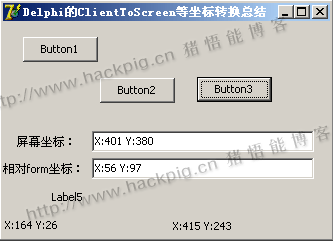
注意一点的是,由于函数名 ClientToScreen,被控件的方法与API函数同名使用,所以造成在调用时delphi优先调用控件的ClientToScreen方法。如果只想调用API函数,那么可以用 windows.ClientToScreen。 源代码如下:
unit Unit1;

interface

uses
  Windows, Messages, SysUtils, Variants, Classes, Graphics, Controls, Forms,
  Dialogs, StdCtrls;

type
  TForm1 = class(TForm)
    Button1: TButton;
    Button2: TButton;
    Edit1: TEdit;
    Label1: TLabel;
    Label2: TLabel;
    Edit2: TEdit;
    Label3: TLabel;
    Label4: TLabel;
    Label5: TLabel;
    Button3: TButton;
    procedure Button1Click(Sender: TObject);
    procedure Button2Click(Sender: TObject);
    procedure Button3Click(Sender: TObject);
    procedure FormClick(Sender: TObject);
    procedure FormMouseMove(Sender: TObject; Shift: TShiftState; X, Y: Integer);
  p rivate
    { P rivate declarations }
  public
    { Public declarations }
  end;

var
  Form1: TForm1;

implementation

{$R *.dfm}
{$APPTYPE CONSOLE}

procedure TForm1.Button1Click(Sender: TObject);
var
  point1:TPoint;

begin
  point1:=Point(Button1.Top,Button1.Left);
  point1:=ClientToScreen(point1);
  Edit1.Text:='X:'+IntToStr(point1.x)+' '+
    'Y:'+IntToStr(point1.y);
  Edit2.Text:='X:'+IntToStr(Button1.Top)+' '+
    'Y:'+IntToStr(Button1.Left);


end;

procedure TForm1.Button2Click(Sender: TObject);
var
  point1:TPoint;
  point2:TPoint;
begin
  point1.x:= Button2.Top;
  point1.y:= Button2.Left;
  point2:=Button2.ClientToScreen(point1);
  Edit1.Text:='X:'+IntToStr(point2.x)+' '+
    'Y:'+IntToStr(point2.y);
  Edit2.Text:='X:'+IntToStr(Button2.Top)+' '+
    'Y:'+IntToStr(Button2.Left);
end;

procedure TForm1.Button3Click(Sender: TObject);
var
  hwnd1,hwnd2:THandle;
  p1:TPoint;
begin
  hwnd1:=FindWindow(nil,PChar('计算器'));
  if hwnd1=0 then WinExec('calc',SW_SHOW);
  while True do
  begin
     hwnd1:=FindWindow(nil,PChar('计算器'));
     if hwnd1<>0 then Break;
     Application.ProcessMessages;
  end;
  hwnd2:=FindWindowEx(hwnd1,0,nil,PChar('十六进制'));
  if hwnd2=0 then
  begin
    ShowMessage('先切换到科学计算器!');
    Exit;
  end;

  p1:=Point(0,0); { TODO -o猪悟能 : 注意point必须先初始化再使用 }
  Windows.ClientToScreen(hwnd2,p1);
  { TODO -o猪悟能 : 计算器窗口置前,点击十六进制单选钮 }
  SetForegroundWindow(hwnd2);
  mouse_event(MOUSEEVENTF_LEFTDOWN,
    p1.X,p1.Y,0,0);

  //Writeln(p1.x);
  //Writeln(p1.y);

end;

procedure TForm1.FormClick(Sender: TObject);
var
  p1:TPoint;
begin
  GetCursorPos(p1);
  Label5.Caption:='鼠标相对于屏幕位置 X:'+IntToStr(p1.x)+
    ' y:'+IntToStr(p1.y);

end;

procedure TForm1.FormMouseMove(Sender: TObject; Shift: TShiftState; X, Y:
    Integer);
var
  p1:TPoint;
begin
  p1:=Point(x,y);
  Label3.Caption:= 'X:'+IntToStr(x)+' '+
    'Y:'+IntToStr(y);
  p1:=ClientToScreen(p1);
  Label4.Caption:= 'X:'+IntToStr(p1.x)+' '+
    'Y:'+IntToStr(p1.y);
end;

end.



 發表於 2020-4-13 20:00:00