|
------------------
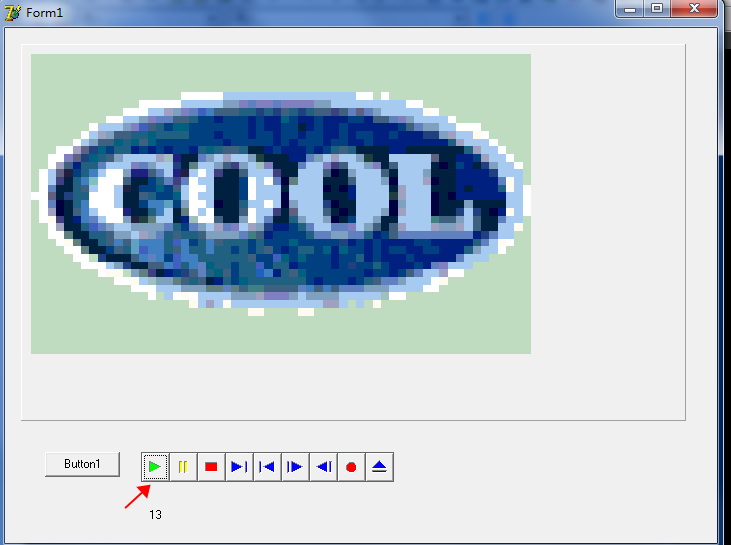
仅做简单的测试,只想看看怎么播放视频,不想弄这个,有兴趣的可以深入了解,谢谢!
要想更深入了解请参考:Delphi多媒体设计之TMediaPlayer组件(一) - pchmonster - 博客园 https://www.cnblogs.com/pchmonster/archive/2012/07/12/2588846.html
--------------------
---------------------------Unit1 开始------------
unit Unit1;
interface
uses
Windows, Messages, SysUtils, Variants, Classes, Graphics, Controls, Forms,
Dialogs, StdCtrls, MPlayer, ComCtrls, ExtCtrls;
type
TForm1 = class(TForm)
MediaPlayer1: TMediaPlayer;
Animate1: TAnimate;
Button1: TButton;
Panel1: TPanel;
Timer1: TTimer;
Label1: TLabel;
procedure Button1Click(Sender: TObject);
procedure MediaPlayer1Click(Sender: TObject; Button: TMPBtnType;
var DoDefault: Boolean);
procedure Timer1Timer(Sender: TObject);
procedure FormCreate(Sender: TObject);
private
{ Private declarations }
public
{ Public declarations }
end;
var
Form1: TForm1;
implementation
var
uDisplayRect:TRect;
{$R *.dfm}
procedure TForm1.Button1Click(Sender: TObject);
begin
//这个cool.avi在delphi7的安装目录下
MediaPlayer1.FileName:='C:\Program Files\Borland\Delphi7\Demos\CoolStuf\cool.avi' ;
end;
procedure TForm1.MediaPlayer1Click(Sender: TObject; Button: TMPBtnType;
var DoDefault: Boolean);
begin
if Button=btPlay then //case Button of btPlay:begin (代码) end; end;比较好
begin
MediaPlayer1.Open;//打开设备,还有对应的Close关闭设备
MediaPlayer1.DisplayRect:=uDisplayRect; //设置显示范围(本人设置的这个范围有点大了,视频失真)
MediaPlayer1.Play;//播放
end;
{case Button of
btPlay:
begin
MediaPlayer1.Open;//打开设备,还有对应的Close关闭设备
MediaPlayer1.DisplayRect:=uDisplayRect; //设置显示范围(本人设置的这个范围有点大了,视频失真)
MediaPlayer1.Play;//播放
end;
end; }
end;
procedure TForm1.Timer1Timer(Sender: TObject);
begin
Label1.Caption:=IntToStr(MediaPlayer1.Position);
end;
procedure TForm1.FormCreate(Sender: TObject);
begin
uDisplayRect.Top:=10;
uDisplayRect.Left:=10;
uDisplayRect.Right:=500;
uDisplayRect.Bottom:=300;
MediaPlayer1.Display:=Panel1; //设置视频显示的地方(这里显示在panel上)
//Devicetype这个很重要,不要乱设置
end;
end.
-----------------------Unit1 结束-------------
----------------Form1 开始----------
object Form1: TForm1
Left = 373
Top = 261
Width = 728
Height = 553
Caption = 'Form1'
Color = clBtnFace
Font.Charset = DEFAULT_CHARSET
Font.Color = clWindowText
Font.Height = -11
Font.Name = 'MS Sans Serif'
Font.Style = []
OldCreateOrder = False
OnCreate = FormCreate
PixelsPerInch = 96
TextHeight = 13
object Label1: TLabel
Left = 144
Top = 480
Width = 129
Height = 13
AutoSize = False
Caption = 'Label1'
end
object MediaPlayer1: TMediaPlayer
Left = 136
Top = 424
Width = 253
Height = 30
AutoEnable = False
AutoRewind = False
FileName = 'C:\Program Files\Borland\Delphi7\Demos\CoolStuf\cool.avi'
TabOrder = 0
OnClick = MediaPlayer1Click
end
object Animate1: TAnimate
Left = 528
Top = 440
Width = 65
Height = 57
end
object Button1: TButton
Left = 40
Top = 424
Width = 75
Height = 25
Caption = 'Button1'
TabOrder = 2
OnClick = Button1Click
end
object Panel1: TPanel
Left = 16
Top = 16
Width = 665
Height = 377
TabOrder = 3
end
object Timer1: TTimer
Interval = 100
OnTimer = Timer1Timer
Left = 64
Top = 472
end
end
---------------Form1 结束---------------
来源:https://www.cnblogs.com/dmqhjp/p/14894692.html |



 發表於 2021-6-17 17:54:00