|
-------------Delphi7没有泛型
开发环境是Delphi XE (是XE,不是XE2,不是XE10)
-------------------
--------------Unit 开始-
  1 unit Unit1;
  2
  3 interface
  4
  5 uses
  6   Windows, Messages, SysUtils, Variants, Classes, Graphics, Controls, Forms,
  7   Dialogs, StdCtrls, ExtCtrls, TypInfo;    //,Generics.Collections
  8
  9 type
 10   TForm1 = class(TForm)
 11     Button1: TButton;
 12     Button2: TButton;
 13     Button3: TButton;
 14     Bevel1: TBevel;
 15     Button4: TButton;
 16     Button5: TButton;
 17     procedure Button1Click(Sender: TObject);
 18     procedure Button2Click(Sender: TObject);
 19     procedure Button3Click(Sender: TObject);
 20     procedure Button4Click(Sender: TObject);
 21     procedure Button5Click(Sender: TObject);
 22   private
 23     { Private declarations }
 24   public
 25     { Public declarations }
 26   end;
 27
 28   Tmycalss=class
 29     private
 30       type
 31         TMyRecord=record
 32           s:string;
 33         end;
 34     public
 35       Myr:TmyreCord;
 36   end;
 37   {
 38    泛型:声明定义的时候看上去就是把类型当成形参一样的东西用T表示,当然也可以用其他的字符代替;
 39          在使用的时候把<T> 中的T看成是实参,实参是类型
 40    比如:
 41    var
 42      ss:TMygeneric<String> ;
 43   }
 44   TMygeneric<T> =array[0..9] of  T ; //TMygeneric<sss> =array[0..9] of  sss;这个也可以的
 45
 46   TmyGenericClass<T>=class(Tobject)
 47     private
 48       FIDCode:T;
 49     public
 50   end;
 51
 52   TmyGenericClass_A<T:Class> =class(TmyGenericClass<T>)
 53     private
 54       FIDCode_A:T;
 55   end;
 56 var
 57   Form1: TForm1;
 58
 59 implementation
 60
 61 {$R *.dfm}
 62
 63 procedure TForm1.Button1Click(Sender: TObject);
 64 var
 65   ss:TMygeneric<String>;     //泛型
 66   i:Integer;
 67 begin
 68   for  i:=0 to 9 do
 69   begin
 70     ss:=IntToStr(i);
 71   end;
 72 end;
 73
 74 procedure TForm1.Button2Click(Sender: TObject);
 75 var
 76   Myc:Tmycalss;
 77 begin
 78   Myc:=Tmycalss.Create;
 79   Myc.Myr.s:='8888';
 80   ShowMessage(Myc.Myr.s);  //看下类中类
 81   FreeAndNil(Myc);
 82 end;
 83
 84 procedure TForm1.Button3Click(Sender: TObject);
 85 var
 86   MyArrayc:TMygeneric<Tmycalss>;  //泛型
 87   i:Integer;
 88 begin
 89   for  i:=0 to 9 do
 90   begin
 91     MyArrayc:=Tmycalss.Create;
 92     MyArrayc.Myr.s:='498789';
 93   end;
 94   for  i:=0 to 9 do
 95   begin
 96     FreeAndNil(MyArrayc);
 97   end;
 98 end;
 99
100 procedure TForm1.Button4Click(Sender: TObject);
101 var
102   vClass:TmyGenericClass<String>;
103 begin
104   vClass:=TmyGenericClass<String>.Create;
105   vClass.FIDCode:='978978';
106   ShowMessage(vClass.FIDCode );
107   FreeAndNil(vClass);
108 end;
109
110 procedure TForm1.Button5Click(Sender: TObject);
111 var
112   vClass_A:TmyGenericClass_A<Tmycalss> ;
113 begin
114   vClass_A:=TmyGenericClass_A<Tmycalss>.Create;
115   vClass_A.FIDCode_A:=Tmycalss.Create;
116   vClass_A.FIDCode_A.Myr.s:='456465';
117   ShowMessage(vClass_A.FIDCode_A.Myr.s);
118   FreeAndNil(vClass_A.FIDCode_A);
119   FreeAndNil(vClass_A);
120 end;
121
122 end.
-------------Unit结束-----
--------Form 开始--------
 1 object Form1: TForm1
 2   Left = 754
 3   Top = 463
 4   BorderStyle = bsDialog
 5   Caption = 'Form1'
 6   ClientHeight = 185
 7   ClientWidth = 308
 8   Color = clBtnFace
 9   Font.Charset = DEFAULT_CHARSET
10   Font.Color = clWindowText
11   Font.Height = -11
12   Font.Name = 'Tahoma'
13   Font.Style = []
14   OldCreateOrder = False
15   Position = poDesigned
16   PixelsPerInch = 96
17   TextHeight = 13
18   object Bevel1: TBevel
19     Left = 152
20     Top = 8
21     Width = 9
22     Height = 159
23   end
24   object Button1: TButton
25     Left = 48
26     Top = 24
27     Width = 75
28     Height = 25
29     Caption = 'Button1'
30     TabOrder = 0
31     OnClick = Button1Click
32   end
33   object Button2: TButton
34     Left = 48
35     Top = 72
36     Width = 75
37     Height = 25
38     Caption = 'Button2'
39     TabOrder = 1
40     OnClick = Button2Click
41   end
42   object Button3: TButton
43     Left = 48
44     Top = 119
45     Width = 75
46     Height = 25
47     Caption = 'Button3'
48     TabOrder = 2
49     OnClick = Button3Click
50   end
51   object Button4: TButton
52     Left = 192
53     Top = 24
54     Width = 75
55     Height = 25
56     Caption = 'Button4'
57     TabOrder = 3
58     OnClick = Button4Click
59   end
60   object Button5: TButton
61     Left = 192
62     Top = 64
63     Width = 75
64     Height = 25
65     Caption = 'Button5'
66     TabOrder = 4
67     OnClick = Button5Click
68   end
69 end
-------Form 结束---------
--------------------------------------------其他--------------------------------------------
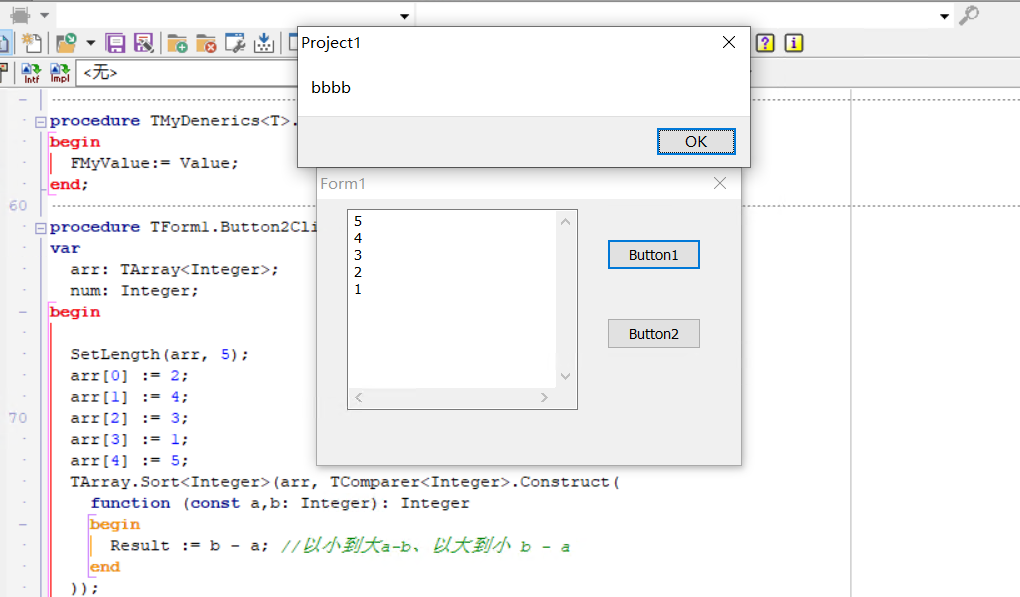
 1 unit Unit1;
 2
 3 interface
 4
 5 uses
 6   Winapi.Windows, Winapi.Messages, System.SysUtils, System.Variants, System.Classes, Vcl.Graphics,
 7   Vcl.Controls, Vcl.Forms, Vcl.Dialogs, System.Generics.Collections, Generics.Defaults,
 8   Vcl.StdCtrls;
 9
10 type
11   TForm1 = class(TForm)
12     Button1: TButton;
13     Button2: TButton;
14     Memo1: TMemo;
15     procedure Button1Click(Sender: TObject);
16     procedure Button2Click(Sender: TObject);
17   private
18     { Private declarations }
19   public
20     { Public declarations }
21   end;
22   TMyDenerics<T>=class
23   private
24     FMyString:string;
25     FMyValue:T;
26     function GetMyValue: T;
27     procedure SetMyValue(const Value: T);
28   public
29     property Myvalue:T read GetMyValue write SetMyValue;
30   end;
31 var
32   Form1: TForm1;
33
34 implementation
35
36 {$R *.dfm}
37
38 procedure TForm1.Button1Click(Sender: TObject);
39 var
40   vMyGenerics:TMyDenerics<string>;
41 begin
42   vMyGenerics:=TMyDenerics<string>.Create;
43   vMyGenerics.FMyString:='aaaaaaaa';
44   vMyGenerics.Myvalue:='bbbb';
45   ShowMessage(vMyGenerics.Myvalue);
46   FreeAndNil(vMyGenerics);
47 end;
48
49 { TMyDenerics<T> }
50
51 function TMyDenerics<T>.GetMyValue: T;
52 begin
53   Result:=FMyValue;
54 end;
55
56 procedure TMyDenerics<T>.SetMyValue(const Value: T);
57 begin
58   FMyValue:= Value;
59 end;
60
61 procedure TForm1.Button2Click(Sender: TObject);
62 var
63   arr: TArray<Integer>;
64   num: Integer;
65 begin
66
67   SetLength(arr, 5);
68   arr[0] := 2;
69   arr[1] := 4;
70   arr[2] := 3;
71   arr[3] := 1;
72   arr[4] := 5;
73   TArray.Sort<Integer>(arr, TComparer<Integer>.Construct(
74     function (const a,b: Integer): Integer
75     begin
76       Result := b - a; //以小到大a-b、以大到小 b - a
77     end
78   ));
79   Memo1.Clear;
80   for num in arr do Memo1.Lines.Add(IntToStr(num)); //5 4 3 2 1
81 end;
82
83 end.
 1 object Form1: TForm1
 2   Left = 0
 3   Top = 0
 4   BorderStyle = bsDialog
 5   Caption = 'Form1'
 6   ClientHeight = 213
 7   ClientWidth = 339
 8   Color = clBtnFace
 9   Font.Charset = DEFAULT_CHARSET
10   Font.Color = clWindowText
11   Font.Height = -11
12   Font.Name = 'Tahoma'
13   Font.Style = []
14   OldCreateOrder = False
15   PixelsPerInch = 96
16   TextHeight = 13
17   object Button1: TButton
18     Left = 232
19     Top = 32
20     Width = 75
21     Height = 25
22     Caption = 'Button1'
23     TabOrder = 0
24     OnClick = Button1Click
25   end
26   object Button2: TButton
27     Left = 232
28     Top = 95
29     Width = 75
30     Height = 25
31     Caption = 'Button2'
32     TabOrder = 1
33     OnClick = Button2Click
34   end
35   object Memo1: TMemo
36     Left = 24
37     Top = 8
38     Width = 185
39     Height = 161
40     Lines.Strings = (
41       'Memo1')
42     ScrollBars = ssBoth
43     TabOrder = 2
44   end
45 end
---------------------------------------------------------
来源:https://www.cnblogs.com/dmqhjp/p/15034422.html |



 發表於 2021-7-20 13:31:00