<!DOCTYPE html>
<html lang="en">

<head>
    <meta charset="UTF-8">
    <title>Document</title>
    <!-- <script src="https://sdk.amazonaws.com/js/aws-sdk-2.410.0.min.js"></script> -->
    <script src="https://sdk.amazonaws.com/js/aws-sdk-2.235.1.min.js"></script>
</head>

<body>
   <input id="file-chooser" type="file"/>
    <button id="upload-button">Upload</button>
    <p id="results"><p></p>
    <script type="text/javascript">
    /// <reference types="aws-sdk" />
    var credentials = {
        accessKeyId: 'xxxxxxxxxxxxx',
        secretAccessKey: 'xxxxxxxxxxxxxx'
    }; //秘钥形式的登录上传
    AWS.config.update(credentials);
    AWS.config.region = 'xxxxxxxxxxxx'; //设置区域

    // create bucket instance
    var bucket = new AWS.S3({ params: { Bucket: 'xxxxxxxxx' } }); //选择桶
    var fileChooser = document.getElementById('file-chooser');
    var button = document.getElementById('upload-button');
    var results = document.getElementById('results');
    button.addEventListener('click', function() {
        var file = fileChooser.files[0];
        if (file) {
            results.innerHTML = '';
            var params = { Key: file.name, ContentType: file.type, Body: file, 'Access-Control-Allow-Credentials': '*', 'ACL': 'public-read' }; //key可以设置为桶的相抵路径,Body为文件, ACL最好要设置
            console.log(params)
            bucket.upload(params, function(err, data) {
                console.log(err); //打印出错误
                results.innerHTML = err ? 'ERROR!' : 'UPLOADED.';
            });
        } else {
            results.innerHTML = 'Nothing to upload.';
        }
    }, false);
    </script>
</body>

</html>
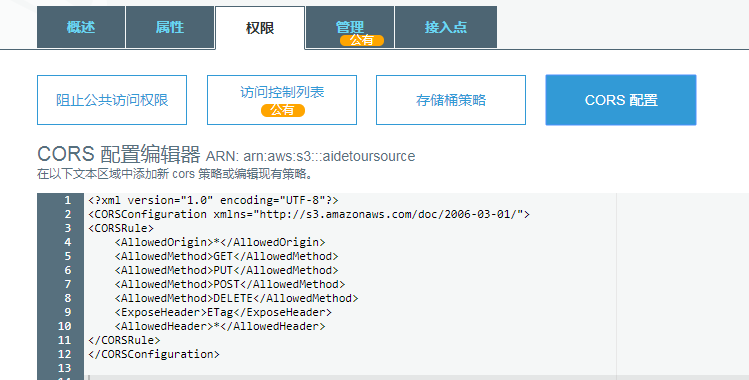
<?xml version="1.0" encoding="UTF-8"?>
<CORSConfiguration xmlns="http://s3.amazonaws.com/doc/2006-03-01/">
<CORSRule>
    <AllowedOrigin>*</AllowedOrigin>
    <AllowedMethod>GET</AllowedMethod>
    <AllowedMethod>PUT</AllowedMethod>
    <AllowedMethod>POST</AllowedMethod>
    <AllowedMethod>DELETE</AllowedMethod>
    <ExposeHeader>ETag</ExposeHeader>
    <AllowedHeader>*</AllowedHeader>
</CORSRule>
</CORSConfiguration>



 發表於 2020-5-23 15:52:00