|
开发日志(4)——MainActivity
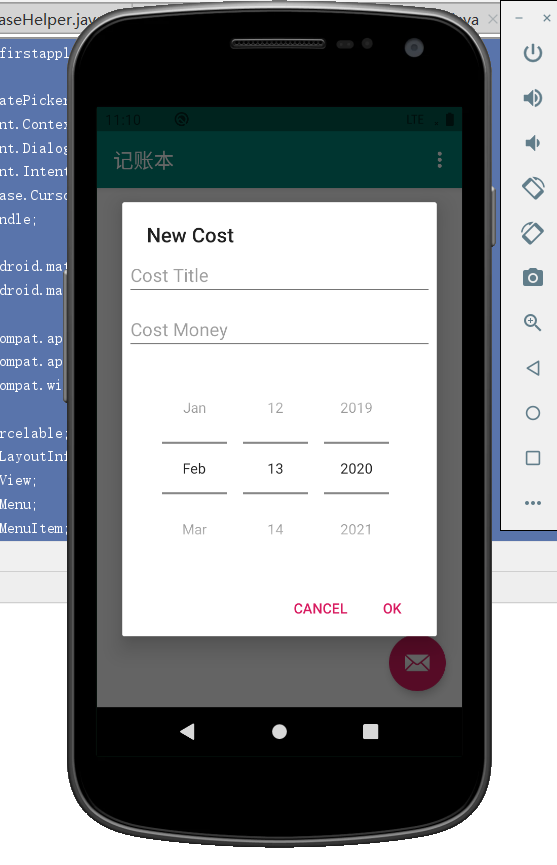
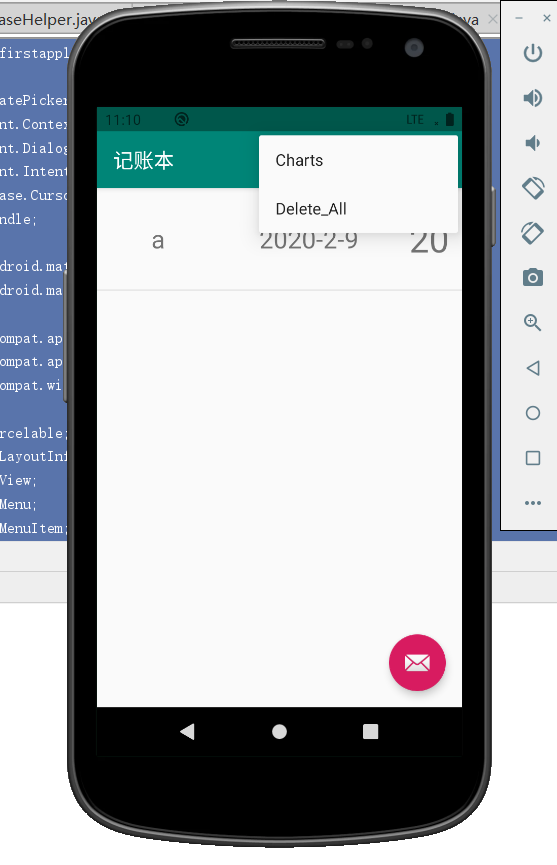
在MainActivity中编写了几个方法。首先,点击账本的一条记录可以选择删除他,然后重写了fab,使之在点击他后能够添加记录。还写了删除全部记录的方法、
删除单条记录:
        costList.setOnItemClickListener(new AdapterView.OnItemClickListener() {
            @Override
            public void onItemClick(AdapterView<?> parent, View view, final int position, long id) {
                AlertDialog.Builder builder = new AlertDialog.Builder(MainActivity.this);
                builder.setTitle("删除");
                builder.setMessage("是否删除这笔账单?");
                builder.setPositiveButton("OK", new DialogInterface.OnClickListener() {
                    @Override
                    public void onClick(DialogInterface dialog, int which) {
                        mDatabaseHelper.deleteOne(mCostBeanList.get(position));
                        mCostBeanList.remove(position);
                        mAdapter.notifyDataSetChanged();
                    }
                });
                builder.setNegativeButton("Cancel", null);
                builder.create().show();
            }
        });
删除全部记录
    public boolean onOptionsItemSelected(MenuItem item) {


        int id = item.getItemId();
        if (id == R.id.action_chart) {
            Intent intent =new Intent(MainActivity.this,ChartsActivity.class);
            intent.putExtra("cost_list",(Serializable) mCostBeanList);
            startActivity(intent);
            return true;
        }
        else if (id == R.id.delete_all) {
            mDatabaseHelper.deleteAlldata();
            mCostBeanList.clear();
            mAdapter.notifyDataSetChanged();
            return true;
        }
        return super.onOptionsItemSelected(item);

    }
添加记录
        FloatingActionButton fab = findViewById(R.id.fab);
        fab.setOnClickListener(new View.OnClickListener() {
            @Override
            public void onClick(View view) {
                AlertDialog.Builder builder = new AlertDialog.Builder(MainActivity.this);
                LayoutInflater inflate = LayoutInflater.from(MainActivity.this);
                View viewDialog = inflate.inflate(R.layout.new_cost_data,null);
                final EditText title = (EditText) viewDialog.findViewById(R.id.et_cost_title);
                final EditText money = (EditText) viewDialog.findViewById(R.id.et_cost_money);
                final DatePicker data = (DatePicker) viewDialog.findViewById(R.id.dp_cost_date);
                builder.setView(viewDialog);
                builder.setTitle("New Cost");
                builder.setPositiveButton("OK", new DialogInterface.OnClickListener() {
                    @Override
                    public void onClick(DialogInterface dialog, int which) {
                        CostBean costBean = new CostBean();
                        costBean.costTitle = title.getText().toString();
                        costBean.costMoney = money.getText().toString();
                        costBean.costDate = data.getYear() + "-" + (data.getMonth() + 1) + "-" + data.getDayOfMonth();
                        mDatabaseHelper.insertCost(costBean);
                        mCostBeanList.add(costBean);
                        mAdapter.notifyDataSetChanged();
                    }
                });
                builder.setNegativeButton("Cancel",null);
                builder.create().show();
            }
        });
下面是MainActivity的全部代码:
package com.example.firstapplication;

import android.app.DatePickerDialog;
import android.content.Context;
import android.content.DialogInterface;
import android.content.Intent;
import android.database.Cursor;
import android.os.Bundle;

import com.google.android.material.floatingactionbutton.FloatingActionButton;
import com.google.android.material.snackbar.Snackbar;

import androidx.appcompat.app.AlertDialog;
import androidx.appcompat.app.AppCompatActivity;
import androidx.appcompat.widget.Toolbar;

import android.os.Parcelable;
import android.view.LayoutInflater;
import android.view.View;
import android.view.Menu;
import android.view.MenuItem;
import android.widget.AdapterView;
import android.widget.DatePicker;
import android.widget.EditText;
import android.widget.ListView;

import java.io.Serializable;
import java.util.ArrayList;
import java.util.List;


public class MainActivity extends AppCompatActivity {

    private List<CostBean> mCostBeanList;
    private Context mContext;
    private DatabaseHelper mDatabaseHelper;
    private CostListAdapter mAdapter;


    @Override
    protected void onCreate(Bundle savedInstanceState) {
        super.onCreate(savedInstanceState);
        setContentView(R.layout.activity_main);
        Toolbar toolbar = findViewById(R.id.toolbar);
        setSupportActionBar(toolbar);


        mDatabaseHelper = new DatabaseHelper(this);
        mCostBeanList = new ArrayList<>();
        ListView costList = (ListView)findViewById(R.id.lv_main);
        initCostDate();
        mAdapter = new CostListAdapter(this, mCostBeanList);
        costList.setAdapter(mAdapter);


        costList.setOnItemClickListener(new AdapterView.OnItemClickListener() {
            @Override
            public void onItemClick(AdapterView<?> parent, View view, final int position, long id) {
                AlertDialog.Builder builder = new AlertDialog.Builder(MainActivity.this);
                builder.setTitle("删除");
                builder.setMessage("是否删除这笔账单?");
                builder.setPositiveButton("OK", new DialogInterface.OnClickListener() {
                    @Override
                    public void onClick(DialogInterface dialog, int which) {
                        mDatabaseHelper.deleteOne(mCostBeanList.get(position));
                        mCostBeanList.remove(position);
                        mAdapter.notifyDataSetChanged();
                    }
                });
                builder.setNegativeButton("Cancel", null);
                builder.create().show();
            }
        });


        FloatingActionButton fab = findViewById(R.id.fab);
        fab.setOnClickListener(new View.OnClickListener() {
            @Override
            public void onClick(View view) {
                AlertDialog.Builder builder = new AlertDialog.Builder(MainActivity.this);
                LayoutInflater inflate = LayoutInflater.from(MainActivity.this);
                View viewDialog = inflate.inflate(R.layout.new_cost_data,null);
                final EditText title = (EditText) viewDialog.findViewById(R.id.et_cost_title);
                final EditText money = (EditText) viewDialog.findViewById(R.id.et_cost_money);
                final DatePicker data = (DatePicker) viewDialog.findViewById(R.id.dp_cost_date);
                builder.setView(viewDialog);
                builder.setTitle("New Cost");
                builder.setPositiveButton("OK", new DialogInterface.OnClickListener() {
                    @Override
                    public void onClick(DialogInterface dialog, int which) {
                        CostBean costBean = new CostBean();
                        costBean.costTitle = title.getText().toString();
                        costBean.costMoney = money.getText().toString();
                        costBean.costDate = data.getYear() + "-" + (data.getMonth() + 1) + "-" + data.getDayOfMonth();
                        mDatabaseHelper.insertCost(costBean);
                        mCostBeanList.add(costBean);
                        mAdapter.notifyDataSetChanged();
                    }
                });
                builder.setNegativeButton("Cancel",null);
                builder.create().show();
            }
        });
    }

    private void initCostDate() {

       // mDatabaseHelper.deleteAlldata();
        /*for (int i = 0;i < 6; i++) {
            CostBean costBean = new CostBean();
            costBean.costTitle = i + "mock";
            costBean.costDate = "11-11";
            costBean.costMoney = "20";
            mDatabaseHelper.insertCost(costBean);
        }*/
        Cursor cursor = mDatabaseHelper.getAllCostData();
        if (cursor != null) {
            while (cursor.moveToNext()) {
                CostBean costBean = new CostBean();
                int dataColumnIndex = cursor.getColumnIndex("cost_title");
                costBean.costTitle = cursor.getString(dataColumnIndex  + 0 );
                costBean.costDate = cursor.getString(dataColumnIndex + 1);
                costBean.costMoney = cursor.getString(dataColumnIndex + 2);
                mCostBeanList.add(costBean);
            }
            cursor.close();
        }

    }


    @Override
    public boolean onCreateOptionsMenu(Menu menu) {
        // Inflate the menu; this adds items to the action bar if it is present.
        getMenuInflater().inflate(R.menu.menu_main, menu);
        return true;
    }

    @Override
    public boolean onOptionsItemSelected(MenuItem item) {


        int id = item.getItemId();
        if (id == R.id.action_chart) {
            Intent intent =new Intent(MainActivity.this,ChartsActivity.class);
            intent.putExtra("cost_list",(Serializable) mCostBeanList);
            startActivity(intent);
            return true;
        }
        else if (id == R.id.delete_all) {
            mDatabaseHelper.deleteAlldata();
            mCostBeanList.clear();
            mAdapter.notifyDataSetChanged();
            return true;
        }
        return super.onOptionsItemSelected(item);

    }
}
这样,基本的功能都实现了。下面是效果图
明天的话打算把线性表的功能实现
来源:https://www.cnblogs.com/wendi/p/12304082.html |



 發表於 2020-2-12 16:36:00