|
项目地址:https://gitee.com/anan9303/iosFrame
目录:(1)网络请求框架
(2)控制台输出中文log日志
(3)iOS开发中添加PrefixHeader.pch要注意的问题
(4)block使用
(5)base64、MD5加密解密
(6)沙盒存储获取
(7)NSLog全部打印总结
(8)JSON序列化,以及NSdata、NSString、NSDictionay之间的转换
(9) 页面切换管理:UINavigationController
(10)观察者模式
(11)WKWebView以及JS混合开发
1)、WKWebViewConfiguration方式
一、网路请求框架:
(1)NSURLConnection
二、控制台输出中文log日志:
https://gitee.com/anan9303/iosFrame
(1)数组和 NSDictionary
.h文件:
#import <UIKit/UIKit.h>

@interface AppDelegate : UIResponder <UIApplicationDelegate>

@end
.m文件
#import "AppDelegate.h"

@interface AppDelegate ()

@end

@implementation AppDelegate


- (BOOL)application:(UIApplication *)application didFinishLaunchingWithOptions:(NSDictionary *)launchOptions {
    // Override point for customization after application launch.
    return YES;
}


#pragma mark - UISceneSession lifecycle


- (UISceneConfiguration *)application:(UIApplication *)application configurationForConnectingSceneSession:(UISceneSession *)connectingSceneSession options:(UISceneConnectionOptions *)options {
    // Called when a new scene session is being created.
    // Use this method to select a configuration to create the new scene with.
    return [[UISceneConfiguration alloc] initWithName:@"Default Configuration" sessionRole:connectingSceneSession.role];
}


- (void)application:(UIApplication *)application didDiscardSceneSessions:(NSSet<UISceneSession *> *)sceneSessions {
    // Called when the user discards a scene session.
    // If any sessions were discarded while the application was not running, this will be called shortly after application:didFinishLaunchingWithOptions.
    // Use this method to release any resources that were specific to the discarded scenes, as they will not return.
}


@end
(2)对象的输出:
- (NSString *)description{
    return [NSString stringWithFormat:@"<%@: %p, name:%@, age:%d>",[self class], self, _name, _age];
}
三、iOS开发中添加PrefixHeader.pch要注意的问题:
(1) 是什么:pch是“precompiled header”,也就是预编译头文件。
所谓的预编译头就是把一个工程中的那一部分代码,预先编译好放在一个文件里(通常是 以.pch为扩展名的),这个文件就称为预编译头文件。
(2)预编译头的作用:
你应该把不常变化的框架(Frameworks)头文件添加到前缀头文件(prefix header)中。这样的话,在编译的时候,框架的代码会被预先编译,
所有的类都将可以使用这些头文件。预编译头文件的作用当然就是提高便宜速度了,有了它你没有必要每次都编译那些不需要经常改变的代码。
(3)配置:
在Xcode6.0已经不默认生成PrefixHeader.pch文件了,而PrefixHeader.pch文件对我们开发带来的便利性是不言而喻的,所以我们怎么在
工程中添加PrefixHeader.pch文件呢.
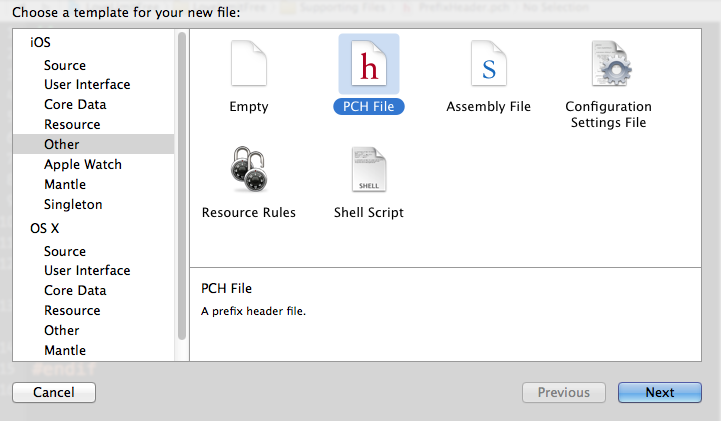
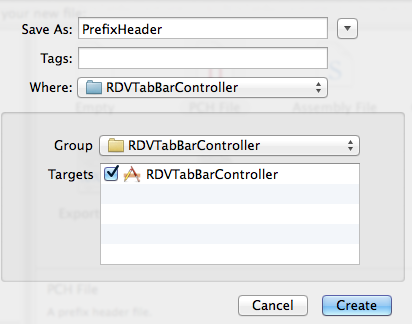
首先.我们创建一个PrefixHeader.pch
然后将这个prefix文件和这个工程关联,
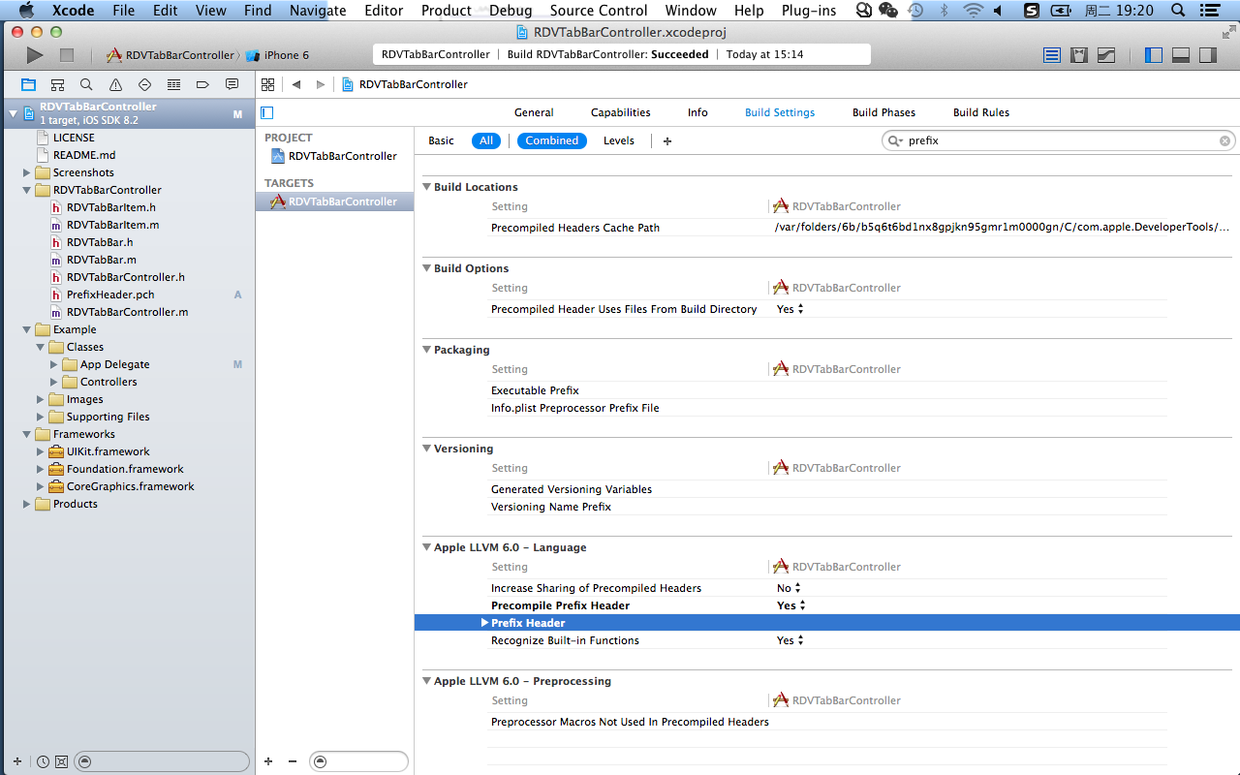
首先开启 Precompile Prefix Header 为Yes
在Build Settings 中搜索Prefix ,在Apple LLVM 6.0 -Languge 中的Prefix Herder 添加新建 的Prefix的路径(直接将这个文件拖进去就行);
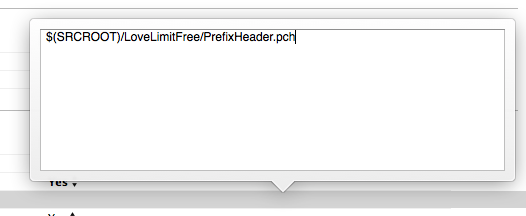
这样修改的路径只能在这台电脑上编译通过,想要在其他电脑上编译通过需要将第一遍工程名之前的路径替换成工程的相对路径$(SRCROOT)
也就是将:
/Users/Zym/Desktop/LoveLimitFree/LoveLimitFree/PrefixHeader.pch
修改为
$(SRCROOT)/LoveLimitFree/PrefixHeader.pch
四、block使用:
(void (^)(id responseObject))success
五、base64、MD5加密解密
1、 Base64,是可逆加密
//加密
- (NSString *) base64Encode:(NSString *)str{
    NSData *data= [str dataUsingEncoding:NSUTF8StringEncoding];
    return [data base64EncodedStringWithOptions:0];
}
//解密
- (NSString *) base64Decode:(NSString *)str{
  NSData *data=  [[NSData alloc] initWithBase64EncodedString:str options:0];
    return [[NSString alloc] initWithData:data encoding:NSUTF8StringEncoding];
}
2、MD5加密,是不可逆加密,一般用于存储密码
(1)MD5直接加密之后也容易进行破解
(2)加盐: 也就是在加密的字符串中加入指定的字符串进行加密
例如: "12323"+"123kjW@(*^&%&%"
[[strPsw stringByAppendingString:@"*&^^%^%$$#!@sdfwrwe"]md5String];
(3)HMAC:
原始密码加上一组字符串在进行混合 md5计算,把计算的结果+原密码在进行md5计算
(4)md5+时间,每次生成的md5值不一样,使用步骤如下:
1)一个字符串key md5计算生成一个md5值
2)把原密码和之前生成的md5值在进行hmac加密;
3)从服务器获取当前时间到分钟的字符串
4)第二步产生的hmac值+时间(截止到分钟) 和第一步产生的md5值进行hmac加密
后台操作流程一样,只不过,会获取两个加密后的值(服务器时间的当前分钟,和前一分钟);
如果有一个值相同,则就可以登录成功
六、沙盒存储获取
#define NAMEKEY @"name"
#define userDefaults [NSUserDefaults standardUserDefaults]
//存
- (void) save{
    [userDefaults setObject:@"name" forKey:NAMEKEY];//设置数据;
    [userDefaults synchronize];//立即保存
}
//取
- (void) get{
  NSString *name=[userDefaults objectForKey:NAMEKEY];
}
七、NSLog全部打印总结
#ifdef DEBUG
#define NSLog(...) NSLog(@"%s 第%d行 \n %@\n\n",__func__,__LINE__,[NSString stringWithFormat:__VA_ARGS__])
#else
#define NSLog(...)
#endif
八、JSON序列化,以及NSdata、NSString、NSDictionay之间的转换
   //NSString转NSData
   NSData *aData = [str dataUsingEncoding: NSUTF8StringEncoding];

    //NSData转为字符串NSString
   [[NSString alloc] initWithData:data encoding:NSUTF8StringEncoding]

   //字典序列化转NSData
      NSData *jsonData = [NSJSONSerialization dataWithJSONObject:dict options:NSJSONWritingPrettyPrinted error:&error];

   //NSData转为反序列化Json字符串:常用接收返回信息NSData的转换  NSData为json形式字符串才可以
   NSDictionary *dict= [NSJSONSerialization JSONObjectWithData:data options:0 error:nil]

   /**
      options:  解析出来可能是数组或者字典
    NSJSONReadingMutableContainers = (1UL << 0), 容器可变 一般使用这个

    NSJSONReadingMutableLeaves = (1UL << 1),

    NSJSONReadingFragmentsAllowed = (1UL << 2),// 允许不是json形式的字符串,一般请求返回只有一个字符串,一般不使用这个
    */

  //序列化: 把对象转换为json形式的字符串


  //反序列化: 把json形式的字符串转化成OC对象

   //一、拼接NSDictionary转化为序列化Json字符串转为NSData
   NSDictionary *json = @{@"username":@"18513884422",@"pwd":@"1",@"captchaValue":@"1223",@"ee":@"111212"};
   NSData *data= [NSJSONSerialization dataWithJSONObject:dict options:NSJSONWritingPrettyPrinted error:nil]

   //二、字符串拼接json串转化为序列化Json字符串转为NSData
    NSString *jsonStr=@"{\"name\":\"张三\",\"age\":\"12\"}";
    NSData *data=  [jsonStr dataUsingEncoding:NSUTF8StringEncoding];

   //三、数组转化为序列化Json字符串转为NSData
         NSArray *array=@[
                 @{@"username":@"18513884422",@"pwd":@(13)},
                 @{@"username":@"18513884462",@"pwd":@(14)},
                 ];
         NSData *data=[NSJSONSerialization dataWithJSONObject:array options:0 error:NULL];

   //四、 对象序列化
       Person *p1=[[Personalloc]init];

       //KVC 赋值
       [p1 setValue:@"张三"forKey:@"name"];
       [p1 setValue:@ (13) forKey:@"age"];

        //判断对象是否能进行json序列化
       [NSJSONSerializationisValidJSONObject:p1];

       //对象转化为data
       NSData *data= [NSJSONSerializationdataWithJSONObject:p1 options:0error:NULL];

       //把自定义对象转化为字典,加入数组中转化为NSData     传入需要序列化的参数
       NSDictionary *dictP=[p1 dictionaryWithValuesForKeys:@[@"name",@"age"]];
       NSMutableArray *mArray=[NSMutableArrayarray];
       [mArray addObject:dictP];
       NSData *data=[NSJSONSerialization dataWithJSONObject:mArray options:0 error:NULL];

        //json文件转为data数据写入文件
       [data writeToFile:@"Users/Apple/Desktop/1111.json" atomically:YES];
        //读取文件返回NSdata数据
       [NSData dataWithContentsOfFile:@"Users/Apple/Desktop/1111.json"];
九、页面切换管理:UINavigationController
设置
(1)如果首页是用storyboard
Appdelegate.m中:
@synthesizewindow=_window;
- (BOOL)application:(UIApplication *)application didFinishLaunchingWithOptions:(NSDictionary *)launchOptions {
    // Override point for customization after application launch.
    UIStoryboard *storyBoard = [UIStoryboard storyboardWithName:@"Login" bundle:nil];
      ViewController *firstVC = [storyBoard instantiateViewControllerWithIdentifier:@"LoginView"];
      UINavigationController *naviController = [[UINavigationController alloc] initWithRootViewController:firstVC];
      [naviController setNavigationBarHidden:YES];
      self.window.rootViewController = naviController;
      self.window.backgroundColor = [UIColor whiteColor];
      [self.window makeKeyAndVisible];
}
(2)如果首页是用动态代码添加
- (BOOL)application:(UIApplication *)application didFinishLaunchingWithOptions:(NSDictionary *)launchOptions {
    // Override point for customization after application launch.
     /*
     不使用storyboard的设置
     */
    ViewController *viewController = [[ViewController alloc]init];
    UINavigationController *uiNavigationController=[[UINavigationController alloc]initWithRootViewController:viewController];
    [uiNavigationController setNavigationBarHidden:YES];
    self.window.rootViewController=uiNavigationController;
self.window.backgroundColor = [UIColor whiteColor];
[self.window makeKeyAndVisible];//让当前UIWindow变成keyWindow,并显示出来
return YES;
}
十、观察者模式
KVO
//注册监听
[self.webView addObserver:self                          //观察者
               forKeyPath:@"name"                      //注册的属性:被观察者
                  options:NSKeyValueObservingOptions  //发生什么变化的时候改变
                  context:nil];                          //
//销毁监听
[self.webView removeObserver:self forKeyPath:@"name"];
//重写监听方法
- (void)observeValueForKeyPath:(NSString *)keyPath ofObject:(id)object change:(NSDictionary *)change context:(void *)context
{
    if (context == <#context#>) {
        <#code to be executed upon observing keypath#>
    } else {
        [super observeValueForKeyPath:keyPath ofObject:object change:change context:context];
    }
}
首次加载HTML文件
1.html本地存储必须在加载完页面之后存储; 杀掉进程再次进入该页面,本地存储不会清除; //JS本地存储必须加载完页面之后存储才有效
2.cookie信息也必须在页面加载完成之后进行存储; cookie信息杀掉进程,再次进入和之前一样,必须在页面加载完成之后才能存储;
十一、WKWebView以及JS混合开发
(1)、WKWebViewConfiguration方式
#import "HomeViewController.h"
#import <WebKit/WebKit.h>
@interface HomeViewController ()<WKNavigationDelegate,WKUIDelegate,WKScriptMessageHandler>
@property (weak, nonatomic)  WKWebView *webView;
@property (weak, nonatomic)  UIProgressView *progressView;
@property (strong, nonatomic)  WKUserContentController *userContentController;

@end
@implementation HomeViewController
- (void)viewDidLoad {
    [super viewDidLoad];
    [self initView];
    [self initData];
}
- (void)initData {
    //设置请求地址
    NSMutableURLRequest *request=[NSMutableURLRequest requestWithURL:[NSURL URLWithString:[NSString stringWithFormat:@"%@%@",BASEURL,HTMLHOME]]];
    [self setCookie];
    [self.webView loadRequest:request];

    //观察者观察进度条
    [self.webView addObserver:self forKeyPath:@"estimatedProgress" options:NSKeyValueObservingOptionNew  context:nil];

    //设置代理
    self.webView.navigationDelegate=self;
    self.webView.UIDelegate=self;

     //添加js注入方法:
     [self  addScriptMessage];
}
#pragma  mark ----------存储cookie和html本地信息   oc调用html方法
- (void) setCookie{
     NSString *uicps_useridString = [userDefaults objectForKey:TOKEN];
     NSString *uicps_userPhoneString = [userDefaults objectForKey:PHONE];
     NSString *cookieString = [NSString stringWithFormat:@"document.cookie = 'uicps_userPhone=%@';\n",uicps_userPhoneString];
     NSString *cookieStringsl = [NSString stringWithFormat:@"document.cookie = 'uicps_userid=%@';\n",uicps_useridString];
     //存储cookie
     [self.webView evaluateJavaScript:cookieString completionHandler:^(id result, NSError *error) {
            NSLog(@"cookie1-------%@",result);
        }];
     [self.webView evaluateJavaScript:cookieStringsl completionHandler:^(id result, NSError *error) {
            NSLog(@"cookie2-------%@",result);
        }];

     //存储本地
     NSString *jsStringsl = [NSString stringWithFormat:@"localStorage.setItem('uicps_userPhone', '%@')", uicps_userPhoneString];
       [self.webView evaluateJavaScript:jsStringsl completionHandler:^(id result, NSError *error) {
           NSLog(@"local-------%@",error);

       }];
     NSString *jsStrings = [NSString stringWithFormat:@"localStorage.setItem('uicps_userid', '%@')", uicps_useridString];
       [self.webView evaluateJavaScript:jsStrings completionHandler:^(id result, NSError *error) {
           NSLog(@"local-------%@",error);
     }];
      //测试调用 oc调用html方法
//    NSString  *str=[NSString stringWithFormat:@"getCooke()"];
//           [self.webView evaluateJavaScript:str completionHandler:^(id result, NSError *error) {
//                      NSLog(@"result-------%@",result);//getcookie方法的返回值
//    }];

}
- (void)initView {
        self.userContentController = [[WKUserContentController alloc] init];
        //配置webView
        WKWebViewConfiguration  *config = [[WKWebViewConfiguration alloc]init];
        config.userContentController = self.userContentController;
        WKWebView *webView = [[WKWebView alloc]initWithFrame:self.view.frame configuration:config];
        self.webView=webView;
        //允许手势,后退前进等操作
        self.webView.allowsBackForwardNavigationGestures = true;
        [self.view addSubview:self.webView];

         //添加进度条
        UIProgressView *progressView= [[UIProgressView alloc]initWithFrame:CGRectMake(0, 88, self.view.frame.size.width, 100)];
        self.progressView=progressView;
        [self.progressView setProgressViewStyle:UIProgressViewStyleDefault];
        [self.view addSubview:self.progressView];
}


#pragma  mark ------观察者
/**
 观察者观察
 */
- (void)observeValueForKeyPath:(NSString *)keyPath ofObject:(id)object change:(NSDictionary<NSKeyValueChangeKey,id> *)change context:(void *)context{
    self.progressView.progress=self.webView.estimatedProgress;
}
/**
观察者观察销毁
*/
- (void)dealloc{
    [self.webView removeObserver:self forKeyPath:@"estimatedProgress"];
}

#pragma  mark -------------------------UIDelegate协议  UI弹窗解决弹窗报错
- (void)webView:(WKWebView *)webView runJavaScriptAlertPanelWithMessage:(NSString *)message initiatedByFrame:(WKFrameInfo *)frame completionHandler:(void (^)(void))completionHandler{
    UIAlertController *alertController = [UIAlertController alertControllerWithTitle:message
                                                                                 message:nil
                                                                          preferredStyle:UIAlertControllerStyleAlert];
    [alertController addAction:[UIAlertAction actionWithTitle:@"OK"
                                                            style:UIAlertActionStyleCancel
                                                          handler:^(UIAlertAction *action) {
                                                              completionHandler();
                                                          }]];
    [self presentViewController:alertController animated:YES completion:^{}];

}


#pragma  mark -------------------------navigationDelegate协议 加载周期
/**
 是否加载请求 (scheme拦截,特殊逻辑,js和navigation通讯)
 */
- (void)webView:(WKWebView *)webView  :(WKNavigationAction *)navigationAction decisionHandler:(void (^)(WKNavigationActionPolicy))decisionHandle{
       //接受全部地址
       decisionHandle(WKNavigationActionPolicyAllow);
}
/**
 webView完成加载
 */
- (void)webView:(WKWebView *)webView didFinishNavigation:(WKNavigation *)navigation{
      showToast(@"加载完毕");
      [self setCookie];
      NSString *useridString = [NSString stringWithFormat:@"window.localStorage.getItem('uicps_userid')"];
      [webView evaluateJavaScript:useridString completionHandler:^(id result, NSError *error) {
          NSLog(@"result-------%@",result);
      }];
      NSString *cookieString= [NSString stringWithFormat:@"document.cookie"];
       [webView evaluateJavaScript:cookieString completionHandler:^(id result, NSError *error) {
              NSLog(@"resultcookieResult-------%@",result);
      }];
}

/**
webView加载失败
*/
- (void)webView:(WKWebView *)webView didFailNavigation:(WKNavigation *)navigation withError:(NSError *)error{

}
/**
 webView Crash回掉,自动重新加载
 */
- (void)webViewWebContentProcessDidTerminate:(WKWebView *)webView{

}

#pragma  mark -----------js方法注册与销毁------------
 //注册js方
- (void)addScriptMessage{
   [self.userContentController addScriptMessageHandler:self name:@"finashH5"];
}
/**
    销毁js方法
 */
- (void)viewDidDisappear:(BOOL)animated{
    [super viewDidDisappear:YES];
    [self.userContentController removeScriptMessageHandlerForName:@"finashH5"];
}
#pragma  mark -----------js交互------------H5调用ios方法
/**
 重要的事情说三遍!重要的事情说三遍!重要的事情说三遍!
 window.webkit.messageHandlers.finashH5.postMessage(1);//只能传一个参数可以是数组、字典等类型不能不传值
 window.webkit.messageHandlers.AppModel.postMessage(NULL或者其他参数),参数messageBody里面不能为空什么都不写,不然不会走代理方法
 */
- (void)userContentController:(WKUserContentController *)userContentController didReceiveScriptMessage:(WKScriptMessage *)message{
    //message.name注册的方法名 message.body参数,可以是数组、字典等类型
     if ([message.name isEqualToString:@"finashH5"]) {
          //退出H5页面
         [self finashH5:message.body];
     }
}
#pragma  mark 关闭H5页面,用于退出界面
- (void) finashH5:(id)body{
    [self.navigationController popViewControllerAnimated:NO];
}
@end
十二、WKWebView与Vue交互:
参考地址:https://www.jianshu.com/p/02018627e41e
ios 调用Vue方法
oc中:
  // 将结果返回给js
      NSString *jsStr = [NSString stringWithFormat:@"getCooke('%@')",@"广东省深圳市南山区学府路XXXX号"];
      [self.webView evaluateJavaScript:jsStr completionHandler:^(id _Nullable result, NSError * _Nullable error) {
          NSLog(@"%@resultGetcookie----%@",result, error);//返回结果: 1111
      }];
vue中:
       //挂载方法
        mounted(){
                window.getCooke=this.getCooke
        },
        methods: {
            closeHtml(){
                window.webkit.messageHandlers.finashH5.postMessage(null);
            },
            getCooke(msg){
                //ios中传来的参数
                alert(msg);
                //返回给ios参数
                return "1111";
            },
        }
来源:https://www.cnblogs.com/huihuizhang/p/12779329.html |



 發表於 2020-4-26 14:33:00