|
最近对linux 游戏发行版系统产生了兴趣,下面简要记录一些链接:
- https://itsfoss.com/linux-gaming-distributions/ (9 款游戏系统)
- https://fedoraproject.org/wiki/Games_Lab (fedora 游戏发行版 wiki)
- https://thishosting.rocks/best-linux-distros-for-gaming/
- https://store.steampowered.com/steamos (stream OS)
- https://itsfoss.com/linux-gaming-guide/ Gaming On Linux: All You Need To Know
- https://steamcommunity.com/groups/steamuniverse/discussions/1/648814395813782335/ (steam os 光盘镜像启动)
- https://linux.cn/article-2422-1.html (steamOS 中文安装教程)
- http://repo.steampowered.com/download/ (steamOS ISO)
- https://www.howtogeek.com/224998/how-to-install-steamos-in-virtualbox/ (较为完整的文档)
- https://docs.microsoft.com/en-us/previous-versions/windows/it-pro/windows-vista/cc749036(v=ws.10)?redirectedfrom=MSDN (oscdimg 使用链接)
- https://answers.microsoft.com/en-us/windows/forum/windows_7-windows_install/where-is-oscdimgexe/b6ccd22e-b478-4222-b370-d5aaf021f575 oscdimg 下载
oscdimg.exe -m -o -j2 -h -pEF -bC:\Users\YourUsername\SteamOS\boot\grub\efi.img -lSteamOS C:\Users\YourUsername\SteamOS C:\Users\YourUsername\SteamOS.iso
保持更新,更多内容,请关注cnblogs.com/xuyaowen; 折腾到一段落,如果大家有问题,欢迎留言;
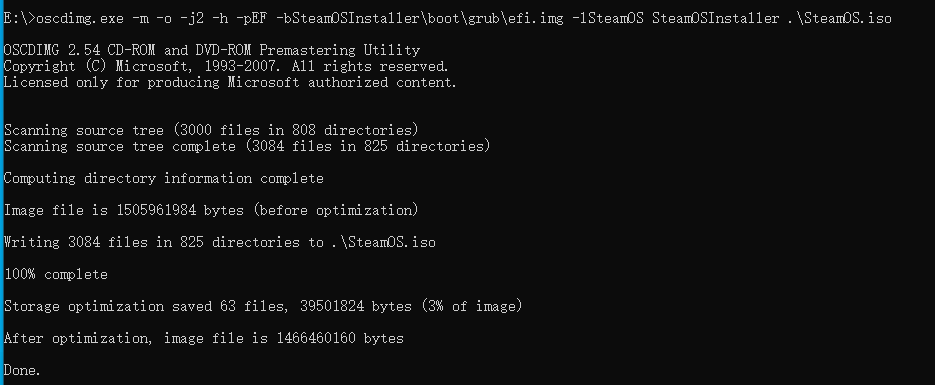
命令:oscdimg.exe -m -o -j2 -h -pEF -bSteamOSInstaller\boot\grub\efi.img -lSteamOS SteamOSInstaller .\SteamOS.iso (不过好像没成功,不折腾了,直接使用官方链接下载)
# 2019.12.18 补充
下面网站展示了一些游戏平台,可以进行参考:https://alternativeto.net/software/itch-io/
https://github.com/yaowenxu
来源:https://www.cnblogs.com/xuyaowen/p/linux-for-games.html |



 發表於 2019-12-17 00:59:00