- UID
- 665951
- 積分
- 0
- 金币
- 0
- 精華
- 0
- 威望
- 0
- 贡献
- 0
- 閲讀權限
- 220
- 註冊時間
- 2012-5-6
- 最後登錄
- 2026-5-6
- 在線時間
- 0 小時
热心网友
- 金币
- 0
- 閲讀權限
- 220
- 精華
- 0
- 威望
- 0
- 贡献
- 0
- 在線時間
- 0 小時
- 註冊時間
- 2012-5-6
|
|
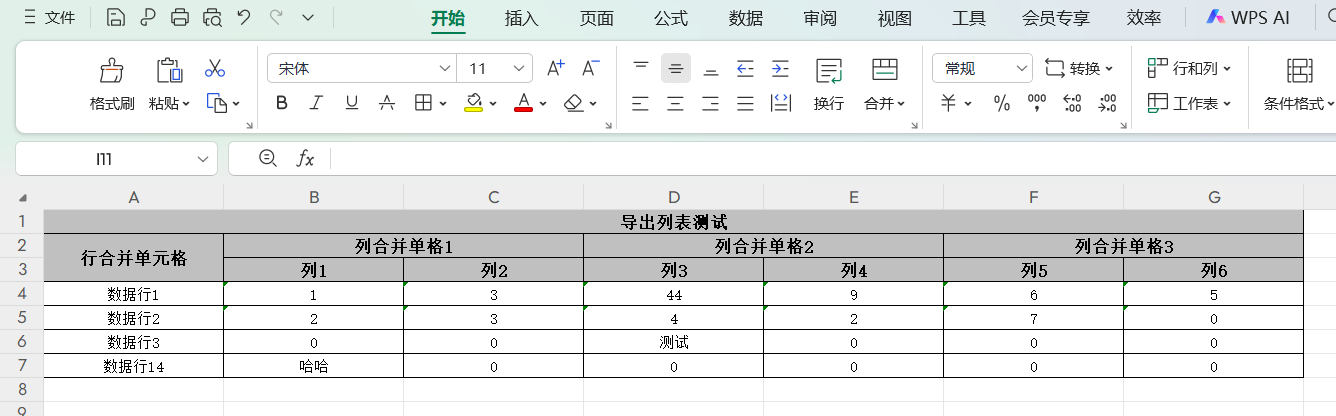
功能说明:
1、自定义表头、多级表头的表格导出
效果展示:
maven引入依赖:
<dependency>
    <groupId>com.alibaba</groupId>
    <artifactId>easyexcel</artifactId>
    <version>2.2.6</version>
</dependency>
工具类:
com.alibaba.excel.EasyExcel;
import com.alibaba.excel.enums.CellDataTypeEnum;
import com.alibaba.excel.metadata.CellData;
import com.alibaba.excel.metadata.Head;
import com.alibaba.excel.write.metadata.holder.WriteSheetHolder;
import com.alibaba.excel.write.metadata.style.WriteCellStyle;
import com.alibaba.excel.write.metadata.style.WriteFont;
import com.alibaba.excel.write.style.HorizontalCellStyleStrategy;
import com.alibaba.excel.write.style.column.AbstractColumnWidthStyleStrategy;
import com.google.common.collect.Lists;
import com.heit.common.core.exception.ZtCommonException;
import lombok.SneakyThrows;
import org.apache.commons.collections4.CollectionUtils;
import org.apache.commons.lang3.ObjectUtils;
import org.apache.poi.ss.usermodel.BorderStyle;
import org.apache.poi.ss.usermodel.Cell;
import org.apache.poi.ss.usermodel.HorizontalAlignment;
import org.apache.poi.ss.usermodel.VerticalAlignment;

import javax.servlet.http.HttpServletResponse;
import javax.validation.constraints.NotNull;
import java.net.URLEncoder;
import java.util.ArrayList;
import java.util.HashMap;
import java.util.List;
import java.util.Map;

/**
 * 导出数据
 * author: 唐泽齐
 */
public class ExclUtil {

    /**
     * 导出excel
     * @param response
     * @param outFileName 导出文件名
     * @param headList    表头列表   分页名->合并列名->...->...->列名
     * @param dataList    数据列表
     */
    @SneakyThrows
    public static void write(@NotNull HttpServletResponse response, String outFileName, List<List<String>> headList, List<List<Object>> dataList) {
        if (ObjectUtils.isEmpty(response)) throw new ZtCommonException("导出环境异常!");
        if (ObjectUtils.isEmpty(outFileName)) throw new ZtCommonException("未设置导出文件名!");
        if (ObjectUtils.isEmpty(headList)) throw new ZtCommonException("未设置导出表格式!");
        if (ObjectUtils.isEmpty(dataList)) throw new ZtCommonException("暂无可导出的数据!");

        response.setContentType("application/vnd.ms-excel");
        response.setCharacterEncoding("utf-8");
        response.setHeader("Content-disposition", "attachment;filename*=utf-8''" + URLEncoder.encode(outFileName, "UTF-8").replaceAll("\\+", "%20") + ".xls");
        response.setHeader("Access-Control-Expose-Headers", "Content-disposition");
        // 设置单元格样式
        HorizontalCellStyleStrategy horizontalCellStyleStrategy =
                new HorizontalCellStyleStrategy(getHeadStyle(), getContentStyle());
        // 列宽策略设置
        ExcelCellWidthStyleStrategy widthStyleStrategy = new ExcelCellWidthStyleStrategy();
        //导出数据
        EasyExcel.write(response.getOutputStream()).
                registerWriteHandler(horizontalCellStyleStrategy)
                .registerWriteHandler(widthStyleStrategy)
                .head(headList)
                .sheet().doWrite(dataList);
    }

    private static final String[] _formats = new String[]{
            "General",
            "0",
            "0.00",
            "#,##0",
            "#,##0.00",
            "\"$\"#,##0_);(\"$\"#,##0)",
            "\"$\"#,##0_);[Red](\"$\"#,##0)",
            "\"$\"#,##0.00_);(\"$\"#,##0.00)",
            "\"$\"#,##0.00_);[Red](\"$\"#,##0.00)",
            "0%", "0.00%", "0.00E+00",
            "# ?/?", "# ??/??",
            "m/d/yy", "d-mmm-yy",
            "d-mmm", "mmm-yy",
            "h:mm AM/PM",
            "h:mm:ss AM/PM",
            "h:mm", "h:mm:ss",
            "m/d/yy h:mm",
            "reserved-0x17",
            "reserved-0x18",
            "reserved-0x19",
            "reserved-0x1A",
            "reserved-0x1B",
            "reserved-0x1C",
            "reserved-0x1D",
            "reserved-0x1E",
            "reserved-0x1F",
            "reserved-0x20",
            "reserved-0x21",
            "reserved-0x22",
            "reserved-0x23",
            "reserved-0x24",
            "#,##0_);(#,##0)",
            "#,##0_);[Red](#,##0)",
            "#,##0.00_);(#,##0.00)",
            "#,##0.00_);[Red](#,##0.00)",
            "_(* #,##0_);_(* (#,##0);_(* \"-\"_);_(@_)",
            "_(\"$\"* #,##0_);_(\"$\"* (#,##0);_(\"$\"* \"-\"_);_(@_)",
            "_(* #,##0.00_);_(* (#,##0.00);_(* \"-\"??_);_(@_)",
            "_(\"$\"* #,##0.00_);_(\"$\"* (#,##0.00);_(\"$\"* \"-\"??_);_(@_)",
            "mm:ss",
            "[h]:mm:ss",
            "mm:ss.0",
            "##0.0E+0",
            "@" // 文本格式
    };


    /**
     * 标题样式
     *
     * @return
     */
    private static WriteCellStyle getHeadStyle() {
        // 头的策略
        WriteCellStyle headWriteCellStyle = new WriteCellStyle();
        // 背景颜色
//        headWriteCellStyle.setFillForegroundColor(IndexedColors.LIGHT_TURQUOISE1.getIndex());
//        headWriteCellStyle.setFillPatternType(FillPatternType.SOLID_FOREGROUND);

        // 字体
        WriteFont headWriteFont = new WriteFont();
        headWriteFont.setFontName("宋体");//设置字体名字
        headWriteFont.setFontHeightInPoints((short) 10);//设置字体大小
        headWriteFont.setBold(true);//字体加粗
        headWriteCellStyle.setWriteFont(headWriteFont); //在样式用应用设置的字体;

        // 样式
        headWriteCellStyle.setBorderBottom(BorderStyle.THIN);//设置底边框;
        headWriteCellStyle.setBottomBorderColor((short) 0);//设置底边框颜色;
        headWriteCellStyle.setBorderLeft(BorderStyle.THIN);  //设置左边框;
        headWriteCellStyle.setLeftBorderColor((short) 0);//设置左边框颜色;
        headWriteCellStyle.setBorderRight(BorderStyle.THIN);//设置右边框;
        headWriteCellStyle.setRightBorderColor((short) 0);//设置右边框颜色;
        headWriteCellStyle.setBorderTop(BorderStyle.THIN);//设置顶边框;
        headWriteCellStyle.setTopBorderColor((short) 0); //设置顶边框颜色;

        headWriteCellStyle.setWrapped(true);  //设置自动换行;

        headWriteCellStyle.setHorizontalAlignment(HorizontalAlignment.CENTER);//设置水平对齐的样式为居中对齐;
        headWriteCellStyle.setVerticalAlignment(VerticalAlignment.CENTER);  //设置垂直对齐的样式为居中对齐;
        headWriteCellStyle.setShrinkToFit(true);//设置文本收缩至合适

        return headWriteCellStyle;
    }


    /**
     * 内容样式
     *
     * @return
     */
    private static WriteCellStyle getContentStyle() {
        // 内容的策略
        WriteCellStyle contentWriteCellStyle = new WriteCellStyle();

        // 背景绿色
        // 这里需要指定 FillPatternType 为FillPatternType.SOLID_FOREGROUND 不然无法显示背景颜色.头默认了 FillPatternType所以可以不指定
//        contentWriteCellStyle.setFillForegroundColor(IndexedColors.PALE_BLUE.getIndex());
//        contentWriteCellStyle.setFillPatternType(FillPatternType.SOLID_FOREGROUND);

        // 设置字体
        WriteFont contentWriteFont = new WriteFont();
        contentWriteFont.setFontHeightInPoints((short) 9);//设置字体大小
        contentWriteFont.setFontName("宋体"); //设置字体名字
        contentWriteCellStyle.setWriteFont(contentWriteFont);//在样式用应用设置的字体;

        //设置样式;
        contentWriteCellStyle.setBorderBottom(BorderStyle.THIN);//设置底边框;
        contentWriteCellStyle.setBottomBorderColor((short) 0);//设置底边框颜色;
        contentWriteCellStyle.setBorderLeft(BorderStyle.THIN);  //设置左边框;
        contentWriteCellStyle.setLeftBorderColor((short) 0);//设置左边框颜色;
        contentWriteCellStyle.setBorderRight(BorderStyle.THIN);//设置右边框;
        contentWriteCellStyle.setRightBorderColor((short) 0);//设置右边框颜色;
        contentWriteCellStyle.setBorderTop(BorderStyle.THIN);//设置顶边框;
        contentWriteCellStyle.setTopBorderColor((short) 0); ///设置顶边框颜色;

        contentWriteCellStyle.setHorizontalAlignment(HorizontalAlignment.CENTER);// 水平居中
        contentWriteCellStyle.setVerticalAlignment(VerticalAlignment.CENTER);// 垂直居中
        contentWriteCellStyle.setWrapped(true); //设置自动换行;

        contentWriteCellStyle.setDataFormat((short) 49);//设置单元格格式是:文本格式,方式长数字文本科学计数法

        contentWriteCellStyle.setShrinkToFit(true);//设置文本收缩至合适

        return contentWriteCellStyle;
    }

    static class ExcelCellWidthStyleStrategy extends AbstractColumnWidthStyleStrategy {
        // 可以根据这里的最大宽度,按自己需要进行调整,搭配单元格样式实现类中的,自动换行,效果更好
        private static final int MAX_COLUMN_WIDTH = 20;
        private Map<Integer, Map<Integer, Integer>> CACHE = new HashMap(8);

        @Override
        protected void setColumnWidth(WriteSheetHolder writeSheetHolder, List<CellData> cellDataList, Cell cell, Head head, Integer relativeRowIndex, Boolean isHead) {
            boolean needSetWidth = isHead || !CollectionUtils.isEmpty(cellDataList);
            if (needSetWidth) {
                Map<Integer, Integer> maxColumnWidthMap = (Map) CACHE.get(writeSheetHolder.getSheetNo());
                if (maxColumnWidthMap == null) {
                    maxColumnWidthMap = new HashMap(16);
                    CACHE.put(writeSheetHolder.getSheetNo(), maxColumnWidthMap);
                }

                Integer columnWidth = this.dataLength(cellDataList, cell, isHead);
                if (columnWidth >= 0) {
                    if (columnWidth > MAX_COLUMN_WIDTH) {
                        columnWidth = MAX_COLUMN_WIDTH;
                    }

                    Integer maxColumnWidth = (Integer) ((Map) maxColumnWidthMap).get(cell.getColumnIndex());
                    if (maxColumnWidth == null || columnWidth > maxColumnWidth) {
                        ((Map) maxColumnWidthMap).put(cell.getColumnIndex(), columnWidth);
                        writeSheetHolder.getSheet().setColumnWidth(cell.getColumnIndex(), columnWidth * 256);
                    }

                }
            }
        }

        private Integer dataLength(List<CellData> cellDataList, Cell cell, Boolean isHead) {
            if (isHead) {
                return cell.getStringCellValue().getBytes().length;
            } else {
                CellData cellData = (CellData) cellDataList.get(0);
                CellDataTypeEnum type = cellData.getType();
                if (type == null) {
                    return -1;
                } else {
                    switch (type) {
                        case STRING:
                            return cellData.getStringValue().getBytes().length;
                        case BOOLEAN:
                            return cellData.getBooleanValue().toString().getBytes().length;
                        case NUMBER:
                            return cellData.getNumberValue().toString().getBytes().length;
                        default:
                            return -1;
                    }
                }
            }
        }


    }

    public static void main(String[] args) {
        //导出环境
        HttpServletResponse response = null;
        //文件名、分页名
        String outFileName = "测试文件";
        //表头格式
        List<List<String>> headList = new ArrayList<List<String>>();
        headList.add(Lists.newArrayList(outFileName, "合并列1", "列1"));
        headList.add(Lists.newArrayList(outFileName, "合并列1", "列2"));
        headList.add(Lists.newArrayList(outFileName, "合并列2", "列3"));
        headList.add(Lists.newArrayList(outFileName, "合并列2", "列4"));
        //数据
        List<List<Object>> dataList = new ArrayList<>();
        for (int i= 0;i<100;i++) {
            List<Object> list = new ArrayList<>();
            list.add("1"+i);
            list.add("2"+i);
            list.add("3"+i);
            list.add("4"+i);
            dataList.add(list);
        }
        //导出表格
        write(response,outFileName,headList,dataList);
    }
}
由于上线linux系统时,大多数是使用openjdk,所以easyExcel用不了,于是用Apache POI写了一份同款导出,以下是完整代码:
package com.heit.road.service.util;

import com.alibaba.excel.EasyExcel;
import com.alibaba.excel.enums.CellDataTypeEnum;
import com.alibaba.excel.metadata.CellData;
import com.alibaba.excel.metadata.Head;
import com.alibaba.excel.write.metadata.holder.WriteSheetHolder;
import com.alibaba.excel.write.metadata.style.WriteCellStyle;
import com.alibaba.excel.write.metadata.style.WriteFont;
import com.alibaba.excel.write.style.HorizontalCellStyleStrategy;
import com.alibaba.excel.write.style.column.AbstractColumnWidthStyleStrategy;
import com.heit.common.core.exception.ZtCommonException;
import io.swagger.models.auth.In;
import lombok.SneakyThrows;
import lombok.extern.slf4j.Slf4j;
import org.apache.commons.collections4.CollectionUtils;
import org.apache.commons.lang3.ObjectUtils;
import org.apache.poi.ss.usermodel.*;
import org.apache.poi.ss.util.CellRangeAddress;
import org.apache.poi.xssf.usermodel.XSSFWorkbook;

import javax.servlet.ServletOutputStream;
import javax.servlet.http.HttpServletResponse;
import javax.validation.constraints.NotNull;
import java.net.URLEncoder;
import java.util.Arrays;
import java.util.HashMap;
import java.util.List;
import java.util.Map;

/**
 * 导出数据
 * author: 唐泽齐
 */
@Slf4j
public class ExclUtil {

    /**
     * 导出excel
     *
     * @param response
     * @param outFileName 导出文件名
     * @param headList    表头列表   分页名->合并列名->...->...->列名
     * @param dataList    数据列表
     */
    @SneakyThrows
    public static void write(@NotNull HttpServletResponse response, String outFileName, List<List<String>> headList, List<List<Object>> dataList) {
        check(response, outFileName, headList, dataList);
        response.setContentType("application/vnd.ms-excel");
        response.setCharacterEncoding("utf-8");
        response.setHeader("Content-disposition", "attachment;filename*=utf-8''" + URLEncoder.encode(outFileName, "UTF-8").replaceAll("\\+", "%20") + ".xls");
        response.setHeader("Access-Control-Expose-Headers", "Content-disposition");
//        Easy.write(response, outFileName, headList, dataList);
        Poi.write(response, outFileName, headList, dataList);
    }
    private static void check(@NotNull HttpServletResponse response, String outFileName, List<List<String>> headList, List<List<Object>> dataList) {
        if (ObjectUtils.isEmpty(response)) throw new ZtCommonException("导出环境异常!");
        if (ObjectUtils.isEmpty(outFileName)) throw new ZtCommonException("未设置导出文件名!");
        if (ObjectUtils.isEmpty(headList)) throw new ZtCommonException("未设置导出表格式!");
        if (ObjectUtils.isEmpty(dataList)) throw new ZtCommonException("暂无可导出的数据!");
    }
    static class Easy {

        @SneakyThrows
        private static void write(@NotNull HttpServletResponse response, String outFileName, List<List<String>> headList, List<List<Object>> dataList) {
            // 设置单元格样式
            HorizontalCellStyleStrategy horizontalCellStyleStrategy =
                    new HorizontalCellStyleStrategy(getHeadStyle(), getContentStyle());
            // 列宽策略设置
            ExcelCellWidthStyleStrategy widthStyleStrategy = new ExcelCellWidthStyleStrategy();
            //导出数据
            EasyExcel.write(response.getOutputStream()).
                    registerWriteHandler(horizontalCellStyleStrategy)
                    .registerWriteHandler(widthStyleStrategy)
                    .head(headList)
                    .sheet(outFileName)
                    .doWrite(dataList);
        }

        /**
         * 标题样式
         *
         * @return
         */
        private static WriteCellStyle getHeadStyle() {
            // 头的策略
            WriteCellStyle headWriteCellStyle = new WriteCellStyle();
            // 背景颜色
//        headWriteCellStyle.setFillForegroundColor(IndexedColors.LIGHT_TURQUOISE1.getIndex());
//        headWriteCellStyle.setFillPatternType(FillPatternType.SOLID_FOREGROUND);

            // 字体
            WriteFont headWriteFont = new WriteFont();
//        headWriteFont.setFontName("宋体");//设置字体名字
            headWriteFont.setFontHeightInPoints((short) 10);//设置字体大小
            headWriteFont.setBold(true);//字体加粗
            headWriteCellStyle.setWriteFont(headWriteFont); //在样式用应用设置的字体;

            // 样式
            headWriteCellStyle.setBorderBottom(BorderStyle.THIN);//设置底边框;
            headWriteCellStyle.setBottomBorderColor((short) 0);//设置底边框颜色;
            headWriteCellStyle.setBorderLeft(BorderStyle.THIN);  //设置左边框;
            headWriteCellStyle.setLeftBorderColor((short) 0);//设置左边框颜色;
            headWriteCellStyle.setBorderRight(BorderStyle.THIN);//设置右边框;
            headWriteCellStyle.setRightBorderColor((short) 0);//设置右边框颜色;
            headWriteCellStyle.setBorderTop(BorderStyle.THIN);//设置顶边框;
            headWriteCellStyle.setTopBorderColor((short) 0); //设置顶边框颜色;

            headWriteCellStyle.setWrapped(true);  //设置自动换行;

            headWriteCellStyle.setHorizontalAlignment(HorizontalAlignment.CENTER);//设置水平对齐的样式为居中对齐;
            headWriteCellStyle.setVerticalAlignment(VerticalAlignment.CENTER);  //设置垂直对齐的样式为居中对齐;
            headWriteCellStyle.setShrinkToFit(true);//设置文本收缩至合适

            return headWriteCellStyle;
        }
        /**
         * 内容样式
         *
         * @return
         */
        private static WriteCellStyle getContentStyle() {
            // 内容的策略
            WriteCellStyle contentWriteCellStyle = new WriteCellStyle();

            // 背景绿色
            // 这里需要指定 FillPatternType 为FillPatternType.SOLID_FOREGROUND 不然无法显示背景颜色.头默认了 FillPatternType所以可以不指定
//        contentWriteCellStyle.setFillForegroundColor(IndexedColors.PALE_BLUE.getIndex());
//        contentWriteCellStyle.setFillPatternType(FillPatternType.SOLID_FOREGROUND);

            // 设置字体
            WriteFont contentWriteFont = new WriteFont();
            contentWriteFont.setFontHeightInPoints((short) 9);//设置字体大小
//        contentWriteFont.setFontName("宋体"); //设置字体名字
            contentWriteCellStyle.setWriteFont(contentWriteFont);//在样式用应用设置的字体;

            //设置样式;
            contentWriteCellStyle.setBorderBottom(BorderStyle.THIN);//设置底边框;
            contentWriteCellStyle.setBottomBorderColor((short) 0);//设置底边框颜色;
            contentWriteCellStyle.setBorderLeft(BorderStyle.THIN);  //设置左边框;
            contentWriteCellStyle.setLeftBorderColor((short) 0);//设置左边框颜色;
            contentWriteCellStyle.setBorderRight(BorderStyle.THIN);//设置右边框;
            contentWriteCellStyle.setRightBorderColor((short) 0);//设置右边框颜色;
            contentWriteCellStyle.setBorderTop(BorderStyle.THIN);//设置顶边框;
            contentWriteCellStyle.setTopBorderColor((short) 0); ///设置顶边框颜色;

            contentWriteCellStyle.setHorizontalAlignment(HorizontalAlignment.CENTER);// 水平居中
            contentWriteCellStyle.setVerticalAlignment(VerticalAlignment.CENTER);// 垂直居中
            contentWriteCellStyle.setWrapped(true); //设置自动换行;

            contentWriteCellStyle.setDataFormat((short) 49);//设置单元格格式是:文本格式,方式长数字文本科学计数法

            contentWriteCellStyle.setShrinkToFit(true);//设置文本收缩至合适

            return contentWriteCellStyle;
        }

        static class ExcelCellWidthStyleStrategy extends AbstractColumnWidthStyleStrategy {
            // 可以根据这里的最大宽度,按自己需要进行调整,搭配单元格样式实现类中的,自动换行,效果更好
            private static final int MAX_COLUMN_WIDTH = 20;
            private Map<Integer, Map<Integer, Integer>> CACHE = new HashMap(8);

            @Override
            protected void setColumnWidth(WriteSheetHolder writeSheetHolder, List<CellData> cellDataList, Cell cell, Head head, Integer relativeRowIndex, Boolean isHead) {
                boolean needSetWidth = isHead || !CollectionUtils.isEmpty(cellDataList);
                if (needSetWidth) {
                    Map<Integer, Integer> maxColumnWidthMap = (Map) CACHE.get(writeSheetHolder.getSheetNo());
                    if (maxColumnWidthMap == null) {
                        maxColumnWidthMap = new HashMap(16);
                        CACHE.put(writeSheetHolder.getSheetNo(), maxColumnWidthMap);
                    }

                    Integer columnWidth = this.dataLength(cellDataList, cell, isHead);
                    if (columnWidth >= 0) {
                        if (columnWidth > MAX_COLUMN_WIDTH) {
                            columnWidth = MAX_COLUMN_WIDTH;
                        }

                        Integer maxColumnWidth = (Integer) ((Map) maxColumnWidthMap).get(cell.getColumnIndex());
                        if (maxColumnWidth == null || columnWidth > maxColumnWidth) {
                            ((Map) maxColumnWidthMap).put(cell.getColumnIndex(), columnWidth);
                            writeSheetHolder.getSheet().setColumnWidth(cell.getColumnIndex(), columnWidth * 256);
                        }

                    }
                }
            }

            private Integer dataLength(List<CellData> cellDataList, Cell cell, Boolean isHead) {
                if (isHead) {
                    return cell.getStringCellValue().getBytes().length;
                } else {
                    CellData cellData = (CellData) cellDataList.get(0);
                    CellDataTypeEnum type = cellData.getType();
                    if (type == null) {
                        return -1;
                    } else {
                        switch (type) {
                            case STRING:
                                return cellData.getStringValue().getBytes().length;
                            case BOOLEAN:
                                return cellData.getBooleanValue().toString().getBytes().length;
                            case NUMBER:
                                return cellData.getNumberValue().toString().getBytes().length;
                            default:
                                return -1;
                        }
                    }
                }
            }


        }
    }
    static class Poi {
        @SneakyThrows
        private static void write(@NotNull HttpServletResponse response, String outFileName, List<List<String>> headList, List<List<Object>> dataList) {
            Workbook workbook = new XSSFWorkbook();
            Sheet sheet = workbook.createSheet(outFileName);
            // 创建单元格样式
            CellStyle headerStyle = getHeadCellStyle(workbook);
            CellStyle contentCellStyle = getContentCellStyle(workbook);
            //创建表头
            Map<String, List<Integer>> regions = new HashMap<>();
            int courrentRow = 0;
            for (int i = 0, j = 0; i < headList.size(); i++ , j = 0) {
                List<String> list = headList.get(i);
                for (; j < list.size(); j++) {
                    courrentRow = j;
                    String str = headList.get(i).get(j);
                    Row headerRow = sheet.getRow(j);
                    if(headerRow == null) headerRow = sheet.createRow(j);
                    Cell headerCell = headerRow.createCell(i);
                    headerCell.setCellValue(str);
                    headerCell.setCellStyle(headerStyle);
                    if (regions.containsKey(str)) {
                        if ((j > 0 && str.equalsIgnoreCase(headList.get(i).get(j - 1))) || (i > 0 && str.equalsIgnoreCase(headList.get(i - 1).get(j)))) {
                            regions.put(str, Arrays.asList(regions.get(str).get(0), j, regions.get(str).get(2), i));
                        } else {
                            if(regions.get(str).get(0).compareTo(regions.get(str).get(1)) != 0 || regions.get(str).get(2).compareTo(regions.get(str).get(3)) != 0) {
                                sheet.addMergedRegion(new CellRangeAddress(regions.get(str).get(0), regions.get(str).get(1), regions.get(str).get(2), regions.get(str).get(3)));
                            }
                            regions.put(str, Arrays.asList(j, j, i, i));
                        }
                    } else {
                        regions.put(str, Arrays.asList(j, j, i, i));
                    }
                }
            }
            //合并表头
            for (Map.Entry<String, List<Integer>> entry : regions.entrySet()) {
                if(entry.getValue().get(0).compareTo(entry.getValue().get(1)) != 0 || entry.getValue().get(2).compareTo(entry.getValue().get(3)) != 0) {
                    sheet.addMergedRegion(new CellRangeAddress(entry.getValue().get(0), entry.getValue().get(1), entry.getValue().get(2), entry.getValue().get(3)));
                }
            }
            //冻结表头
            sheet.createFreezePane(0,headList.get(0).size());
            // 创建数据
            Map<Integer,Integer> widths = new HashMap<>();
            for (int i = 0; i < dataList.size(); i++) {
                Row dataRow = sheet.createRow(i + courrentRow + 1);
                for (int j = 0; j < dataList.get(i).size(); j++) {
                    Cell dataCell = dataRow.createCell(j);
                    dataCell.setCellStyle(contentCellStyle);
                    if(dataList.get(i).get(j) instanceof Number && (dataList.get(i).get(j) instanceof Integer || dataList.get(i).get(j) instanceof Long) ) {
                        dataCell.setCellValue(((Number) dataList.get(i).get(j)).longValue());
                    } else if (dataList.get(i).get(j) instanceof Number) {
                        dataCell.setCellValue(((Number) dataList.get(i).get(j)).doubleValue());
                    } else {
                        dataCell.setCellValue(dataList.get(i).get(j) == null ? "" : dataList.get(i).get(j).toString());
                    }
                    Integer width = widths.getOrDefault(j, 20);
                    if(dataList.get(i).get(j).toString().length() > width) width = dataList.get(i).get(j).toString().length();
                    widths.put(j, width);
                }
            }
            for (Map.Entry<Integer, Integer> entry : widths.entrySet()) {
                sheet.setColumnWidth(entry.getKey(), entry.getValue() * 256);
            }
            // 写入文件
            ServletOutputStream outputStream = response.getOutputStream();
            workbook.write(outputStream);
            outputStream.flush();
            outputStream.close();
        }
        private static CellStyle getHeadCellStyle(Workbook workbook) {
            CellStyle style = workbook.createCellStyle();
            style.setBorderBottom(BorderStyle.THIN);//设置底边框;
            style.setBottomBorderColor((short) 0);//设置底边框颜色;
            style.setBorderLeft(BorderStyle.THIN);  //设置左边框;
            style.setLeftBorderColor((short) 0);//设置左边框颜色;
            style.setBorderRight(BorderStyle.THIN);//设置右边框;
            style.setRightBorderColor((short) 0);//设置右边框颜色;
            style.setBorderTop(BorderStyle.THIN);//设置顶边框;
            style.setTopBorderColor((short) 0); //设置顶边框颜色;


            style.setAlignment(HorizontalAlignment.CENTER);//设置水平对齐的样式为居中对齐;
            style.setVerticalAlignment(VerticalAlignment.CENTER);  //设置垂直对齐的样式为居中对齐;
            style.setFillForegroundColor(IndexedColors.GREY_25_PERCENT.getIndex());
            style.setFillPattern(FillPatternType.SOLID_FOREGROUND);
            style.setWrapText(true);  //设置自动换行;
            style.setShrinkToFit(true);//设置文本收缩至合适

            Font font = workbook.createFont();
            font.setBold(true);
            font.setFontHeightInPoints((short) 10);
            style.setFont(font);
            return style;
        }
        private static CellStyle getContentCellStyle(Workbook workbook) {
            CellStyle style = workbook.createCellStyle();
            style.setBorderBottom(BorderStyle.THIN);//设置底边框;
            style.setBottomBorderColor((short) 0);//设置底边框颜色;
            style.setBorderLeft(BorderStyle.THIN);  //设置左边框;
            style.setLeftBorderColor((short) 0);//设置左边框颜色;
            style.setBorderRight(BorderStyle.THIN);//设置右边框;
            style.setRightBorderColor((short) 0);//设置右边框颜色;
            style.setBorderTop(BorderStyle.THIN);//设置顶边框;
            style.setTopBorderColor((short) 0); //设置顶边框颜色;

            style.setWrapText(true);  //设置自动换行;

            style.setAlignment(HorizontalAlignment.CENTER);//设置水平对齐的样式为居中对齐;
            style.setVerticalAlignment(VerticalAlignment.CENTER);  //设置垂直对齐的样式为居中对齐;
            style.setShrinkToFit(true);//设置文本收缩至合适
            Font font = workbook.createFont();
            font.setBold(true);
            font.setFontHeightInPoints((short) 9);
            style.setFont(font);
            return style;
        }
    }


}
来源:https://www.cnblogs.com/tangzeqi/p/18880124 |
|



 發表於 2025-5-16 15:40:00