C#封装YOLOv4算法进行目标检测
概述
官网:https://pjreddie.com/darknet/
Darknet:【Github】
C#封装代码:【Github】
YOLO: 是实现实时物体检测的系统,Darknet是基于YOLO的框架
采用C#语言对 YOLOv4 目标检测算法封装,将模型在实际应用系统中落地,实现模型在线远程调用。
环境准备
本章只讲解如何对YOLOv4封装进行详解,具体环境安装过程不做介绍
查看你的GPU计算能力是否支持 >= 3.0:【点击查看】
Windows运行要求
- CMake >= 3.12: 【点击下载】
- CUDA >= 10.0: 【点击下载】
- OpenCV >= 2.4: 【点击下载】
- cuDNN >= 7.0: 【点击下载】
- Visual Studio 2017/2019: 【点击下载】
我所使用的环境
- 系统版本:Windows 10 专业版
- 显卡:GTX 1050 Ti
- CMake版本:3.18.2
- CUDA版本:10.1
- OpenCV版本:4.4.0
- cuDNN版本:10.1
- MSVC 2017/2019: Visual Studio 2019
程序代码准备
源代码下载
下载地址:【Darknet】
使用Git
git clone https://github.com/AlexeyAB/darknet
cd darknet
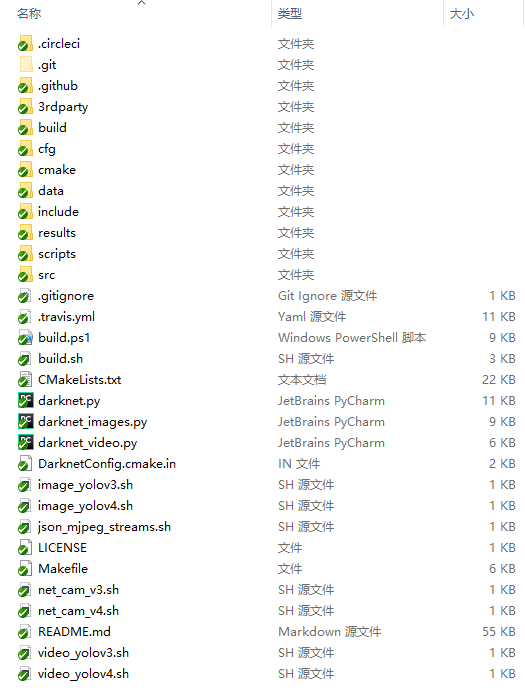
代码结构
将YOLOv4编译为DLL
详细教程:【点击查看】,这个教程描述的很详细。
进入 darknet\build\darknet 目录,打开解决方案 yolo_cpp_dll.sln
设置Windows SDK版本和平台工具集为当前系统安装版本
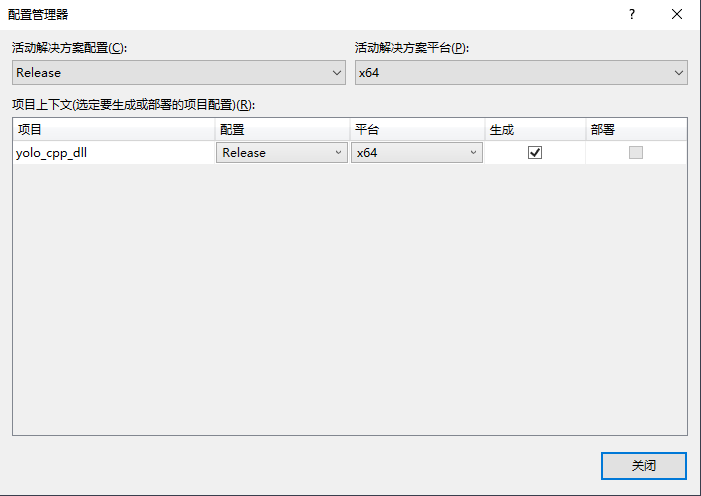
设置Release和x64
然后执行以下操作:Build-> Build yolo_cpp_dll
已完成生成项目“yolo_cpp_dll.vcxproj”的操作。
========== 生成: 成功 1 个,失败 0 个,最新 0 个,跳过 0 个 ==========
在打包DLL的过程中可能遇到如下问题
C1041
无法打开程序数据库“D:\代码管理\C\darknet\build\darknet\x64\DLL_Release\vc142.pdb”;如果要将多个 CL.EXE 写入同一个 .PDB 文件,请使用 /FS	yolo_cpp_dll	C:\Users\administrator\AppData\Local\Temp\tmpxft_00005db0_00000000-6_dropout_layer_kernels.compute_75.cudafe1.cpp	1
MSB3721
命令“"C:\Program Files\NVIDIA GPU Computing Toolkit\CUDA\v10.1\bin\nvcc.exe" -gencode=arch=compute_30,code=\"sm_30,compute_30\" -gencode=arch=compute_75,code=\"sm_75,compute_75\" --use-local-env -ccbin "C:\Program Files (x86)\Microsoft Visual Studio\2019\Community\VC\Tools\MSVC\14.27.29110\bin\HostX86\x64" -x cu  -IC:\opencv\build\include -IC:\opencv_3.0\opencv\build\include -I..\..\include -I..\..\3rdparty\stb\include -I..\..\3rdparty\pthreads\include -I"C:\Program Files\NVIDIA GPU Computing Toolkit\CUDA\v10.1\include" -I"C:\Program Files\NVIDIA GPU Computing Toolkit\CUDA\v10.1\include" -I\include -I\include -I"C:\Program Files\NVIDIA GPU Computing Toolkit\CUDA\v10.1\include"     --keep-dir x64\Release -maxrregcount=0  --machine 64 --compile -cudart static     -DCUDNN_HALF -DCUDNN -DGPU -DLIB_EXPORTS -D_TIMESPEC_DEFINED -D_SCL_SECURE_NO_WARNINGS -D_CRT_SECURE_NO_WARNINGS -DWIN32 -DNDEBUG -D_CONSOLE -D_LIB -D_WINDLL -D_MBCS -Xcompiler "/EHsc /W3 /nologo /O2 /Fdx64\DLL_Release\vc142.pdb  /Zi  /MD " -o x64\DLL_Release\dropout_layer_kernels.cu.obj "D:\darknet\src\dropout_layer_kernels.cu"”已退出,返回代码为 2。	yolo_cpp_dll	C:\Program Files (x86)\Microsoft Visual Studio\2019\Community\MSBuild\Microsoft\VC\v160\BuildCustomizations\CUDA 10.1.targets	757
解决方法
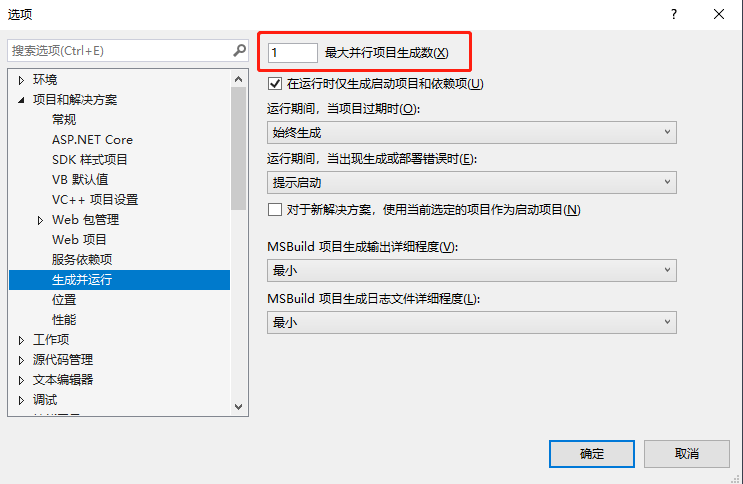
在VS 2019 工具》选项》项目和解决方案》生成并运行 中最大并行项目生成数设为 1
在VS 2019 项目-》属性-》配置属性-》常规 将Windows SDK版本设置为系统当前版本即可
封装YOLOv4编译后的DLL
- 1、进入
darknet\build\darknet\x64 目录,将 pthreadGC2.dll 和 pthreadVC2.dll 拷贝到项目 Dll 文件夹
- 2、将编译后的YOLOv4 DLL文件拷贝到项目
Dll 文件夹
- 3、进入
darknet\build\darknet\x64\cfg 目录,将 yolov4.cfg 拷贝到项目 Cfg 文件夹
- 4、进入
darknet\build\darknet\x64\data 目录,将 coco.names 拷贝到项目 Data 文件夹
- 5、下载 yolov4.weights 权重文件 拷贝到
Weights 文件夹,文件245 MB 【点击下载】
项目文件
代码下载:【Github】
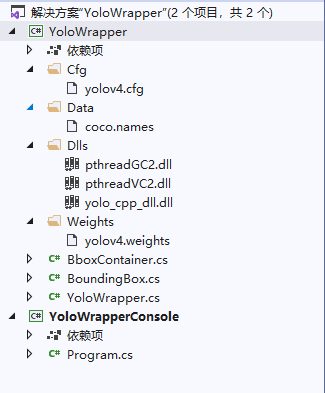
YoloWrapper - YOLOv4封装项目
Cfg - 配置文件夹Data - label文件夹Dll - YOLOv4 编译后的DLL文件夹Weights - YOLOv4 权重文件夹BboxContainer.csBoundingBox.csYoloWrapper.cs - 封装主文件,调用 YOLOv4 的动态链接库
YoloWrapperConsole - 调用封装DLL控制台程序
Program.cs - 控制台主程序,调用 YOLOv4 封装文件
代码
YOLOv4封装项目
YoloWrapper.cs - 封装主文件,调用 YOLOv4 的动态链接库
using System;
using System.Runtime.InteropServices;

namespace YoloWrapper
{

    public class YoloWrapper : IDisposable
    {
        private const string YoloLibraryName = @"\Dlls\yolo_cpp_dll.dll";

        [DllImport(YoloLibraryName, EntryPoint = "init")]
        private static extern int InitializeYolo(string configurationFilename, string weightsFilename, int gpu);

        [DllImport(YoloLibraryName, EntryPoint = "detect_image")]
        private static extern int DetectImage(string filename, ref BboxContainer container);

        [DllImport(YoloLibraryName, EntryPoint = "detect_mat")]
        private static extern int DetectImage(IntPtr pArray, int nSize, ref BboxContainer container);

        [DllImport(YoloLibraryName, EntryPoint = "dispose")]
        private static extern int DisposeYolo();

        public YoloWrapper(string configurationFilename, string weightsFilename, int gpu)
        {
            InitializeYolo(configurationFilename, weightsFilename, gpu);
        }

        public void Dispose()
        {
            DisposeYolo();
        }

        public BoundingBox[] Detect(string filename)
        {
            var container = new BboxContainer();
            var count = DetectImage(filename, ref container);

            return container.candidates;
        }

        public BoundingBox[] Detect(byte[] imageData)
        {
            var container = new BboxContainer();

            var size = Marshal.SizeOf(imageData[0]) * imageData.Length;
            var pnt = Marshal.AllocHGlobal(size);

            try
            {
                Marshal.Copy(imageData, 0, pnt, imageData.Length);
                var count = DetectImage(pnt, imageData.Length, ref container);
                if (count == -1)
                {
                    throw new NotSupportedException($"{YoloLibraryName} has no OpenCV support");
                }
            }
            catch (Exception exception)
            {
                return null;
            }
            finally
            {
                Marshal.FreeHGlobal(pnt);
            }

            return container.candidates;
        }

    }

}
BboxContainer.cs
using System.Runtime.InteropServices;

namespace YoloWrapper
{
    [StructLayout(LayoutKind.Sequential)]
    public struct BboxContainer
    {
        [MarshalAs(UnmanagedType.ByValArray, SizeConst = 1000)]
        public BoundingBox[] candidates;
    }
}
BoundingBox.cs
using System;
using System.Runtime.InteropServices;

namespace YoloWrapper
{
    [StructLayout(LayoutKind.Sequential)]
    public struct BoundingBox
    {
        public UInt32 x, y, w, h;
        public float prob;
        public UInt32 obj_id;
        public UInt32 track_id;
        public UInt32 frames_counter;
        public float x_3d, y_3d, z_3d;
    }
}
调用封装DLL控制台程序
BoundingBox.cs
using ConsoleTables;
using System;
using System.Collections.Generic;
using System.IO;
using System.Linq;
using YoloWrapper;

namespace YoloWrapperConsole
{
    class Program
    {
        private const string configurationFilename = @".\Cfg\yolov4.cfg";
        private const string weightsFilename = @".\Weights\yolov4.weights";
        private const string namesFile = @".\Data\coco.names";

        private static Dictionary<int, string> _namesDic = new Dictionary<int, string>();

        private static YoloWrapper.YoloWrapper _wrapper;

        static void Main(string[] args)
        {
            Initilize();

            Console.Write("ImagePath:");
            string imagePath = Console.ReadLine();
            var bbox = _wrapper.Detect(imagePath);

            Convert(bbox);

            Console.ReadKey();
        }

        private static void Initilize()
        {
            _wrapper = new YoloWrapper.YoloWrapper(configurationFilename, weightsFilename, 0);

            var lines = File.ReadAllLines(namesFile);
            for (var i = 0; i < lines.Length; i++)
                _namesDic.Add(i, lines);
        }


        private static void Convert(BoundingBox[] bbox)
        {
            Console.WriteLine("Result:");
            var table = new ConsoleTable("Type", "Confidence", "X", "Y", "Width", "Height");
            foreach (var item in bbox.Where(o => o.h > 0 || o.w > 0))
            {
                var type = _namesDic[(int)item.obj_id];
                table.AddRow(type, item.prob, item.x, item.y, item.w, item.h);
            }
            table.Write(Format.MarkDown);
        }
    }
}
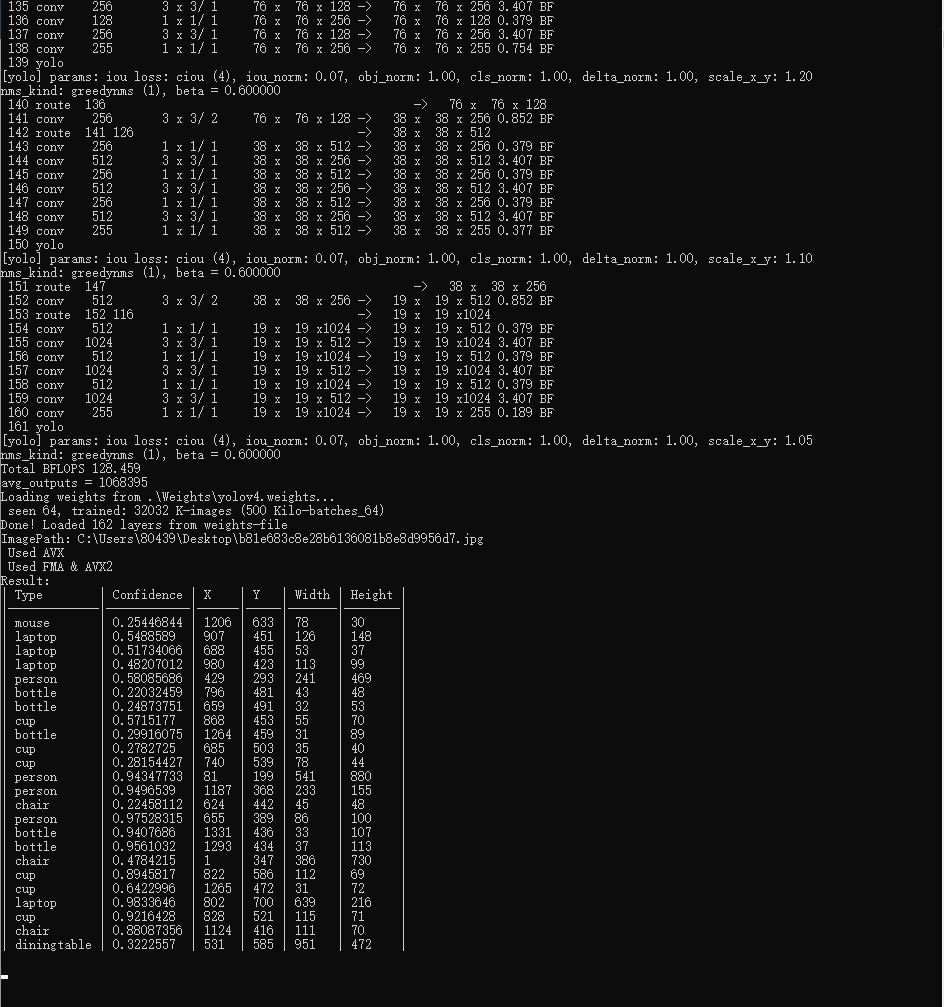
测试返回结果
| Type |
Confidence |
X |
Y |
Width |
Height |
| mouse |
0.25446844 |
1206 |
633 |
78 |
30 |
| laptop |
0.5488589 |
907 |
451 |
126 |
148 |
| laptop |
0.51734066 |
688 |
455 |
53 |
37 |
| laptop |
0.48207012 |
980 |
423 |
113 |
99 |
| person |
0.58085686 |
429 |
293 |
241 |
469 |
| bottle |
0.22032459 |
796 |
481 |
43 |
48 |
| bottle |
0.24873751 |
659 |
491 |
32 |
53 |
| cup |
0.5715177 |
868 |
453 |
55 |
70 |
| bottle |
0.29916075 |
1264 |
459 |
31 |
89 |
| cup |
0.2782725 |
685 |
503 |
35 |
40 |
| cup |
0.28154427 |
740 |
539 |
78 |
44 |
| person |
0.94347733 |
81 |
199 |
541 |
880 |
| person |
0.9496539 |
1187 |
368 |
233 |
155 |
| chair |
0.22458112 |
624 |
442 |
45 |
48 |
| person |
0.97528315 |
655 |
389 |
86 |
100 |
| bottle |
0.9407686 |
1331 |
436 |
33 |
107 |
| bottle |
0.9561032 |
1293 |
434 |
37 |
113 |
| chair |
0.4784215 |
1 |
347 |
386 |
730 |
| cup |
0.8945817 |
822 |
586 |
112 |
69 |
| cup |
0.6422996 |
1265 |
472 |
31 |
72 |
| laptop |
0.9833646 |
802 |
700 |
639 |
216 |
| cup |
0.9216428 |
828 |
521 |
115 |
71 |
| chair |
0.88087356 |
1124 |
416 |
111 |
70 |
| diningtable |
0.3222557 |
531 |
585 |
951 |
472 |
控制台
来源:https://www.cnblogs.com/zypblog/p/13656366.html |



 發表於 2020-9-12 16:28:00