|
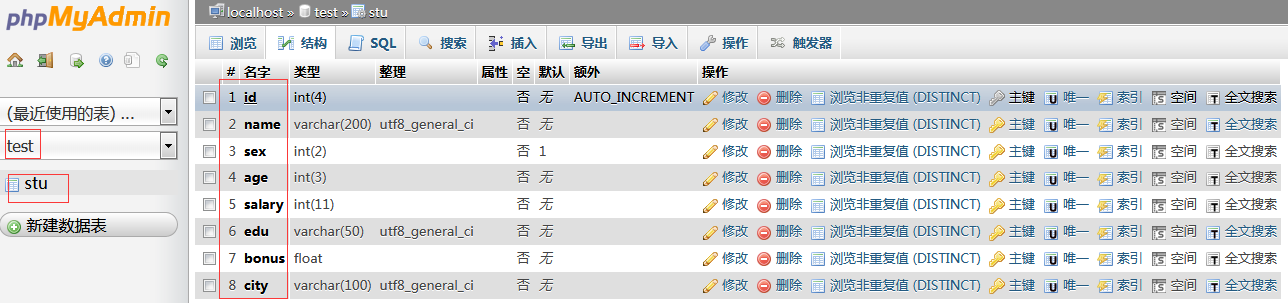
首先是建数据库: 字段
id     name         sex     age     salary     edu       bonus     city
1     周杰伦_CHOU     1     40     6000       淡江大学      1000     台湾
8     罗大佑          1     50     6000      香港国际大学    50       香港
6     邓紫棋_GEN      0     29     8000       香港大学      2000     香港
7     萧敬腾          1     35     4000       台积电        500      台湾
9     张彬彬          1     30     3000     北京电影学院     20       北京
10     王之涣         1     119     3000      唐朝大学      200      长安城
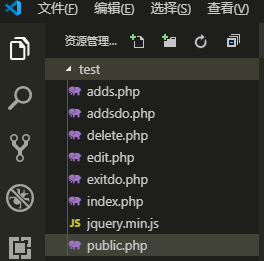
vscode看全貌全文件:
就这么多文件.
链接数据库为公共文件 public.php
<?php
$host = '127.0.0.1';
$h_name = 'root';
$h_pwd  = 'root';
$char   = 'utf8';
$h_db = 'test';
$conn = mysqli_connect($host,$h_name,$h_pwd,$h_db);//链接到数据库
if(!@$conn){
    echo '链接失败'.mysqli_connect_error();//链接失败返回信息
}
mysqli_set_charset($conn,$char);//设置字符集
首页: index.php
<?php
include 'public.php';
$sql = "select * from stu";
$result = mysqli_query($conn,$sql);
?>
<!DOCTYPE html>
<html lang="en">
<head>
    <meta charset="UTF-8">
    <meta name="viewport" content="width=device-width, initial-scale=1.0">
    <meta http-equiv="X-UA-Compatible" content="ie=edge">
    <script type="text/javascript" src="jquery.min.js" ></script>
    <title>学生信息表</title>
</head>
<body>
    <h2 style="float:left;width:100%;margin-top:50px; text-align:center">学生信息管理中心</h2>
    <div style="text-align:center">
    <a href="adds.php" style="padding:3px;font-size:16px;background-color:greenyellow">添加学生信息</a>
    共有<?php echo mysqli_num_rows($result); ?>个学生信息
    </div>
    <table style="margin-top:60px" align="center" width="60%" border="" cellspacing="0" cellpadding="0">
        <tr><th>id</th><th>姓名</th><th>性别</th><th>年龄</th><th>爱好</th><th>学历</th><th>工资</th><th>奖金</th><th>所在城市</th><th>操作</th></tr>
        <?php
            if(mysqli_num_rows($result) > 0){
                while ($row = mysqli_fetch_assoc($result)) {
        ?>
        <tr style='background-color:aqua'>
            <td align="center"><?php echo  $row['id'];  ?></td>
            <td align="center"><?php echo  $row['name'];  ?></td>
            <td align="center"><?php echo  $row['sex'];  ?></td>
            <td align="center"><?php echo  $row['age'];  ?></td>
            <td align="center"><?php echo  $row['city'];  ?></td>
            <td align="center"><?php echo  $row['edu'];  ?></td>
            <td align="center"><?php echo  $row['salary'];  ?></td>
            <td align="center"><?php echo  $row['bonus'];  ?></td>
            <td align="center"><?php echo  $row['city'];  ?></td>
            <td align="center">
                <a href="edit.php?id=<?php echo  $row['id'];  ?>" style="color:forestgreen">修改</a> | <a href="javascript:del_sure(<?php echo  $row['id'];  ?>)" style="color:crimson">删除</a>
            </td>
        </tr>
        <?php
             }
            }else{
                echo '没有数据';
            }
        ?>
    </table>
    <script>
        function del_sure(id){//形参
        if(confirm("确认删除吗") ==true){
            window.location.href="delete.php?id="+id;
        }else{
            return ;
        }
      }
    </script>
</body>
</html>
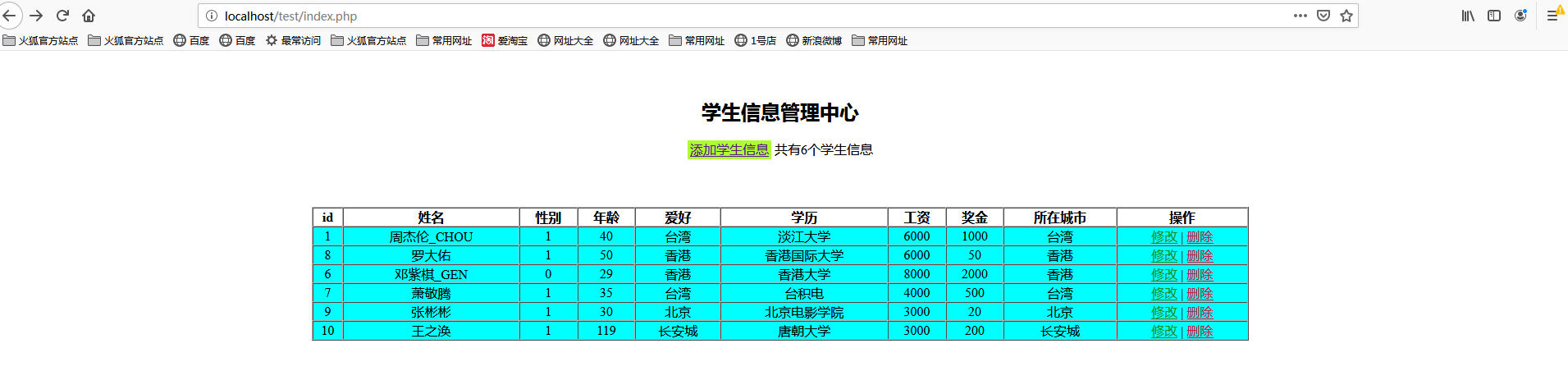
添加页面: adds.php
<!DOCTYPE html>
<html lang="en">
<head>
<meta charset="UTF-8">
<meta name="viewport" content="width=device-width, initial-scale=1.0">
<meta http-equiv="X-UA-Compatible" content="ie=edge">
<title>添加学生信息</title>
<style>
.adds-stu-wrap{
width: 700px;
height: auto;
margin: 0 auto;
margin-top: 100px;
}
.adds-stu{
float: left;
width: 100%;
height: auto;
background-color: #eee;
padding: 15px 10px;
}
.adds-stu div{
float: left;
width: 100%;
margin-bottom: 20px;
}
.adds-stu div>p{
float: left;
width: 100px;
margin: 0 10px 0 0;
text-align: right;
}
.adds-stu div>input{
float: left;
width: 260px;
}
</style>
</head>
<body>
<div class="adds-stu-wrap">
<h2 class="head" style="text-align:center">添加学生信息</h2>
<div class="adds-stu">
<form action="addsdo.php" method="post">
<div>
<p>姓名:</p>
<input type="text" name="name" id="">
</div>
<div>
<p>性别:</p>
<span>
男:<input type="radio" checked='checked' name="sex" value="1" id="">
女:<input type="radio" name="sex" value="0" id="" >
</span>
</div>
<div>
<p>年龄:</p>
<input type="text" name="age" id="">
</div>
<div>
<p>学历:</p>
<input type="text" name="edu" id="">
</div>
<div>
<p>工资:</p>
<input type="text" name="salary" id="">
</div>
<div>
<p>奖金:</p>
<input type="text" name="bonus" id="">
</div>
<div>
<p>所在城市:</p>
<input type="text" name="city" id="">
<input type="hidden" name="token" value='令牌'>
</div>
<div>
<button>提交</button>
</div>
</form>
</div>
</div>
</body>
</html>
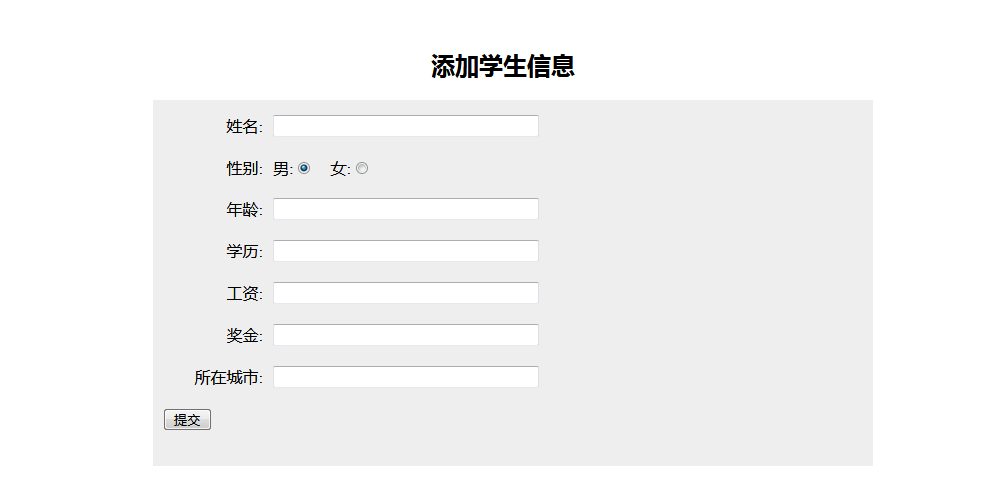 执行数据的添加页面:addsdo.php
<?php
include 'public.php';

if(isset($_POST['token']) && $_POST['token'] == '令牌' )
{
    //获取POST信息
    $name = $_POST['name'];
    $sex = $_POST['sex'];
    $age = $_POST['age'];
    $edu = $_POST['edu'];
    $salary = $_POST['salary'];
    $bonus = $_POST['bonus'];
    $city = $_POST['city'];

    //sql语句
    $sql = "insert into stu (name,sex,age,salary,edu,bonus,city) values ('$name','$sex','$age','$salary','$edu','$bonus','$city')";//常规写法
    // $sql = "insert into stu values (null,'$name','$sex','$age','$salary','$edu','$bonus','$city')";//第二种插入语句,前面的null值不能省,不然报错

    if(mysqli_query($conn,$sql))
    {
        echo 'id为 '.mysqli_insert_id($conn).'插入成功';
        header("refresh:3;url=index.php");
        print('正在加载,请稍等...<br>三秒后自动跳转到首页');
    }else{
        echo '没有数据';
    }
}else{
    echo '非法提交<br>';
    header("refresh:3;url=index.php");
    print('正在加载,请稍等...<br>三秒后自动跳转到首页');
}
删除页面 delete.php
<?php
include 'public.php';
$id = $_GET['id'];

$sql = "delete from stu where id = $id"; //根据id删除
if(mysqli_query($conn,$sql))
{
    echo '成功删除'.mysqli_affected_rows($conn).'条数据';
    header("refresh:3;url=index.php");
    print('正在加载,请稍等...<br>三秒后自动跳转到首页');
}else {
    echo '删除失败'.mysqli_affected_rows($conn).'条数据';
    header("refresh:3;url=index.php");
    print('正在加载,请稍等...<br>三秒后自动跳转到首页');
}
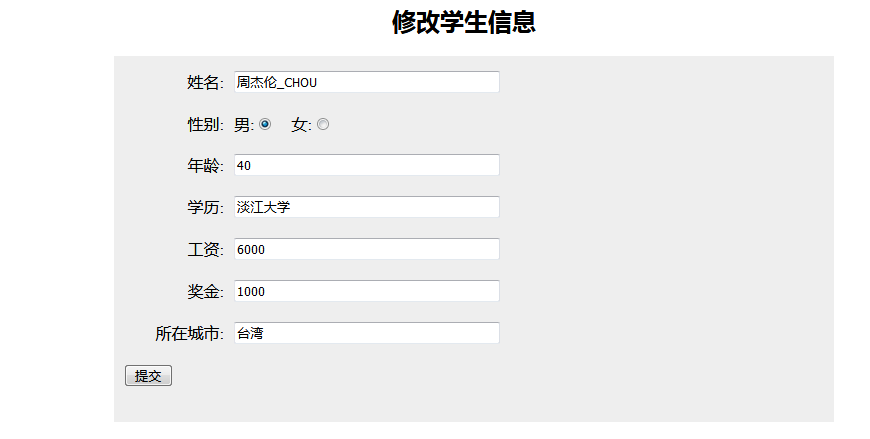
修改的渲染html页面 edit.php
<?php
include 'public.php';
if(isset($_GET['id']))
{
$id = $_GET['id'];
$sql = "select * from stu where id=$id";
$result = mysqli_query($conn,$sql);
?>
<!DOCTYPE html>
<html lang="en">
<head>
<meta charset="UTF-8">
<meta name="viewport" content="width=device-width, initial-scale=1.0">
<meta http-equiv="X-UA-Compatible" content="ie=edge">
<title>修改学生信息</title>
<style>
.adds-stu-wrap{
width: 700px;
height: auto;
margin: 0 auto;
margin-top: 100px;
}
.adds-stu{
float: left;
width: 100%;
height: auto;
background-color: #eee;
padding: 15px 10px;
}
.adds-stu div{
float: left;
width: 100%;
margin-bottom: 20px;
}
.adds-stu div>p{
float: left;
width: 100px;
margin: 0 10px 0 0;
text-align: right;
}
.adds-stu div>input{
float: left;
width: 260px;
}
</style>
</head>
<body>
<div class="adds-stu-wrap">
<h2 class="head" style="text-align:center">修改学生信息</h2>
<div class="adds-stu">
<form action="exitdo.php" method="post">
<?php
if(mysqli_num_rows($result) > 0)
{
while($row = mysqli_fetch_assoc($result))
{
?>
<div>
<p>姓名:</p>
<input type="text" name="name" id="" value="<?php echo $row['name']; ?>">
</div>
<div>
<p>性别:</p>
<span>
男:<input type="radio"
<?php
if($row['sex'] == 1){ //sex=1 就加check
echo 'checked';
}else{
echo '';
}
?> name="sex" value="1" id="">
女:<input
<input type="radio"
<?php
if($row['sex'] == 0){ //sex=0 就加check
echo 'checked';
}else{
echo '';
}
?>
type="radio" name="sex" value="0" id="" >
</span>
</div>
<div>
<p>年龄:</p>
<input type="text" name="age" id="" value="<?php echo $row['age']; ?>">
<input type="hidden" name="id" id="" value="<?php echo $row['id']; ?>">
</div>
<div>
<p>学历:</p>
<input type="text" name="edu" id="" value="<?php echo $row['edu']; ?>"">
</div>
<div>
<p>工资:</p>
<input type="text" name="salary" id="" value="<?php echo $row['salary']; ?>"">
</div>
<div>
<p>奖金:</p>
<input type="text" name="bonus" id="" value="<?php echo $row['bonus']; ?>"">
</div>
<div>
<p>所在城市:</p>
<input type="text" name="city" id="" value="<?php echo $row['city']; ?>"">
</div>
<div>
<button>提交</button>
</div>
<?php
}
}else
{
echo '暂无数据';
}
}
?>
</form>
</div>
</div>
</body>
</html>
修改页面的执行 editdo.php
<?php
include 'public.php';
//获取数据
$id = $_POST['id'];
$name = $_POST['name'];
$sex = $_POST['sex'];
$age = $_POST['age'];
$edu = $_POST['edu'];
$salary = $_POST['salary'];
$bonus = $_POST['bonus'];
$city = $_POST['city'];
//执行sql语句
$sql = "update stu set name='$name',sex='$sex',age='$age',edu='$edu',salary='$salary',bonus='$bonus',city='$city' where id=$id";

if(mysqli_query($conn,$sql))
{
    echo 'id为 '.mysqli_affected_rows($conn).'更新成功';
    header("refresh:3;url=index.php");
    print('正在加载,请稍等...<br>三秒后自动跳转到首页');
}else{
    echo '没有数据';
    header("refresh:3;url=index.php");
    print('正在加载,请稍等...<br>三秒后自动跳转到首页');
}
结束! 呼吁下:共同加油兄弟们,一起创造美好未来.
来源:https://www.cnblogs.com/xm666/p/11211672.html |



 發表於 2019-7-19 10:20:00