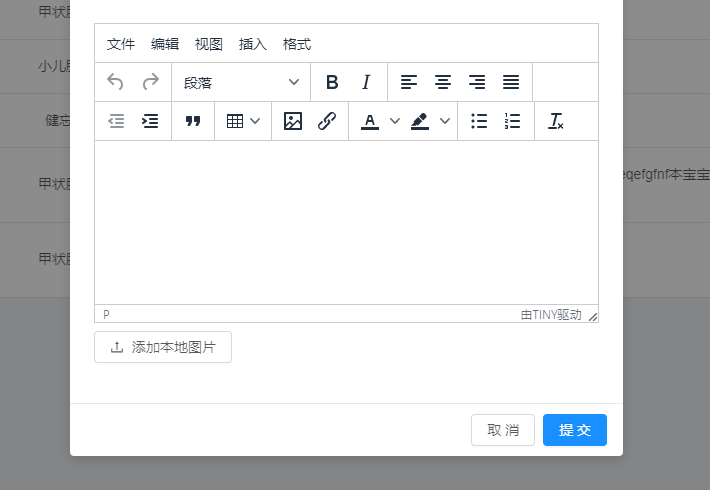
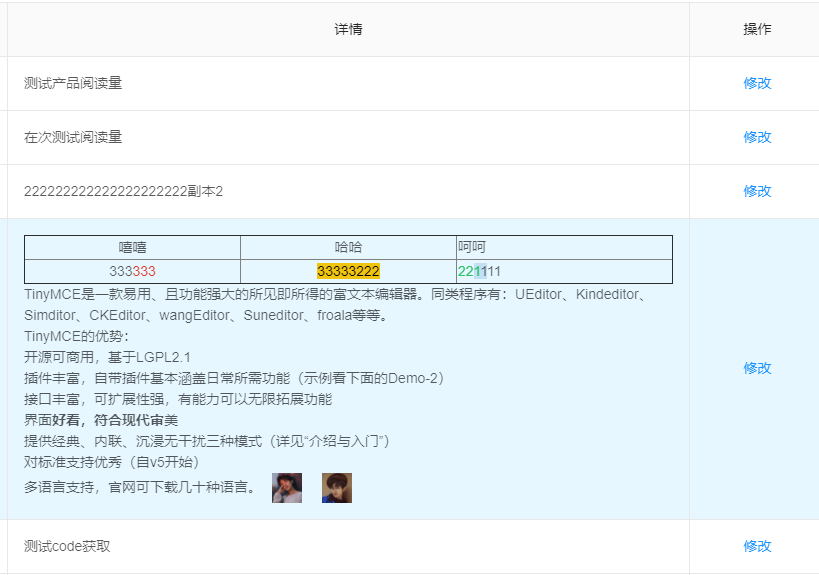
TinyMCE是一款易用、且功能强大的所见即所得的富文本编辑器。同类程序有:UEditor、Kindeditor、Simditor、CKEditor、wangEditor、Suneditor、froala等等。
import React from 'react';
import './Editor.scss';

import {isDev, nginxPrefix} from '@/config';

import {Upload, Button, Icon, Popconfirm, Spin, message} from 'antd';

import _get from 'lodash/get';
import _uniqueId from 'lodash/uniqueId';

import PropTypes from 'prop-types';

/*
* @props string id? 标识符
* @props number height? 高度
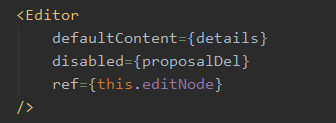
* @props string defaultContent? 初始内容
* @props boolen disabled? 禁用
* @props function onDelete? 删除事件
* @props function onAdd? 添加事件
* @props object uploadConfig? 自定义上传配置
* @event function getEditorContent 获取编辑内容
* @event function setEditorContent 设置编辑内容
* @event function insertContent 插入编辑内容
*/
class Editor extends React.Component {
    constructor(props) {
        super(props);

        const tinymceId = `editor-tinymce-${this.props.id}-${_uniqueId()}-${new Date().getTime()}`;

        this.state = {
            // 编辑器ID
            tinymceId,
            // 编辑器实例
            editor: null
        };
    }

    componentDidMount() {
        const {height = 300, defaultContent = ''} = this.props;
        window.tinymce.init({
            selector: `#${this.state.tinymceId}`,
            language: 'zh_CN',
            height: height,
            min_height: 200,
            width: '100%',
            resize: true,
            default_link_target: '_blank',
            init_instance_callback: editor => {
                if (defaultContent) {
                    editor.setContent(defaultContent);
                }
            },
            paste_enable_default_filters: true,
            // paste_word_valid_elements: () => {
            //
            // },
            // 插件配置
            plugins: 'table image lists link paste',
            // 菜单配置
            menubar: 'file edit view insert format',
            // 工具栏配置
            /* eslint-disable */
            toolbar: 'undo redo | styleselect | bold italic | alignleft aligncenter alignright alignjustify | outdent indent | blockquote | table | image link | forecolor backcolor | bullist numlist | removeformat'
            /* eslint-enable */
        }).then(([editor]) => this.setState({editor}));
    }

    componentWillUnmount() {
        // 在某些生命周期中,实例并未生成,没有卸载方法。(组件挂载阶段)
        // if (this.state.editor !== null) {
        //     this.state.editor.destroy();
        // }
        window.tinymce.get(this.state.tinymceId).destroy();
    }

    getEditorContent = () => {
        return this.state.editor.getContent();
    }

    setEditorContent = (content) => {
        window.tinymce.get(this.state.tinymceId).setContent(content);
    }

    insertContent = (content) => {
        try {
            this.state.editor.insertContent(content);
        } catch(e) {
            window.tinymce.get(this.state.tinymceId).insertContent(content);
        }
    }

    // 默认上传配置
    uploadConfig = {
        name: 'file',
        action: (isDev ? '' : nginxPrefix) + '/admin/common/uploadFile',
        headers: {
            authorization: 'authorization-text',
        },
        onChange: (info) => {
            if (info.file.status === 'done') {
                message.success('图片上传成功');
                this.state.editor.insertContent(
                    `<img src="${_get(info, 'file.response.data.result')}" >`
                );
            } else if (info.file.status === 'error') {
                message.error('图片上传失败');
            }
        },
        accept: '.jpg,.jpeg,.jpe,.png,.bmp'
    }

    render() {
        const {uploadConfig} = this.props;
        return (
            <Spin spinning={this.props.disabled} indicator={<Icon type="stop" style={{color: '#555'}} />}>
                <div className="editor-container">
                    <textarea id={this.state.tinymceId} />
                    <div className="btn-bar">
                        <Upload {...(uploadConfig ? uploadConfig : this.uploadConfig)}>
                            <Button><Icon type="upload" />添加本地图片</Button>
                        </Upload>
                        <span>
                            {
                                this.props.onAdd
                                &&
                                <Button icon="plus" shape="circle" onClick={this.props.onAdd} />
                            }
                            {
                                this.props.onDelete
                                &&
                                <Popconfirm
                                    title="无法撤回,确认删除?"
                                    onConfirm={this.props.onDelete}
                                    okText="确认"
                                    cancelText="取消"
                                    placement="leftBottom"
                                >
                                    <Button
                                        type="danger"
                                        icon="delete"
                                        shape="circle"
                                        style={{marginLeft: '4px'}}
                                        onClick={() => {
                                            // 当富文本编辑器中没有内容时,删除按钮不弹窗,直接调用删除方法
                                            const content = this.getEditorContent();

                                            if (!content) {
                                                this.props.onDelete();
                                            }
                                        }}
                                    />
                                </Popconfirm>
                            }
                        </span>
                    </div>
                </div>
            </Spin>
        );
    }
}

Editor.defaultProps = {
    id: 'no-props-id',
    height: 300,
    defaultContent: '',
    onDelete: null,
    onAdd: null,
    disabled: false,
    uploadConfig: null
};

Editor.propTypes = {
    id: PropTypes.string,
    height: PropTypes.number,
    defaultContent: PropTypes.string,
    onDelete: PropTypes.func,
    onAdd: PropTypes.func,
    disabled: PropTypes.bool
};

export default Editor;



 發表於 2020-4-10 21:01:00