|
一、CDN引入JS使用Redux
1.定义一个reducer函数(根据当前想要做的修改返回一个新的状态)
2.使用createStore方法传入reducer函数 生成一个store实例对象
3.使用store实例的subscribe订阅数据的变化(数据一旦变化,可以得到通知)
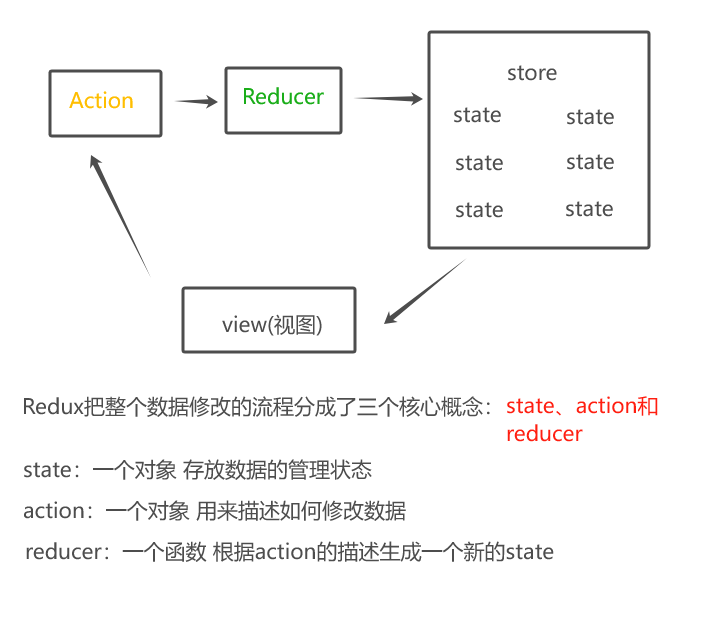
4.使用store实例的dispatch方法提交action对象触发数据变化(告诉reducer你想怎么改数据)(修改数据的唯一方式)
5.使用store实例的getState方法获取最新的状态数据更新到视图中
<script src="https://cdnjs.cloudflare.com/ajax/libs/redux/4.1.1/redux.min.js"></script>
<div class="sum">
        <button id="reduce">
            -
        </button>
        <span id="num">
            0
        </span>
        <button id="add">
            +
        </button>
    </div>
<script>
    //1.定义reducer函数 : 根据不用的action函数,返回不同的state
    //state:管理数据的初始状态
    //action:对象 type 标记当前想做什么样的修改
    function reducer(state={count:0},action){
    //数据不可变,基于原始状态生成新的状态
        if(action.type === 'INCREMENT'){
            return {count:state.count+1}
        }
        if(action.type === 'DECREMENT'){
            return {count:state.count-1}
        }
        return state
    }
    //2.使用createStore方法传入reducer函数 生成一个store实例对象
    const store = Redux.createStore(reducer)
    //3.通过store实例的subscribe订阅数据变化
    store.subscribe(()=>{
        console.log('state变化了',store.getState())
        document.getElementById('num').innerText=store.getState().count
    })
    //4.使用store实例的dispatch方法提交action对象触发数据变化
    const inBtn = document.getElementById('add')
    const dBtn = document.getElementById('reduce')
    inBtn.addEventListener('click',()=>{
        store.dispatch({
            type:'INCREMENT'
        })
    })
    dBtn.addEventListener('click',()=>{
        store.dispatch({
            type:'DECREMENT'
        })
    })
</script>
二、creatReactApp(框架)使用Redux
1.创建环境
npm i @reduxjs/toolkit react-redux
(1) Redux Toolkit(RTK) 官方推荐编写Redux逻辑的方式,是一套工具的集合集,简化书写方式
(2)react-redux 用来链接Redux和React组件的中间件
(3)目录结构设计
2.使用方式
(1)配置子模块(子store)
import {createSlice} from "@reduxjs/toolkit"
//createSlice 创建store的方法
const countStore = createSlice({
    name : 'counter', //给模块一个名字
    initialState:{
        count : 0
    }, //初始化state
    reducers :{
        add(state){
            state.count++
        },
        reduce(state){
            state.count--
        },
    }//修改状态的方法 同步方法 支持直接修改
})

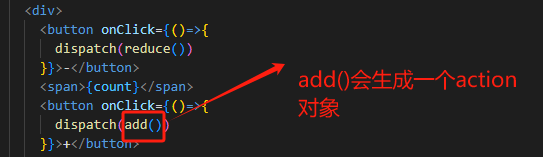
//解构出来actionCreater函数==》解构出来的方法叫做actionCreater (也就是说这些方法是生成action对象的)
const {add,reduce} = countStore.actions

//获取reducer函数
const reducer = countStore.reducer
//导出创建action对象的函数和reducer函数
export {add,reduce,addNum}
export default reducer
(2)index.js入口文件配置根store并组合子store
import {configureStore} from "@reduxjs/toolkit" //组合子模块的方法
import countReducer from './modules/counterStore' //导入子模块


//配置
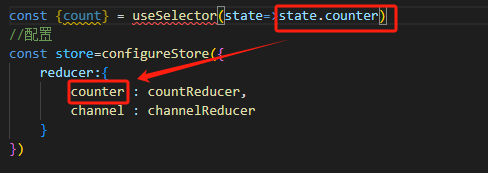
const store=configureStore({
    reducer:{
        counter : countReducer,
    }
})

//导出
export default store
(3)在react中注入store
import store from './store/index'
import {Provider} from 'react-redux'
//react-redux负责把Redux和React连接起来,内置Provider组件通过store参数把创建好的store实例注入到应用中,链接正式建立

//把App根组件渲染到id为root的dom节点
const root = ReactDOM.createRoot(document.getElementById("root"));
root.render(
  <Provider store={store}>
    <App />
  </Provider>
);
(4)使用store中的数据 修改store中的数据
import { useSelector,useDispatch } from 'react-redux';
//在React组件中使用store的数据,需要用到一个钩子函数useSelector,他的作用是把store中的数据映射到组件中

import {add,reduce} from './store/modules/counterStore'
//导入actionCreater

function App(){
  const {count} = useSelector(state=>state.counter)
  const dispatch = useDispatch()
//React组件中修改store中的数据需要借助另一个hook函数 useDispatch ,他的作用是生成提交action对象的dispatch函数
return <div>

<div>
        <button onClick={()=>{
          dispatch(reduce())
        }}>-</button>
        <span>{count}</span>
        <button onClick={()=>{
          dispatch(add())
        }}>+</button>

      </div>


</div>

}
(5)总结
组件中使用useSelector (hook函数)获取store中的对象
组件中使用useDispatch(hook函数)获取dispatch方法
执行store模块中导出的actionCreater方法就能得到要提交的action对象
3.action传参
(1)在reducer的同步修改方法中添加action对象参数
const countStore = createSlice({
    name : 'counter', //给模块一个名字
    initialState:{
        count : 0
    }, //初始化state
    reducers :{
        add(state){
            state.count++
        },
        reduce(state){
            state.count--
        },
        addNum(state,action){
            state.count= state.count+action.payload
//参数会被传递到action对象的payload属性上
        } //在reducer的同步修改方法中添加action对象参数
    }//修改状态的方法 同步方法 支持直接修改
})

//解构出来actionCreater函数==》解构出来的方法叫做actionCreater (也就是说这些方法是生成action对象的)
const {add,reduce,addNum} = countStore.actions

//获取reducer函数
const reducer = countStore.reducer

export {add,reduce,addNum}

export default reducer
(2)调用actionCreater的时候传递参数,参数会被传递到action对象的payload属性上
<div>
        <button onClick={()=>{
          dispatch(reduce())
        }}>-</button>
        <span>{count}</span>
        <button onClick={()=>{
          dispatch(add())
        }}>+</button>
        <button onClick={()=>{
          dispatch(addNum(10))
        }}>
          +10
        </button>
        <button onClick={()=>{
          dispatch(addNum(20))
        }}>
          +20
        </button>
      </div>

//调用actionCreater的时候传递参数
4.异步操作
(1)配置store
(2)同步修改
const channelStore=createSlice({
    name : 'channel', //定义子store的名字
    initialState :{
        channelList : [] //初始化数据的状态
    },
    reducers:{
      //定义修改数据的同步方法
        setList(state,action){
            state.channelList = action.payload
        }
    }
})
(3)异步修改
//异步请求
const {setList} = channelStore.actions
const channelAsync=()=>{
    return async (dispatch)=>{
       const res = await axios.get('。。。') //封装异步请求获取数据
       dispatch(setList(res.data.data.channels)) //调用同步actionCreater传入异步数据生成的一个action对象,并使用dispatch提交
    }
}
(4)使用store的数据
(5)diapatch提交action对象更新store
import {channelAsync} from './store/modules/channelStore'
const {channelList} = useSelector(state=>state.channel)
const dispatch = useDispatch()
  //React组件中修改store中的数据需要借助另一个hook函数 useDispatch ,他的作用是生成提交action对象的dispatch函数
  useEffect(()=>{
    dispatch(channelAsync()//异步操作生成的就不是一个action对象了 是一个action函数)
  },[dispatch])
来源:https://www.cnblogs.com/qinlinkun/p/18059389 |



 發表於 2024-3-7 17:27:00