|
一、使用第三方库做本地/远程消息推送
推荐:https://github.com/zo0r/react-native-push-notification
demo解析:
AndroidManifest.xml:配置基本权限
<manifest xmlns:android="http://schemas.android.com/apk/res/android"
    package="com.example">

    <uses-permission android:name="android.permission.INTERNET" />
    <uses-permission android:name="android.permission.SYSTEM_ALERT_WINDOW"/>

    <application
      android:name=".MainApplication"
      android:label="@string/app_name"
      android:icon="@mipmap/ic_launcher"
      android:allowBackup="false"
      android:theme="@style/AppTheme">
      <activity
        android:name=".MainActivity"
        android:label="@string/app_name"
        android:configChanges="keyboard|keyboardHidden|orientation|screenSize"
        android:windowSoftInputMode="adjustResize">
        <intent-filter>
            <action android:name="android.intent.action.MAIN" />
            <category android:name="android.intent.category.LAUNCHER" />
        </intent-filter>
      </activity>
      <activity android:name="com.facebook.react.devsupport.DevSettingsActivity" />

       <receiver
            android:name="com.google.android.gms.gcm.GcmReceiver"
            android:exported="true"
            android:permission="com.google.android.c2dm.permission.SEND" >
            <intent-filter>
                <action android:name="com.google.android.c2dm.intent.RECEIVE" />
                <category android:name="${applicationId}" />
            </intent-filter>
        </receiver>

        <receiver android:name="com.dieam.reactnativepushnotification.modules.RNPushNotificationPublisher" />
        <receiver android:name="com.dieam.reactnativepushnotification.modules.RNPushNotificationBootEventReceiver">
            <intent-filter>
                <action android:name="android.intent.action.BOOT_COMPLETED" />
            </intent-filter>
        </receiver>
        <service android:name="com.dieam.reactnativepushnotification.modules.RNPushNotificationRegistrationService"/>
        <service
            android:name="com.dieam.reactnativepushnotification.modules.RNPushNotificationListenerService"
            android:exported="false" >
            <intent-filter>
                <action android:name="com.google.android.c2dm.intent.RECEIVE" />
            </intent-filter>
        </service>


        <meta-data  android:name="com.dieam.reactnativepushnotification.notification_channel_name"
                    android:value="Example-Channel"/>
        <meta-data  android:name="com.dieam.reactnativepushnotification.notification_channel_description"
                    android:value="Super channel description"/>
        <meta-data  android:name="com.dieam.reactnativepushnotification.notification_color"
                    android:resource="@android:color/white"/>
    </application>


    <uses-permission android:name="android.permission.WAKE_LOCK" />
    <permission
        android:name="${applicationId}.permission.C2D_MESSAGE"
        android:protectionLevel="signature" />
    <uses-permission android:name="${applicationId}.permission.C2D_MESSAGE" />


    <uses-permission android:name="android.permission.VIBRATE" />
    <uses-permission android:name="android.permission.RECEIVE_BOOT_COMPLETED"/>
</manifest>
NotifService.js:配置各类推送的消息显示
import PushNotification from 'react-native-push-notification';

export default class NotifService {

  constructor(onRegister, onNotification) {
    this.configure(onRegister, onNotification);

    this.lastId = 0;
  }

  configure(onRegister, onNotification, gcm = "") {
    PushNotification.configure({
      // (optional) Called when Token is generated (iOS and Android)
      onRegister: onRegister, //this._onRegister.bind(this),

      // (required) Called when a remote or local notification is opened or received
      onNotification: onNotification, //this._onNotification,

      // ANDROID ONLY: GCM Sender ID (optional - not required for local notifications, but is need to receive remote push notifications)
      senderID: gcm,

      // IOS ONLY (optional): default: all - Permissions to register.
      permissions: {
        alert: true,
        badge: true,
        sound: true
      },

      // Should the initial notification be popped automatically
      // default: true
      popInitialNotification: true,

      /**
        * (optional) default: true
        * - Specified if permissions (ios) and token (android and ios) will requested or not,
        * - if not, you must call PushNotificationsHandler.requestPermissions() later
        */
      requestPermissions: true,
    });
  }

  localNotif() {
    this.lastId++;
    PushNotification.localNotification({
      /* Android Only Properties */
      id: ''+this.lastId, // (optional) Valid unique 32 bit integer specified as string. default: Autogenerated Unique ID
      ticker: "My Notification Ticker", // (optional)
      autoCancel: true, // (optional) default: true
      largeIcon: "ic_launcher", // (optional) default: "ic_launcher"
      smallIcon: "ic_notification", // (optional) default: "ic_notification" with fallback for "ic_launcher"
      bigText: "My big text that will be shown when notification is expanded", // (optional) default: "message" prop
      subText: "This is a subText", // (optional) default: none
      color: "red", // (optional) default: system default
      vibrate: true, // (optional) default: true
      vibration: 300, // vibration length in milliseconds, ignored if vibrate=false, default: 1000
      tag: 'some_tag', // (optional) add tag to message
      group: "group", // (optional) add group to message
      ongoing: false, // (optional) set whether this is an "ongoing" notification

      /* iOS only properties */
      alertAction: 'view', // (optional) default: view
      category: null, // (optional) default: null
      userInfo: null, // (optional) default: null (object containing additional notification data)

      /* iOS and Android properties */
      title: "Local Notification", // (optional)
      message: "My Notification Message", // (required)
      playSound: false, // (optional) default: true
      soundName: 'default', // (optional) Sound to play when the notification is shown. Value of 'default' plays the default sound. It can be set to a custom sound such as 'android.resource://com.xyz/raw/my_sound'. It will look for the 'my_sound' audio file in 'res/raw' directory and play it. default: 'default' (default sound is played)
      number: '10', // (optional) Valid 32 bit integer specified as string. default: none (Cannot be zero)
      actions: '["Yes", "No"]',  // (Android only) See the doc for notification actions to know more
    });
  }

  scheduleNotif() {
    this.lastId++;
    PushNotification.localNotificationSchedule({
      date: new Date(Date.now() + (30 * 1000)), // in 30 secs

      /* Android Only Properties */
      id: ''+this.lastId, // (optional) Valid unique 32 bit integer specified as string. default: Autogenerated Unique ID
      ticker: "My Notification Ticker", // (optional)
      autoCancel: true, // (optional) default: true
      largeIcon: "ic_launcher", // (optional) default: "ic_launcher"
      smallIcon: "ic_notification", // (optional) default: "ic_notification" with fallback for "ic_launcher"
      bigText: "My big text that will be shown when notification is expanded", // (optional) default: "message" prop
      subText: "This is a subText", // (optional) default: none
      color: "blue", // (optional) default: system default
      vibrate: true, // (optional) default: true
      vibration: 300, // vibration length in milliseconds, ignored if vibrate=false, default: 1000
      tag: 'some_tag', // (optional) add tag to message
      group: "group", // (optional) add group to message
      ongoing: false, // (optional) set whether this is an "ongoing" notification

      /* iOS only properties */
      alertAction: 'view', // (optional) default: view
      category: null, // (optional) default: null
      userInfo: null, // (optional) default: null (object containing additional notification data)

      /* iOS and Android properties */
      title: "Scheduled Notification", // (optional)
      message: "My Notification Message", // (required)
      playSound: true, // (optional) default: true
      soundName: 'default', // (optional) Sound to play when the notification is shown. Value of 'default' plays the default sound. It can be set to a custom sound such as 'android.resource://com.xyz/raw/my_sound'. It will look for the 'my_sound' audio file in 'res/raw' directory and play it. default: 'default' (default sound is played)
    });
  }

  checkPermission(cbk) {
    return PushNotification.checkPermissions(cbk);
  }

  cancelNotif() {
    PushNotification.cancelLocalNotifications({id: ''+this.lastId});
  }

  cancelAll() {
    PushNotification.cancelAllLocalNotifications();
  }
}
App.js:消息显示
/**
 * Sample React Native App
 * https://github.com/facebook/react-native
 *
 * @format
 * @flow
 */

import React, { Component } from 'react';
import { TextInput, StyleSheet, Text, View, TouchableOpacity, Alert } from 'react-native';
import NotifService from './NotifService';
import appConfig from './app.json';

type Props = {};
export default class App extends Component<Props> {

  constructor(props) {
    super(props);
    this.state = {
      senderId: appConfig.senderID
    };

    this.notif = new NotifService(this.onRegister.bind(this), this.onNotif.bind(this));
  }

  render() {
    return (
      <View style={styles.container}>
        <Text style={styles.title}>Example app react-native-push-notification</Text>
        <View style={styles.spacer}></View>
        <TextInput style={styles.textField} value={this.state.registerToken} placeholder="Register token" />
        <View style={styles.spacer}></View>

        <TouchableOpacity style={styles.button} onPress={() => { this.notif.localNotif() }}><Text>Local Notification (now)</Text></TouchableOpacity>
        <TouchableOpacity style={styles.button} onPress={() => { this.notif.scheduleNotif() }}><Text>Schedule Notification in 30s</Text></TouchableOpacity>
        <TouchableOpacity style={styles.button} onPress={() => { this.notif.cancelNotif() }}><Text>Cancel last notification (if any)</Text></TouchableOpacity>
        <TouchableOpacity style={styles.button} onPress={() => { this.notif.cancelAll() }}><Text>Cancel all notifications</Text></TouchableOpacity>
        <TouchableOpacity style={styles.button} onPress={() => { this.notif.checkPermission(this.handlePerm.bind(this)) }}><Text>Check Permission</Text></TouchableOpacity>

        <View style={styles.spacer}></View>
        <TextInput style={styles.textField} value={this.state.senderId} onChangeText={(e) => {this.setState({ senderId: e })}} placeholder="GCM ID" />
        <TouchableOpacity style={styles.button} onPress={() => { this.notif.configure(this.onRegister.bind(this), this.onNotif.bind(this), this.state.senderId) }}><Text>Configure Sender ID</Text></TouchableOpacity>
        {this.state.gcmRegistered && <Text>GCM Configured !</Text>}

        <View style={styles.spacer}></View>
      </View>
    );
  }

  onRegister(token) {
    Alert.alert("Registered !", JSON.stringify(token));
    console.log(token);
    this.setState({ registerToken: token.token, gcmRegistered: true });
  }

  onNotif(notif) {
    console.log(notif);
    Alert.alert(notif.title, notif.message);
  }

  handlePerm(perms) {
    Alert.alert("Permissions", JSON.stringify(perms));
  }
}


const styles = StyleSheet.create({
  container: {
    flex: 1,
    justifyContent: 'center',
    alignItems: 'center',
    backgroundColor: '#F5FCFF',
  },
  welcome: {
    fontSize: 20,
    textAlign: 'center',
    margin: 10,
  },
  button: {
    borderWidth: 1,
    borderColor: "#000000",
    margin: 5,
    padding: 5,
    width: "70%",
    backgroundColor: "#DDDDDD",
    borderRadius: 5,
  },
  textField: {
    borderWidth: 1,
    borderColor: "#AAAAAA",
    margin: 5,
    padding: 5,
    width: "70%"
  },
  spacer: {
    height: 10,
  },
  title: {
    fontWeight: "bold",
    fontSize: 20,
    textAlign: "center",
  }
});
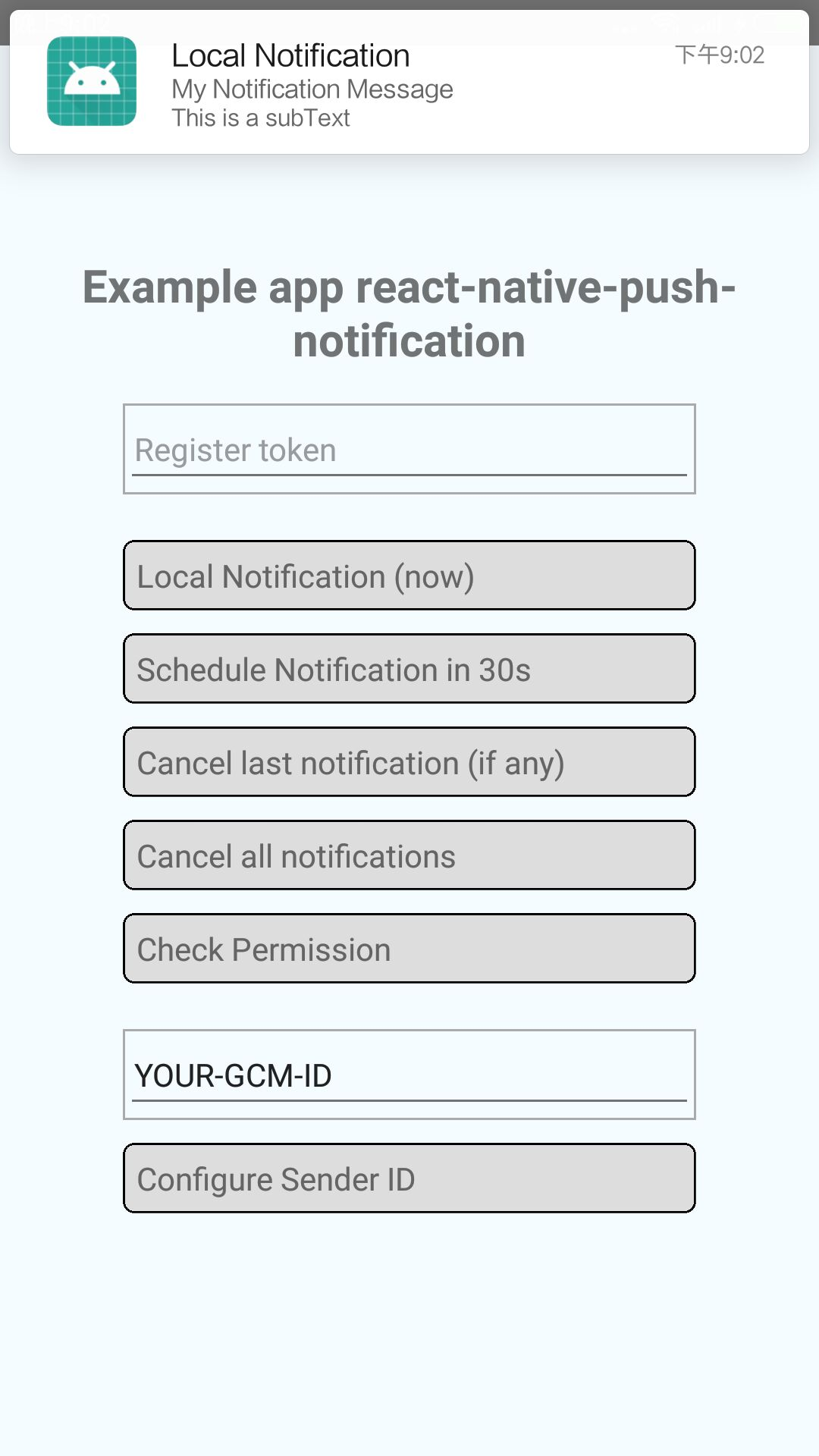
最终效果:
二、使用极光开发者服务做远程消息推送
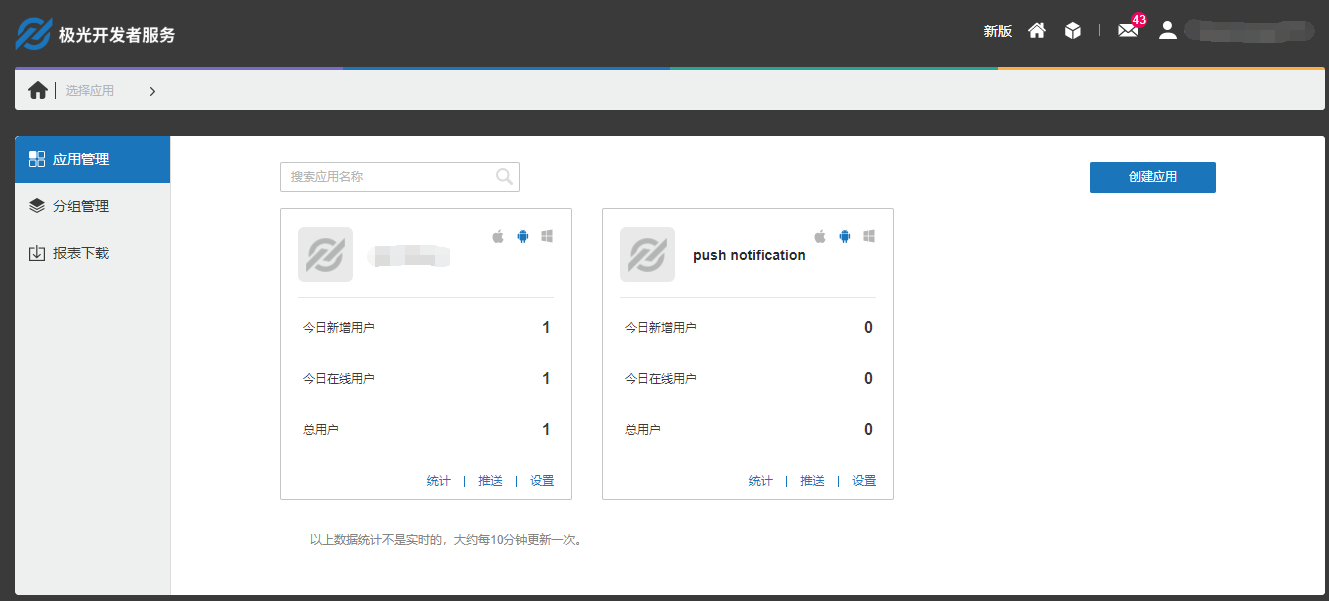
1.官网注册极光开发者账号,并创建应用
2.安装
npm install jpush-react-native --save
npm install jcore-react-native --save
3.关联
react-native link jpush-react-native
react-native link jcore-react-native
4.打开 project/android/app/src/main/java/com/项目名/下的 MainApplication.java 文件,然后加入 JPushPackage
import cn.jpush.reactnativejpush.JPushPackage;

public class MainApplication extends Application implements ReactApplication {
// 设置为 true 将不会弹出 toast
    private boolean SHUTDOWN_TOAST = false;
    // 设置为 true 将不会打印 log
    private boolean SHUTDOWN_LOG = false;
  private final ReactNativeHost mReactNativeHost = new ReactNativeHost(this) {
    @Override
    public boolean getUseDeveloperSupport() {
      return BuildConfig.DEBUG;
    }

    @Override
    protected List<ReactPackage> getPackages() {
      return Arrays.<ReactPackage>asList(
            new MainReactPackage(),
               new JPushPackage(SHUTDOWN_TOAST, SHUTDOWN_LOG)
      );
    }
5.打开 project/android/app/src/main/java/com/项目名/下的MainActivity.java 文件,然后加入 如下代码:
import android.os.Bundle;
import com.facebook.react.ReactActivity;
import cn.jpush.android.api.JPushInterface;

public class MainActivity extends ReactActivity {

    @Override
    protected void onCreate(Bundle savedInstanceState) {
        super.onCreate(savedInstanceState);
        JPushInterface.init(this);
    }

    @Override
    protected void onPause() {
        super.onPause();
        JPushInterface.onPause(this);
    }

    @Override
    protected void onResume() {
        super.onResume();
        JPushInterface.onResume(this);
    }

    @Override
    protected void onDestroy() {
        super.onDestroy();
    }
}
6.使用
(1)RN工程代码:
import React, { Component } from "react";
import { Dimensions, Text, Platform, Linking, Alert } from "react-native";
import JPushModule from 'jpush-react-native'

const deviceHeight = Dimensions.get('window').height;

export default class Login extends Component {
    constructor(props){
        super(props);
        this.state = {

        }
    }

    componentDidMount() {
    /****************************通知 start **************************************************/
        if (Platform.OS === 'android') {
          JPushModule.initPush()
       // 新版本必需写回调函数
          JPushModule.notifyJSDidLoad(resultCode => {
            if (resultCode === 0) {
            }
          })
        } else {
          JPushModule.setupPush()
        }
        // 接收自定义消息
        this.receiveCustomMsgListener = map => {
          this.setState({
            pushMsg: map.content
          })
          console.log('extras: ' + map.extras)
        }

        // 接收自定义消息JPushModule.addReceiveCustomMsgListener(this.receiveCustomMsgListener)
        this.receiveNotificationListener = map => {
          console.log('alertContent: ' + map.alertContent)
          console.log('extras: ' + map.extras)
        }

        // 接收推送通知
        JPushModule.addReceiveNotificationListener(this.receiveNotificationListener)
        // 打开通知
        this.openNotificationListener = map => {
          // console.log('Opening notification!')
        //  console.log('map.extra: ' + map.extras)
          let webUrl= JSON.parse(map.extras).webUrl
          let url = webUrl.replace(new RegExp("\/", 'g'), "/")
          Linking.canOpenURL(url).then(supported => {
            if (!supported) {
              Alert.alert('您的系统不支持打开浏览器!')
            } else {
              return Linking.openURL(url);
            }
          }).catch(err => { });

        }

        JPushModule.addReceiveOpenNotificationListener(this.openNotificationListener)

        // this.getRegistrationIdListener = registrationId => {
        //   console.log('Device register succeed, registrationId ' + registrationId)
        // }
        // JPushModule.addGetRegistrationIdListener(this.getRegistrationIdListener)
        /****************************通知 end **************************************************/
      }

    componentWillUnmount() {
        JPushModule.removeReceiveCustomMsgListener(this.receiveCustomMsgListener)
        JPushModule.removeReceiveNotificationListener(this.receiveNotificationListener)
        JPushModule.removeReceiveOpenNotificationListener(this.openNotificationListener)
        // JPushModule.removeGetRegistrationIdListener(this.getRegistrationIdListener)
        // console.log('Will clear all notifications')
        // JPushModule.clearAllNotifications()
    }


    render() {
        return (
          <Text>push notification test</Text>
        );
    }
}
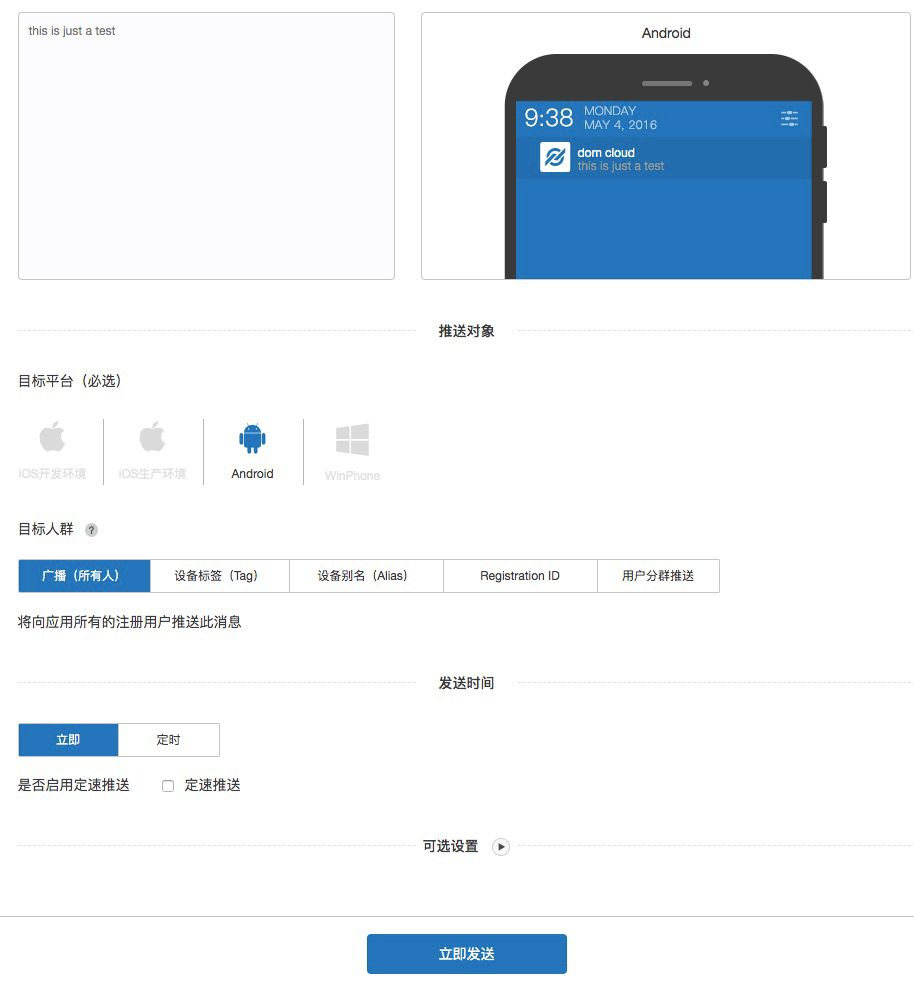
(2)极光官网推送
7.最终效果
三、APP内消息通知
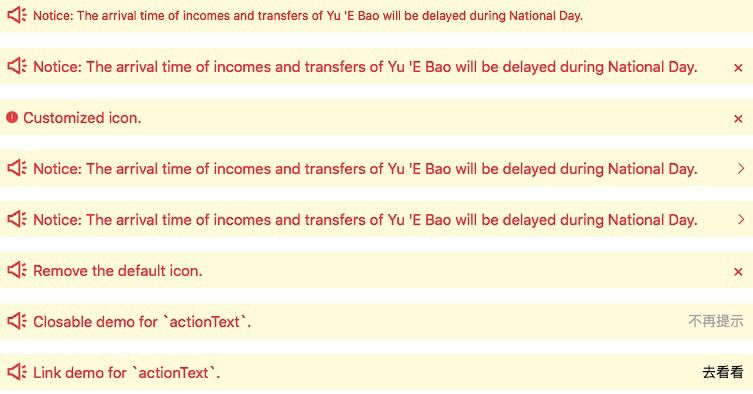
使用antd组件NoticeBar通告栏:https://rn.mobile.ant.design/components/notice-bar-cn/ 即可
最终效果:
参考:React Native之通知栏消息提示(android) 作者:jackson影琪
来源:https://www.cnblogs.com/bbcfive/p/11123274.html |



 發表於 2019-7-2 21:30:00